Note
Access to this page requires authorization. You can try signing in or changing directories.
Access to this page requires authorization. You can try changing directories.
Fabric workspace item events notify you when certain actions occur on your workspace items, such as when you create a new artifact or delete an existing artifact. Use these events to alert on other actions or workflows in Fabric, such as running a pipeline or sending an email notification by using Fabric Activator alerting capabilities. This article explains how to explore Fabric workspace item events in Real-Time hub.
Note
Effective March 21, 2025, the Microsoft.Fabric.ItemReadSucceeded and Microsoft.Fabric.ItemReadFailed event types are deprecated. So, users in your organization don't see these event types when creating subscriptions (eventstreams or alerts) for the Fabric workspace.
Existing subscriptions (eventstreams or alerts) for these events will stop receiving events on March 21, 2025.
View Fabric workspace item events detail page
In Real-Time hub, select Fabric events.
Select Fabric workspace item events from the list.

You see the detail view for Fabric workspace item events.


Actions
At the top of the detail page, you see the following two actions.
Create eventstream - create an eventstream based on events from the selected Fabric workspace item.
Set alert - set an alert when an operation is done for a Fabric workspace item, such as a new artifact is created.


See what's using this category
This section shows the artifacts that use Fabric workspace item events. The following table lists the columns and their descriptions.
| Column | Description |
|---|---|
| Name | Name of the artifact that uses Fabric workspace item events. |
| Type | Artifact type – Activator or Eventstream |
| Workspace | Workspace where the artifact resides. |
| Source | Name of the workspace that is the source of the events. |
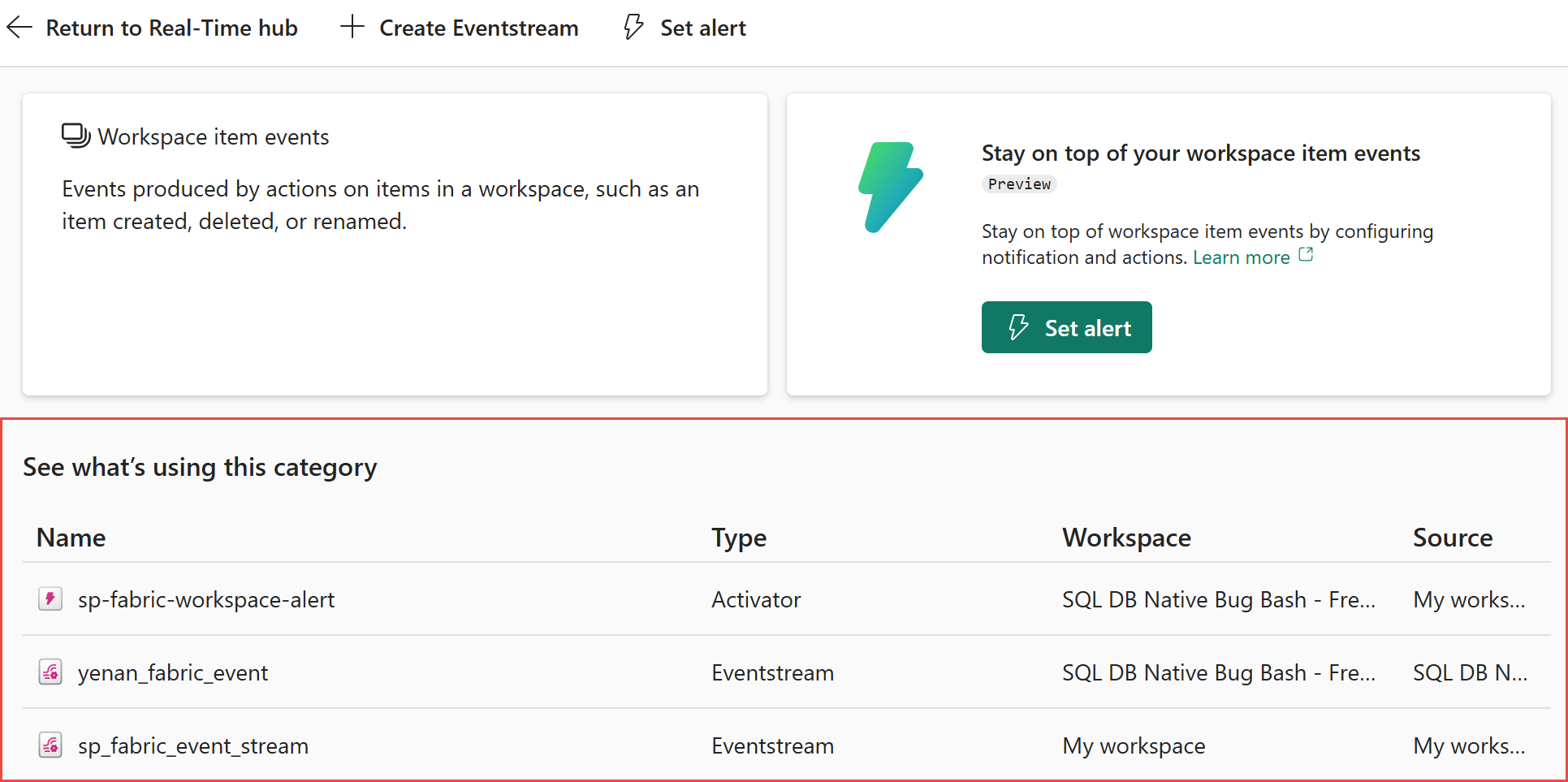
Fabric workspace item events profile

Event types
| Event type name | Description |
|---|---|
| Microsoft.Fabric.ItemCreateSucceeded | Fabric raises this event when a create operation on a resource succeeds. For example, an event produced when a new artifact is created successfully. |
| Microsoft.Fabric.ItemCreateFailed | Fabric raises this event when a create operation on a resource fails. For example, an event produced when a new artifact fails during creation. |
| Microsoft.Fabric.ItemUpdateSucceeded | Fabric raises this event when an update operation on a resource succeeds. For example, an event produced when a dataflow is updated successfully. |
| Microsoft.Fabric.ItemUpdateFailed | Fabric raises this event when an update operation on a resource fails. For example, an event produced when a dataflow fails during the update. |
| Microsoft.Fabric.ItemDeleteSucceeded | Fabric raises this event when a delete operation on a resource succeeds. For example, an event produced when a dataflow is deleted successfully. |
| Microsoft.Fabric.ItemDeleteFailed | Fabric raises this event when a delete operation on a resource fails. For example, an event produced when a dataflow fails during deletion. |
| Microsoft.Fabric.ItemSoftDeleteSucceeded | Fabric raises this event when a soft delete operation on a resource succeeds. For example, an event produced when a dataflow is soft deleted successfully. |
| Microsoft.Fabric.ItemSoftDeleteFailed | Fabric raises this event when a soft delete operation on a resource fails. For example, an event produced when a dataflow soft delete fails. |
| Microsoft.Fabric.ItemRecoverSucceeded | Fabric raises this event when a recover operation on a resource succeeds. For example, an event produced when a dataflow is recovered successfully. |
| Microsoft.Fabric.ItemRecoverFailed | Fabric raises this event when a recover operation on a resource fails. For example, an event produced when a dataflow recovery fails. |
Schemas
An event has the following top-level data:
| Property | Type | Description | Example |
|---|---|---|---|
source |
string | Identifies the context in which an event happened. | 00000000-0000-0000-0000-000000000000 |
subject |
string | Identifies the subject of the event in the context of the event producer. | /workspaces/00000000-0000-0000-0000-000000000000/items/00000000-0000-0000-0000-000000000000 |
type |
string | Contains a value describing the type of event related to the originating occurrence. | Microsoft.Fabric.ItemCreateSucceeded |
time |
timestamp | Timestamp of when the occurrence happened. | 2024-04-23T21:17:32.6029537+00:00 |
id |
string | Unique identifier for the event. | 00000000-0000-0000-0000-000000000000 |
specversion |
string | The version of the Cloud Event spec. | 1.0 |
dataschemaversion |
String | The version of the data schema. | 1.0 |
datacontenttype |
string | Content type of data value. | application/json |
The data object has the following properties:
| Property | Type | Description | Example |
|---|---|---|---|
itemId |
guid | Unique identifier for the item/artifact. | 00000000-0000-0000-0000-000000000000 |
itemKind |
string | The kind of item/artifact. | Item type such as Notebook, Lakehouse, etc. See the next section for a list of item types that workspace item events don't support. |
itemName |
string | The item/artifact name. | Test Notebook |
workspaceId |
guid | Unique identifier for the workspace. | 00000000-0000-0000-0000-000000000000 |
workspaceName |
string | The name of the workspace. | Test Workspace |
executingPrincipalId |
guid | Unique identifier for the user. | 00000000-0000-0000-0000-000000000000 |
executingPrincipalType |
string | The kind of user. | User |
Note
Currently, Fabric workspace item events for the following Power BI item types (itemKind) are not supported:
- Semantic Model
- Paginated report
- Report
- App
- Dashboard
- Dataflow Gen1
Subscribe permission
For more information, see subscribe permission for Fabric events.