Note
Access to this page requires authorization. You can try signing in or changing directories.
Access to this page requires authorization. You can try changing directories.
MakePkg and Submission Validator normally create the symbol bundle automatically when you package or upload a title. Use this procedure only as a fallback when automatic symbol bundling isn't available or doesn't produce the required bundle.
Before you begin
Before you create the bundle, collect the following information and files:
- The package full name (
PackageFullName). - The title ID (
TitleId). - The
IdentityNamevalue from MicrosoftGame.config. - The exact layout file that was passed to MakePkg by using
/f. - The packaged EXE and DLL files.
- The exact matching PDB file for each packaged EXE and DLL.
If you created the package without /f, use makepkg genmap to create a layout file. Rebuild the package by passing that file to makepkg pack /f, and then use the same layout file in the symbol bundle.
Important
Each PDB must exactly match the binary from the packaged build. A PDB from a different build can't provide symbols for that binary.
Create the bundle
Create a root directory named
<PackageFullName>_<TitleId>.In the root directory, create a file named
game.txtwith the following JSON. Replace the placeholder values with the identity name and package full name for your package.{ "Title": "<IdentityName>", "Version": "<PackageFullName>" }Copy the exact layout file that was passed to MakePkg into the root directory. For example, copy
layout.xml.Re-create the packaged directory path for each EXE and DLL under the root directory.
At the location of each packaged EXE or DLL, create a directory named exactly after the binary, including its
.exeor.dllextension.Copy the binary and its exact matching PDB file into that directory.
Verify the bundle structure. For example, a package with
MyGame.exeat the package root andResources\MyDll.dllhas the following structure:<PackageFullName>_<TitleId>\ |-- game.txt |-- layout.xml |-- MyGame.exe\ | |-- MyGame.exe | `-- MyGame.pdb `-- Resources\ `-- MyDll.dll\ |-- MyDll.dll `-- MyDll.pdb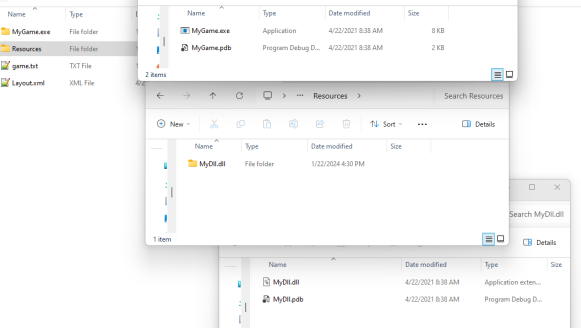
Create a ZIP archive that contains
<PackageFullName>_<TitleId>as its top-level directory.In Partner Center, upload the ZIP archive as the symbol bundle for the matching title and package.