Note
Access to this page requires authorization. You can try signing in or changing directories.
Access to this page requires authorization. You can try changing directories.
Release date: September 15, 2026
The XBOX PC Remote Tools help game developers remotely configure, deploy, launch, debug, and iterate on Windows-based devices. The toolset includes the XBOX PC Toolbox app, the wdRemote and wdEndpoint command-line tools, the XBOX PC Remote Iteration API, and the XBOX PC Remote Debugger Visual Studio extension.
In addition to bug fixes and general improvements, this release includes updates to XBOX PC Toolbox, the XBOX PC Remote Iteration API, the wdRemote command-line tool, and the XBOX PC Remote Debugger Visual Studio extension:
- XBOX PC Remote Tools: September 2026 (2609) release notes
XBOX PC Toolbox
New configuration platform
XBOX PC Toolbox now uses a new configuration platform for device setup and configuration. This foundational update simplifies how configuration is managed behind the scenes while maintaining the same experience and outcomes for developers.
The app no longer surfaces DSC as a prerequisite or setup component. No action is required for existing users.
During setup, the Install required tools step shows the required components and installation progress.

Troubleshoot and Reset
The Troubleshoot and Reset section in Settings provides three options for checking, repairing, or resetting XBOX PC Toolbox:

- Check XBOX PC Toolbox Configuration: Checks whether settings and components managed by XBOX PC Toolbox are configured correctly without making changes. Results and recommended fixes appear on the Home screen.
- Repair XBOX PC Toolbox Installation: Checks the required components and reapplies configuration for the current device role. The device role, pairings, keys, and saved XBOX PC Toolbox data are preserved.
- Start over with XBOX PC Toolbox: Removes the device role, pairings, keys, and configuration, and then returns the app to first-run setup. Use this option to change the device role or completely redo XBOX PC Toolbox setup.
Warning
Start over with XBOX PC Toolbox removes all pairings and keys from the device.
Copy device connection information
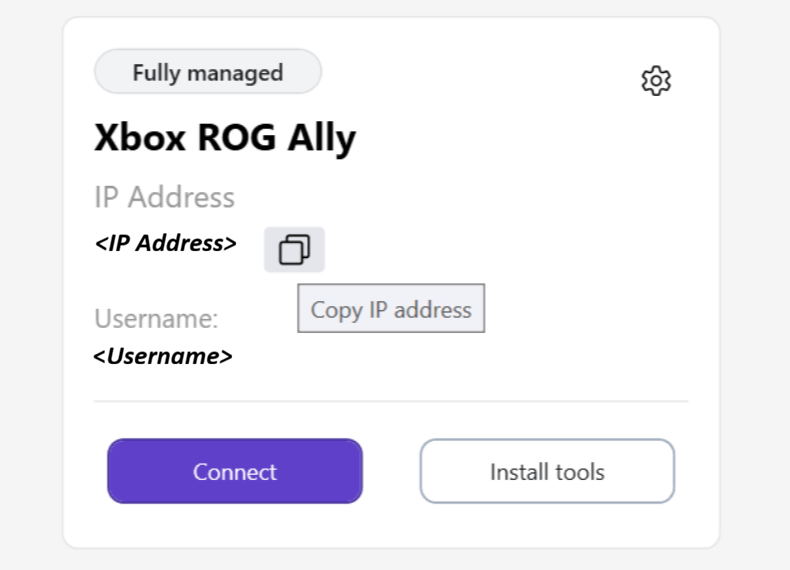
Paired-device cards in the Device Workspace now include a copy button next to the IP address or device name, depending on the connection type. Use this button to copy the connection information for use with other development tools.
XBOX PC Remote Iteration APIs
Copy files back from remote devices
Added remote-to-local copying through the XBOX PC Remote Iteration API, enabling you to retrieve output and artifacts from remote devices.
Clean up remote files
Added recursive remote file cleanup through the WdDeleteRemoteFiles function in the XBOX PC Remote Iteration API, with name and attribute filters for selecting files and excluding files or directories from cleanup.
XBOX PC Remote Iteration command-line tools
Copy files with copyfrom
Added a wdRemote copyfrom command for copying files from a remote device to the development PC. You can use this command to retrieve logs and other output from remote devices.
Delete remote files
Added a wdRemote delete command for removing a file or selected directory contents on a remote device, with name and attribute filters for selecting files and excluding files or directories.
Run remote tools
Added a wdRemote run command for running tools independently of the game lifecycle. The command provides options to wait for an exit code or stream standard output and standard error back to the development PC. Tool launches can also request administrator elevation on the target device.
Terminate remote tools
Added a /tool option to wdRemote terminate for terminating the remote tool job, or a specific remote process by PID.
Filter deployment by file attributes
Added attribute-based filtering to wdRemote deploy to include or exclude files and directories during deployment.
Visual Studio debugger changes
Automatically provision the remote debugger
The XBOX PC Remote Debugger Visual Studio extension can now automatically provision the Visual Studio remote debugger from a local Visual Studio installation when needed during remote debugging. The integration selects the target device's architecture and reuses suitable existing debugger installations.
Visual Studio integration improvements
Added deployment options for additional directories and Visual C++ runtimes, live debugger-provisioning progress, and clearer connection and setup diagnostics.
Known problems
The XBOX PC Remote Tools are currently in preview. The following known issues may affect some workflows in this release.
XBOX PC Toolbox known problems
1. Pairing a development PC to a Fully Managed target device
Issue: Setting up a fully managed remote device may fail with this error: Windows capability 'OpenSSH.Server~~~~0.0.1.0' did not reach desired Ensure 'Present'. This error could be caused by a pending Windows Update reboot on the PC.
Workaround: Reboot the PC and re-run XBOX PC Toolbox setup to resolve this issue.
Remote Iteration API and command-line tools known problems
2. Concurrent file transfer operations
Issue: Concurrent copy or deployment operations targeting the same device are not supported and may result in incomplete or zero-byte files, even when the operation reports success.
Workaround: Run file copy and deployment operations sequentially when targeting the same device.
3. Elevated remote tool execution
Issue: Running wdRemote run /asAdmin requires administrator approval on the target device. A Windows elevation prompt is displayed on the target machine, making this scenario unsuitable for unattended or CI/CD workflows. If elevation is declined, wdRemote may return error 0x800704C7, which may not clearly indicate that the elevation request was rejected.
Workaround: Ensure a user is available to approve the elevation prompt, or avoid /asAdmin in unattended scenarios.
4. Cancellation of remote delete operations
Issue: Cancelling a remote delete operation may return control to the client before deletion has fully stopped on the target device. As a result, some selected files may continue to be deleted after cancellation is requested.
Workaround: Verify the deletion state on the target device before proceeding with subsequent operations.
5. Interrupted deployments
Issue: If a wdRemote deploy operation is interrupted, a partially written file may remain at the target location under its final filename.
Workaround: Re-run the deployment before using the deployed content. The deployment process will detect and replace incomplete files during the retry.
For the complete list of active issues and limitations, see the XBOX PC Remote Tools FAQ and troubleshooting guide.