This tutorial offers step-by-step guidance for automating employee mover tasks by using lifecycle workflows APIs in Microsoft Graph.
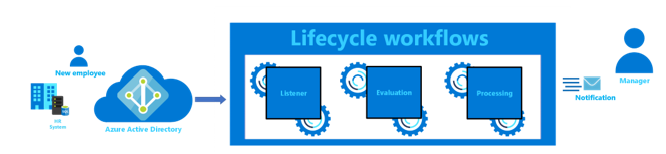
In this tutorial, you learn how to:
- Configure a lifecycle workflow to check for employees moving into a new department.
- Configure a task to notify the manager of the users moved via email.
- Monitor the status of the workflow and its associated tasks.
Prerequisites
To complete this tutorial, you need the following resources and privileges:
This feature requires Microsoft Entra ID Governance licenses. To find the right license for your requirements, see Microsoft Entra ID Governance licensing fundamentals.
Sign in to an API client such as Graph Explorer to call Microsoft Graph with account that has at least the lifecycle administrator Microsoft Entra role.
Grant yourself the LifecycleWorkflows.ReadWrite.All Microsoft Graph delegated permission.
Create two user accounts to use in this tutorial: one for the employee and another for their manager and have the following settings configured as applicable.
| User property |
Description |
Set on |
| mail |
Notifies the manager that the employee was moved to the department. Both the manager and employee should have active mailboxes to receive emails. |
Employee, Manager |
| manager |
This attribute is used by the workflow task. |
Employee |
Create a mover workflow
Request
The following request creates a mover workflow with the following settings:
- It runs on schedule but also can be run on demand.
- The workflow runs when an employee is added to the Sales department.
- Only one built-in task runs in this workflow: to send an email to the employee's manager notifying them of the move. This task is identified in lifecycle workflows by the taskDefinitionId
aab41899-9972-422a-9d97-f626014578b7.
POST https://graph.microsoft.com/v1.0/identityGovernance/lifecycleWorkflows/workflows
Content-type: application/json

{
    "category": "mover",
    "description": "Configure mover tasks for a user moved to the Sales department.",
    "displayName": "Added to Sales department workflow",
    "isEnabled": true,
    "isSchedulingEnabled": true,
    "executionConditions": {
        "@odata.type": "#microsoft.graph.identityGovernance.triggerAndScopeBasedConditions",
        "scope": {
            "@odata.type": "#microsoft.graph.identityGovernance.ruleBasedSubjectSet",
            "rule": "(department eq 'Sales')"
        },
        "trigger": {
            "@odata.type": "#microsoft.graph.identityGovernance.attributeChangeTrigger",
            "triggerAttributes": [
                {
                    "name": "department"
                }
            ]
        }
    },
    "tasks": [
        {
            "continueOnError": false,
            "description": "Send email to moving employee's manager",
            "displayName": "Notify manager of move",
            "isEnabled": true,
            "taskDefinitionId": "aab41899-9972-422a-9d97-f626014578b7",
            "arguments": []
        }
    ]
}
// Code snippets are only available for the latest version. Current version is 5.x

// Dependencies
using Microsoft.Graph.Models.IdentityGovernance;
using Microsoft.Graph.Models;

var requestBody = new Workflow
{
	Category = LifecycleWorkflowCategory.Mover,
	Description = "Configure mover tasks for a user moved to the Sales department.",
	DisplayName = "Added to Sales department workflow",
	IsEnabled = true,
	IsSchedulingEnabled = true,
	ExecutionConditions = new TriggerAndScopeBasedConditions
	{
		OdataType = "#microsoft.graph.identityGovernance.triggerAndScopeBasedConditions",
		Scope = new RuleBasedSubjectSet
		{
			OdataType = "#microsoft.graph.identityGovernance.ruleBasedSubjectSet",
			Rule = "(department eq 'Sales')",
		},
		Trigger = new AttributeChangeTrigger
		{
			OdataType = "#microsoft.graph.identityGovernance.attributeChangeTrigger",
			TriggerAttributes = new List<TriggerAttribute>
			{
				new TriggerAttribute
				{
					Name = "department",
				},
			},
		},
	},
	Tasks = new List<TaskObject>
	{
		new TaskObject
		{
			ContinueOnError = false,
			Description = "Send email to moving employee's manager",
			DisplayName = "Notify manager of move",
			IsEnabled = true,
			TaskDefinitionId = "aab41899-9972-422a-9d97-f626014578b7",
			Arguments = new List<KeyValuePair>
			{
			},
		},
	},
};

// To initialize your graphClient, see https://learn.microsoft.com/en-us/graph/sdks/create-client?from=snippets&tabs=csharp
var result = await graphClient.IdentityGovernance.LifecycleWorkflows.Workflows.PostAsync(requestBody);
Read the SDK documentation for details on how to add the SDK to your project and create an authProvider instance.
// Code snippets are only available for the latest major version. Current major version is $v1.*

// Dependencies
import (
	  "context"
	  msgraphsdk "github.com/microsoftgraph/msgraph-sdk-go"
	  graphmodelsidentitygovernance "github.com/microsoftgraph/msgraph-sdk-go/models/identitygovernance"
	  graphmodels "github.com/microsoftgraph/msgraph-sdk-go/models"
	  //other-imports
)

requestBody := graphmodelsidentitygovernance.NewWorkflow()
category := graphmodels.MOVER_LIFECYCLEWORKFLOWCATEGORY
requestBody.SetCategory(&category)
description := "Configure mover tasks for a user moved to the Sales department."
requestBody.SetDescription(&description)
displayName := "Added to Sales department workflow"
requestBody.SetDisplayName(&displayName)
isEnabled := true
requestBody.SetIsEnabled(&isEnabled)
isSchedulingEnabled := true
requestBody.SetIsSchedulingEnabled(&isSchedulingEnabled)
executionConditions := graphmodelsidentitygovernance.NewTriggerAndScopeBasedConditions()
scope := graphmodelsidentitygovernance.NewRuleBasedSubjectSet()
rule := "(department eq 'Sales')"
scope.SetRule(&rule)
executionConditions.SetScope(scope)
trigger := graphmodelsidentitygovernance.NewAttributeChangeTrigger()


triggerAttribute := graphmodelsidentitygovernance.NewTriggerAttribute()
name := "department"
triggerAttribute.SetName(&name)

triggerAttributes := []graphmodelsidentitygovernance.TriggerAttributeable {
	triggerAttribute,
}
trigger.SetTriggerAttributes(triggerAttributes)
executionConditions.SetTrigger(trigger)
requestBody.SetExecutionConditions(executionConditions)


task := graphmodelsidentitygovernance.NewTask()
continueOnError := false
task.SetContinueOnError(&continueOnError)
description := "Send email to moving employee's manager"
task.SetDescription(&description)
displayName := "Notify manager of move"
task.SetDisplayName(&displayName)
isEnabled := true
task.SetIsEnabled(&isEnabled)
taskDefinitionId := "aab41899-9972-422a-9d97-f626014578b7"
task.SetTaskDefinitionId(&taskDefinitionId)
arguments := []graphmodels.KeyValuePairable {

}
task.SetArguments(arguments)

tasks := []graphmodelsidentitygovernance.Taskable {
	task,
}
requestBody.SetTasks(tasks)

// To initialize your graphClient, see https://learn.microsoft.com/en-us/graph/sdks/create-client?from=snippets&tabs=go
workflows, err := graphClient.IdentityGovernance().LifecycleWorkflows().Workflows().Post(context.Background(), requestBody, nil)
Read the SDK documentation for details on how to add the SDK to your project and create an authProvider instance.
// Code snippets are only available for the latest version. Current version is 6.x

GraphServiceClient graphClient = new GraphServiceClient(requestAdapter);

com.microsoft.graph.models.identitygovernance.Workflow workflow = new com.microsoft.graph.models.identitygovernance.Workflow();
workflow.setCategory(com.microsoft.graph.models.identitygovernance.LifecycleWorkflowCategory.Mover);
workflow.setDescription("Configure mover tasks for a user moved to the Sales department.");
workflow.setDisplayName("Added to Sales department workflow");
workflow.setIsEnabled(true);
workflow.setIsSchedulingEnabled(true);
com.microsoft.graph.models.identitygovernance.TriggerAndScopeBasedConditions executionConditions = new com.microsoft.graph.models.identitygovernance.TriggerAndScopeBasedConditions();
executionConditions.setOdataType("#microsoft.graph.identityGovernance.triggerAndScopeBasedConditions");
com.microsoft.graph.models.identitygovernance.RuleBasedSubjectSet scope = new com.microsoft.graph.models.identitygovernance.RuleBasedSubjectSet();
scope.setOdataType("#microsoft.graph.identityGovernance.ruleBasedSubjectSet");
scope.setRule("(department eq 'Sales')");
executionConditions.setScope(scope);
com.microsoft.graph.models.identitygovernance.AttributeChangeTrigger trigger = new com.microsoft.graph.models.identitygovernance.AttributeChangeTrigger();
trigger.setOdataType("#microsoft.graph.identityGovernance.attributeChangeTrigger");
LinkedList<com.microsoft.graph.models.identitygovernance.TriggerAttribute> triggerAttributes = new LinkedList<com.microsoft.graph.models.identitygovernance.TriggerAttribute>();
com.microsoft.graph.models.identitygovernance.TriggerAttribute triggerAttribute = new com.microsoft.graph.models.identitygovernance.TriggerAttribute();
triggerAttribute.setName("department");
triggerAttributes.add(triggerAttribute);
trigger.setTriggerAttributes(triggerAttributes);
executionConditions.setTrigger(trigger);
workflow.setExecutionConditions(executionConditions);
LinkedList<com.microsoft.graph.models.identitygovernance.Task> tasks = new LinkedList<com.microsoft.graph.models.identitygovernance.Task>();
com.microsoft.graph.models.identitygovernance.Task task = new com.microsoft.graph.models.identitygovernance.Task();
task.setContinueOnError(false);
task.setDescription("Send email to moving employee's manager");
task.setDisplayName("Notify manager of move");
task.setIsEnabled(true);
task.setTaskDefinitionId("aab41899-9972-422a-9d97-f626014578b7");
LinkedList<KeyValuePair> arguments = new LinkedList<KeyValuePair>();
task.setArguments(arguments);
tasks.add(task);
workflow.setTasks(tasks);
com.microsoft.graph.models.identitygovernance.Workflow result = graphClient.identityGovernance().lifecycleWorkflows().workflows().post(workflow);
Read the SDK documentation for details on how to add the SDK to your project and create an authProvider instance.
const options = {
	authProvider,
};

const client = Client.init(options);

const workflow = {
    category: 'mover',
    description: 'Configure mover tasks for a user moved to the Sales department.',
    displayName: 'Added to Sales department workflow',
    isEnabled: true,
    isSchedulingEnabled: true,
    executionConditions: {
        '@odata.type': '#microsoft.graph.identityGovernance.triggerAndScopeBasedConditions',
        scope: {
            '@odata.type': '#microsoft.graph.identityGovernance.ruleBasedSubjectSet',
            rule: '(department eq \'Sales\')'
        },
        trigger: {
            '@odata.type': '#microsoft.graph.identityGovernance.attributeChangeTrigger',
            triggerAttributes: [
                {
                    name: 'department'
                }
            ]
        }
    },
    tasks: [
        {
            continueOnError: false,
            description: 'Send email to moving employee\'s manager',
            displayName: 'Notify manager of move',
            isEnabled: true,
            taskDefinitionId: 'aab41899-9972-422a-9d97-f626014578b7',
            arguments: []
        }
    ]
};

await client.api('/identityGovernance/lifecycleWorkflows/workflows')
	.post(workflow);
Read the SDK documentation for details on how to add the SDK to your project and create an authProvider instance.
<?php
use Microsoft\Graph\GraphServiceClient;
use Microsoft\Graph\Generated\Models\IdentityGovernance\Workflow;
use Microsoft\Graph\Generated\Models\IdentityGovernance\LifecycleWorkflowCategory;
use Microsoft\Graph\Generated\Models\IdentityGovernance\TriggerAndScopeBasedConditions;
use Microsoft\Graph\Generated\Models\IdentityGovernance\RuleBasedSubjectSet;
use Microsoft\Graph\Generated\Models\IdentityGovernance\AttributeChangeTrigger;
use Microsoft\Graph\Generated\Models\IdentityGovernance\TriggerAttribute;
use Microsoft\Graph\Generated\Models\IdentityGovernance\Task;
use Microsoft\Graph\Generated\Models\KeyValuePair;


$graphServiceClient = new GraphServiceClient($tokenRequestContext, $scopes);

$requestBody = new Workflow();
$requestBody->setCategory(new LifecycleWorkflowCategory('mover'));
$requestBody->setDescription('Configure mover tasks for a user moved to the Sales department.');
$requestBody->setDisplayName('Added to Sales department workflow');
$requestBody->setIsEnabled(true);
$requestBody->setIsSchedulingEnabled(true);
$executionConditions = new TriggerAndScopeBasedConditions();
$executionConditions->setOdataType('#microsoft.graph.identityGovernance.triggerAndScopeBasedConditions');
$executionConditionsScope = new RuleBasedSubjectSet();
$executionConditionsScope->setOdataType('#microsoft.graph.identityGovernance.ruleBasedSubjectSet');
$executionConditionsScope->setRule('(department eq \'Sales\')');
$executionConditions->setScope($executionConditionsScope);
$executionConditionsTrigger = new AttributeChangeTrigger();
$executionConditionsTrigger->setOdataType('#microsoft.graph.identityGovernance.attributeChangeTrigger');
$triggerAttributesTriggerAttribute1 = new TriggerAttribute();
$triggerAttributesTriggerAttribute1->setName('department');
$triggerAttributesArray []= $triggerAttributesTriggerAttribute1;
$executionConditionsTrigger->setTriggerAttributes($triggerAttributesArray);

$executionConditions->setTrigger($executionConditionsTrigger);
$requestBody->setExecutionConditions($executionConditions);
$tasksTask1 = new Task();
$tasksTask1->setContinueOnError(false);
$tasksTask1->setDescription('Send email to moving employee\'s manager');
$tasksTask1->setDisplayName('Notify manager of move');
$tasksTask1->setIsEnabled(true);
$tasksTask1->setTaskDefinitionId('aab41899-9972-422a-9d97-f626014578b7');
$tasksTask1->setArguments([]);
$tasksArray []= $tasksTask1;
$requestBody->setTasks($tasksArray);


$result = $graphServiceClient->identityGovernance()->lifecycleWorkflows()->workflows()->post($requestBody)->wait();
Read the SDK documentation for details on how to add the SDK to your project and create an authProvider instance.
Import-Module Microsoft.Graph.Identity.Governance

$params = @{
	category = "mover"
	description = "Configure mover tasks for a user moved to the Sales department."
	displayName = "Added to Sales department workflow"
	isEnabled = $true
	isSchedulingEnabled = $true
	executionConditions = @{
		"@odata.type" = "#microsoft.graph.identityGovernance.triggerAndScopeBasedConditions"
		scope = @{
			"@odata.type" = "#microsoft.graph.identityGovernance.ruleBasedSubjectSet"
			rule = "(department eq 'Sales')"
		}
		trigger = @{
			"@odata.type" = "#microsoft.graph.identityGovernance.attributeChangeTrigger"
			triggerAttributes = @(
				@{
					name = "department"
				}
			)
		}
	}
	tasks = @(
		@{
			continueOnError = $false
			description = "Send email to moving employee's manager"
			displayName = "Notify manager of move"
			isEnabled = $true
			taskDefinitionId = "aab41899-9972-422a-9d97-f626014578b7"
			arguments = @(
			)
		}
	)
}

New-MgIdentityGovernanceLifecycleWorkflow -BodyParameter $params
Read the SDK documentation for details on how to add the SDK to your project and create an authProvider instance.
# Code snippets are only available for the latest version. Current version is 1.x
from msgraph import GraphServiceClient
from msgraph.generated.models.identity_governance.workflow import Workflow
from msgraph.generated.models.lifecycle_workflow_category import LifecycleWorkflowCategory
from msgraph.generated.models.identity_governance.trigger_and_scope_based_conditions import TriggerAndScopeBasedConditions
from msgraph.generated.models.identity_governance.rule_based_subject_set import RuleBasedSubjectSet
from msgraph.generated.models.identity_governance.attribute_change_trigger import AttributeChangeTrigger
from msgraph.generated.models.identity_governance.trigger_attribute import TriggerAttribute
from msgraph.generated.models.identity_governance.task import Task
from msgraph.generated.models.key_value_pair import KeyValuePair
# To initialize your graph_client, see https://learn.microsoft.com/en-us/graph/sdks/create-client?from=snippets&tabs=python
request_body = Workflow(
	category = LifecycleWorkflowCategory.Mover,
	description = "Configure mover tasks for a user moved to the Sales department.",
	display_name = "Added to Sales department workflow",
	is_enabled = True,
	is_scheduling_enabled = True,
	execution_conditions = TriggerAndScopeBasedConditions(
		odata_type = "#microsoft.graph.identityGovernance.triggerAndScopeBasedConditions",
		scope = RuleBasedSubjectSet(
			odata_type = "#microsoft.graph.identityGovernance.ruleBasedSubjectSet",
			rule = "(department eq 'Sales')",
		),
		trigger = AttributeChangeTrigger(
			odata_type = "#microsoft.graph.identityGovernance.attributeChangeTrigger",
			trigger_attributes = [
				TriggerAttribute(
					name = "department",
				),
			],
		),
	),
	tasks = [
		Task(
			continue_on_error = False,
			description = "Send email to moving employee's manager",
			display_name = "Notify manager of move",
			is_enabled = True,
			task_definition_id = "aab41899-9972-422a-9d97-f626014578b7",
			arguments = [
			],
		),
	],
)

result = await graph_client.identity_governance.lifecycle_workflows.workflows.post(request_body)
Read the SDK documentation for details on how to add the SDK to your project and create an authProvider instance.
Response
The following example shows the response.
HTTP/1.1 201 Created
Content-Type: application/json

{
    "@odata.context": "https://graph.microsoft.com/v1.0/$metadata#identityGovernance/lifecycleWorkflows/workflows/$entity",
    "category": "mover",
    "description": "Configure mover tasks for a user moved to the Sales department.",
    "displayName": "Added to Sales department workflow",
    "isEnabled": true,
    "isSchedulingEnabled": true,
    "lastModifiedDateTime": "2024-03-28T12:46:10.0505943Z",
    "createdDateTime": "2024-03-28T12:46:10.0505809Z",
    "deletedDateTime": null,
    "id": "2bb05c85-556a-429a-8c16-16f6be5ef880",
    "nextScheduleRunDateTime": "2024-03-28T13:37:08Z",
    "version": 1,
    "executionConditions": {
        "@odata.type": "#microsoft.graph.identityGovernance.triggerAndScopeBasedConditions",
        "scope": {
            "@odata.type": "#microsoft.graph.identityGovernance.ruleBasedSubjectSet",
            "rule": "(department eq 'Sales')"
        },
        "trigger": {
            "@odata.type": "#microsoft.graph.identityGovernance.attributeChangeTrigger",
            "triggerAttributes": [
                {
                    "name": "department"
                }
            ]
        }
    }
}
Check scope of workflow
Now that the workflow is created, take note of your workflow ID, and then add the user you want to test the workflow on to the Sales department. After 15-30 minutes, you can determine whether the user is queued to have the workflow run for them by checking the execution scope of your workflow. To determine whether a user is queued to have the workflow run for them, use the following request.
POST https://graph.microsoft.com/v1.0/identityGovernance/lifecycleWorkflows/workflows/2bb05c85-556a-429a-8c16-16f6be5ef880/executionScope
const options = {
	authProvider,
};

const client = Client.init(options);

await client.api('/identityGovernance/lifecycleWorkflows/workflows/2bb05c85-556a-429a-8c16-16f6be5ef880/executionScope')
	.post();
Read the SDK documentation for details on how to add the SDK to your project and create an authProvider instance.
Response
The following example shows the response.
HTTP/1.1 200 OK
Content-Type: application/json

{
    "@odata.context": "https://graph.microsoft.com/v1.0/$metadata#Collection(microsoft.graph.identityGovernance.userProcessingResult)",
    "@microsoft.graph.tips": "Use $select to choose only the properties your app needs, as this can lead to performance improvements. For example: GET identityGovernance/lifecycleWorkflows/workflows('<guid>')/executionScope?$select=completedDateTime,failedTasksCount",
    "value": [
        {
            "id": "2bb05c85-556a-429a-8c16-16f6be5ef880_1_2bb05c85-556a-429a-8c16-16f6be5ef880_638472334281668424_6324d383-5034-49dc-a62d-30d61e01b613",
            "completedDateTime": null,
            "failedTasksCount": 0,
            "processingStatus": "queued",
            "scheduledDateTime": "2024-03-28T14:37:08.1668424Z",
            "startedDateTime": null,
            "totalTasksCount": 1,
            "totalUnprocessedTasksCount": 1,
            "workflowExecutionType": "scheduled",
            "workflowVersion": 1,
            "subject": {
                "id": "6324d383-5034-49dc-a62d-30d61e01b613"
            }
        }
    ]
}
Check tasks and workflow status
At any time, you can monitor the status of the workflows and their associated tasks at three levels.
- Monitor tasks at the user level.
- Monitor the aggregate high-level summary of the user-level results for a workflow, within a specified period.
- Retrieve the detailed log of all tasks that were executed for a specific user in the workflow.
Option 1: Monitor tasks for a workflow at the user level
Request
The following example shows a request.
GET https://graph.microsoft.com/v1.0/identityGovernance/lifecycleWorkflows/workflows/2bb05c85-556a-429a-8c16-16f6be5ef880/userProcessingResults
// Code snippets are only available for the latest version. Current version is 5.x

// To initialize your graphClient, see https://learn.microsoft.com/en-us/graph/sdks/create-client?from=snippets&tabs=csharp
var result = await graphClient.IdentityGovernance.LifecycleWorkflows.Workflows["{workflow-id}"].UserProcessingResults.GetAsync();
Read the SDK documentation for details on how to add the SDK to your project and create an authProvider instance.
// Code snippets are only available for the latest major version. Current major version is $v1.*

// Dependencies
import (
	  "context"
	  msgraphsdk "github.com/microsoftgraph/msgraph-sdk-go"
	  //other-imports
)


// To initialize your graphClient, see https://learn.microsoft.com/en-us/graph/sdks/create-client?from=snippets&tabs=go
userProcessingResults, err := graphClient.IdentityGovernance().LifecycleWorkflows().Workflows().ByWorkflowId("workflow-id").UserProcessingResults().Get(context.Background(), nil)
Read the SDK documentation for details on how to add the SDK to your project and create an authProvider instance.
// Code snippets are only available for the latest version. Current version is 6.x

GraphServiceClient graphClient = new GraphServiceClient(requestAdapter);

com.microsoft.graph.models.identitygovernance.UserProcessingResultCollectionResponse result = graphClient.identityGovernance().lifecycleWorkflows().workflows().byWorkflowId("{workflow-id}").userProcessingResults().get();
Read the SDK documentation for details on how to add the SDK to your project and create an authProvider instance.
const options = {
	authProvider,
};

const client = Client.init(options);

let userProcessingResults = await client.api('/identityGovernance/lifecycleWorkflows/workflows/2bb05c85-556a-429a-8c16-16f6be5ef880/userProcessingResults')
	.get();
Read the SDK documentation for details on how to add the SDK to your project and create an authProvider instance.
<?php
use Microsoft\Graph\GraphServiceClient;


$graphServiceClient = new GraphServiceClient($tokenRequestContext, $scopes);


$result = $graphServiceClient->identityGovernance()->lifecycleWorkflows()->workflows()->byWorkflowId('workflow-id')->userProcessingResults()->get()->wait();
Read the SDK documentation for details on how to add the SDK to your project and create an authProvider instance.
# Code snippets are only available for the latest version. Current version is 1.x
from msgraph import GraphServiceClient
# To initialize your graph_client, see https://learn.microsoft.com/en-us/graph/sdks/create-client?from=snippets&tabs=python

result = await graph_client.identity_governance.lifecycle_workflows.workflows.by_workflow_id('workflow-id').user_processing_results.get()
Read the SDK documentation for details on how to add the SDK to your project and create an authProvider instance.
Response
The following example shows the response.
HTTP/1.1 200 OK
Content-Type: application/json

{
    "@odata.context": "https://graph.microsoft.com/v1.0/$metadata#identityGovernance/lifecycleWorkflows/workflows('2bb05c85-556a-429a-8c16-16f6be5ef880')/userProcessingResults",
    "@microsoft.graph.tips": "Use $select to choose only the properties your app needs, as this can lead to performance improvements. For example: GET identityGovernance/lifecycleWorkflows/workflows('<guid>')/userProcessingResults?$select=completedDateTime,failedTasksCount",
    "value": [
        {
            "id": "2bb05c85-556a-429a-8c16-16f6be5ef880_1_2bb05c85-556a-429a-8c16-16f6be5ef880_638470955486351520_6324d383-5034-49dc-a62d-30d61e01b613",
            "completedDateTime": "2024-03-27T00:19:22.5753749Z",
            "failedTasksCount": 1,
            "processingStatus": "completedWithErrors",
            "scheduledDateTime": "2024-03-27T00:19:08.635152Z",
            "startedDateTime": "2024-03-27T00:19:17.1696067Z",
            "totalTasksCount": 1,
            "totalUnprocessedTasksCount": 0,
            "workflowExecutionType": "onDemand",
            "workflowVersion": 1,
            "subject": {
                "id": "6324d383-5034-49dc-a62d-30d61e01b613"
            }
        }
    ]
}
Option 2: Get the aggregate high-level summary of the user-level results for a workflow, within a specified period
Request
The following example shows a request.
GET https://graph.microsoft.com/v1.0/identityGovernance/lifecycleWorkflows/workflows/2bb05c85-556a-429a-8c16-16f6be5ef880/userProcessingResults/summary(startDateTime=2024-03-01T00:00:00Z,endDateTime=2024-03-30T00:00:00Z)
// Code snippets are only available for the latest version. Current version is 5.x

// To initialize your graphClient, see https://learn.microsoft.com/en-us/graph/sdks/create-client?from=snippets&tabs=csharp
var result = await graphClient.IdentityGovernance.LifecycleWorkflows.Workflows["{workflow-id}"].UserProcessingResults.MicrosoftGraphIdentityGovernanceSummaryWithStartDateTimeWithEndDateTime(DateTimeOffset.Parse("{endDateTime}"),DateTimeOffset.Parse("{startDateTime}")).GetAsync();
Read the SDK documentation for details on how to add the SDK to your project and create an authProvider instance.
// Code snippets are only available for the latest major version. Current major version is $v1.*

// Dependencies
import (
	  "context"
	  msgraphsdk "github.com/microsoftgraph/msgraph-sdk-go"
	  //other-imports
)


// To initialize your graphClient, see https://learn.microsoft.com/en-us/graph/sdks/create-client?from=snippets&tabs=go
startDateTime , err := time.Parse(time.RFC3339, "{startDateTime}")
endDateTime , err := time.Parse(time.RFC3339, "{endDateTime}")
microsoftGraphIdentityGovernanceSummary, err := graphClient.IdentityGovernance().LifecycleWorkflows().Workflows().ByWorkflowId("workflow-id").UserProcessingResults().MicrosoftGraphIdentityGovernanceSummaryWithStartDateTimeWithEndDateTime(&startDateTime, &endDateTime).Get(context.Background(), nil)
Read the SDK documentation for details on how to add the SDK to your project and create an authProvider instance.
// Code snippets are only available for the latest version. Current version is 6.x

GraphServiceClient graphClient = new GraphServiceClient(requestAdapter);

var result = graphClient.identityGovernance().lifecycleWorkflows().workflows().byWorkflowId("{workflow-id}").userProcessingResults().microsoftGraphIdentityGovernanceSummaryWithStartDateTimeWithEndDateTime(OffsetDateTime.parse("{endDateTime}"), OffsetDateTime.parse("{startDateTime}")).get();
Read the SDK documentation for details on how to add the SDK to your project and create an authProvider instance.
const options = {
	authProvider,
};

const client = Client.init(options);

let userSummary = await client.api('/identityGovernance/lifecycleWorkflows/workflows/2bb05c85-556a-429a-8c16-16f6be5ef880/userProcessingResults/summary(startDateTime=2024-03-01T00:00:00Z,endDateTime=2024-03-30T00:00:00Z)')
	.get();
Read the SDK documentation for details on how to add the SDK to your project and create an authProvider instance.
<?php
use Microsoft\Graph\GraphServiceClient;


$graphServiceClient = new GraphServiceClient($tokenRequestContext, $scopes);


$result = $graphServiceClient->identityGovernance()->lifecycleWorkflows()->workflows()->byWorkflowId('workflow-id')->userProcessingResults()->microsoftGraphIdentityGovernanceSummaryWithStartDateTimeWithEndDateTime(new \DateTime('{endDateTime}'),new \DateTime('{startDateTime}'))->get()->wait();
Read the SDK documentation for details on how to add the SDK to your project and create an authProvider instance.
Import-Module Microsoft.Graph.Identity.Governance

Invoke-MgSummaryIdentityGovernanceLifecycleWorkflowUserProcessingResult -WorkflowId $workflowId
Read the SDK documentation for details on how to add the SDK to your project and create an authProvider instance.
# Code snippets are only available for the latest version. Current version is 1.x
from msgraph import GraphServiceClient
# To initialize your graph_client, see https://learn.microsoft.com/en-us/graph/sdks/create-client?from=snippets&tabs=python

result = await graph_client.identity_governance.lifecycle_workflows.workflows.by_workflow_id('workflow-id').user_processing_results.microsoft_graph_identity_governance_summary_with_start_date_time_with_end_date_time("{endDateTime}","{startDateTime}").get()
Read the SDK documentation for details on how to add the SDK to your project and create an authProvider instance.
Response
The following example shows the response.
HTTP/1.1 200 OK
Content-Type: application/json

{
    "@odata.context": "https://graph.microsoft.com/v1.0/$metadata#microsoft.graph.identityGovernance.userSummary",
    "failedTasks": 2,
    "failedUsers": 2,
    "successfulUsers": 10,
    "totalTasks": 12,
    "totalUsers": 12
}
Related content
