Note
Access to this page requires authorization. You can try signing in or changing directories.
Access to this page requires authorization. You can try changing directories.
Overview
Autodesk 3ds Max is a professional 3D modeling, animation, rendering, and visualization application used across industries such as media and entertainment, architecture, engineering, construction, product design, and game development. It provides a comprehensive set of tools for creating high-quality 3D assets, visual effects, simulations, and photorealistic visualizations within a unified content creation environment.
This article describes the validation of Autodesk 3ds Max 2026 on Azure GPU-enabled virtual machines using the Autodesk 3ds Max 2026 Hardware Certification Test Suite. The certification suite evaluates key application capabilities including Windows interaction, viewport operations, selection and visualization workflows, steering wheel navigation, MassFX simulations, Nitrous viewport features, UV editing, skin weight solving, particle simulations, and Arnold rendering workflows where applicable.
The validation was performed to assess application stability, graphics behavior, viewport responsiveness, rendering functionality, simulation behavior, and overall user experience within an Azure-hosted workstation environment. Test results were evaluated against Autodesk-defined certification criteria, including application responsiveness, visual correctness, viewport refresh behavior, and the absence of graphical artifacts, flickering, glitches, or application failures.
By running Autodesk 3ds Max on Azure GPU-enabled virtual machines, organizations can provide artists, designers, architects, and visualization professionals with secure access to high-performance cloud workstations without relying on dedicated physical hardware. Azure enables centralized management, scalable infrastructure, and GPU acceleration for graphics-intensive 3D content creation workloads while supporting remote and hybrid work scenarios.
Current challenges
Organizations that provide Autodesk 3ds Max environments for 3D content creation, visualization, and animation often face the following challenges:
Workstation procurement and maintenance: 3ds Max requires workstation-class CPU and GPU resources for modeling, animation, simulation, viewport visualization, and rendering. Procuring and maintaining this hardware can increase infrastructure costs and administrative overhead.
Supporting remote creative teams: Artists, designers, and visualization specialists frequently work across multiple locations. Delivering a responsive 3D design experience while maintaining secure access to project assets and production data can be challenging with traditional workstation deployments.
Productivity with complex workloads: Large scenes, high-polygon models, particle simulations, physics-based effects, and rendering workflows can affect user productivity when graphics and compute resources aren't appropriately sized.
Managing large digital assets and project data: 3ds Max projects often include extensive collections of models, textures, animations, simulation caches, and rendered outputs. Ensuring efficient storage, sharing, and protection of these assets can become increasingly complex as projects grow.
Maintaining visual consistency and application stability: Production environments require reliable viewport performance, accurate graphical output, and stable application behavior. Organizations must ensure that infrastructure can support graphics-intensive workflows without visual artifacts, rendering issues, or workflow interruptions.
Protecting creative content and intellectual property: Digital assets created using 3ds Max often represent valuable intellectual property. Organizations must secure access to project data while enabling collaboration among internal teams, contractors, and external stakeholders.
Key benefits
Microsoft Azure, together with AMD Radeon PRO V710 GPU-enabled virtual machines, provides a scalable and high-performance platform for Autodesk 3ds Max workloads. This combination enables organizations to deliver professional 3D content creation environments while reducing dependency on dedicated physical workstations.
Benefits of running Autodesk 3ds Max on Azure include:
Access Autodesk 3ds Max from virtually any location through a centralized Azure-hosted environment.
Leverage AMD Radeon PRO V710 GPU resources to support graphics-intensive modeling, animation, simulation, and visualization workflows that require responsive viewport interaction and stable graphics processing.
Provide a consistent user experience across teams without requiring workstation-class hardware at every user endpoint.
Scale compute, memory, and GPU resources based on project requirements and workload demands.
Centralize project assets and production data to simplify management, collaboration, and data protection.
Reduce infrastructure management overhead associated with procuring, maintaining, and upgrading physical workstations.
Provision development, visualization, and content creation environments quickly using Azure's flexible infrastructure.
By combining Azure infrastructure with AMD Radeon PRO V710 GPU acceleration, organizations can provide artists, designers, and visualization professionals with a secure, flexible, and high-performance platform for Autodesk 3ds Max workloads.
Prerequisites
Before deploying and validating Autodesk 3ds Max 2026 on an Azure virtual machine, ensure that you meet the following requirements:
Azure environment
An active Azure subscription.
Microsoft Azure is generally available in regions worldwide.
A GPU-enabled Azure virtual machine deployed for Autodesk 3ds Max workloads.
A
Standard_NV24ads_V710_v5virtual machine with 24 vCPUs, 128 GiB of memory, and AMD Radeon PRO V710 GPU resources.
Operating system and GPU drivers
Windows Server 2022 Datacenter: Azure Edition or another operating system supported by Autodesk 3ds Max 2026 and the selected VM size.
The latest supported AMD Radeon PRO V710 GPU driver installed and configured for hardware-accelerated graphics.
Verify that the AMD GPU driver is functioning correctly and that hardware acceleration is available within Autodesk 3ds Max.
Autodesk 3ds Max software
Access to the Autodesk 3ds Max installation media.
Autodesk 3ds Max 2026 installed on the virtual machine.
Any required test scenes, sample files, and supporting content from the Autodesk 3ds Max Hardware Certification Test Suite copied to a local location on the virtual machine before validation.
Licensing infrastructure
A cloud-enabled Autodesk 3ds Max license associated with your email address.
Connectivity to Autodesk Licensing Services and Autodesk cloud services for software activation and license validation.
Project storage and data access
A storage location for project files, textures, simulations, animation assets, caches, and rendered outputs.
For this validation, an Azure managed disk was attached to the virtual machine and mounted as a shared drive for storing project assets.
In production environments, organizations can use Azure Files, Azure NetApp Files, or SMB-based file shares based on their performance and collaboration requirements.
User access and connectivity
User accounts with appropriate permissions to access the virtual machine.
Reliable network connectivity to the Azure-hosted 3ds Max environment and associated storage resources.
Remote Desktop Protocol (RDP) access to connect to the virtual machine.
Application and GPU validation
Verify that Windows detects the AMD Radeon PRO V710 GPU correctly.
Confirm that Autodesk 3ds Max launches successfully and uses the available GPU resources.
Verify that the Nitrous Direct3D graphics mode is configured as recommended by Autodesk for certification testing.
Validate that the Autodesk 3ds Max 2026 Hardware Certification Test Suite runs successfully.
Graphics software mode configuration
Before running the certification tests, configure Autodesk 3ds Max to use the Autodesk-recommended Nitrous Direct3D 11 graphics mode.
To check the graphics mode:
Launch Autodesk 3ds Max.
Select Customize > Preferences.
Open the Viewports tab.
Select Choose Driver. The default driver is Nitrous Direct3D 11. If a different driver is selected, change it to Nitrous Direct3D 11.
Restart Autodesk 3ds Max if you make any changes to the graphics mode.
After configuration, verify that viewport rendering works correctly.
Architecture
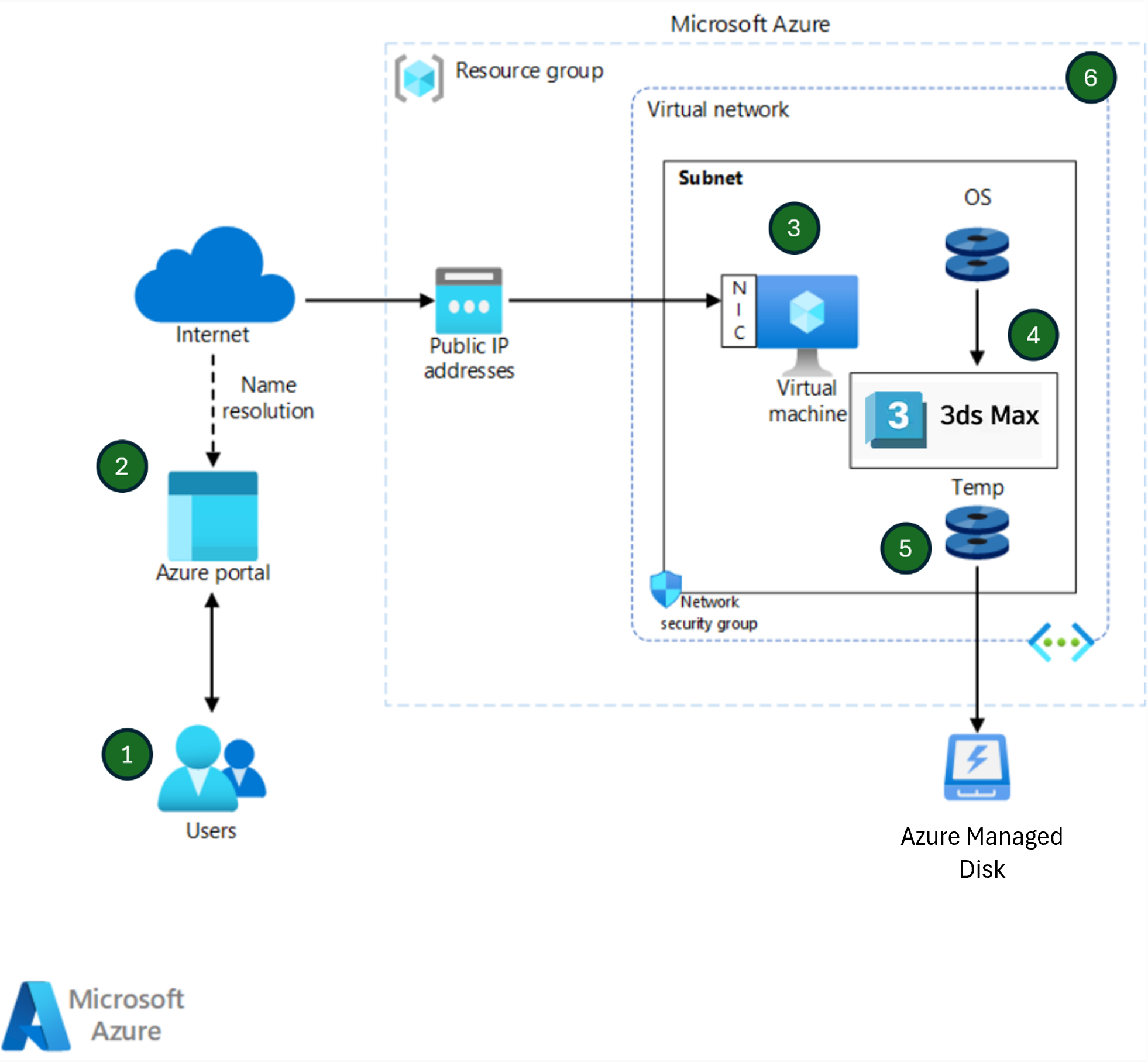
This architecture provides an AMD-powered V710 GPU-based VM for an Autodesk 3ds Max environment on Azure. The following architecture diagram shows the validation test environment used for this assessment and doesn't represent a full production deployment architecture.
Workflow
The following workflow describes how Autodesk 3ds Max is accessed and executed within the Azure validation environment. The steps correspond to the numbered components shown in the architecture diagram.
Users connect to the Azure virtual machine: Users establish a Remote Desktop Protocol (RDP) connection to the Azure virtual machine by using its public IP address. The VM serves as the centralized workstation hosting Autodesk 3ds Max and associated project resources.
Azure services provide access to the environment: Azure management and networking services support the deployment and operation of the 3ds Max environment. Azure DNS provides name resolution services, while Azure management tools enable administrators to provision, monitor, and manage the virtual machine and related resources.
Network traffic is routed to the virtual machine: User traffic is directed through the public IP address and network interface to the virtual machine hosted within the Azure Virtual Network (VNet). Network security groups (NSGs) enforce configured security rules to control inbound and outbound traffic.
The virtual machine runs Autodesk 3ds Max: The Azure virtual machine hosts the Windows operating system and Autodesk 3ds Max application. The VM provides the compute, memory, and AMD Radeon PRO V710 GPU resources required to support 3D modeling, animation, simulation, viewport interaction, visualization, and rendering workflows.
Temporary storage supports application processing: The temporary disk associated with the virtual machine provides local storage for temporary files, caches, intermediate rendering data, and other processing activities generated during 3ds Max workflows and validation testing.
Azure infrastructure hosts and organizes the environment: Azure resource groups and virtual networks logically organize and contain the resources used by the validation environment. These services provide resource management, network isolation, and administrative control for the Azure-hosted Autodesk 3ds Max deployment.
Azure components
The reference architecture uses the following Azure components.
Azure portal is the browser-based console where authorized users sign in to deploy and manage Azure resources.
Azure DNS provides name resolution for Azure endpoints.
Azure Resource Manager resource groups organize and manage related Azure resources. You deploy the test resources in one resource group.
Public IP addresses provide public connectivity to Azure resources. You associate a public IP address with the virtual machine's network interface.
Network interfaces connect virtual machines to virtual networks.
Azure NVads V710 v5 virtual machines provide on-demand, scalable compute without the need to maintain physical hardware. Use these GPU-enabled virtual machines to host the Autodesk 3ds Max application. The tested Standard_NV24ads_V710_v5 size has 24 vCPUs and 128 GiB of memory.
Azure Virtual Network facilitates secure communication between Azure resources, storage services, the internet, and enterprise networks.
Network security groups filter network traffic to and from the VM's network interface or subnet.
Azure managed disks provide persistent and reliable storage for Azure virtual machines that host Autodesk 3ds Max workloads. They store the operating system, Autodesk 3ds Max application files, and design data while providing consistent performance and simplified storage management through Azure-managed infrastructure. In this study, one managed disk is named Temp.
Remote Desktop client lets you connect to Windows desktops over a network by using the Remote Desktop Protocol. In this architecture, RDP establishes a connection between the Azure virtual machine and an on-premises machine or remote laptop.
Validate 3ds Max on V710 GPU
Testing strategy
The Autodesk 3ds Max 2026 Hardware Certification Test Suite was used to validate application stability, graphics behavior, viewport responsiveness, simulation functionality, rendering workflows, and overall user experience. The validation focused on ensuring that artists, designers, and visualization professionals could perform day-to-day 3D content creation tasks without experiencing graphical artifacts, viewport refresh issues, instability, rendering anomalies, or application failures. The certification suite included tests covering viewport operations, user interface interactions, navigation tools, simulation features, UV editing workflows, particle systems, and rendering capabilities.
Test configuration
The following table shows the tested configuration. Treat changes to the operating system, driver, 3ds Max build, VM size, storage, test scenes, or settings as a new configuration that requires validation.
| Item | Tested value |
|---|---|
| VM size | Standard_NV24ads_V710_v5 |
| Operating system | Microsoft Windows Server 2022 Datacenter: Azure Edition |
| Compute and memory | 24 vCPUs and 128 GiB RAM |
| GPU | AMD Radeon PRO V710 GPU |
| Application | Autodesk 3ds Max 2026 |
| Graphics mode | Nitrous Direct3D 11 |
| Test execution | Manual, one execution per scenario |
3ds Max test scenarios and outcome
Each Autodesk 3ds Max validation scenario was executed manually once to assess the application's behavior across a broad range of graphics-intensive and content creation workflows. Validation activities included user interface interactions, viewport operations, object selection workflows, navigation tools, simulation capabilities, UV editing, skin weighting, particle systems, and rendering-related functionality. During testing, particular attention was given to viewport responsiveness, graphical accuracy, application stability, visual consistency, and overall user experience.
The output generated by each test scenario was reviewed against the expected application behavior, with validation focusing on the correct operation of features and the quality of visual output. A test case was considered successful when the workflow completed as expected without graphical artifacts, viewport refresh problems, flickering, rendering anomalies, application instability, unexpected behavior, or application failures. In addition, common user interactions such as orbiting, panning, zooming, scene navigation, object manipulation, simulation playback, and viewport updates were verified to ensure responsive and consistent performance throughout the testing process.
The validation results provide confidence that Autodesk 3ds Max 2026 can reliably support professional 3D modeling, animation, visualization, simulation, and content creation workloads on the tested Azure virtual machine configuration.
| SI No. | Test suite | Validation summary | Result |
|---|---|---|---|
| 1 | Windows Interaction | Window operations, desktop interaction, multi-application workflows, and viewport refresh behavior functioned correctly without display glitches or flickering. | Pass |
| 2 | 3ds Max Basic Operations | Menus, toolbars, tooltips, dialogs, workspace transitions, track bar operations, and curve editor workflows operated as expected. | Pass |
| 3 | Viewport Operations | Viewport resizing, layout changes, display mode switching, clipping controls, statistics overlay, and viewport refresh behavior functioned correctly. | Pass |
| 4 | Selection Mode and XOR Line | Rectangle, circle, fence, lasso, paint selection tools, XOR line rendering, quick slice, cut operations, and object linking behaved correctly. | Pass |
| 5 | Steering Wheel and ViewCube | Navigation controls, steering wheel functionality, viewport manipulation, zoom, orbit, pan, and ViewCube operations functioned as expected. | Pass |
| 6 | MassFX Simulation | Physics simulations, constraints, object interactions, and MassFX workflow execution completed successfully with stable viewport performance. | Pass |
| 7 | Nitrous Features | Nitrous-specific viewport capabilities including backface culling, viewport canvas operations, painting tools, and visual style functionality operated correctly. | Pass |
| 8 | Unwrap UVW | UV seam creation, UV editing, distortion visualization, material assignment, multitile textures, and viewport updates functioned as expected. | Pass |
| 9 | Skin Weight Solver | GPU-assisted Voxel and Heatmap skinning workflows executed successfully and produced expected deformation behavior. | Pass |
| 10 | Particle Flow Solver (mParticles) | Particle simulations, collision behavior, MassFX integration, and mParticles workflows executed successfully with correct visual results. | Pass |
| 11 | Arnold GPU Cache | Requires NVIDIA GPU and CUDA/OptiX support. AMD Radeon PRO V710 doesn't support this workflow. | N/A |
| 12 | Arnold CPU/GPU Rendering | Arnold CPU rendering wasn't tested. Arnold GPU validation requires NVIDIA GPU support and wasn't applicable in the AMD-based test environment. | N/A |
| 13 | Arnold OptiX Denoising | OptiX functionality requires NVIDIA hardware and wasn't applicable to the AMD GPU test configuration. | N/A |
Validation summary
The Autodesk 3ds Max 2026 Hardware Certification Test Suite workloads applicable to the AMD Radeon PRO V710 GPU environment completed successfully on the Azure virtual machine. The application remained stable and responsive while producing visually correct output without graphical artifacts, flickering, rendering anomalies, or application failures. NVIDIA-specific Arnold GPU, Arnold OptiX, and related CUDA-dependent tests weren't executed and were classified as not applicable because the validation environment used AMD Radeon PRO V710 GPU resources. Overall, the results demonstrate that the Azure Standard_NV24ads_V710_v5 virtual machine provides a stable and capable platform for professional Autodesk 3ds Max 2026 workloads.
Scenario details
An organization deploys Autodesk 3ds Max on Azure Virtual Machines to provide artists, designers, and visualization professionals with access to a GPU-accelerated 3D content creation environment. By hosting 3ds Max on Azure, users can securely access a centralized workstation that provides the compute, memory, and AMD Radeon PRO V710 GPU resources required for graphics-intensive workflows.
The validated environment supports key Autodesk 3ds Max capabilities, including user interface interactions, viewport operations, object selection workflows, navigation tools, simulation features, UV editing, skin weighting, particle systems, and rendering-related tasks. Store project files and digital assets on centralized Azure storage resources to simplify data management while providing a consistent working environment for users.
This architecture enables organizations to deliver Autodesk 3ds Max workloads on scalable Azure infrastructure while supporting remote access, centralized management, and GPU-accelerated content creation workflows.
Potential use cases
Autodesk 3ds Max on Azure Virtual Machines supports a variety of 3D content creation, visualization, and design workflows. Consider this architecture for the following use cases:
3D modeling and digital content creation for developing assets, environments, and visual content for production workflows.
Architectural and design visualization, including photorealistic renderings, walkthroughs, and design reviews.
Animation and motion graphics for creating animated content, character movements, and visual storytelling.
Visual effects (VFX) and simulation workflows involving particle systems, physics-based simulations, and dynamic scene interactions.
Product and industrial visualization for showcasing concepts, prototypes, and engineering designs through realistic 3D representations.
Game development workflows, including asset creation, scene development, and content preparation for real-time applications.
Remote and distributed creative teams that require secure access to a GPU-accelerated 3D content creation environment without relying on dedicated workstation hardware.
This architecture is applicable across industries such as media and entertainment, architecture, engineering and construction (AEC), manufacturing, product design, advertising, education, and game development, where graphics-intensive visualization and content creation workloads are required.
Considerations
The following considerations align with the pillars of the Azure Well-Architected Framework, which is a set of guiding tenets used to improve the quality of a workload. For more information, see Well-Architected Framework.
Reliability
Reliability helps ensure that your application can meet the commitments that you make to your customers. For more information, see Design review checklist for Reliability.
Reliability ensures that Autodesk 3ds Max workloads remain available and recoverable in the event of planned maintenance, infrastructure issues, or unexpected disruptions. Azure provides resilient infrastructure, durable managed storage, and built-in platform maintenance capabilities to help maintain application availability and protect project assets, scenes, textures, simulation data, and rendered outputs.
Organizations can improve reliability by implementing regular backup procedures, using Azure managed disks for durable storage, and establishing recovery processes for critical project data. By leveraging Azure's infrastructure and data protection capabilities, organizations can minimize downtime and maintain continuity for 3ds Max content creation, visualization, and production workflows while aligning with the Reliability principles of the Azure Well-Architected Framework.
Security
Security provides protection against deliberate attacks and the misuse of your valuable data and systems. For more information, see Design review checklist for Security.
Security helps protect Autodesk 3ds Max workloads, creative assets, and project data from unauthorized access and potential cyber threats. Azure provides identity, network, and data protection capabilities that help organizations secure access to 3ds Max environments while safeguarding valuable digital content and intellectual property.
Organizations can use Microsoft Entra ID, multifactor authentication (MFA), and role-based access control (RBAC) to ensure that only authorized users can access the virtual machine and associated project resources. Data can be protected through encryption at rest and in transit, while Azure networking controls such as network security groups (NSGs) help secure communication between users and Azure-hosted workloads.
By leveraging Azure's security capabilities, organizations can maintain a secure environment for Autodesk 3ds Max while protecting project assets, scenes, textures, simulation data, and rendered outputs in alignment with the Security principles of the Azure Well-Architected Framework.
Cost optimization
Cost Optimization focuses on ways to reduce unnecessary expenses and improve operational efficiencies. For more information, see Design review checklist for Cost Optimization.
Cost Optimization focuses on aligning infrastructure costs with Autodesk 3ds Max workload requirements while maintaining the performance needed for professional content creation. Azure enables organizations to select appropriately sized GPU-enabled virtual machines and adjust compute, memory, and graphics resources as project demands change, helping to avoid overprovisioning.
Organizations can further optimize costs by monitoring resource utilization, implementing scheduled start and stop operations for non-production environments, and leveraging Azure pricing options for predictable workloads. By matching infrastructure capacity to actual usage requirements, organizations can reduce operational expenses while continuing to support graphics-intensive modeling, animation, visualization, simulation, and rendering workflows in alignment with the Cost Optimization principles of the Azure Well-Architected Framework.
Performance efficiency
Performance Efficiency refers to your workload's ability to scale to meet the demands that users place on it efficiently. For more information, see Design review checklist for Performance Efficiency.
Performance Efficiency focuses on delivering the compute, memory, storage, and GPU resources required to support Autodesk 3ds Max workloads effectively. Azure provides GPU-enabled virtual machines powered by AMD Radeon PRO V710 GPUs, enabling responsive viewport interaction and efficient execution of graphics-intensive tasks such as 3D modeling, animation, simulation, UV editing, particle effects, and visualization workflows.
You can select virtual machine sizes that align with project requirements and scale resources as workloads evolve. When you combine Azure-managed infrastructure with high-performance storage, you help maintain application responsiveness, visual consistency, and a productive user experience for artists and designers working with complex scenes and digital assets.
By leveraging Azure GPU-enabled virtual machines, you can efficiently support Autodesk 3ds Max workloads while aligning with the Performance Efficiency principles of the Azure Well-Architected Framework.
Stability
Stability focuses on ensuring that Autodesk 3ds Max operates reliably during prolonged content creation, visualization, simulation, and rendering activities. A stable environment helps artists and designers work productively without unexpected application interruptions, graphical anomalies, viewport refresh issues, or system crashes.
Azure Virtual Machines powered by AMD Radeon PRO V710 GPU resources provide a consistent platform for graphics-intensive 3ds Max workloads. During validation, key workflows including viewport operations, navigation tools, simulations, UV editing, particle systems, and content creation tasks executed successfully while maintaining responsive application behavior and visual consistency.
By leveraging Azure's managed infrastructure, you can provide a dependable 3ds Max environment that supports day-to-day production workflows and helps maintain a consistent user experience across creative teams.
Operational excellence
Operational Excellence covers the operations processes that deploy an application and keep it running in production. For more information, see Design review checklist for Operational Excellence.
Operational Excellence focuses on simplifying the deployment, management, monitoring, and maintenance of Autodesk 3ds Max environments while improving operational efficiency. By hosting 3ds Max on Azure Virtual Machines, you can centrally manage application updates, operating system maintenance, security configurations, and infrastructure resources through Azure management services.
Azure services such as Azure Monitor, Azure Advisor, and Azure Update Manager help administrators monitor system health, track resource utilization, identify potential issues, and maintain a consistent user experience. Centralized management also simplifies patching, troubleshooting, backup operations, and environment configuration, reducing the administrative effort associated with managing individual workstations.
By leveraging Azure's management and monitoring capabilities, you can improve maintainability, streamline operations, and provide a reliable platform for Autodesk 3ds Max workloads while aligning with the Operational Excellence principles of the Azure Well-Architected Framework.
Contributors
Microsoft maintains this article. The following contributors from Microsoft originally wrote it:
Principal author:
- Sunita Phanse | Sr. Technical Program Manager
Contributors:
- Sachin Rastogi | Senior Program Manager
To see nonpublic LinkedIn profiles, sign in to LinkedIn.