Note
Access to this page requires authorization. You can try signing in or changing directories.
Access to this page requires authorization. You can try changing directories.
Overview
This reference architecture describes the deployment and validation of Autodesk AutoCAD 2027 on an Azure NVads V710 v5 virtual machine. AutoCAD is a computer-aided design (CAD) application for creating 2D drawings, 3D models, and engineering documentation.
The validation used an AMD Radeon PRO V710 GPU-powered Standard_NV24ads_V710_v5 virtual machine with 24 vCPUs and 128 GiB of memory. An Autodesk-provided benchmark suite ran each scenario five times and recorded the total runtime for each run. The results apply only to the tested configuration and aren't a comparison with physical workstations, other VM sizes, or other hardware.
Current challenges
Organizations that provide AutoCAD environments often face the following challenges:
Costly workstation hardware: Graphics-intensive design workflows require high-performance physical workstations that need ongoing maintenance and periodic refreshes.
Secure access for distributed teams: Remote and hybrid teams need responsive access to AutoCAD and centralized project data without exposing engineering intellectual property.
Inconsistent environments: Individually managed workstations can result in configuration drift, uneven performance, and increased support effort.
Changing project requirements: Larger drawings and more complex 3D models can require additional compute, memory, storage, and GPU capacity.
Key benefits
Azure GPU-enabled virtual machines provide centrally managed AutoCAD workstations that users can access from virtually any location.
Validated across multiple project types: The tested configuration completed scenarios from the Autodesk-provided benchmark suite for architectural design, engineering projects, infrastructure planning, facility layouts, and 3D visualization across five iterations.
Support for CAD and graphics-intensive workflows: Azure NVads V710 v5 virtual machines with AMD Radeon PRO V710 GPUs support 2D drafting, 3D modeling, design documentation, visualization, drawing regeneration, plotting, model manipulation, and project review.
Simplified deployment and reduced infrastructure overhead: Centralize AutoCAD, templates, and configurations in Azure instead of deploying, maintaining, upgrading, and refreshing individual physical workstations.
Flexible capacity: Resize the virtual machine as drawing size, model complexity, and compute, memory, storage, or GPU requirements change. Validate the workload after resizing.
Centralized project data management: Store AutoCAD drawings, templates, plot configurations, and engineering documentation in Azure storage services to support governance and controlled access.
Remote access: Host AutoCAD on an Azure virtual machine so authorized users can access the application without a high-performance local workstation. Select and validate an appropriate remote-access solution for production use.
Prerequisites
Before you deploy and validate Autodesk AutoCAD 2027 on an Azure virtual machine, ensure you meet the following requirements:
Azure environment
An active Azure subscription.
Microsoft Azure is generally available in regions worldwide.
A GPU-enabled Azure virtual machine deployed for AutoCAD workloads.
A
Standard_NV24ads_V710_v5virtual machine with 24 vCPUs, 128 GiB of memory, and AMD Radeon PRO V710 GPU resources.
Operating system and GPU drivers
Windows Server 2022 Datacenter: Azure Edition or another operating system supported by AutoCAD 2027 and the selected VM size.
The latest supported AMD Radeon PRO V710 GPU driver installed and configured for hardware-accelerated graphics.
Verify that the AMD GPU driver functions correctly and that hardware acceleration is available in AutoCAD.
Autodesk AutoCAD software
Access to the Autodesk AutoCAD 2027 installation media.
AutoCAD 2027 installed on the virtual machine.
Licensing infrastructure
A valid Autodesk AutoCAD subscription or license.
Connectivity to Autodesk Licensing Services and Autodesk cloud services for software activation and license validation.
User access and connectivity
User accounts with appropriate permissions to access the virtual machine.
Reliable network connectivity to the Azure-hosted AutoCAD environment and any storage services that contain project data.
GPU validation
Verify that Windows detects the AMD Radeon PRO V710 GPU.
Confirm that AutoCAD starts with hardware acceleration enabled.
Validate that the AutoCAD benchmark suite runs successfully and that 2D drafting, 3D modeling, visualization, navigation, and graphics-rendering operations perform as expected.
Architecture
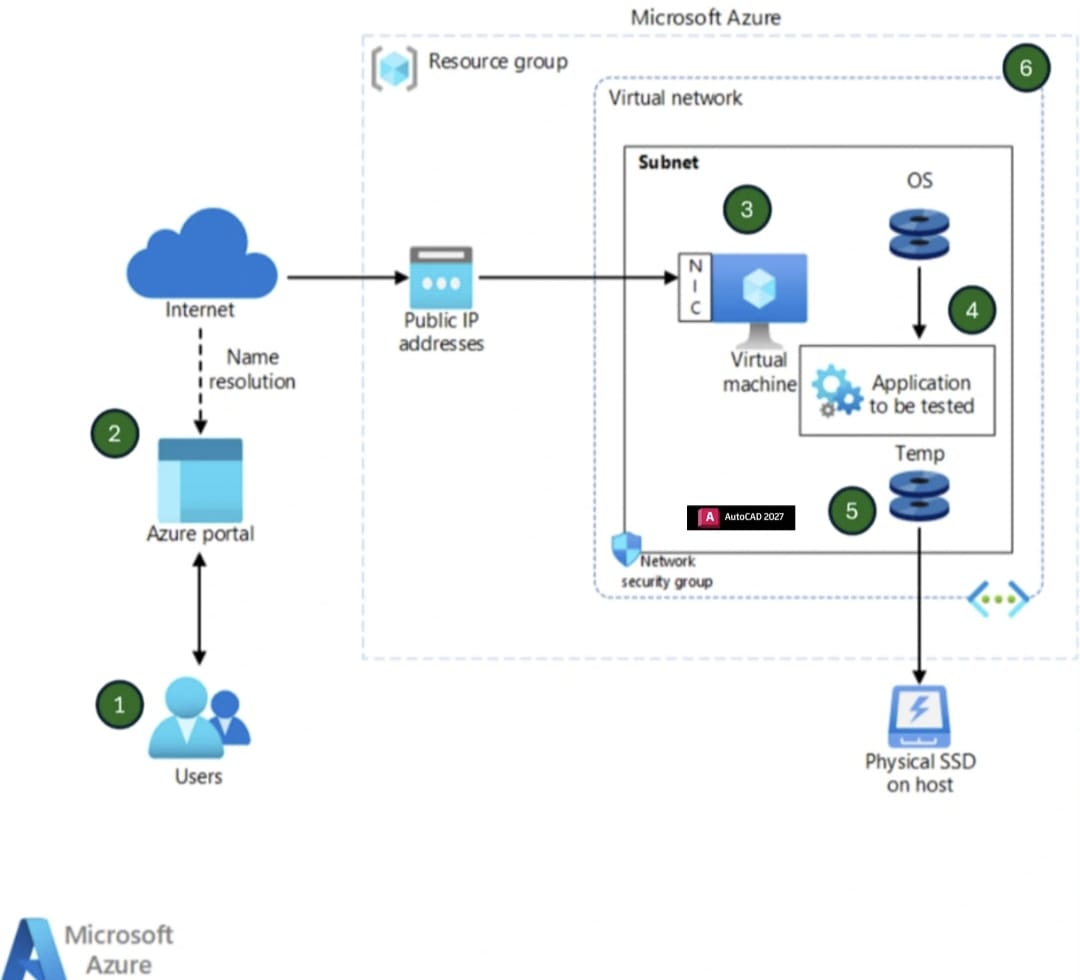
This architecture provides a centralized, GPU-accelerated AutoCAD environment on Azure. An NVads V710 v5 virtual machine combines Windows, AutoCAD, and AMD Radeon PRO V710 GPU resources within an Azure resource group and virtual network. This configuration provides the compute and graphics resources used by the AutoCAD benchmark suite. The diagram represents the validation test topology, not a complete production deployment.
Workflow
The following workflow explains how the components in the validation environment interact. The steps correspond to the numbered items in the diagram:
User signs in to Azure: The user signs in to the Azure portal with an authorized Azure account.
Azure portal provides access to resources: The Azure portal provides browser-based access for deploying and managing the AutoCAD environment. Azure DNS provides name resolution for Azure endpoints.
Network traffic reaches the virtual machine: The public IP address and network interface direct traffic to the virtual machine in the virtual network subnet. Network security groups enforce inbound and outbound security rules.
Virtual machine runs AutoCAD: The virtual machine hosts the operating system and AutoCAD and provides the compute, memory, and graphics resources required for the automated tests.
The Temp disk provides storage: A managed disk named
Tempstores files used by the test scenarios.Azure infrastructure contains the test environment: The resource group and virtual network contain and organize the Azure resources used by the AutoCAD test environment.
Components
This reference architecture uses the following Azure components.
Azure portal is the browser-based console where authorized users sign in to deploy and manage Azure resources.
Azure DNS provides name resolution for Azure endpoints.
Azure Resource Manager resource groups organize and manage related Azure resources. You deploy the test resources in one resource group.
Public IP addresses provide public connectivity to Azure resources. You associate a public IP address with the virtual machine's network interface.
Network interfaces connect virtual machines to virtual networks.
Azure NVads V710 v5 virtual machines provide on-demand, scalable compute without the need to maintain physical hardware. Use these GPU-enabled virtual machines to host AutoCAD. The tested Standard_NV24ads_V710_v5 size has 24 vCPUs and 128 GiB of memory.
Azure Virtual Network facilitates secure communication between Azure resources, storage services, the internet, and enterprise networks.
Network security groups filter network traffic to and from the VM's network interface or subnet.
Azure managed disks provide persistent and reliable storage for Azure virtual machines that host AutoCAD workloads. They store the operating system, AutoCAD application files, and design data while providing consistent performance and simplified storage management through Azure-managed infrastructure. In this study, one managed disk is named Temp.
Validation
The validation process used the same tested configuration, files, and settings for each iteration. It included the following activities:
- Application installation validation
- Functional workflow validation
- Graphics validation
- Automated execution of the benchmark suite
- Stability testing
The automated benchmark suite ran each scenario five times and recorded the total runtime for each run. This process validates AutoCAD on the tested configuration. It isn't a comparative benchmark of different scenarios or hardware configurations.
Test configuration
The following table shows the tested configuration. Treat changes to the operating system, driver, AutoCAD build, VM size, storage, test files, or settings as a new configuration that requires validation.
| Item | Tested value |
|---|---|
| VM size | Standard_NV24ads_V710_v5 |
| Compute and memory | 24 vCPUs and 128 GiB of memory |
| GPU | AMD Radeon PRO V710 GPU |
| Application | Autodesk AutoCAD 2027 |
| Test execution | Automated |
| Files and settings | Unchanged across iterations |
| Iterations | Five per scenario |
Benchmark suite scenarios
The Autodesk-provided benchmark suite contains scripts and models for scenarios that cover 2D drafting, 3D modeling, architectural design, industrial engineering, infrastructure planning, and graphics-intensive visualization.
| Scenario | Workload description |
|---|---|
| Airport | Large-scale airport infrastructure model used to evaluate AutoCAD performance for complex architectural layouts, navigation, zooming, regeneration, and drawing operations. |
| HT-01 | Engineering design workload that contains detailed geometry and multiple drawing elements. It measures processing efficiency and workstation responsiveness. |
| Instrument_3D | Graphics-intensive 3D model used to validate rendering performance, model manipulation, visualization, and GPU-acceleration capabilities. |
| IT40-014 | Industrial engineering workload designed to test drawing regeneration, object handling, and overall CAD processing performance. |
| MedSF | Medium-to-large healthcare facility design model used to evaluate architectural drafting performance and the handling of complex floor plans. |
| Pavilion_3D | 3D architectural structure used to assess model visualization, orbiting, shading, and graphics-rendering performance. |
| PDD_Exhibit | Exhibition or presentation layout that contains detailed design elements. It tests drafting, plotting, and workspace responsiveness. |
| PLANO2 | Facility planning and space-layout workload used to measure drawing manipulation, editing performance, and object-management operations. |
| PRIMER | General-purpose CAD workload that evaluates standard drafting workflows, editing activities, and drawing performance. |
| TP900_3D | Detailed 3D engineering model used to test advanced visualization, rendering speed, and the handling of complex assemblies. |
| X_Zenplan | Large planning and design model used to validate AutoCAD performance for complex project layouts, navigation, and drawing updates. |
Results
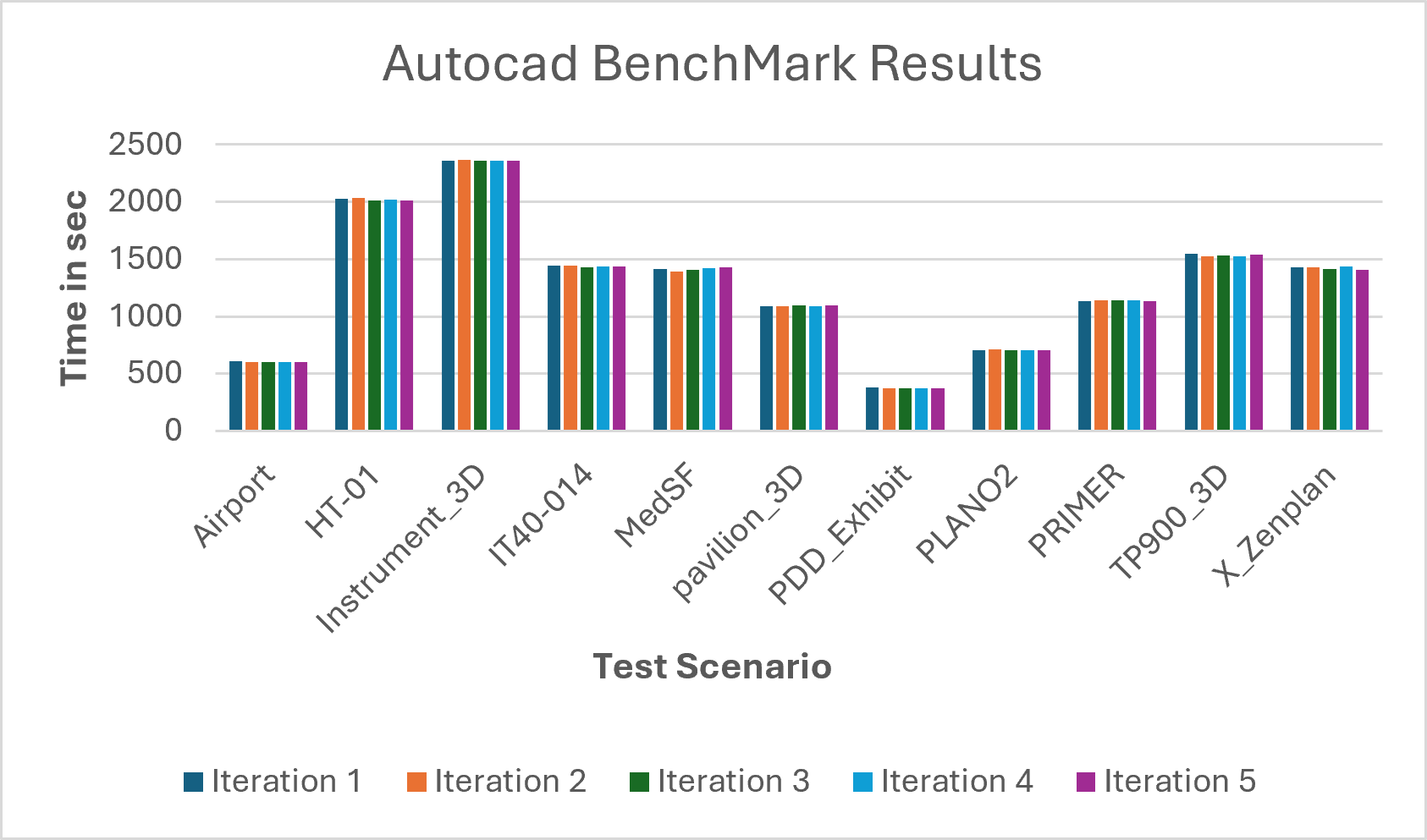
The following table shows the total runtime, in seconds, recorded for each test scenario across five iterations.
| Scenario | Iteration 1 (s) | Iteration 2 (s) | Iteration 3 (s) | Iteration 4 (s) | Iteration 5 (s) |
|---|---|---|---|---|---|
| Airport | 606.56 | 601.75 | 599.72 | 602.16 | 602.09 |
| HT-01 | 2,030.52 | 2,034.48 | 2,015.48 | 2,022.34 | 2,011.86 |
| Instrument_3D | 2,360.67 | 2,369.67 | 2,357.60 | 2,358.70 | 2,363.03 |
| IT40-014 | 1,443.79 | 1,444.45 | 1,431.45 | 1,438.62 | 1,440.07 |
| MedSF | 1,412.62 | 1,395.72 | 1,409.28 | 1,421.07 | 1,426.86 |
| Pavilion_3D | 1,090.07 | 1,089.23 | 1,098.40 | 1,087.47 | 1,096.90 |
| PDD_Exhibit | 378.38 | 377.17 | 375.03 | 376.62 | 377.17 |
| PLANO2 | 704.28 | 710.62 | 702.97 | 708.93 | 706.21 |
| PRIMER | 1,131.03 | 1,143.14 | 1,139.86 | 1,138.86 | 1,137.34 |
| TP900_3D | 1,546.50 | 1,527.20 | 1,534.67 | 1,527.73 | 1,543.20 |
| X_Zenplan | 1,427.07 | 1,430.66 | 1,417.24 | 1,433.31 | 1,410.69 |
How to interpret the results
Use the results within the following boundaries:
Review the five runtime values within each scenario. The values are consistent across the iterations and show limited variation.
Don't compare runtimes between scenarios because each scenario performs different work.
Apply the results only to the tested
Standard_NV24ads_V710_v5configuration. They aren't a sizing recommendation or a comparison with other hardware.
Scenario details
An engineering organization deploys AutoCAD on Azure Virtual Machines to provide designers and engineers with a centralized, high-performance CAD environment that they can access from any location. Traditionally, users depended on dedicated physical workstations that required significant hardware investment, manual maintenance, and periodic upgrades to support evolving design requirements.
By hosting AutoCAD on Azure, the organization can provide a consistent design experience while using scalable compute, storage, and graphics capabilities. Engineers connect to a dedicated Azure virtual machine where AutoCAD is installed and configured. They can create, edit, and review 2D drawings and 3D models without relying on local workstation resources.
Design files can be stored on attached Azure managed disks or other Azure storage services to keep project data centralized and protected. Administrators can resize virtual machines as workload requirements grow. This approach supports complex design projects while simplifying workstation management, improving business continuity, and enabling remote access to engineering applications.
Potential use cases
Consider this architecture for the following use cases:
CAD and drafting for creating and managing 2D drawings and 3D models.
Architectural and construction design for floor plans, building layouts, and construction documentation.
Mechanical and industrial design for product components, assemblies, and manufacturing drawings.
Civil engineering and infrastructure for roads, utilities, land development, and site planning.
Remote and hybrid design teams that need centralized access to AutoCAD without high-end local workstations.
Project collaboration and design review using centrally managed project data.
Dedicated cloud workstations for small and medium engineering environments that don't require a multiuser virtual desktop deployment.
This architecture applies to industries such as architecture, engineering, construction, manufacturing, industrial equipment, utilities, oil and gas, transportation, and engineering consulting services. By hosting AutoCAD on Azure Virtual Machines, organizations can provide a secure, scalable, and centrally managed design environment while reducing dependency on physical workstation infrastructure.
Considerations
The following recommendations align with the pillars of the Azure Well-Architected Framework. For more information, see Well-Architected Framework.
Reliability
Reliability helps ensure that your application can meet the commitments that you make to your customers. For more information, see Design review checklist for Reliability.
Design the AutoCAD environment to remain available and recoverable during planned maintenance, hardware failures, and unexpected disruptions. A dedicated Azure virtual machine provides a resilient infrastructure foundation with Azure service-level commitments and platform-managed maintenance capabilities.
Select an appropriate virtual machine size, use managed disks with built-in durability, and implement regular backup and recovery processes. Use Azure Backup to protect the virtual machine and its associated data so that engineering environments and project files can be restored when required.
Store design files on durable, highly available Azure storage services, and implement disaster recovery procedures that align with business continuity requirements. Regularly validate backup and recovery processes so that critical engineering data can be recovered efficiently, downtime can be minimized, and users can regain access to AutoCAD workloads.
Security
Security provides protections against deliberate attacks and the misuse of valuable data and systems. For more information, see Design review checklist for Security.
Protect AutoCAD workloads, engineering data, and user access from unauthorized activity, data breaches, and cybersecurity threats. A dedicated Azure virtual machine supports identity, network, and data-protection controls for the operating environment and stored design data.
Integrate access with Microsoft Entra ID, enforce multifactor authentication, and apply Azure role-based access control so that only authorized users can access engineering resources. Restrict administrative access by applying the principle of least privilege to reduce the risk of accidental or malicious changes.
Use Azure Virtual Network, network security groups, Azure Firewall, and just-in-time VM access to control traffic, limit exposure of management ports, and reduce the attack surface. Encrypt engineering and project data at rest and in transit, regularly update Windows and AutoCAD, and use Microsoft Defender for Cloud to monitor security posture and identify potential vulnerabilities. Use regular backups and secure storage practices to protect intellectual property and support organizational security requirements.
Cost optimization
Cost Optimization focuses on reducing unnecessary expenses and improving operational efficiency. For more information, see Design review checklist for Cost Optimization.
Select a virtual machine size that aligns with AutoCAD application requirements and user workloads. Avoid overprovisioning compute, memory, storage, and GPU resources so that the environment provides the required performance without unnecessary infrastructure and operational expenses.
Resize the virtual machine as demand changes. Increase resources for complex design activities, and scale down when the extra performance is no longer required. This flexibility helps align infrastructure costs with business needs while maintaining a productive user experience.
For predictable workloads, evaluate Azure Reserved VM Instances or Azure savings plans. Use Azure Monitor and Azure Advisor to review resource utilization, identify underused resources, obtain right-sizing recommendations, and improve cost efficiency. Schedule nonproduction and project-based environments to stop during periods of inactivity. Continuously evaluate resource utilization, operating costs, and performance requirements to balance cost and productivity.
Operational excellence
Operational Excellence covers the processes that deploy an application and keep it running in production. For more information, see Design review checklist for Operational Excellence.
Simplify the management and maintenance of AutoCAD workloads to improve operational efficiency. By hosting AutoCAD on an Azure virtual machine, you can centrally manage the application, operating system updates, security configurations, and infrastructure through Azure management tools.
Use Azure Monitor, Azure Advisor, and Azure Update Manager to monitor system health, track resource utilization, identify potential issues, and maintain a reliable user experience. Centralized management also simplifies patching, troubleshooting, backup operations, and configuration management.
Use Azure monitoring and management capabilities to reduce administrative overhead, improve system reliability, and maintain a consistent AutoCAD environment. Apply an operational excellence approach to support repeatable, reliable, and safe deployments of infrastructure and code.
Performance efficiency
Performance Efficiency is the ability of a workload to meet demand efficiently. For more information, see Design review checklist for Performance Efficiency.
Select compute, memory, storage, and GPU resources that provide the required responsiveness, graphics performance, and user experience while using Azure resources effectively. Choose a virtual machine family and size that align with design-project complexity, rendering requirements, and user expectations.
Use GPU-enabled virtual machines for AutoCAD activities that benefit from hardware-accelerated graphics. GPU resources can improve model visualization, rendering, and overall application responsiveness.
Use Premium SSD or Premium SSD v2 managed disks to provide consistent storage throughput and low latency for project files and application data. Regularly monitor CPU, memory, disk, and network utilization through Azure Monitor to identify performance bottlenecks and verify that resources remain appropriately sized. Continuously assess performance and right-size the infrastructure to balance resource utilization with application responsiveness.
Scalability
Scalability helps the AutoCAD environment adapt to changing performance and workload requirements while maintaining a consistent user experience. For a dedicated Azure virtual machine, scale resources vertically by resizing the virtual machine to provide more CPU, memory, storage, or GPU capacity as project complexity and user demands increase.
Azure offers a range of virtual machine sizes optimized for engineering and graphics-intensive workloads. Select the appropriate compute configuration based on design requirements. As business needs evolve, administrators can upgrade the virtual machine to a larger size with minimal operational effort, which helps maintain application responsiveness and productivity.
This flexibility enables organizations to accommodate larger design models, more complex rendering tasks, and growing engineering workloads without redesigning the underlying infrastructure. Use Azure on-demand capacity to align resource consumption with operational requirements, maintain efficient performance, and support future growth.
Contributors
Microsoft maintains this article. The following contributors from Microsoft originally wrote it:
Principal author:
- Sunita Phanse | Sr. Technical Program Manager
Contributors:
- Sachin Rastogi | Senior Program Manager
To see nonpublic LinkedIn profiles, sign in to LinkedIn.