Note
Access to this page requires authorization. You can try signing in or changing directories.
Access to this page requires authorization. You can try changing directories.
Windows driver updates provide updated device drivers and firmware that help ensure hardware compatibility, stability, and performance. These updates are released by device manufacturers and can include fixes for reliability issues, security vulnerabilities, and support for new hardware capabilities. Because driver updates can vary by device model and hardware configuration, organizations often prefer a more controlled approval process.
In Microsoft Intune, Windows driver updates are managed through driver update policies, which provide a dedicated policy surface for reviewing, approving, and deploying driver updates to managed devices. This policy is built on cloud‑based update orchestration and works alongside other Windows update policies, such as feature updates and quality updates. Driver update policies can be used independently or as part of Windows Autopatch. Client‑side install behavior—such as restarts and user notifications—continues to be governed by standard Windows Update policy settings.
Driver update policies support automatic or manual approval workflows, allowing you to choose whether recommended drivers are deployed automatically or require administrator review before installation. This approach helps organizations balance hardware stability, risk management, and operational efficiency while maintaining visibility into which drivers are approved for deployment.
Prerequisites
 Network and connectivity requirements
Devices must have internet access and be able to reach required Microsoft endpoints:
 Cloud requirements
This feature is supported in the following cloud environments:
- Public cloud
- Government Community Cloud (GCC)
 Tenant configuration requirements
To enable reporting for this feature, ensure your organization allows Intune to access Windows diagnostic data collected from enrolled devices.
For details, see Enable use of Windows diagnostic data.
 Licensing requirements
To use this feature, the following licenses are required:
- Microsoft Intune Plan 1
- A Windows license that includes the Autopatch entitlement.
 Device platform requirements
This feature supports the following Windows editions:
- Pro
- Pro Education
- Enterprise
- Education
Note
Windows Enterprise LTSC (Long Term Service Channel) isn't supported. Use update ring policies instead.
 Device configuration requirements
This policy type supports devices that are:
- Managed by Intune
- Microsoft Entra joined
- Microsoft Entra hybrid joined
Devices must also meet the following requirements:
- Telemetry must be turned on, with a minimum setting of Required.
- The Microsoft Account Sign-In Assistant service (
wlidsvc) must be enabled and running.
 Roles requirements
To manage this feature, use an account with at least one of the following roles:
- Policy and Profile manager
- Custom role that includes:
- The Device configurations permissions Assign,Create,Delete,View Reports,Update, and Read
- Permissions that provide visibility into and access to managed devices in Intune (for example, Organization/Read, Managed devices/Read)
To view the reports for this feature, use an account with at least one of the following roles:
- Endpoint Security Manager
- Read Only Operator
- Help Desk Operator
- Custom role with the Managed devices/View Reports permission.
Architecture
The following diagram illustrates the high‑level architecture for managing Windows driver updates by using Microsoft Intune and Windows Autopatch.
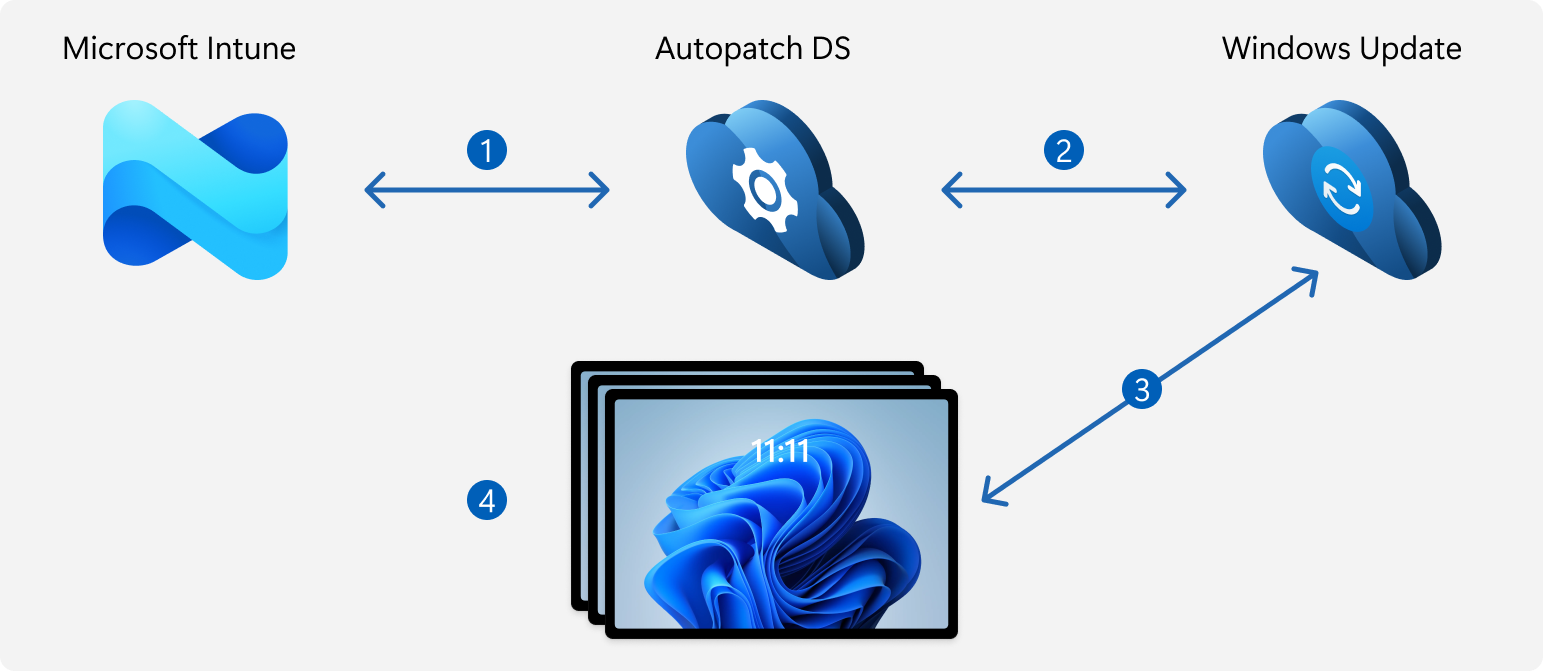
- Microsoft Intune provides device identity, assignment, and driver update approval information. Intune sends policy settings, approved drivers, and pause commands to Windows Autopatch.
- Windows Autopatch uses this information to configure Windows Update behavior for managed devices and to coordinate driver update deployment.
- Windows Update evaluates device and hardware information to determine which driver updates are applicable, and installs only approved updates during regular update scans.
- Reporting data collected during update operations is sent through Windows Autopatch and surfaced in Intune reporting.
This architecture allows administrators to approve and control driver updates centrally in Intune while relying on Windows Update and Autopatch to determine applicability and handle installation.