Understand Azure Data Factory components
An Azure subscription might have one or more Azure Data Factory instances. Azure Data Factory is composed of key components. These components work together to provide the platform on which you can compose data-driven workflows with steps to move and transform data.
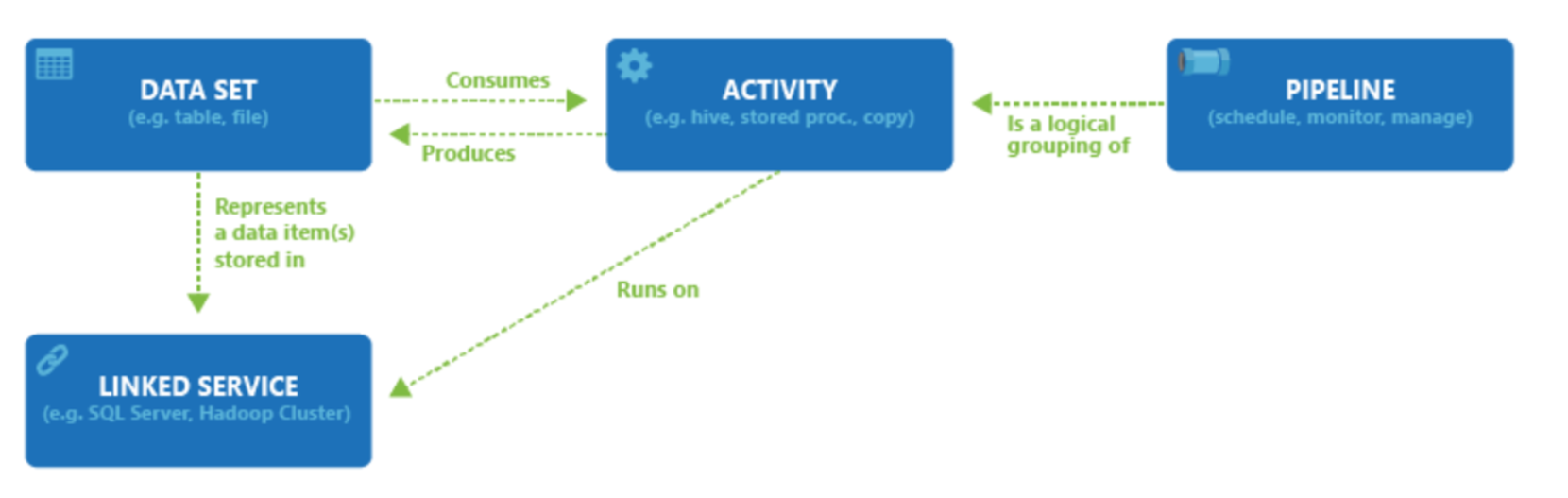
Data Factory supports a wide variety of data sources that you can connect to through the creation of an object known as a Linked Service, which enables you to ingest the data from a data source in readiness to prepare the data for transformation and/or analysis. In addition, Linked Services can fire up compute services on demand. For example, you may have a requirement to start an on-demand HDInsight cluster for the purpose of just processing data through a Hive query. So Linked Services enables you to define data sources, or compute resource that is required to ingest and prepare data.
With the linked service defined, Azure Data Factory is made aware of the datasets that it should use through the creation of a Datasets object. Datasets represent data structures within the data store that's being referenced by the Linked Service object. Datasets can also be used by an ADF object known as an Activity.
Activities typically contain the transformation logic or the analysis commands of the Azure Data Factory’s work. Activities include the Copy Activity that can be used to ingest data from various data sources. It can also include the Mapping Data Flow to perform code-free data transformations. It can also include the execution of a stored procedure, Hive Query, or Pig script to transform the data. You can push data into a Machine Learning model to perform analysis. It isn't uncommon for multiple activities to take place that may include transforming data using a SQL stored procedure and then perform analytics with Databricks. In this case, multiple activities can be logically grouped together with an object referred to as a Pipeline, and these can be scheduled to execute, or a trigger can be defined that determines when a pipeline execution needs to be kicked off. There are different types of triggers for different types of events.
Control flow is an orchestration of pipeline activities that includes chaining activities in a sequence, branching, defining parameters at the pipeline level, and passing arguments while invoking the pipeline on-demand or from a trigger. It also includes custom-state passing and looping containers, and For-each iterators.
Parameters are key-value pairs of read-only configuration. Parameters are defined in the pipeline. The arguments for the defined parameters are passed during execution from the run context that was created by a trigger or a pipeline that was executed manually. Activities within the pipeline consume the parameter values.
Data Flows provide a visual, code-free way to build data transformation logic that executes on a managed Apache Spark cluster. You create reusable transformation graphs in the Azure Data Factory Studio and run them from a Data Flow activity within a pipeline. Azure Data Factory manages the Spark cluster automatically—no cluster setup or Spark knowledge is required.
Azure Data Factory has an integration runtime that enables it to bridge between the activity and linked Services objects. It's referenced by the linked service, and provides the compute environment where the activity either runs on or gets dispatched from. This way, the activity can be performed in the region closest possible. There are three types of Integration Runtime, including Azure, Self-hosted, and Azure-SSIS.
Once the work is complete, you can then use Data Factory to publish the final dataset to another linked service that can then be consumed by technologies such as Power BI or Machine Learning.