Note
Access to this page requires authorization. You can try signing in or changing directories.
Access to this page requires authorization. You can try changing directories.
ISettingsSynchronization interface also provides an API to query and retrieve the automatic device settings synchronization status.
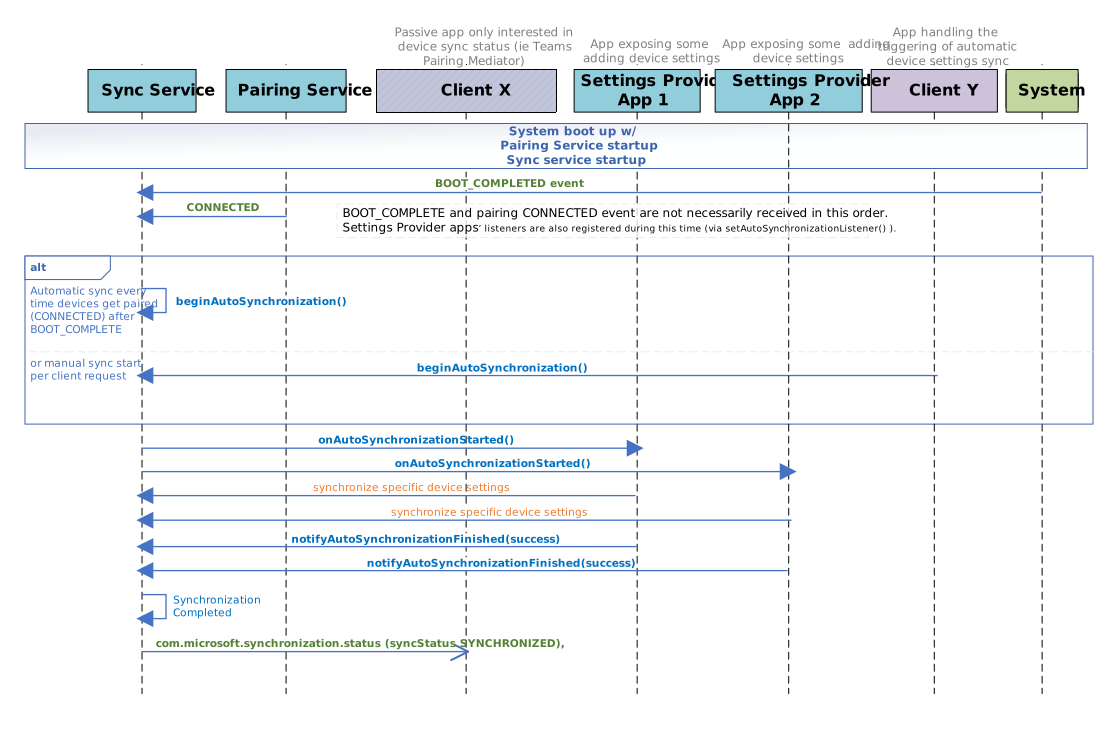
Automatic Device Settings synchronization after pairing
The clients will register for the setup process by setting up the listener. The Synchronization Service will notify all the registered clients via the registered callback listener. For the current implementation, three conditions need to be met for the process to start:
- Complete boot event is received ,
- The front of room and touch console are paired ,
- One client triggers the event via the
beginAutoSynchronizationAPI - The timeout after boot and pairing complete is received. For now, the timeout is set at five seconds.
- One client triggers the event via the
- When clients finish synchronization between devices, they must update the state using the
notifyAutoSynchronizationFinished. The whole process is limited to five seconds, but if the clients finish the work faster, the Synchronization Service will trigger the broadcast when the last client ends its work.
If the setup synchronizations start but no clients are registered, the SYNCHRONIZED event will be triggered. Suppose one client fails to update its state or sets the values as false in the Synchronization Service before reaching the timeout. In that case, the whole setup synchronization will fail, and the error event will be triggered via broadcast intent.
If clients register to set up a synchronization process but don't do it in time, they will be part of it the next time the process restarts. This can happen when:
- The devices are restarted,
- A client calls the trigger via
beginAutoSynchronizationAPI, - The devices are unpaired and repaired after,
- The Synchronization Service crashes and restarts.