Note
Access to this page requires authorization. You can try signing in or changing directories.
Access to this page requires authorization. You can try changing directories.
Microsoft 365 Organizational Data Service allows organizations to import user data from HR and other non-Microsoft systems into Microsoft 365. When organizations ingest public data through Microsoft 365 Organizational Data Service, that data becomes available to Microsoft 365 services that rely on organizational information, including Microsoft 365 Profile, Microsoft Copilot, Viva applications, and other connected experiences.
Public data overview
Public data is organizational data that describes people in your tenant and is appropriate to be available broadly across the organization. Public doesn't mean that the data is visible outside your tenant or available on the public internet. It means the data is allowed to be seen by users in the tenant and used by Microsoft 365 apps and services that rely on organizational and profile data.
| Example public data | Attribute name | Description |
|---|---|---|
| Department | Microsoft_Organization | The internal organization or department name that an employee belongs to |
| Job title | Microsoft_JobTitle | The public facing job title of the employee |
| Cost center | Microsoft_CostCenter | The financial cost center to which the employee is assigned |
| Company name | Microsoft_Company | The company name |
Public data is important because it helps create a consistent people experience across Microsoft 365. When employee data is inconsistent across systems, users might see different job titles, organizations, locations, or reporting information depending on the app they're using. Ingesting public data through Microsoft 365 Organizational Data Service gives Microsoft 365 apps and services a shared, governed source of organizational context.
How public data is made available across Microsoft 365
All public data ingested through Microsoft 365 Organizational Data Service is automatically available to Microsoft 365 User Profile, Microsoft Copilot, and Viva apps and services.
Organizations only need to ingest public data once through Microsoft 365 Organizational Data Service rather than separately managing organizational data for individual applications.
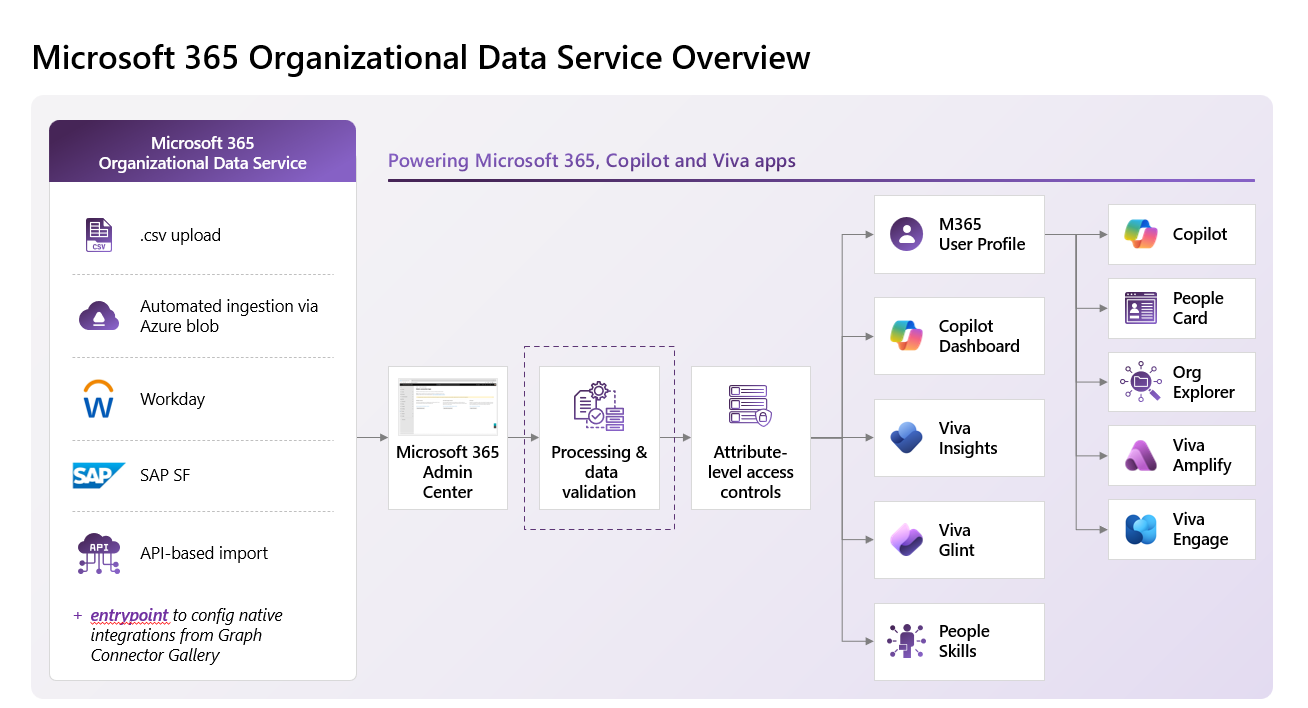
Ingested data is available to Microsoft 365 apps and services including but not limited to:
Microsoft 365 Profile
Microsoft Copilot experiences
Viva applications and services
- Glint
- Insights
- Engage
- Amplify
Other Microsoft 365 services that use organizational information
- People Search
- People Card
- Org Explorer
- Outlook
- Teams
- Office apps such as Word, Excel, PowerPoint, and OneNote
- Power BI
- Planner
- Bookings
Note
Availability of specific attributes and experiences depends on the application receiving the data. Not all applications use every organizational attribute that's ingested through Microsoft 365 Organizational Data Service.
This functionality is different from app-specific and custom data. App-specific and custom attributes have additional controls that let admins choose which apps can access the data.
Impact on Microsoft 365 Profile
Microsoft 365 User Profile can receive profile data from multiple sources, including Microsoft Entra ID and Microsoft 365 Organizational Data Service. When more than one source provides a value for the same profile property, profile source precedence determines which value is returned to Microsoft 365 apps and services. Learn more.
By default, Microsoft Entra ID takes precedence over Microsoft 365 Organizational Data Service. This means Microsoft 365 Organizational Data Service commonly acts as a supporting or fallback source for overlapping attributes. If Microsoft Entra ID has a value for a property, the Entra ID value is used. If Entra ID doesn't have a value and Microsoft 365 Organizational Data Service does, the Microsoft 365 Organizational Data Service value can be used. Learn more.
Tenant admins can change this behavior by assigning data precedence to Microsoft 365 Organizational Data Service. When Microsoft 365 Organizational Data Service is configured as the higher-priority source, the values ingested through Microsoft 365 Organizational Data Service are used as the primary profile values for overlapping attributes. Learn more.
Example 1: Microsoft 365 Organizational Data Service used as a secondary source
| Attribute | Microsoft Entra ID (precedence = 1) | Microsoft 365 Organizational Data Service (precedence = 2) | Value shown in Profile |
|---|---|---|---|
| Job Title | Senior Product Manager | Product Manager | Senior Product Manager |
| Department | Engineering | Engineering | Engineering |
| Office Location | Seattle | Redmond | Seattle |
Because the higher-precedence source contains data, Microsoft 365 Profile uses that value instead of the Microsoft 365 Organizational Data Service value.
Example 2: Microsoft 365 Organizational Data Service provides missing profile data
| Attribute | Microsoft Entra ID (precedence = 1) | Microsoft 365 Organizational Data Service (precedence = 2) | Value shown in Profile |
|---|---|---|---|
| Department | Engineering | Engineering | Engineering |
| Cost Center | CC-1234 | CC-1234 | |
| Organization Unit | Product Management | Product Management | Product Management |
In this scenario, Microsoft 365 Organizational Data Service provides data when no higher-precedence value exists.
Example 3: Microsoft 365 Organizational Data Service configured as the primary source
| Attribute | Microsoft 365 Organizational Data Service (precedence = 1) | Microsoft Entra ID (precedence =2) | Value shown in Profile |
|---|---|---|---|
| Department | Product Manager | Senior Product Manager | Product Manager |
| Cost Center | Engineering | Engineering | Engineering |
| Organization Unit | Redmond | Seattle | Redmond |
In this case, Microsoft 365 Profile uses the Microsoft Organizational Data value because Microsoft 365 Organizational Data Service is configured as the preferred source for those attributes.
Note
Data source precedence and profile attribute resolution are Microsoft 365 Profile capabilities. Microsoft 365 Organizational Data Service provides and distributes organizational data, but Microsoft 365 Profile determines which attribute values are displayed to users.