Note
Access to this page requires authorization. You can try signing in or changing directories.
Access to this page requires authorization. You can try changing directories.
Applies to: Outlook, Microsoft Teams, Microsoft Copilot
When you send feedback about finding or choosing people in Microsoft 365, you can choose to include diagnostic data. For this kind of feedback, diagnostic data includes relevant parts of your personal user index. This article explains what your personal user index is, and how Microsoft might use it to look into your feedback.
Finding and choosing people
When you add someone to an email, chat, or meeting, Microsoft 365 suggests people as you type. This is sometimes called people picking.
If the suggestions aren't what you expected, you can tell Microsoft. Select Submit feedback, then I like something or I don't like something.
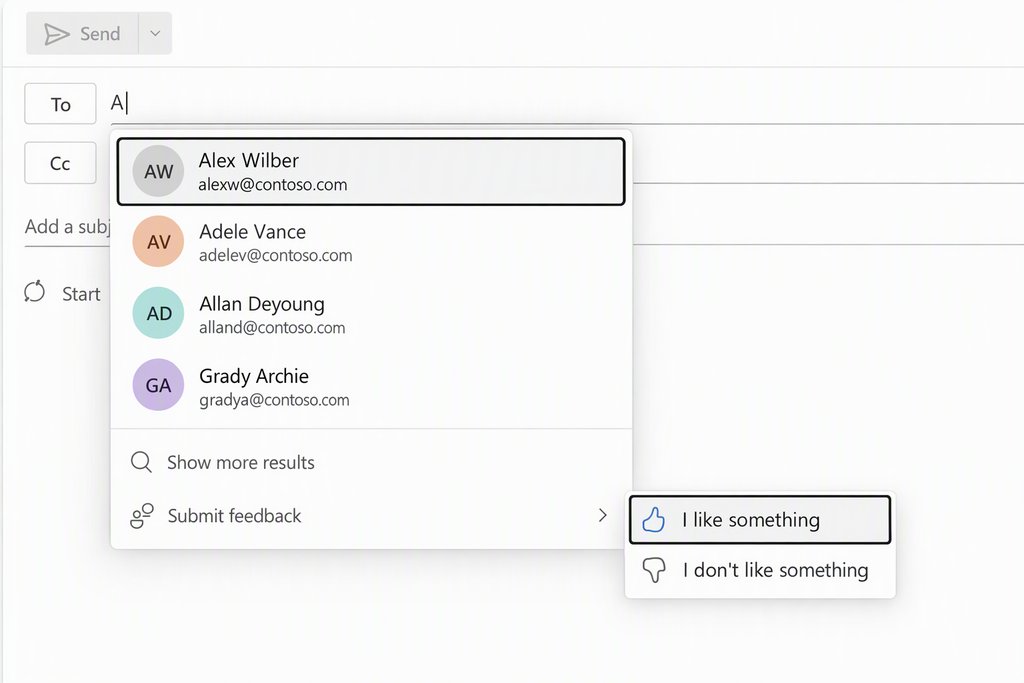
People suggestions in Outlook on the web, with the feedback options open. Names are fictitious.
Your personal user index
Your personal user index is information that Microsoft 365 keeps for your account to help you find the right people quickly. It's used when you search for someone, and when people are suggested as you type, like in the example above.
It can include:
- Details about people, such as names, email addresses, skills and other Microsoft 365 profile properties.
- Your contacts, including the contacts explicitly created by you, as well as your implicit contacts (contacts automatically created based on your interactions with others).
- Signals about who you work with, such as people you've recently emailed, met, or worked on files with, and how you're connected in your organization.
- How results were chosen, such as how up to date a record is, how people were ranked, and whether someone wasn't suggested.
Your personal user index is different from your organization's directory, which lists everyone in your organization. It also isn't the same as your mailbox, chats, or files, although some signals come from your activity in them.
When it's used with your feedback
Microsoft might look at relevant parts of your personal user index only when:
- your feedback is about finding or choosing people, for example the person you wanted didn't appear, or appeared lower in the list than expected, and
- you chose to include diagnostic data with your feedback, and
- your organization's policies allow it.
Most feedback doesn't involve your personal user index.
What Microsoft might check
To understand the problem you reported, Microsoft might check:
- whether the person you expected was in your index
- which details matched what you typed
- whether a record was missing or out of date
- why people appeared in the order they did
- whether someone wasn't suggested, and why, for example because of an organization policy such as information barriers or address book policies
- whether the app showed the results it received correctly
Microsoft uses this information to investigate your feedback and improve the experience. Access is subject to your organization's policies and Microsoft's authorized access controls.
Your choice
You decide whether to include diagnostic data when you send feedback. Your organization's policies can also limit or turn off feedback and diagnostic data.
Note
This article describes the types of information involved, not how Microsoft's systems store it.