Note
Access to this page requires authorization. You can try signing in or changing directories.
Access to this page requires authorization. You can try changing directories.
This article explains the partner integration architecture for Copilot Managed Runtime, including the boundary between partner-owned and Microsoft-operated components. For the fuller product architecture, see the Copilot Managed Runtime architecture reference.
Copilot Managed Runtime app components
When an app runs, it uses three logical components:
- Your code
- The Copilot Managed Runtime SDK: Exposes APIs that your code uses and the generated models and services your app uses to perform data requests through connectors.
- The Copilot Managed Runtime app host:Manages end-user authentication through Microsoft Entra, app loading, runtime governance (Conditional Access, Data Loss Prevention, Advanced Connector Policies, and sharing limits), and surfaces contextual messages if the app fails to load.
Partner and Microsoft responsibilities
The partner translates product actions such as connect, preview, and publish into versioned CLI operations. Each matrix row represents an independent responsibility rather than a paired handoff.
| Area | Responsibility | Owner |
|---|---|---|
| Authoring | Provide the app generation and editing experience. | Partner product |
| Development environment | Provide the development container, app filesystem, and local development server. | Partner product |
| Integration UX | Translate product actions into versioned CLI operations; orchestrate the CLI; and present progress and returned errors. | Partner product |
| Hosted CLI identity | Authenticate the app maker to the partner product and Microsoft Entra; operate the HTTP Forward Mode gateway; bind each request to the correct user and tenant; and acquire, store, and refresh upstream tokens securely. | Partner product |
| Source and build | Manage the source repository or artifact pipeline when partner-managed. | Partner product |
| Support | Support the partner product experience. | Partner product |
| Runtime identity and access | Provide automatic end-user authentication through Microsoft Entra and enforce app access at runtime in the Copilot Managed Runtime app host. | Microsoft Copilot Managed Runtime |
| App lifecycle | Route creators to environments and register apps. | Microsoft Copilot Managed Runtime |
| Source and build | Provide the platform-managed source option and build. | Microsoft Copilot Managed Runtime |
| Runtime | Operate the Copilot Managed Runtime app host, app runtime boundary, hosting, and stable app identity. | Microsoft Copilot Managed Runtime |
| Data and governance | Provide the connector catalog, evaluate tenant policy, and operate service-side governance. | Microsoft Copilot Managed Runtime |
| Sharing | Provide sharing and app-level authorization. | Microsoft Copilot Managed Runtime |
| Support | Provide platform support. | Microsoft Copilot Managed Runtime |
Copilot Managed Runtime app host
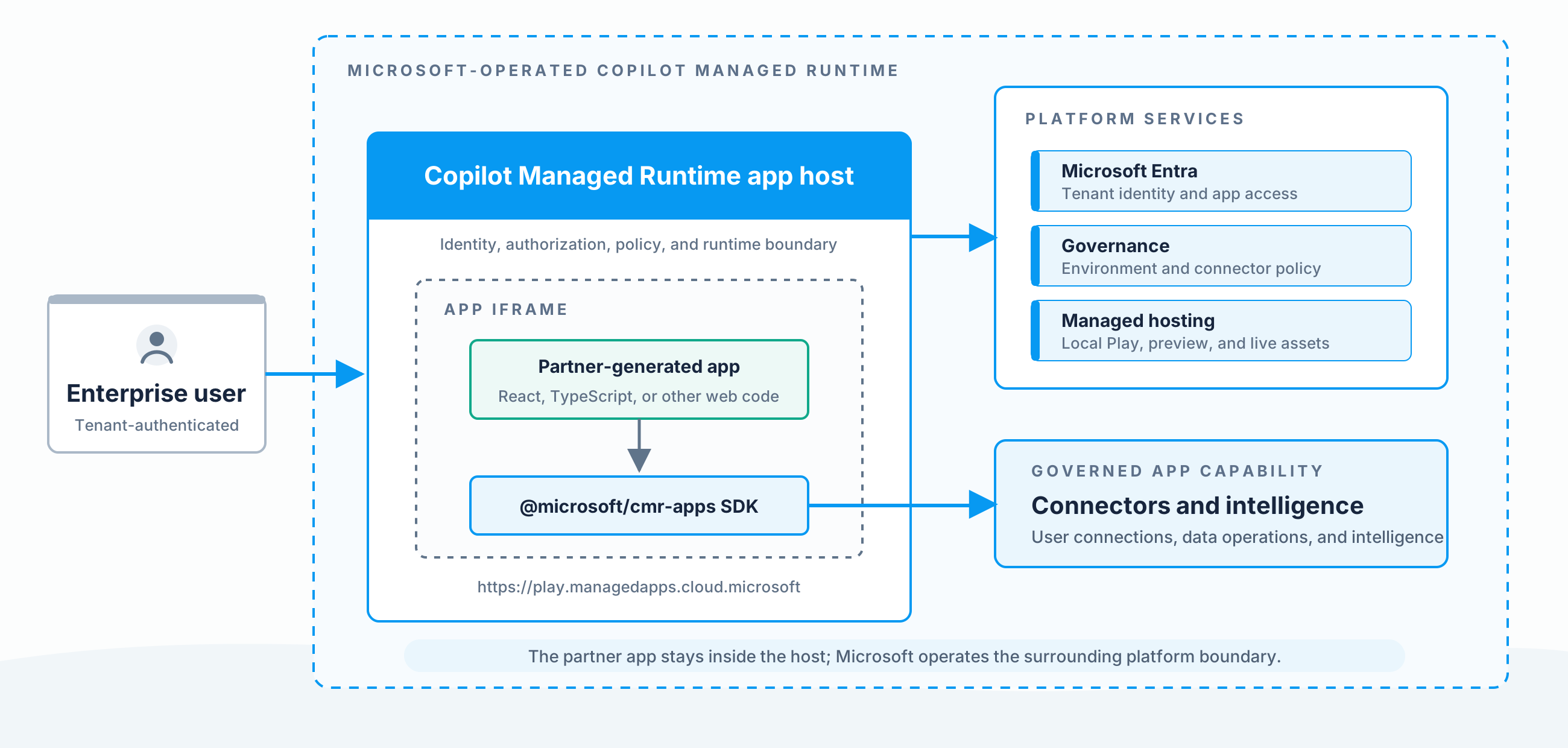
Apps run in an iframe in the Copilot Managed Runtime app host.
The host supplies the Microsoft-operated runtime around the partner app. It:
- Authenticates the user and evaluates app access
- Supplies app and user context to the SDK
- Mediates connector operations
- Provides the runtime governance boundary
- Loads either the local dev server, a preview build, or the live deployment
The app must run in the host during local development, cloud preview, and live use. Loading the app's dev-server or deployed asset URL directly bypasses required host capabilities.
The app remains ordinary web code inside a sandboxed iframe. It must not assume it is the top-level window.
The diagram shows the boundary between the partner app and Microsoft-operated identity, governance, hosting, connectors, and intelligence capabilities.
Project files
The Copilot Managed Runtime CLI scaffolds a standard SPA project layout. The files specific to Copilot Managed Runtime are:
| File or folder | Purpose |
|---|---|
ms.config.json |
App metadata, including the app ID, the bound environment, and the registered connectors. The CLI and the SDK manage this file. Don't edit it directly. Use ms commands like ms app set-setting or ms app add data-source to update its contents. |
generated/ |
Strongly typed models and services generated by ms app add data-source. Your code imports from this folder to call data sources. |
package.json |
Includes the Copilot Managed Runtime SDK as a dependency and any framework scripts your project uses. |
The rest of the project, including components, routes, styles, and tests, is whatever your framework calls for. Copilot Managed Runtime doesn't impose conventions on your app code beyond the SDK API surface.
Source and deployment modes
The table summarizes the partner-facing choices. For fuller product guidance on repository and source options, see the developer overview.
By default, an app is provisioned with a platform-provided Git repository. Pushing a commit updates that source of truth and makes the commit available to the platform-managed build and preview flow; the push alone does not build or deploy it. When a build is requested for preview or deployment, the platform performs the build and its security and governance checks. A successful build is available to preview, while promotion to the live app remains an explicit deployment action.
| Mode | CLI selection | Best fit |
|---|---|---|
| Platform-managed Git (default) | Omit --repo in the default ms app create flow |
Use the platform-provided repository and platform-managed build and deployment pipeline. |
| External Git | --repo <supported-url> |
Keep a supported external Git repository as the source of truth while using the platform build and deployment flow. |
| Partner artifact | --repo none |
Keep partner-owned source and build infrastructure and submit only deployable output. |
For an established app-creation platform, the platform-provided Git mechanism is the recommended default starting point. It is enabled by default and automatically applies platform governance and security checks to the code and build flow.
Important
External artifact deployment is disabled by default. An environment administrator must enable Allow External Artifact Deployment before you use that flow. See Deploy a partner-provided artifact.