Note
Access to this page requires authorization. You can try signing in or changing directories.
Access to this page requires authorization. You can try changing directories.
Dynamic tool discovery enables declarative agents that use MCP server-based plugins to resolve their available tools at runtime, directly from the MCP server, instead of being limited to the tool list captured in the agent's plugin manifest at publish time. This feature lets users access the latest capabilities of an MCP server in near real time, without waiting for the agent to be repackaged, revalidated, and republished.
Note
Dynamic tool discovery includes tools that return interactive UI widgets (MCP apps). The agent renders these widgets with no extra configuration.
Note
This article covers dynamic tool discovery for plugins, where an MCP server is registered through a plugin manifest for a declarative agent. Registering an MCP server as an agent connector uses a different manifest — the agentConnectors node in the Microsoft 365 app manifest. For agent connectors, dynamic tool discovery requires app manifest version 1.29 or later and a host that permits it. For more information, see Register MCP servers as agent connectors.
How dynamic tool discovery differs from pinned tools
With pinned tools, the agent developer selects the tools that an MCP server exposes, declares them in the plugin manifest, and ships them as part of the agent package. Any change to the tool surface, such as adding a new tool, removing a deprecated one, renaming a parameter, or refining a description, requires the agent developer to update the manifest, resubmit the agent, and have it revalidated and republished before users see the change.
With dynamic tool discovery, the agent no longer carries a fixed tool list. The platform fetches the current tool definitions from the MCP server at runtime, diffs them against the last known set, validates the changes, and applies them so the agent operates on an up-to-date view of the server's capabilities.
The following table summarizes the differences.
| Aspect | Pinned tools | Dynamic tool discovery |
|---|---|---|
| Source of tool definitions | Plugin manifest packaged with the agent | MCP server, fetched at runtime |
| When tool definitions are resolved | At agent publish time | At runtime, per session |
| Adding or removing a tool | Requires updating the manifest, resubmitting the agent, and republishing | Reflected automatically once the MCP server exposes the change and runtime validations pass |
| Updating a tool's schema or description | Requires republishing the agent | Picked up at runtime |
| User-specific tool surfaces (for example, by SKU, role, or entitlement) | Not supported. Every user sees the same manifest-defined tool list. | Supported. The MCP server can return a tool list tailored to the signed-in user. |
| Time to roll out a new tool capability | Days to weeks, gated on the agent republish cycle | Near real time, gated only on MCP server deployment and runtime validation |
| Time to retire a deprecated tool | Days to weeks | Near real time |
| Trust and safety checks on tool definitions | Performed at publish time during store validation | Publish-time agent-level validation plus runtime responsible AI (RAI) and cross-prompt injection attack (XPIA) validation on every newly discovered or modified tool before it is activated |
Plugin manifest differences
The plugin manifest expresses the discovery mode through the configuration of the RemoteMCPServer runtime.
With pinned tools, list the tools in the functions array and the runtime's run_for_functions property. Store their definitions in the runtime's mcp_tool_description property:
{
  "functions": [
    { "name": "search_repositories" },
    { "name": "search_users" }
  ],
  "runtimes": [
    {
      "type": "RemoteMCPServer",
      "spec": {
        "url": "https://api.contoso.com/mcp",
        "mcp_tool_description": {
          "file": "mcp-tools.json"
        }
      },
      "run_for_functions": [
        "search_repositories",
        "search_users"
      ]
    }
  ]
}
With dynamic tool discovery, the functions array is empty and the runtime's run_for_functions property is set to ["*"], so the agent resolves all of the server's tools at runtime:
{
  "functions": [],
  "runtimes": [
    {
      "type": "RemoteMCPServer",
      "spec": {
        "url": "https://api.contoso.com/mcp"
      },
      "run_for_functions": [
        "*"
      ]
    }
  ]
}
For more information, see MCP server spec object.
Configure pinned tools with Agents Toolkit
By default, Microsoft 365 Agents Toolkit configures a new MCP plugin for dynamic tool discovery. To pin a fixed, curated set of tools instead - for example, to expose only a subset of the server's tools, or to keep the tool surface constant between releases - select the tools in Agents Toolkit. The tool surface then doesn't change until you update the manifest and republish the agent.
To pin a specific set of tools:
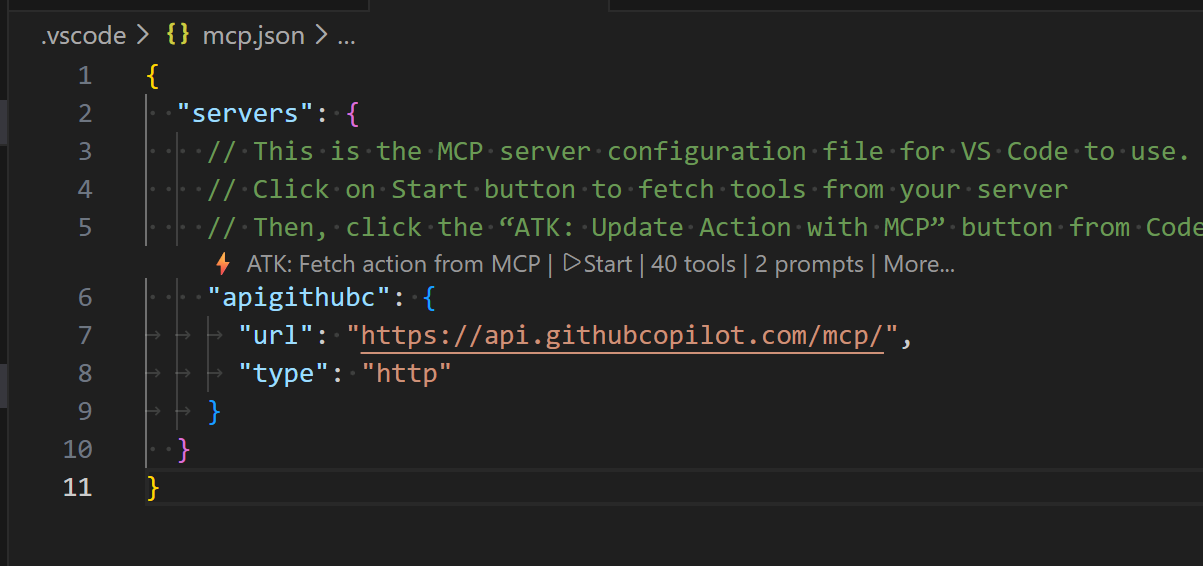
Open the .vscode/mcp.json file. Select the Start button in the file editor.
If prompted to authenticate, select Allow to authenticate.
Select the ATK: Fetch action from MCP button in the file editor, then select ai-plugin.json.
Select the tools for the agent to use.
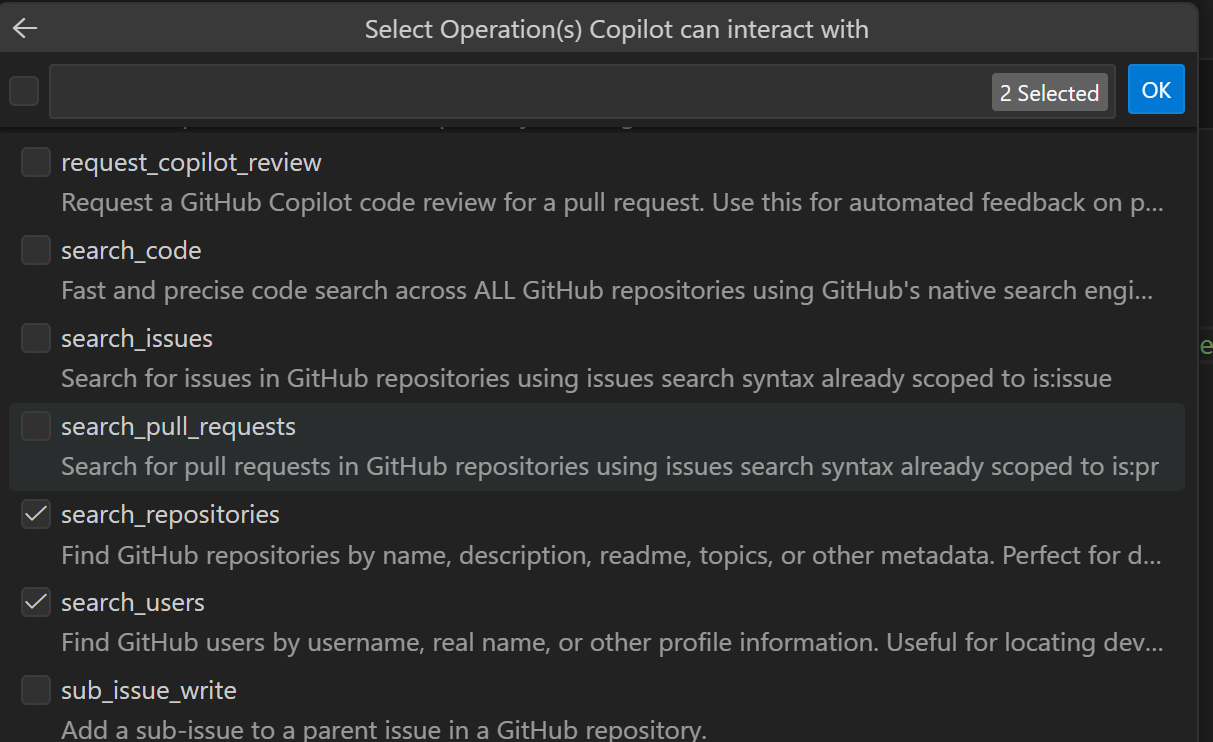
After you select the tools, Agents Toolkit updates ai-plugin.json with the pinned tools, as shown in Plugin manifest differences. Agents Toolkit stores the tool definitions in the runtime's mcp_tool_description property, either inline in a tools array or as a reference to a file that contains them. The definitions match the format returned by the MCP server's tools/list method.
Transparency, governance, and audit for admins
Dynamic tool discovery shifts when tools are discovered from publish time to runtime. The MCP server developer still authors and owns the tool definitions. To preserve the transparency, governance, and compliance guarantees admins rely on, the platform provides controls and audit signals through the Microsoft 365 admin center (MAC) and Microsoft Purview.
Distinguishing agents with dynamic discovery from pinned tools
Admins can identify which agents in their tenant use dynamic tool discovery from the agent details view in the Microsoft 365 admin center. In the Data & tools tab of the agent details view, an information banner under the Tools section indicates that the agent uses an MCP server whose tools can change at runtime.
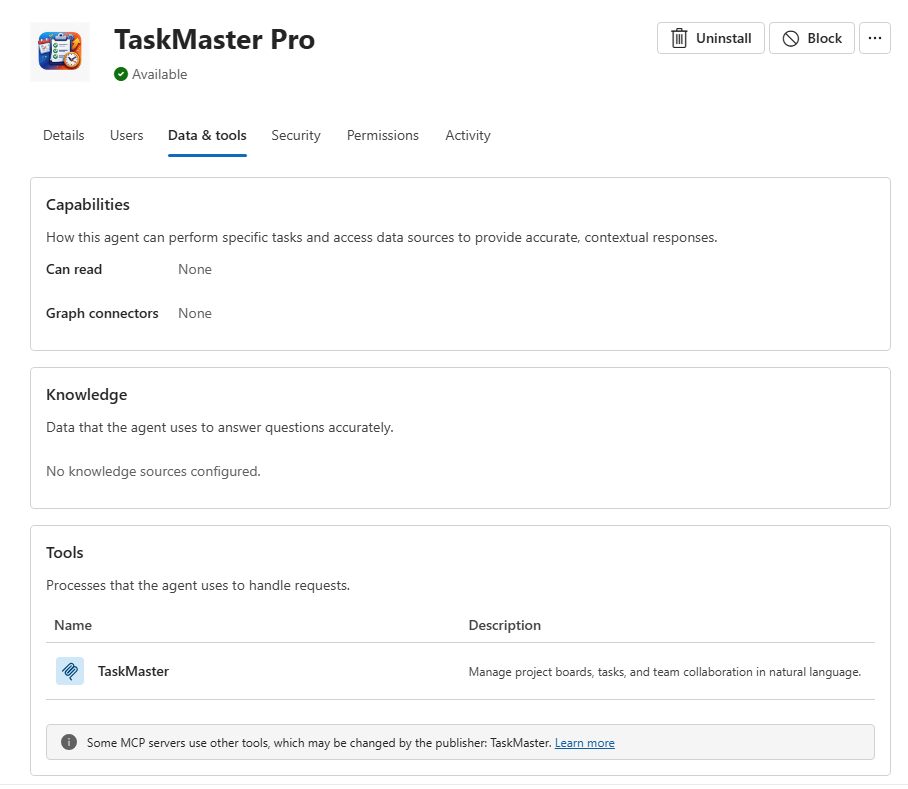
The agent and connector catalog list view itself is unchanged. The discovery mechanism is surfaced on the per-agent details page, not in catalog-level listings.
Disabling agents that use dynamic tool discovery
There's no separate tenant- or agent-level switch for the dynamic tool discovery capability itself. Instead, admins use the existing agent-level controls in the Microsoft 365 admin center:
- If an admin doesn't want a specific agent that uses dynamic tool discovery to be available in their tenant, they can disable or block that agent through the same agent-management controls they use today for any declarative agent.
- Use the same controls, including assigning an agent to specific users or groups, to stage availability of an agent that uses dynamic tool discovery before broader rollout.
This approach means dynamic tool discovery doesn't introduce a new policy surface for admins to learn. Agent enablement, scoping, and disablement work the same way regardless of whether the agent uses pinned tools or dynamic tool discovery. The agent-details view tells the admin which discovery mechanism the agent uses, so they can make an informed decision about whether to allow it.
Audit logs in Microsoft Purview
Interactions with agents that use dynamic tool discovery are recorded in the Microsoft Purview audit log under the Copilot workload, alongside interactions with any other declarative agent. Admins can locate these records by filtering on Workload = Copilot in Purview audit search, and can identify the specific agent using the TargetAgentName field in CopilotEventData.
How existing trust and safety guarantees are preserved
Dynamic tool discovery doesn't bypass the trust and safety model that applies to MCP plugins today. It extends the model with a runtime validation layer:
- ISV (3P) apps continue to rely on the existing extensibility governance stack: publisher attestation and M365 certification, the tenant and ISV service contract and terms of use, and store validation performed at publish time.
- Line-of-business (LOB) apps continue to rely on the tenant's existing internal onboarding and compliance procedures for first-party and internal apps.
- Runtime validation: every newly discovered or modified tool is screened by RAI and XPIA classifiers before the tool is activated for end users. The process blocks tool changes that fail validation.
Together, these processes guarantee that the assurances customers rely on at publish time continue to hold as tools evolve at runtime.