Note
Access to this page requires authorization. You can try signing in or changing directories.
Access to this page requires authorization. You can try changing directories.
Important
Personal Content Mode is designed as a short-term solution to allow time for you to review and audit site and file permissions. It's not intended or scalable for long-term use. Comprehensive data security solutions are available, including SharePoint Advanced Management and Microsoft Purview.
Overview
Personal Content Mode (PCM) restricts the file content that Microsoft 365 Copilot and agents can reason over. With PCM restrictions, Copilot and agents are limited to reasoning over a user's Microsoft Graph work data (including emails, calendar, chats, approved third-party data via connectors) within the boundaries defined by Restricted SharePoint Search:
- Other OneDrive files and files the user has access to
- Files from their frequently visited SharePoint sites
- Files that were shared directly with them
- Files that the users viewed, edited, or created
Unlike Restricted SharePoint Search, PCM doesn't use an allow list and doesn't limit users' ability to locate content with SharePoint Search. In Personal Content Mode, both Enterprise Search and custom search applications continue to work without restrictions.
Service Plan setting
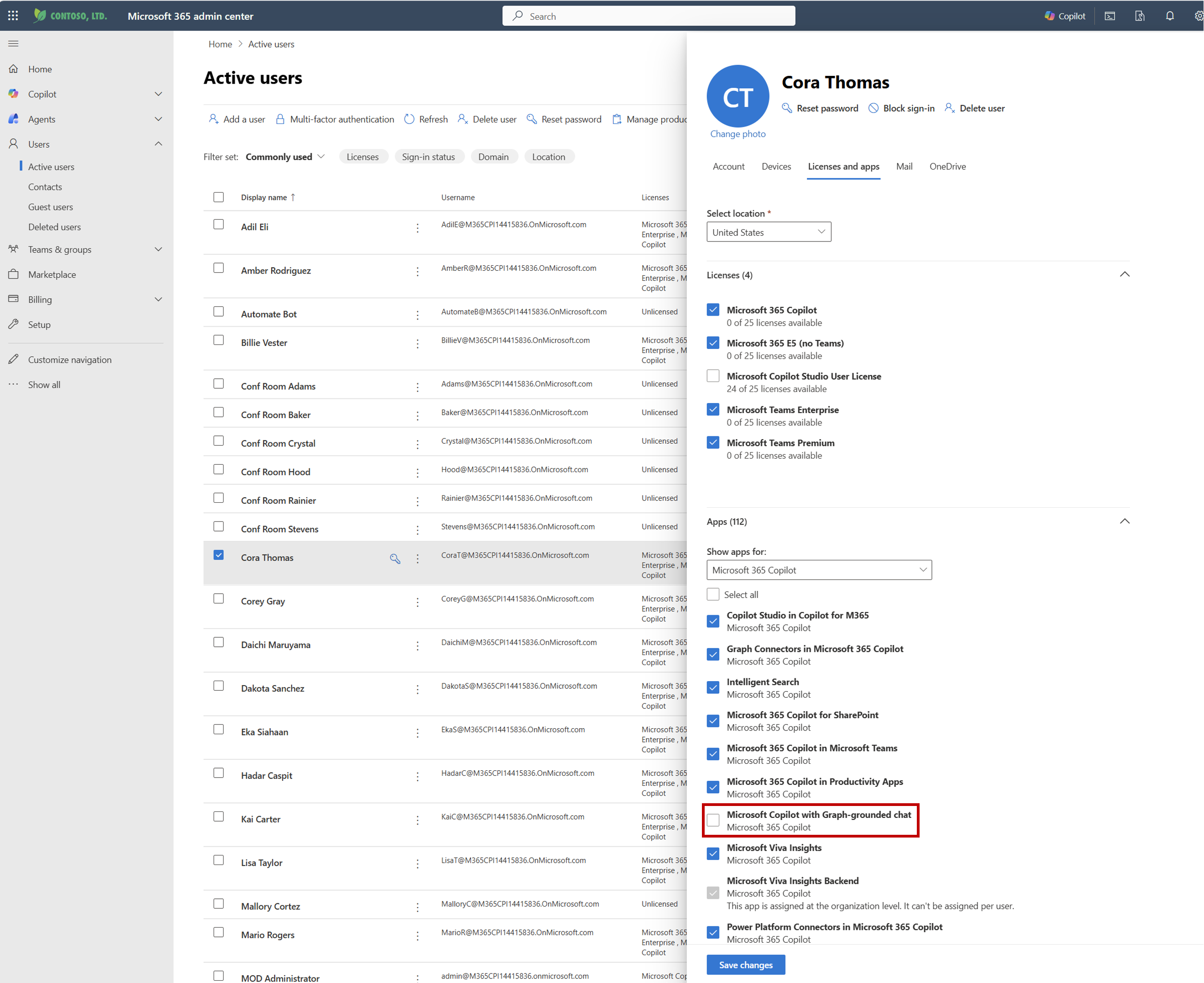
A setting in the Enterprise Service Plan provides users with PCM when the service plan is off. To make PCM available to individual users, an admin must update a Copilot-licensed user's individual service plan setting called Microsoft Copilot with Graph-grounded chat. This box is checked by default, allowing Copilot to reason over that user's entire M365 Graph. Unchecking this box, as depicted in this screenshot, creates the grounding restrictions associated with the Personal Content Mode:
FAQ
What defines frequently visited SharePoint sites? Is this something that end users can influence? We identify your most frequently visited SharePoint sites by looking at standard team sites (not personal sites) and ranking them based on how often you interact with them. The system considers factors like:
- Site type: SharePoint sites, Teams sites, and Hub sites are included
- Activity: How often you access or use the site
- Recent visits: When you last visited the site
- Top results: The top 10 sites you use most often
These criteria are what PCM uses to determine the most relevant content that Copilot can reason over. Users can't influence these determinations-Microsoft curates this experience for each individual user.
How do agents work under PCM? Agents honor PCM, which means that users can't create agents that ground on any file or content outside the scope defined by Personal Content Mode. In some cases, Copilot agent responses may appear to extend beyond the intended knowledge scope, even when SharePoint permissions remain unchanged. This is because content from sites a user has recently accessed or that were shared with them in Teams or Outlook can surface in results even if those sites are not on the allowed list.
Are email attachments included in files that can be considered in PCM? If the attachment is a classic file attachment and not a OneDrive/SPO link, Copilot can reason over it, whether you've opened it or not. This is because the attachment gets indexed as part of the email. If the attachment is a cloud file link, Copilot only reasons over it if the user has accessed the document itself.