Note
Access to this page requires authorization. You can try signing in or changing directories.
Access to this page requires authorization. You can try changing directories.
The Microsoft Copilot pay-as-you-go service offers a flexible and cost-effective way for organizations to access Copilot services.
You can monitor your organization's consumption of the pay-as-you-go service in the Microsoft 365 admin center > Cost Management page for each Microsoft 365 pay-as-you-go service that you use, including Microsoft Copilot Chat and SharePoint agents.
This article explains how administrators can view cost and billing details for pay-as-you-go.
This article applies to:
- Microsoft Copilot
- SharePoint agents
Access usage and billing information
To view detailed reports on Copilot usage and the associated costs, use the following steps:
Sign in to the Microsoft 365 admin center with one of the following administrator roles:
- Global administrator
- Billing administrator
Go to Billing > Cost Management.
On the Cost Management page, under Service family, you see a service-level view of costs based on Copilot usage.
Important
Microsoft recommends that you use roles with the fewest permissions. Using roles with the fewest permissions helps improve security for your organization. Global Administrator is a highly privileged role that should be limited to emergency scenarios when you can't use an existing role. For more information, see About administrator roles in the Microsoft 365 admin center.
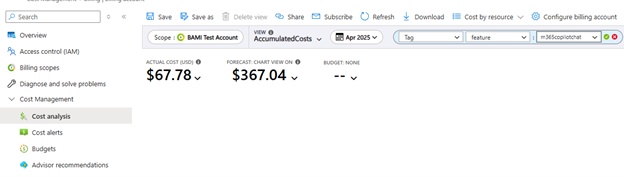
To view costs in the Azure portal, see What is Microsoft Cost Management?. You can filter the accumulated costs by using tags, like m365copilotchat:
Billed amounts are updated daily and sometimes more frequently. It can take 24 hours after usage of a service to show in Microsoft Cost Management.
Related content
- Microsoft Copilot pay-as-you-go service (article)
- Set up pay-as-you-go for Microsoft Copilot (article)
- Meters for Microsoft Copilot pay-as-you-go (article)