Note
Access to this page requires authorization. You can try signing in or changing directories.
Access to this page requires authorization. You can try changing directories.
Important
You need to be part of the Frontier preview program to get early access to Microsoft Agent 365. Frontier connects you directly with Microsoft’s latest AI innovations. Frontier previews are subject to the existing preview terms of your customer agreements. As these features are still in development, their availability and capabilities may change over time.
AI-powered agents are rapidly becoming ubiquitous across enterprises, driving a broad and accelerating transformation. Microsoft Agent 365 provides the ability to observe, govern, and secure the growing number of agents within organizations.
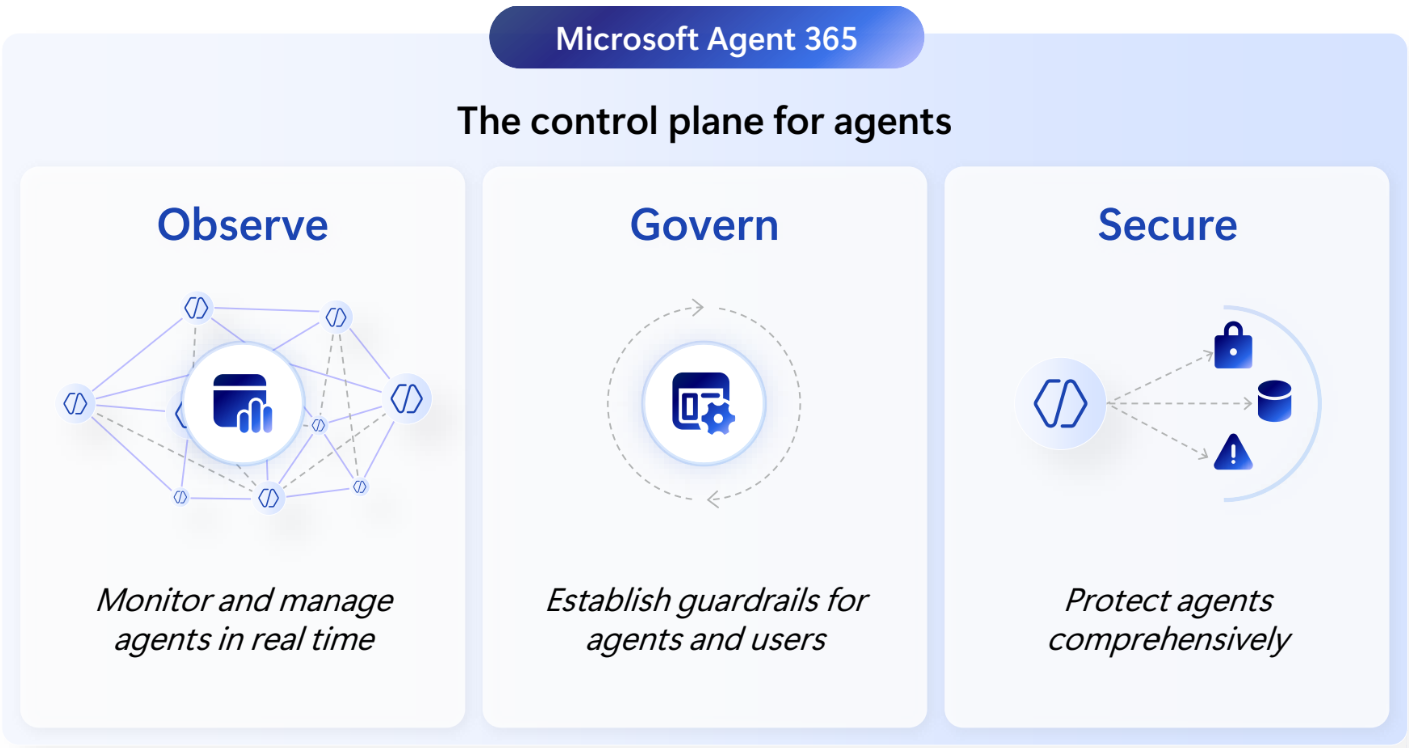
Observe
Microsoft Agent 365 gives organizations real-time visibility into their agentic environment, helping admins understand how agents are used, identify performance or risk signals early, and take action before issues impact the business. Admins can now view all their agents in a single, centralized registry providing a unified view of agent adoption, activity, and agent health. These insights help leaders and AI admins stay in control, operate efficiently, and maximize the value of their agent investments from a centralized AI admin experience. Learn more: Observability, Use and collaborate with agents, Observe agent activity, Use Agent Map.
Govern
Establish consistent guardrails for AI agents by centralizing lifecycle management, access control, and compliance across the enterprise. Through the Agent 365 registry in the Microsoft 365 admin center, Microsoft Entra, and Microsoft Purview, admins can intentionally manage the lifecycle of their organization’s agents while ensuring the right permissions, policies, and reviews are in place. Together, these controls help organizations reduce risk, stay audit-ready, and ensure agents remain aligned with organizational policies and business needs. Learn more: Agent 365 overview.
Secure
Microsoft Agent 365 delivers end‑to‑end protection for every agent by extending Microsoft’s enterprise‑grade identity, data, and threat‑defense capabilities across your AI ecosystem. Microsoft Entra enforces consistent, risk‑based access controls for users and the agents acting on their behalf, while MicrosoftPurview provides deep visibility into data risks with information protection, DLP, and risk safeguards. Microsoft Defender adds continuous threat detection and real‑time protection to block unsafe behaviors and malicious activity. Together, these capabilities ensure agents only access authorized resources, prevent data leakage, and defend against evolving threats. Learn more: Threat protection, Use Microsoft Purview to manage data security & compliance for Microsoft Agent 365, Protect your agents in real-time during runtime (Preview).
Addressing stakeholder needs
Agent 365 is built to address the needs of a range of stakeholders.
With Agent 365, IT administrators can monitor agent activity, enforce policies, resolve issues, and manage threats, ensuring agents behave securely and in compliance with enterprise standards.
Learn more: Agent 365 Overview page in the Microsoft 365 admin center
Agent 365 ensures that each agent is managed with enterprise-grade controls for identity, authentication, compliance, and observability. Agent 365 integrates with Microsoft Purview to apply data protection policies and audit agent activity, and with Microsoft Defender to detect, investigate, and respond to threats in real time.
Learn more: Observability, Threat protection, Use Microsoft Purview to manage data security & compliance for Microsoft Agent 365, Agent identity
Agent 365 offers unified SDKs and frameworks that simplify building, onboarding, and certifying agents. Agent 365's agentic tools expose consistent MCP interfaces and SDKs. Developers can use agentic tools for Outlook, Teams, and SharePoint and business integrations—accelerating delivery while inheriting enterprise grade security and compliance. Learn more: Extend agents with the Microsoft Agent 365 SDK
Agent 365 ensures agents are deployed in a secure and governable manner, driving productivity and business outcomes.
Learn more: Discover, create, and onboard an agent
Agent 365 allows information workers to amplify the size and quality of their impact by collaborating seamlessly with agents and transferring busy work over to agents.
Learn more: Use and collaborate with agents
Prerequisites
Tenants must be part of the Frontier preview program and have agreed to the Agent 365 terms of service. The preview disclaimers in your customer agreements apply. In order to access features in Frontier, the tenant needs to have at least one license of Microsoft 365 Copilot to enable Microsoft Agent 365 in Frontier.
Enable Agent 365
To start with Agent 365, sign into Microsoft 365 admin center > select Copilot > select Settings > under User access, select Copilot Frontier > choose the specific users, groups, or select all to grant access to the Frontier program.
After you've granted users and groups the access to the Copilot Frontier program, go to Agents from the left-pane inside the Microsoft 365 admin center to get started. You might be prompted to agree to the terms of service. For more guidance about enabling Frontier access, see Getting started with Frontier.
Frontier program: Agent 365 enrollment FAQ
This table provides answers to common concerns and questions about Agent 365 enrollment in the Frontier program, including how to check if you're enrolled, troubleshooting access problems, and understanding Agent 365 licenses in Frontier.
For information about the general availability and licensing of Agent 365, see Secure agentic AI for your Frontier transformation.
| Common questions | Answers |
|---|---|
| Frontier program: In the Microsoft 365 admin center, I don't see Copilot Frontier under Copilot Settings. | Purchase a Microsoft 365 Copilot license if you don't already have one. Frontier features are available to all Microsoft 365 customers with a Copilot license. |
| Frontier program: The option to purchase a Microsoft 365 Copilot license is unavailable for me. | Microsoft 365 Copilot is an add-on that requires an eligible base for Microsoft 365 plan (for example, Business Premium, E3, E5, and other plans). Review the prerequisites tab when purchasing a plan for the Microsoft 365 Copilot license. |
| Frontier program: How do I check if I'm enrolled in Agent 365 Frontier? | In the Microsoft 365 Admin Center, go to Billing → Licenses. You should see 25 Microsoft Agent 365 Frontier. |
| Frontier program: When using the Agent 365 CLI, I encountered the following error message: ERROR: Error response: Forbidden – Access denied by Frontier access control. | Change the setting to Specific users or No access, and then change it back to All users to reapply the configuration. Updates might not appear immediately. It might take up to an hour for the change to take effect. |
| What is a Microsoft Agent 365 license and how is it used? | In the Frontier program, Microsoft Agent 365 licenses enable AI agents extended to run in a Microsoft 365 tenant. Licenses are assigned per agent instance and are required before an agent instance can be created. For general availability, Agent 365 is licensed per user. All agents acting on behalf of (OBO) a licensed user are covered under that user’s Agent 365 or Microsoft 365 E7 license. Agents don't require their own Agent 365 or Microsoft 365 E7 license. |
| When will Agent 365 be generally available? | May 1, 2026. For more information, see Secure agentic AI for your Frontier transformation |