Note
Access to this page requires authorization. You can try signing in or changing directories.
Access to this page requires authorization. You can try changing directories.
Only applies to:  GitHub Copilot harness
An agentic loop lets an agent evaluate a result and decide whether to continue, correct an error, try another approach, or stop. This flexibility helps agents complete multistep tasks, but it also needs boundaries. Costs can continue to accumulate even when the task is no closer to completion. Without retry limits and stopping conditions, repeated model and tool calls can consume tokens and add latency without advancing the work.
Use this guidance when designing or reviewing agents powered by the GitHub Copilot harness in Microsoft Copilot Studio. It explains how to define handoffs, limit retries, and verify completion through seven illustrative failure scenarios.
The scenarios describe example processing tools and execution environments, not requirements that apply to every Copilot Studio agent. File locations, preprocessing steps, and dependency restrictions depend on the tools and runtime you use. Learn more about the two harnesses in Compare Copilot Studio agent harnesses.
How agentic loops expand
When a tool fails, the agent examines the failure and chooses a response, such as correcting the inputs or trying another tool. Each result informs the next action. For example, the agent might invoke the tool, evaluate the result, and decide whether to continue, stop, or ask for help. If the result reveals another problem or leaves the task incomplete, the cycle can repeat.
Repeated steps, unclear stopping conditions, and incomplete handoffs can keep this cycle active without making progress. An ambiguous result creates another risk: the tool might have completed part of its work even though it returned an error. Retrying without checking the outcome can duplicate actions or alter existing results.
Use instructions to guide the agent's decisions. Where supported, use tool validation and runtime limits to enforce the boundaries. Instructions alone aren't a guarantee that execution stops.
Design practices
Define what the agent can change, what it must preserve, and when it needs help. Use these practices to preserve the agent's ability to adapt while limiting unnecessary work.
You don't need to prescribe every action in advance. Define the permitted tools, input routes, and state-changing actions, along with the completion criteria. Then let the agent choose how to proceed within those boundaries.
Learn more about agent design and orchestration boundaries in Use the agent design framework.
Define tool handoffs
For each handoff, describe what each step receives, what it must return, how the next step uses the result, and what shows the step succeeded. Validate the output against the receiving tool's requirements. Don't rely on the agent to infer the required format.
Record the contract in the agent's instructions, require it to remain unchanged, and prohibit unapproved substitutions or conversions.
Learn more about structured outputs and downstream handoffs in Add an agent node to a workflow (GitHub Copilot).
Align completion criteria across agents
Define the findings, evidence requirements, and response format that the calling agent needs from the connected agent. Specify what constitutes sufficient information and when each agent should stop. State whether the calling agent needs to combine or summarize the results.
Avoid generating another response solely to reformat an answer that already meets the requirements. Additional work should address a missing fact, combine separate results, or resolve a conflict.
Check prerequisites before execution
Check that required libraries are available, permitted routes are configured, and mandatory runtime or security prerequisites are compatible with skill instructions. Don't expect the agent to discover, install, bypass, or repair its execution environment. Resolve conflicts between skill instructions and runtime requirements before the agent runs the task.
If a required dependency is unavailable, define whether the agent must stop or use an approved alternative. Don't leave environment changes, package installation, or replacement implementations as open-ended recovery options.
Learn more about skill-package checks and missing resources in Troubleshoot skills that don't load.
Give the agent only the tools it needs
Enable only the tools and MCP server operations the task requires. Use read-only tools when the task doesn't change data. Remove tools that duplicate an operation unless they're an approved fallback.
For example, a task that only retrieves and summarizes records shouldn't have update or delete operations enabled. Don't expose every operation from an MCP server "in case it's useful"; extra tools give the agent more alternatives to explore after a failure.
Learn more about configuring available tools and MCP operations in Manage and delete tools in an agent (GitHub Copilot).
Return complete status from workflows
When you build a workflow that an agent calls, return its execution status, any output or state changes, and specific errors. Include an indication of whether it's safe to retry. Clearly report when work is partially complete or the outcome is uncertain. Don't use a generic success or failure message for these results.
For example, if a workflow creates a document but delivery fails, report that the document was created, identify the failed delivery step, and state whether that step can be retried without repeating processing. Include a file reference only when the next step requires it.
Learn more about workflow tools and responses to agents in Add a workflow to your agent as a tool (GitHub Copilot).
Define when to correct and when to stop
List correctable invocation errors separately from terminal technical or configuration failures. Define the checks and attempt limits that permit a retry.
Use hooks to apply recovery rules and alter the agent's behavior, including retry behavior.
Terminal conditions override any remaining retry allowance. Require the agent to stop and report or escalate rather than search for another route.
When human review is required, specify what the agent must report. Define the required approval, corrected input, or configuration change it needs before it can resume.
Stop when repeated steps produce no new result. When no approved action applies, require the agent to ask for clarification, report the failure, or escalate.
Learn more about product errors and their recovery actions in Error codes reference for agents (GitHub Copilot).
Limit retries and verify prior state
Define what counts as an attempt. State the maximum number of attempts, the exact conditions that authorize another attempt, and the verification required before retrying an action that might have changed state.
Where supported, enforce the attempt limit in the tool or runtime. Don't rely on instructions alone.
For errors outside a tool call, an Error hook can specify retryCount when requesting a retry.
Retry only when the error identifies a correctable input and the previous attempt made no changes. If the outcome is unknown, report it and stop.
Enforce boundaries in the runtime
Use instructions to define permitted actions and stopping conditions. Where supported, enforce critical boundaries through tool or runtime controls. When an action is denied, require the agent to report it and stop rather than try another command, tool, or route.
Put stopping and retry rules that apply to every task in the agent's instructions. Put procedure-specific rules in the relevant skill. For example, a Pre tool use hook can check and deny a tool call that violates a policy.
For errors outside a tool call, an Error hook can change recovery behavior and user notifications. For a failed tool call, an After tool failure hook can provide guidance to the model.
Learn more about tool-call checks and error recovery in Hooks (GitHub Copilot).
Confirm irreversible actions
Before an agent deletes or overwrites data, sends information, or performs another irreversible action, require user confirmation or an authorized human review. Apply the same requirement when the agent retries or changes its approach. A recovery step must not introduce an unapproved irreversible action.
For example, if an output file already exists, don't let the agent overwrite it merely to complete the task. Require the agent to explain the conflict and obtain confirmation before replacing the file. Otherwise, it must report the conflict and stop.
Learn more about human oversight for critical actions in Design autonomous agent capabilities.
Verify completion
Define the observable results that prove the task is complete. A tool reporting success alone might not confirm that the output meets the user's request.
Keep checks with predefined success or fail criteria, such as input validation and output verification, in the components responsible for them. When possible, have the tool responsible for the output perform these checks.
Require the agent to check that the returned evidence meets the task's completion criteria and invoke any additional required validation. If evidence is missing or a check fails, report the task as incomplete and follow the defined recovery rule.
Learn more about expected responses and evaluation methods in Create a test set for an agent.
Use traces to find missing controls
Review the activity trace for repeated calls, unnecessary searches, route changes, and actions that continue after a stopping condition. Examine the displayed reasoning to determine why the agent acted, retried, changed routes, or failed to stop. Identify the missing instruction, contract, configuration, or runtime boundary behind such behavior.
Modify the instruction, tool contract, or runtime configuration responsible for the problem. Then rerun the same test and verify the expected behavior.
Learn more in Use the activity trace to debug your agent (GitHub Copilot) and Run an evaluation for an agent.
Preserve original inputs and tool results
For each tool or step, preserve the original input, tool-produced result, validation status, or error code. Don't let the agent guess a missing value or silently change a result returned by the tool. Preserve the original result for verification.
If an authoritative input or result is missing or can't be verified, report it and stop. Don't create a replacement.
If a conversion is required, assign it to a designated component and validate the converted output.
Learn more about preserving intermediate results and shared state in Context and state management.
Failure scenarios
Each of the following failure scenarios shows a failure pattern, the missing control, and an expected result to test against. The diagrams illustrate example processing contracts. The restrictions apply only to the examples, not to every tool or agent.
Ambiguous tool results
A processing tool returns a nonzero exit code without an explanatory message. When the agent can't determine whether the program was invoked incorrectly, failed, or returned no diagnostic output, it might try to diagnose the failure through self-directed looping actions, such as changing the command and running it again.
This sequence can lead to compounding failures. For example, if the first attempt created an output folder before failing, the next attempt might fail because that folder already exists.
The missing control is a retry policy that covers incomplete results and partial state. Without one, command variations can appear to be separate diagnostic actions rather than repeated attempts.
Learn more in Limit retries and verify prior state and Return complete status from workflows.
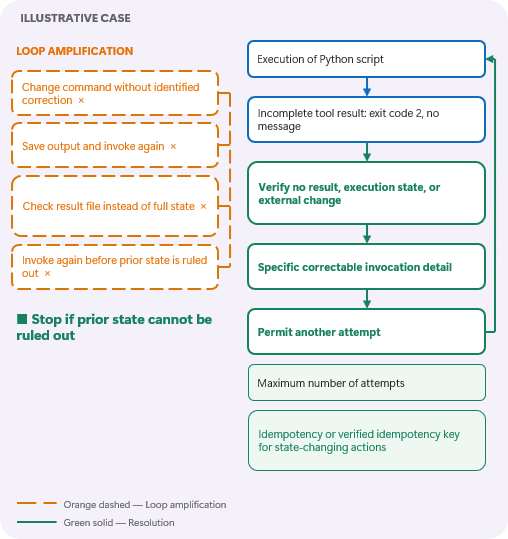
For this example, configure the agent through its instructions or tools to permit another attempt only after a specific invocation error is identified and checks confirm that the prior attempt made no changes. If prior state can't be ruled out, require the agent to stop rather than invoke the processing step again. Tools with documented idempotent retry support can use their own retry mechanism instead.
To verify the fix, simulate an incomplete result after partial output is created. Confirm that the agent handles the processing step according to the stated retry control.
Conflicting runtime and skill requirements
A skill permits only its bundled program, but the runtime used by the GitHub Copilot harness requires a prerequisite that conflicts with the skill's instructions. The runtime can block the skill's attempt to proceed. This conflict can lead the agent to try another command rather than resolve the configuration conflict or treat it as a stopping condition.
The missing control is an approved execution route that satisfies both the runtime requirements and the skill's instructions.
Learn more in Check prerequisites before execution and Enforce boundaries in the runtime.
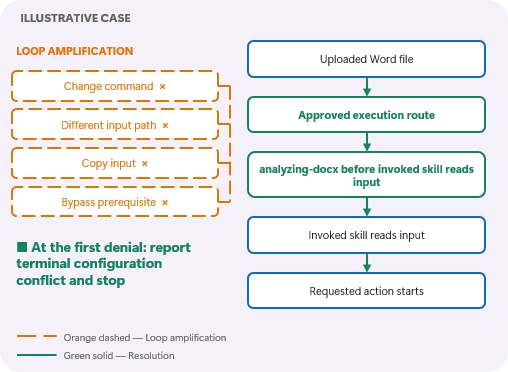
The diagram labels the example preprocessing step "analyzing-docx." This label doesn't establish a required built-in Copilot Studio step.
Resolve the conflicting requirements before running the task. If a mandatory runtime action is missing from or prohibited by the approved route, require the agent to stop and report the conflict after the first denial. Don't let the agent change the command, copy the input, search for another path, or bypass the runtime control.
To verify the fix, block the required prerequisite. Confirm that the agent reports the configuration problem without trying another route.
Misaligned completion criteria
A calling agent and its connected agent (child) have conflicting output goals without a shared completion contract. Without a clear stopping condition (for example, if web search limits are reached), the calling agent can continue searching, adding examples, and expanding its response even when the connected agent already returns a satisfactory result.
The missing control is a shared definition of sufficient evidence and the response format between agents or tools.
Learn more in Align completion criteria across agents.
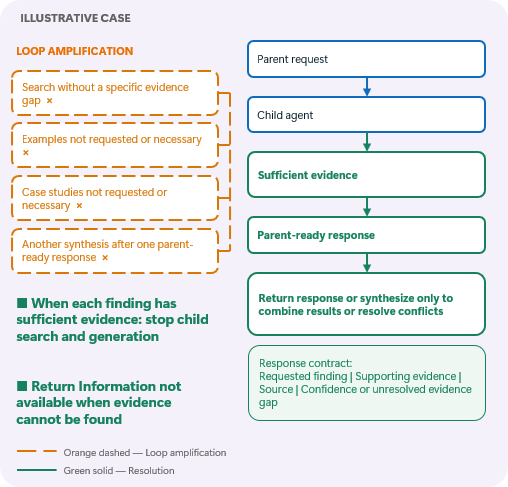
Configure the calling and connected agents with the same completion criteria and response format. Require the connected agent to return a response ready for the calling agent, using a defined structure:
- The requested finding
- Supporting evidence and its source
- Any unresolved evidence gap
Permit the calling agent to perform additional processing on the response only to address a specific gap, combine results from multiple connected agents, or resolve conflicting findings. If the requested information can't be found within the search limit, return that status. If a single connected agent already returns a response that meets the requirements, return it without another synthesis step. The diagram labels the calling agent as the parent and the connected agent as the child.
To verify the fix, have the connected agent return a response that meets the requested finding, evidence, and format requirements. Confirm that the calling agent returns it without running unrequested searches, adding unrequested examples, or generating another synthesized response.
Missing runtime dependencies
An agent invokes a skill that requires a library that's unavailable. In this scenario, policy in the GitHub Copilot harness execution environment denies many network- or system-modifying commands. The agent's attempts to resolve the missing dependency can expand into searches for installers, offline installation files, direct downloads, or copies of the library elsewhere in the GitHub Copilot harness execution environment.
The missing control is a prerequisite check with a defined response when a required dependency isn't found.
Learn more in Check prerequisites before execution and Enforce boundaries in the runtime.
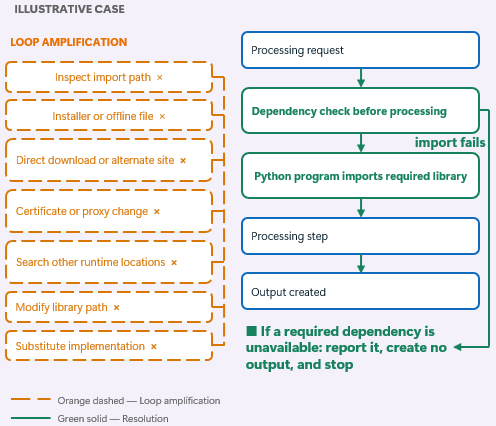
Use global instructions to require supported libraries and a dependency check through a tool before processing begins. The instructions must require the agent to report a missing required library and stop without creating an output. Prohibit changes to package sources, certificate or proxy settings, or library paths during processing.
To verify the fix, run the prerequisite check with the library unavailable. Confirm that the agent identifies the dependency, creates no output, and makes no installation attempts.
Mismatched document input routes
Processing instructions don't identify the uploaded document location, so the agent might treat a submitted document as missing.
Direct uploads and workflow submissions can provide documents in different locations or representations in the GitHub Copilot harness execution environment. The agent can apply its lookup expectations for one route to the other. Finding no file in the expected location can then lead the agent to search other directories or attempt to recover the missing input.
The missing control is a mapping from each supported input route to the lookup expectations the agent must follow and the tool that resolves its document location.
Learn more in Define tool handoffs and Return complete status from workflows.
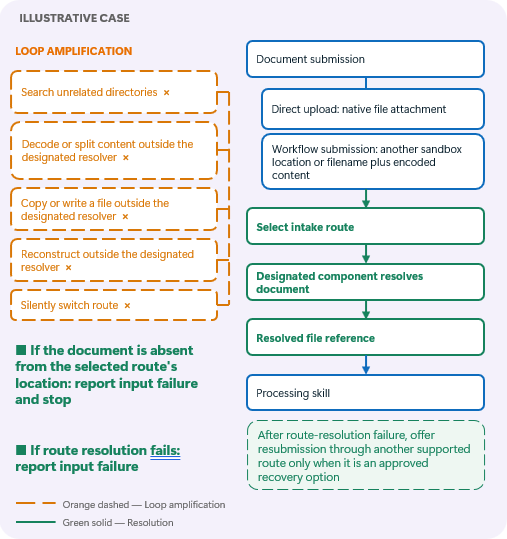
Select the input route before processing. Have a designated tool locate the document and return the file reference that the processing tool expects.
In instructions, specify where to find the document for each input route and which tool to use to locate it. Also specify the file type, reference format, and input field that the receiving tool requires.
Require the agent to keep the selected document intake route and resolved location unchanged throughout processing. It must also pass the agreed reference unchanged through validation and delivery.
The agent must not search unrelated directories or reconstruct the document outside the designated tool. If route resolution fails, the agent must report the input failure. It might offer resubmission through another supported route only when that route is an approved recovery option. If the document is missing, the agent must report an input failure and stop.
If the agreed reference can't be provided, the agent must report the handoff failure and stop.
To verify the fix, submit an input that's missing from the selected route's expected location. Confirm that the agent reports the input failure and stops without silently switching routes.
Undefined file handoffs
A processing tool returns a file path, but the receiving tool expects an attachment. The agent tries a file URI, copied path, and encoded content without establishing which representation is required. One attempt might even create a file containing the path text instead of the processed document.
The missing control is an agreed file-handoff format.
Learn more in Define tool handoffs and Verify completion.
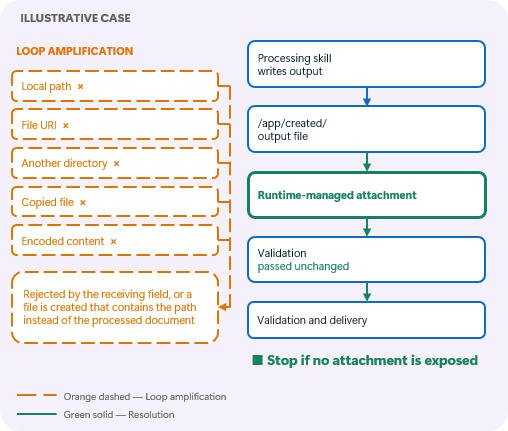
Define the file type, reference format, and receiving field at the integration boundary. In this example, the receiving tool requires a runtime-managed attachment. A local path isn't a substitute. The /app/created/ location in the diagram is illustrative, not a guaranteed output location.
Pass the agreed attachment unchanged through validation and delivery. If the GitHub Copilot harness can't provide it, report the handoff failure and stop. Other integrations can use paths or encoded content when those formats are explicitly supported.
To verify the fix, return a path where an attachment is required. Confirm that the agent reports the mismatch instead of converting the value or claiming delivery succeeded.
Structurally invalid inputs
A processing tool reports that an input object—for example, a document—is invalid. The agent can continue trying to make it usable rather than stop. For example, the agent might transcribe encoded input, compare different copies, change suspected characters or bytes, test decompression, or search for possible substitutions.
The missing control is an instruction that requires the agent to stop when structural validation fails rather than attempt repairs based on guesses.
Learn more in Preserve original inputs and tool results and Confirm irreversible actions.
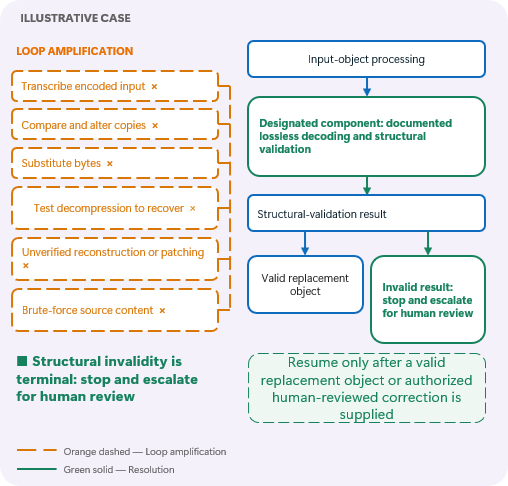
Identify a trusted component authorized to perform bounded, verifiable recovery. If validation fails, stop and request a valid replacement or an authorized human-reviewed correction. Don't let the agent guess missing source content. Resume processing only after a valid replacement object or an authorized human-reviewed correction is supplied.
To verify the fix, supply an invalid document. Confirm that the agent reports the validation failure and doesn't modify or reconstruct the source. If an authorized conversion tool is provided, confirm that only that tool performs bounded, verifiable conversion and that processing resumes only after a valid replacement object is supplied.
Validate your design
Before publishing changes, test both successful tasks and failure conditions that apply to your agent:
- Each input route resolves the expected document or reports a clear failure.
- Tools exchange the agreed input and output formats.
- Agents stop when their completion criteria are met.
- Configuration conflicts and missing dependencies stop execution as defined.
- Retry counts stay within the configured limit, including command variations.
- Ambiguous outcomes trigger state verification, not an automatic retry.
- Invalid source content remains unchanged.
- Completion is reported only after the required output checks pass.
- Runtime controls block prohibited actions, and the agent reports the denial and stops without trying another command, tool, or route.
- Irreversible actions wait for the required user confirmation or authorized human review.
Compare the activity trace and evaluation results before and after each change. Examine the displayed reasoning alongside the tool calls, inputs, outputs, errors, and timing to determine why the agent selected an action, what caused a retry, why it changed routes, and which condition should have made it stop.
Use those findings to identify the missing instruction, contract, configuration, or runtime boundary. Change the layer responsible and rerun the same test. Confirm that the unwanted behavior no longer occurs and the required result is still produced. Fewer actions or a shorter run alone aren't proof of improvement.
Related information
- Design autonomous agent capabilities
- Use the agent design framework
- Why Do Multi-Agent LLM Systems Fail? (research paper)
- Verified Tool Calls Improve LLM Agent Reliability Under Non-Atomic Failures (research paper)
- Budget-Aware Tool Use Enables Effective Agent Scaling (research paper)
- Inference-Time Budget Control for LLM Search Agents (research paper)