Note
Access to this page requires authorization. You can try signing in or changing directories.
Access to this page requires authorization. You can try changing directories.
Different automation approaches solve different kinds of problems. Whether you're building a new solution or modernizing an existing one, understanding the strengths of each approach helps you choose the right architecture for your scenario.
Some solutions are conversational, others automate a business process, and many do both. The best choice depends on how much interaction, autonomy, and process control the solution requires, and whether you can define the process path in advance.
Assess process predictability
When designing an automation, assess whether the overall process is predictable before execution begins. Process predictability helps determine whether an agent, a workflow, or a combination of both is the best fit for the solution.
Both agents and workflows can be used to automate business processes, but they differ in how they determine the process path.
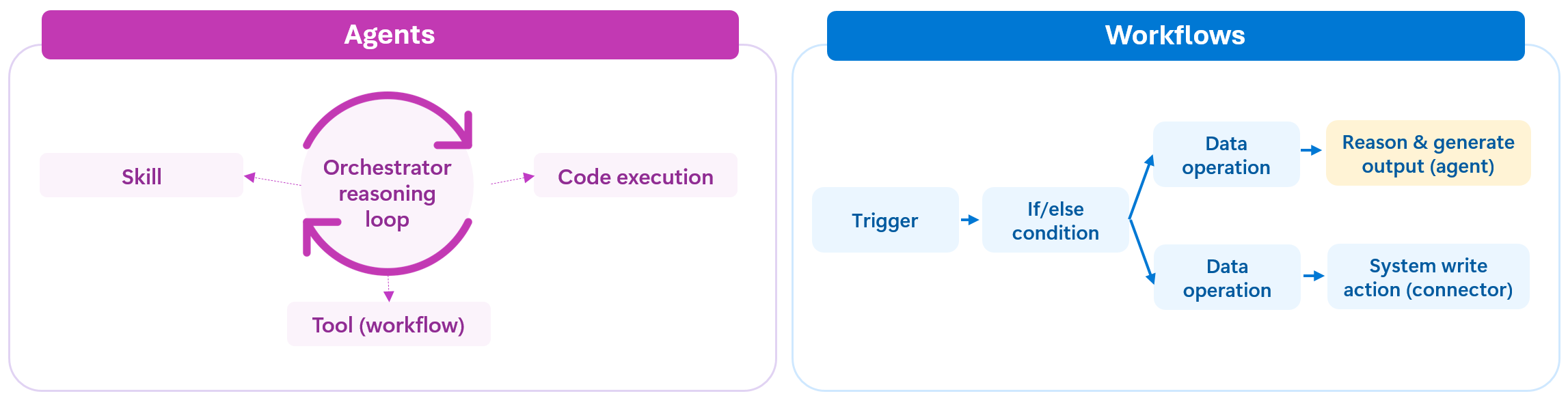
An agent reasons about what to do next and can call skills, workflows, or code as needed. This approach works well when the next step depends on information discovered during execution.
A workflow defines the overall process path in advance and uses AI only where a step requires reasoning or judgment. This approach works well for business processes such as employee onboarding, expense approvals, or compliance reviews, where the start and end points are known but individual steps might require AI assistance.
- Choose a workflow when the process requires a predictable path, approvals, compliance controls, or consistent execution.
- Choose an agent when the next step can't be known until information is gathered and evaluated.
- Combine both when part of the process is predictable and part requires judgment.
Agents and workflows work together
Agents and workflows aren't competing approaches. They often work together.
For example:
- An agent gathers information from a user and starts a workflow.
- A workflow runs a controlled business process and calls an agent when reasoning is required.
- An agent calls a workflow to perform actions that require approvals or process controls.
Agents and workflows can call each other. Employee offboarding shows both directions in one scenario.
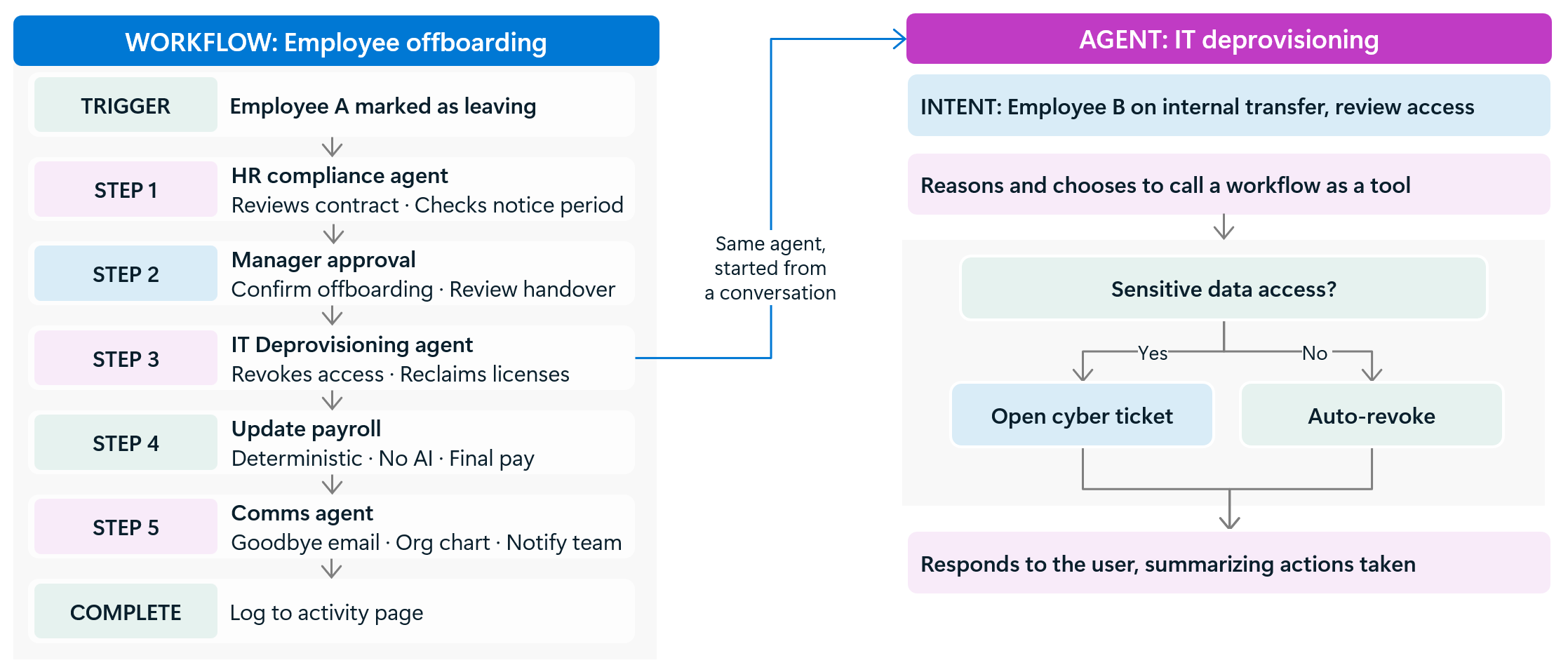
On the left, offboarding runs as a workflow. The workflow defines the process and calls an agent only at the three steps that need judgment: reviewing the contract, deprovisioning access, and drafting the communications.
On the right, the same IT deprovisioning agent is started from a conversation instead. Here the path isn't known in advance because it depends on what the agent finds. The agent reasons over the request and calls a workflow as a tool, and the workflow applies the process control: sensitive data access opens a cybersecurity ticket, anything else is revoked automatically.
The capability is identical in both directions. What changes is which component defines the process path.
Evaluate existing automation patterns
Cloud flows, agent flows, and workflows represent three generations of the same idea: automating a process across services. Each one builds on the last.
| Aspect | Cloud flows | Agent flows | Workflows |
|---|---|---|---|
| Purpose | Automate processes across services | Extend standard harness-powered agents with automation and integrations | Build business processes that combine automation, AI reasoning, and human review |
| Where it runs | Power Automate | Copilot Studio | Copilot Studio |
| Connectors | Standard and premium connectors | Connectors optimized for agentic use | Connectors optimized for agentic use |
| AI capabilities | AI prompts and AI Builder actions | Prompt nodes and the ability to call other agents | AI action nodes, inline agent design, and human-in-the-loop scenarios |
| Best suited to | Automation across apps and services | Automation that is closely integrated with a standard harness-powered agent | Predictable business processes that combine deterministic automation and reasoning |
Workflows can also be viewed as a deterministic alternative to event-triggered autonomous agents. While autonomous agents determine their next action at runtime, workflows follow a predefined process and invoke AI reasoning only where it's needed.
You can redesign some scenarios that previously relied on autonomous agents, agent flows, cloud flows, or prompt nodes as workflows. Moving to workflows isn't a requirement. For example, if an existing cloud flow meets the business need, it can remain a cloud flow. Consider a workflow when native AI nodes, inline agents, or workflow-specific capabilities provide additional value.
| Existing pattern | Workflow pattern |
|---|---|
| Autonomous agent triggered by an event | A workflow triggered by the same event, using AI nodes where reasoning, multistep orchestration, or information from outside the workflow is needed. |
| Agent flow | A workflow called as a tool by an agent. Triggered by when an agent calls the workflow, with output options (text, structured, or JSON) used to keep output shape. |
| Prompt node | An inline agent within a workflow. |
| Cloud flow | Remains a cloud flow unless workflow capabilities provide additional value. |
Other examples:
Prompt node to inline agent: Consider this pattern when a prompt grows beyond a single reasoning task and needs access to tools, knowledge sources, or agent-driven reasoning. Inline agents can add instructions, knowledge, tools, and orchestration while remaining part of the workflow. Distinguish this pattern from prompts used as agent tools. Those prompts might be better implemented as skills or workflows.
Autonomous agent to workflow: Consider a workflow instead of an autonomous agent when you need:
- A predictable process path
- Human approval or review gates
- Better cost predictability
- Clear workflow-run traceability
- Consistent execution
The workflow run shows what happened in the workflow, but doesn't necessarily provide the same visibility into what happened inside an inline agent.
Learn more in Plan cost and credit consumption for workflows.
For customer-facing conversational automation, consider the Customer Conversation harness.