Note
Access to this page requires authorization. You can try signing in or changing directories.
Access to this page requires authorization. You can try changing directories.
Conversational agents built with Copilot Studio run on a platform that automatically scales to support increases in demand and load. However, conversational agents often use custom logic or calls to backend APIs, which introduce latency because the custom logic is inefficient or the underlying APIs and backend systems don't scale well.
Performance testing evaluates an agent's performance and stability under varying patterns of load. It identifies potential problems as the user base grows, ensuring the agent remains functional and responsive. If you don't test your conversational agent under load, it might function well during development and testing but fail under real user traffic.
Before addressing the technical aspects of performance testing, define acceptance criteria that capture the desired user experience and identify conversational use cases that generate distinct load patterns. This article briefly covers the planning stage of performance testing and provides guidance on the technical specifics of generating load for your conversational agents.
Plan your performance test
A performance test plan should have a defined goal and specific acceptance criteria. For example, some tests measure a system's performance under standard load, while other tests generate more extreme stress that purposely causes a system to become non-responsive. When measuring the performance of conversational agents built with Copilot Studio, design tests to measure either the agent's baseline performance or the anticipated heavy load, but don't configure tests to generate excessive stress.
Warning
Generated load that exceeds expected user behavior might lead to message consumption overage and unwanted throttling of environments. To avoid throttling and consumption overage, make sure that:
- Your tests mimic realistic user behavior.
- Your tenant and environments have sufficient licenses and billing policies assigned.
Understand user behavior
Start your test plan by analyzing how users are expected to behave across different conversational use cases. From a load testing perspective, user behavior might vary across use cases in terms of what users say or ask (for example, "I want to book a flight" or "What's your return policy?"), the number of users that drives a particular use case, and the users' engagement patterns (for example, users connecting all at once at noon versus a gradual buildup throughout the day).
The following table describes the anticipated user behavior for a banking conversational agent.
| Use Case | Common user utterances | Engagement pattern |
|---|---|---|
| Loan application | I need a new loan I would like to apply for a new loan ... |
1,000 concurrent users on average throughout the day |
| Balance inquiry | What's my account balance? Show my account balance ... |
10,000 concurrent users, all connecting around midday |
| Additional use cases | … | … |
Create a test plan
After you define the user behavior in terms of use cases and engagement patterns, think about the specifics of your performance test plan. At a minimum, a performance test plan for a conversational agent should specify an objective, test scenarios, key performance indicators, detailed test data, and success criteria.
If your team already defined conversational scenarios for evaluations, either through creating test cases in-product or by using the Copilot Studio Kit, you can reuse these scenarios to start creating your test plan.
The following example test plan is for a banking conversational agent. The plan uses the conversational use cases that were previously identified to define a baseline testing scenario and a load testing scenario. Testing the baseline assesses normal performance, identifying issues during regular use, while more load might reveal how the system handles peak user activity.
| Section | Details |
|---|---|
| Objective | Evaluate the banking conversational agent's performance under baseline and load conditions |
| Scope | In scope: Baseline and load testing Out of scope: Stress testing |
| Key Performance Indicators (KPIs) |
|
| Test scenarios | Baseline testing
|
| Test data |
|
| Tools |
|
| Success criteria |
|
Work with technical and business stakeholders to develop a test plan that suits your organization's needs. Agree on the key parameters outlined in the example. Learn about using tools such as Apache JMeter to create test scripts in Performance test reference sample and guidelines.
Simulate multi-turn conversations
The test data specified in the plan implies the planned performance test drives multi-turn conversations. Multi-turn conversations are series of back-and-forth messages sent between the simulated users and the conversational agent. Performance tests should drive multi-turn conversations so the generated load resembles real user behavior. Also, some long running actions or API calls only invoke when users make a specific series of choices or send a specific pattern of messages within a conversation.
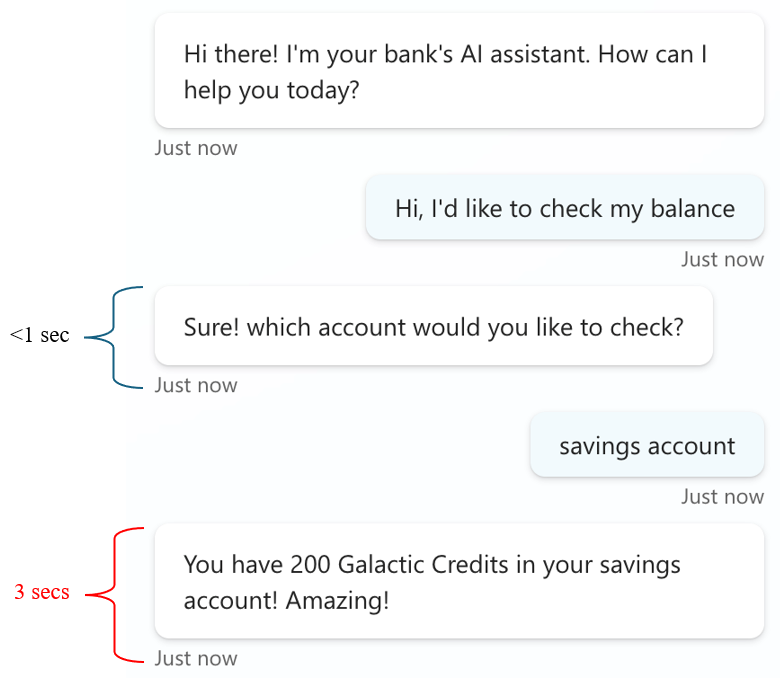
In the following example, the bank's backend API only invokes after the user selects savings account. The response time for the first message is lower than a second because only the agent's intent recognition engine is involved. The last message waits for a response from a backend API, which introduces extra latency. Without simulating a multi-turn conversation, performance issues wouldn't have emerged.
Simulating multi-turn conversations requires planning both when you prepare test data and build test scripts. Include a series of user utterances in your test data that invoke complete conversational flows, as shown in the example. Make sure your test scripts send multiple utterances within a single conversation.