Note
Access to this page requires authorization. You can try signing in or changing directories.
Access to this page requires authorization. You can try changing directories.
Only applies to:  Microsoft Copilot harness
Human-in-the-loop (HITL) capabilities let a workflow pause and involve a person before continuing. The goal is to place human review only where it adds value, while allowing the rest of the process to run autonomously.
Use human gates when a decision carries risk, requires approval, or needs human judgment.
Choose predefined gates or agent-requested assistance
Human-in-the-loop (HITL) gates pause a Copilot Studio workflow so a person can provide input, review a decision, or approve an action before the workflow continues. You can place gates at predefined control points or let an inline agent request assistance when it needs help.
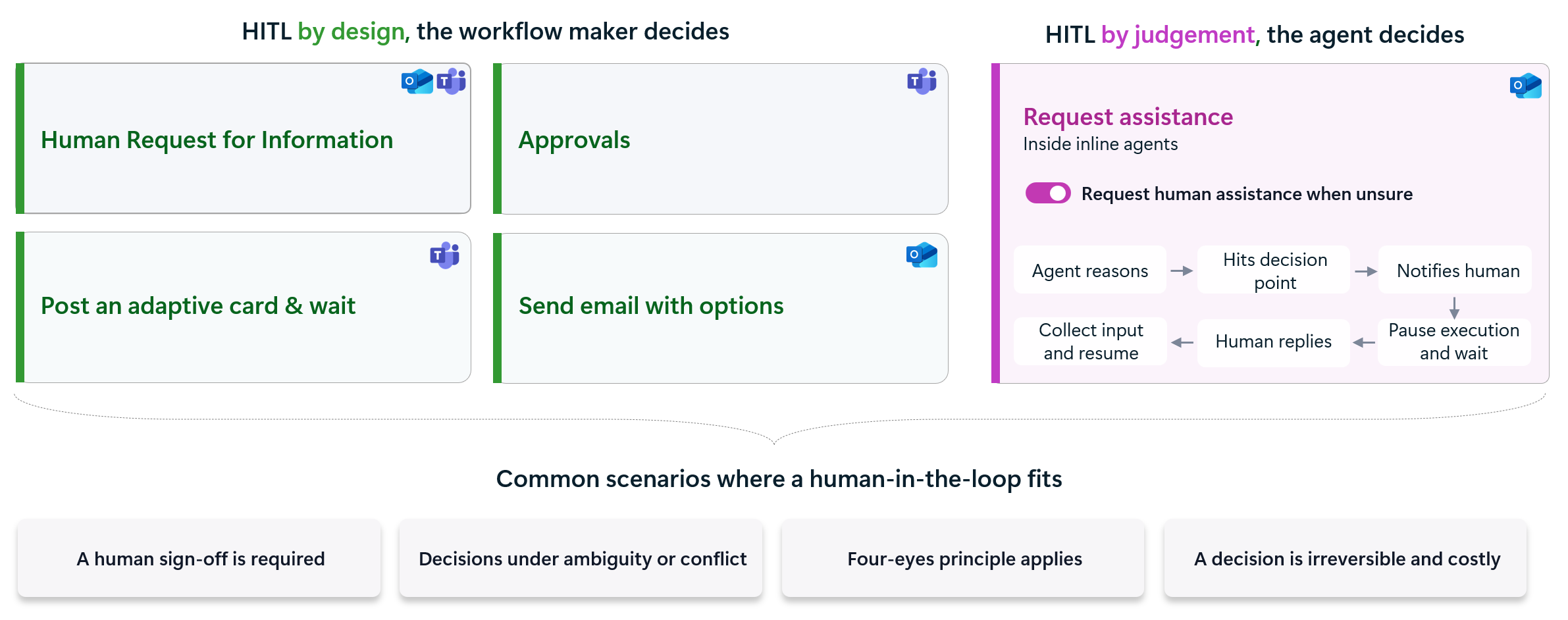
HITL by design: The workflow maker decides where the run pauses. You place a human input node at a specific point, and every run stops there.
HITL by judgment: The agent decides. An inline agent can request human assistance when it can't confidently continue on its own.
Use HITL by design for control points you can name in advance. Use HITL by judgment for uncertainty you can't predict. The two approaches combine. A workflow can hold a designed approval gate and still let an inline agent request assistance earlier in the run.
Either way, the run follows the same sequence:
- The workflow reaches the decision point.
- The workflow notifies the person.
- The workflow pauses execution and waits.
- The person replies.
- The workflow collects the input and resumes.
When to add a human gate
Add a human gate when:
- A decision is irreversible and costly, such as a data deletion.
- Human sign-off is required, such as a large expense approval.
- Human judgment is needed to resolve ambiguity or conflict, such as finding the best meeting times.
- The four-eyes principle applies and accountability requires independent review, such as a pull request review.
Give the reviewer enough context, evidence, and decision criteria to make an informed decision. Otherwise, the human gate might not provide meaningful oversight.
Choose the right gate
Choose a gate based on the input you need, where the person responds, and whether the workflow or an inline agent requests their involvement. The following table compares the available options.
| Need | Use | Where it runs |
|---|---|---|
| Structured input such as text, date, or yes/no | Human request for information | Built-in action with structured inputs |
| Approval or rejection | Approvals | Microsoft Teams approval hub |
| Rich interactive experience | Adaptive Card | Microsoft Teams |
| Simple choices by email | Send email with options | Outlook 365 prebuilt connector |
| Human assistance when an agent is uncertain | Request assistance | Inside inline agents |
Human review is a native node. It sends a request through Microsoft Teams or Outlook, pauses the workflow, and resumes when the person responds. Existing approval experiences such as Approvals, Adaptive Cards, and Outlook-based interactions remain available.
Build a custom HITL experience
If the built-in gates don't meet your requirements, use webhook actions to integrate your workflow with external review and approval systems.