Note
Access to this page requires authorization. You can try signing in or changing directories.
Access to this page requires authorization. You can try changing directories.
Note
This article describes features used in agents or agent flows powered by the standard harness.
Before creating prompts, it's essential to understand how they operate. The system first retrieves any Retrieval Augmented Generation (RAG) based data, such as Dataverse tables associated with the prompt. It then analyzes input documents. Finally, the large language model (LLM) processes the collected information, combined with the instructions.
The larger the combined input, the longer the response time, with document data being the most significant contributor.
Consider these points in the context of the prompt constraints:
- Prompt execution is limited to 100 seconds.
- Each model has a maximum allowable size for the combined input, including instructions, data, and the model’s response.
- Although Microsoft regularly increases GPU capacity, resources remain finite and are allocated per region and per model.
As a result, you might encounter issues such as execution timeouts, token‑window limits being reached, inconsistent response times, or throttling. The following practices can help you minimize these problems.
Choose the most efficient model for the task
More advanced models generally take longer to respond. Always start with the Basic model for your scenario, then consider the Standard model, and reserve the Premium model only for tasks that truly require it.
Example: Using a Premium model for a simple sentiment analysis task is unnecessary.
Optimize the length of the model output
The length of the output is the largest single factor that affects both response time and cost.
Constrain the model
When generating summaries or similar outputs, specify limits such as word or sentence counts. Without constraints, model responses can vary in length, complexity, and time.
Example: Summarize in 50 words.
Optimize JSON structure
When using JSON outputs, reduce complexity by simplifying the structure and minimizing the number of keys.
Example: These two outputs contain the same information, but Output 2 is significantly more compact and efficient.
| Output 1 | Output 2 |
|---|---|
{"extracted data from document":{"Contoso internal policy number": "value"}} |
{"policy":"value"} |
Consider only necessary information
Avoid asking the model to produce information that you won't use. Unnecessary content increases cost and latency.
Example: Only request the model to provide a reason if you need it for human validation or auditability.
Optimize the size of the model input
The size of the input moderately affects response time and cost, especially when processing documents or images.
Avoid redundancy
Repeating similar instructions increases costs and might confuse the model.
Example: Avoid providing multiple instructions that convey the same requirement.
Convert the numbers in US format ... While analyzing the content, always use US norms
Be concise
Models understand concise and direct instructions. Brief prompts are easier to process, and often deliver more precise results.
Example: The second prompt is more efficient.
- Generate a summary from this [content]. The summary must be professional and formatted as bullet points.
- Summarize [content] as bullet points with professional tone.
Reduce input size
Note
For standard harness agents, large tool outputs can exceed the model's context capacity because oversized results aren't automatically reduced before processing. Reduce or preprocess tool output before returning it to the agent.
Inputs often contain content that's irrelevant for the analysis (for example, HTML tags, repeated email signatures, boilerplate text). Preprocess the content when possible: extract text, clean formatting, or summarize large sections before sending them to a more complex prompt.
Example: Use the Html to text action in a workflow when analyzing an email with a prompt.
Process documents only when required
Document processing is expensive. If you use the same document repeatedly, extract its content once and reuse it instead of reprocessing it each time.
Example: Don't process a [guideline document] at each run. Instead, provide it to the prompt as text.
"Consider this [guideline document] to extract information from this [document to process]".
Process long documents in sections
Long documents might cause timeouts or exceed token limits. When possible, process content incrementally, page by page, or truncate unnecessary pages beforehand. The same advice applies to other content types like emails by providing only the most recent thread.
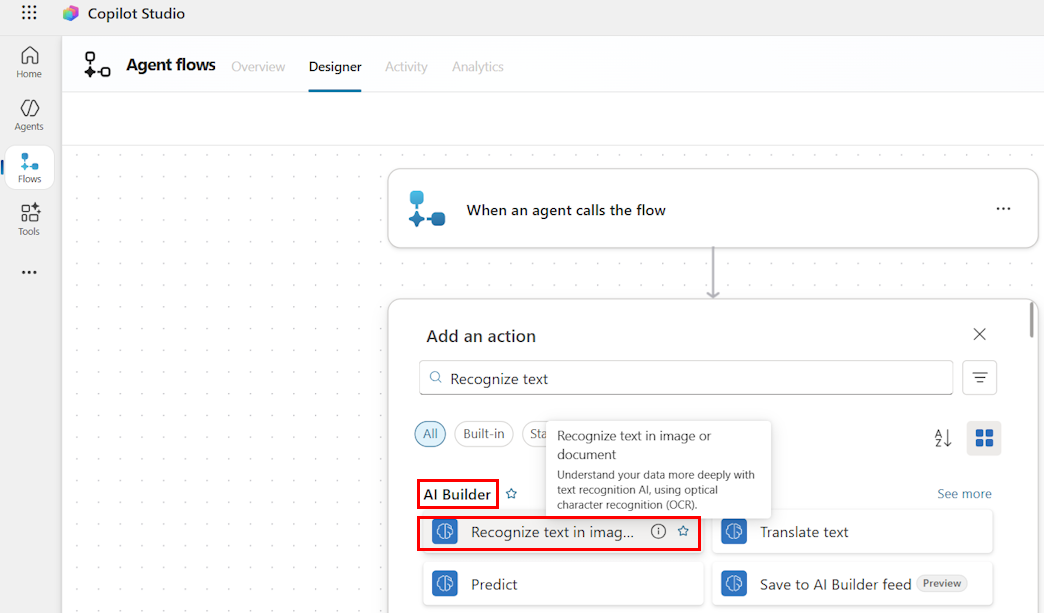
Example: Use the Recognize text in image or document action in the AI Builder category to get page content and process each page result with an apply to each.
Use filters when applying Retrieval Augmented Generation (RAG)
When adding business context from sources such as Dataverse tables, retrieve only the necessary fields and apply filters to reduce the data set.
Example: Filter products by the Computer devices family and retrieve only the Name field before matching product names in an email.