Note
Access to this page requires authorization. You can try signing in or changing directories.
Access to this page requires authorization. You can try changing directories.
Applies to: Microsoft Teams
APPLIES TO:  Meetings
  Events
External meeting assistant tools (such as transcription or note-taking bots) are increasingly used in meetings. While these tools may improve individual productivity, they may also introduce security and compliance risks when they access meetings without the organizer’s awareness or consent.
These bots may:
Record or transcribe meetings without participant awareness.
Store meeting data in third-party systems outside of the organization's compliance boundaries.
Introduce compliance, privacy, and data leakage risks.
Microsoft Teams provides admins with controls to detect and manage external bots when they attempt to join meetings hosted in the organization. Using these controls admins are able to manage or prevent unauthorized joins of external bots to the meetings hosted in their organization.
How bot detection works
Teams uses built-in detection mechanisms to identify external AI bots based on signals collected during the meeting join process. We utilize a combination of infrastructural and behavioral signals leading to high accuracy levels and detection coverage. Based on the detection result, we mark the participants as bots and enforce the behavior as per the admin policy setting.
In-meeting awareness and control
When bot detection is enabled, meeting organizers see enhanced controls and visibility. The participants detected as bots are placed in the meeting lobby irrespective of the lobby configuration for the meeting. Organizers (also presenters, depending on the meeting setting), need to explicitly admit these bots into the meeting. They're reminded about the risk of admitting bots into their meeting to ensure bots aren't mistakenly admitted from the lobby.
Tip
Configure the meetings hosted in your organization to only allow Organizers and co-organizers to admit participants from the meeting lobby. This setting ensures that no other participant in the meeting with the presenter role can admit participants bypassing required scrutiny and risking security.
Admin policy: Manage external bots and their access
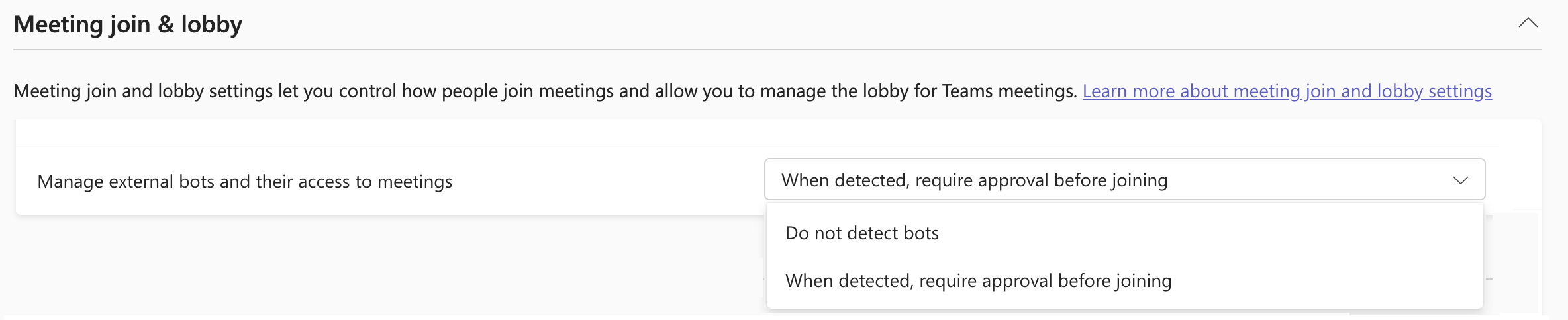
You can manage how external bots are handled using a Teams meeting policy in the Teams Admin Center. Configure this meeting policy at the tenant level with the default org-wide meeting policy or configure for a specific user group/user by creating or modifying the appropriate targeted meeting policy.
Policy details
Scope: Meetings policies at a user / group level
This setting is present in the Meeting Join and Lobby section of Meeting policies. Look for "Manage external bots and their access to meetings" and select the appropriate option. You can use the Set-CsTeamsMeetingPolicy PowerShell cmdlet to manage this policy option. You need to set the "ExternalBotAccessMode" attribute.
Options
| Admin Center | PowerShell | Behavior |
|---|---|---|
| Do not detect bots | AllowBots | Bots aren't detected or marked in the lobby or in the meeting. They appear as any other external participant in the meetings. |
| When detected, require approval before joining | RequireApprovalWhenDetected | (default) Bots are detected and marked in the lobby. They're enforced to be in the lobby until explicitly admitted into the meeting. |
Use PowerShell to manage lobby policies
You can use the Set-CsTeamsMeetingPolicy PowerShell cmdlet to manage this policy option.
To enable the detection of bots and enforcing meeting lobby:
Set-CsTeamsEventsPolicy -Identity <policy name> -ExternalBotAccessMode RequireApprovalWhenDetected
To disable detection of bots and the secure lobby experience:
Set-CsTeamsEventsPolicy -Identity <policy name> -ExternalBotAccessMode AllowBots
Best practices
Use the default Require approval when detected setting for this policy for balanced security.
Educate organizers about bot risks and practising caution during lobby admission decisions.
Monitor audit logs for unusual participant activity.
Avoid disabling bot detection unless required for specific business scenarios.
Known limitations
Some external bots may not be detected. We're constantly improving our detection mechanism and filling in any gaps that are observed. Help improve the system by reporting any undetected external meeting bots to us via the Feeback option in Teams.
Detection may occasionally misclassify human participants as bots. When you observe this misclassification in the meetings, you can rectify the situation by admitting the participants from the lobby and marking them with "This is not a bot" option. This action changes the representation as a standard human participant in that specific meeting. We triage this reported information regularly to tune our detection mechanism.
Related features
Next steps
Assign or update a meeting policy to manage external bots.
Communicate security enhancements lobby experience to meeting organizers in your organization.