Note
Access to this page requires authorization. You can try signing in or changing directories.
Access to this page requires authorization. You can try changing directories.
Appropriate roles: Admin agent | Sales agent
Important
Growth margins (the experience, APIs, and reconciliation attribute) are currently available in the Sandbox environment only and are not yet available in production.
Microsoft supports growth margins in new commerce. Growth margins are incremental partner margins that reward partners for driving high-value growth into strategic products. When a growth margin applies, you receive a new partner price for the transaction in addition to your standard base margin. Growth margins are partner-earned economics (a partner margin), not a customer-facing discount.
Growth margins are applicable only to Direct Bill partners and Distributors.
Refer the Growth Margin Guide for latest information on the Growth Margins. You need to sign-in to access the guide.
Sandbox availability
Sandbox availability is starting July 7, 2026. The early sandbox availability window helps partners prepare to operationalize and adopt the new Growth margins models.
In sandbox starting July 7, 2026:
- Discovery: Enabling partners to view available growth margins. This includes support for catalog APIs to return the product, SKUs, and availabilities for the new benefit artifacts. Partners are able to export the growth margins details by market from the pricing workspace.
- Transact: Partners are able to view growth margins available for a base product/SKU for their customers. Eligibility is enforced so growth margins are applied only for customers that meet the growth margins conditions.
- Eligibility checks: An API specifically to provide growth margin eligibility results before the partner attempts to purchase the base product/SKU.
Available in future sandbox updates:
- Schedule change: Schedule change will be available mid-July.
- Price breakdown: Price breakdown will be available in Sandbox from July 21, 2026.
- Growth Margin Guide: The Growth Margin Guide will be accessible through the Pricing workspace effective July 21, 2026.
- Billing: Recon and invoice data will be available for billing at the end of July, aligning to the typical monthly billing cadence. An additional attribute is available to identify growth margin specific data and properties. Invoice and billing will follow the long standing SLAs for the month following the billing close.
- Growth margin re-evaluation at renewal: Growth margin re-evaluation at renewal will be available at the end of July.
Download and view growth margins list
Partners can download or view growth margin details directly in the Partner Center UX.
To download or view growth margins:
- Go to Partner Center and navigate to the Pricing workspace.
- Select Benefits from the left navigation.
- Select Growth margins from the Benefit type dropdown.
- Browse the growth margins table showing Product ID, Name, Sku Id, and Description.
- Select a growth margin row to open the details panel with full growth margin information including offer dates, discount type and value, term, billing cycle, and constraints.
- Partners can download list of active commercial growth margins for a given market (country/region) and segment. For example, if a partner wants to get growth margins for products sold to a German (DE) Commercial customer, then select the German (DE) market and Commercial segment to download the growth margins list.
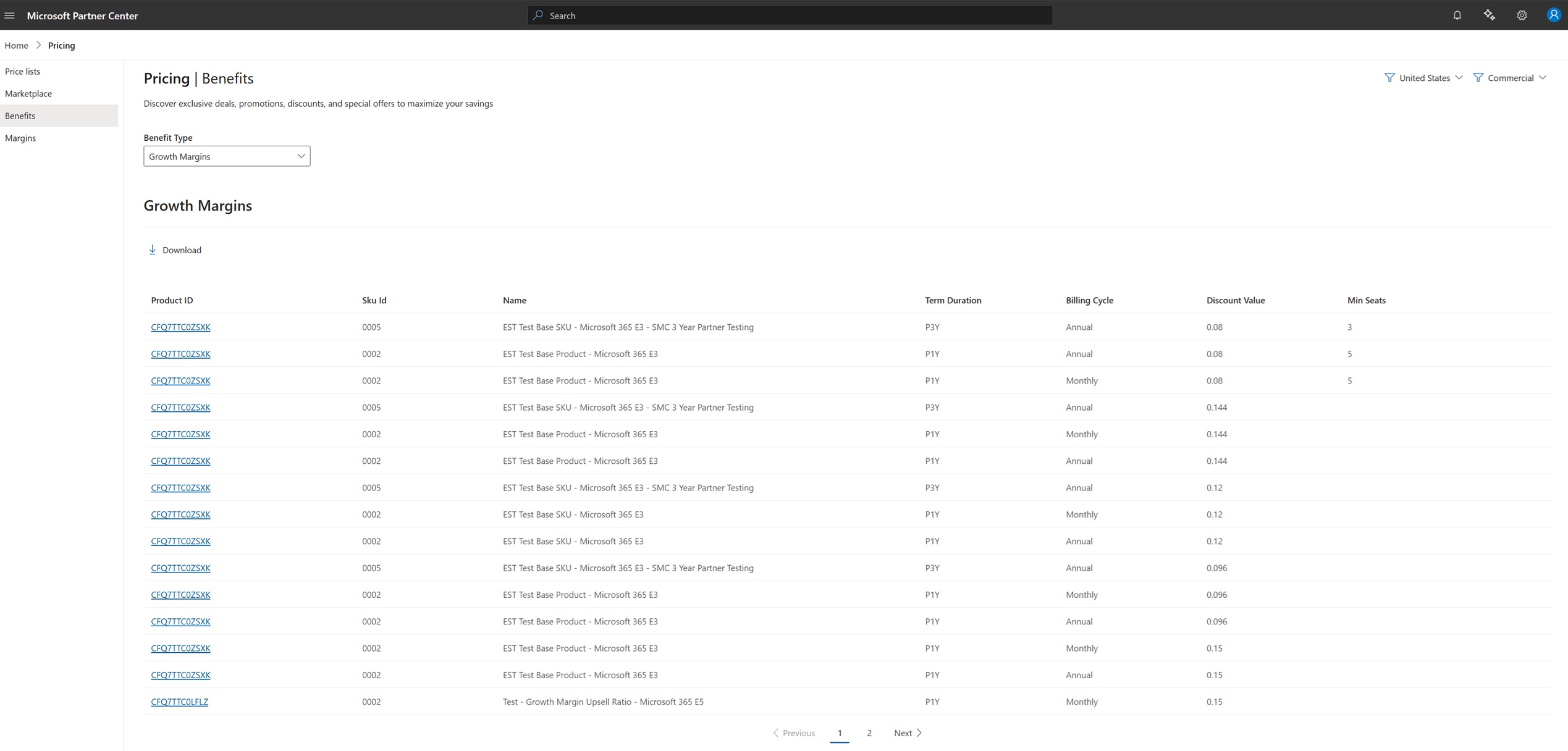
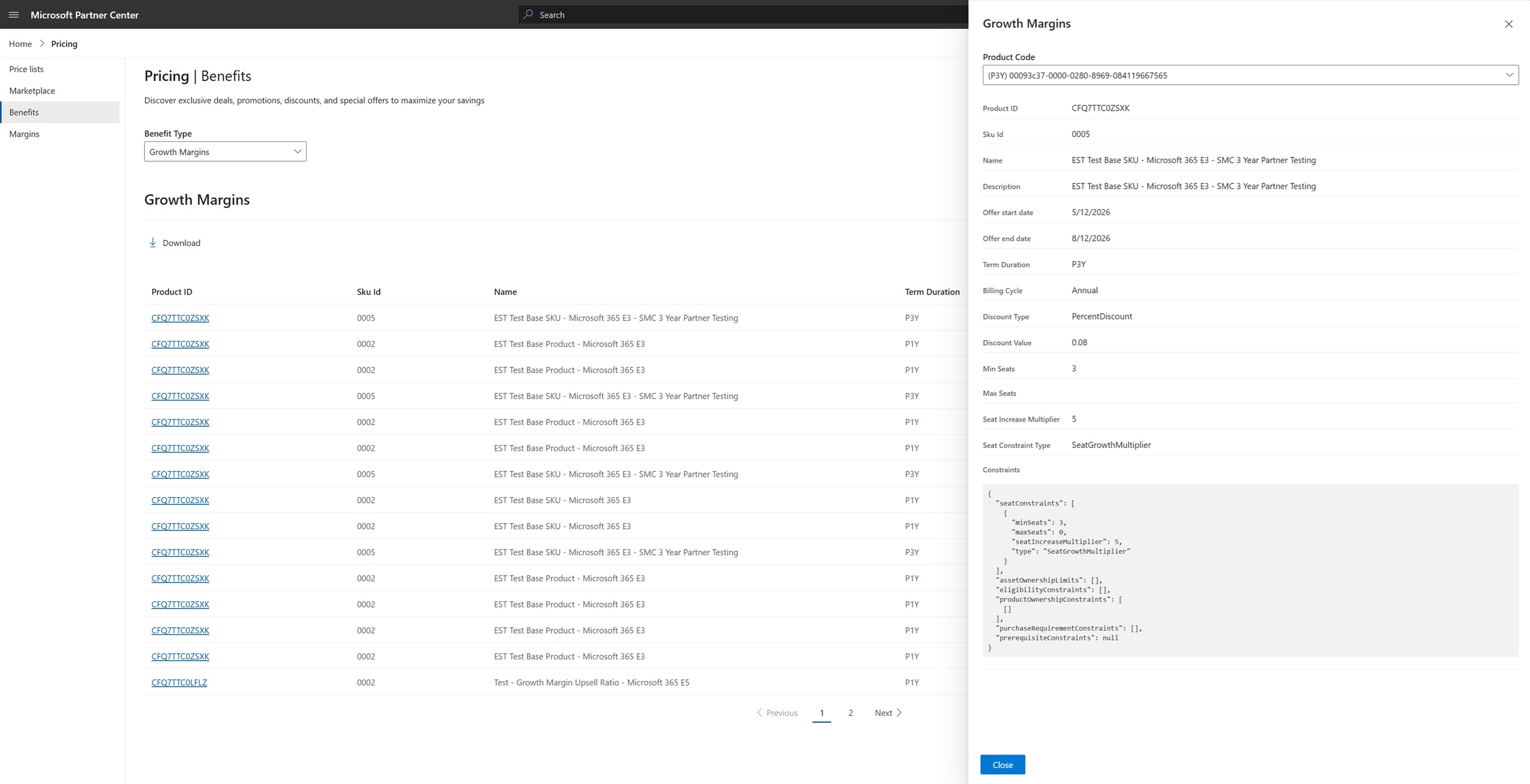
The growth margins download list contains the following data:
| Field | Example | Description |
|---|---|---|
| productCode | 00093c37-0000-0280-8969-084119667565 | Growth margin Product Code identifier. |
| productId | CFQ7TTC0ZSXK | Identifier of the product. |
| skuId | 0005 | Identifier of the SKU. |
| name | Growth Margin – New to offer | Title of the growth margin. |
| description | You will receive a new partner price for this transaction. New-to-offer margins are available when acquiring select SKUs for new customers. | Growth margin short description. |
| startDate | 2026-05-12T11:16:17Z | Start date for the growth margin. |
| endDate | 2026-08-12T11:17:02Z | End date for the growth margin. Always refer to the latest start and end dates to identify the active growth margin. |
| termDuration | P1Y, P1M, P3Y | Length of the term. |
| billingCycle | Monthly, Annual | How frequently billing occurs. |
| discountType | PercentDiscount | Type of discount applied (percentage or flat). |
| discountValue | 0.08 | Value of the discount. |
| minSeats | 3 | Minimum seats required for the growth margin. |
| maxSeats | 0 | Maximum seats for the growth margin. A value of 0 indicates no maximum. |
| seatIncreaseMultiplier | 5 | The minimum growth factor required for a seat expansion transaction to qualify for a Growth Margin. The number of new seats added must meet or exceed the specified multiplier relative to the customer's existing qualifying seat count, in addition to any minimum seat threshold requirements. Growth Margin eligibility is determined at the time of purchase based on these criteria. |
| seatConstraintType | SeatGrowthMultiplier | Type of seat constraint applied. |
| constraints | (JSON object) | Full eligibility constraints in JSON format. See the constraint definitions below for details on each constraint type. |
The constraints field contains the following constraint types:
| Constraint | Definition |
|---|---|
| seatConstraints | Defines the minimum or maximum seat requirements that must be met for a transaction to qualify for Growth Margin. Examples include minimum net-new seats or required seat expansion thresholds. |
| assetOwnershipLimits | Defines limits based on the customer's existing ownership of qualifying subscriptions or assets. Growth Margin eligibility may depend on whether the customer already owns, previously owned, or currently holds qualifying subscriptions. |
| eligibilityConstraints | Defines the set of business rules that determine whether a transaction qualifies for Growth Margin. These rules can include customer history, seat growth requirements, product eligibility, purchase timing, and other qualifying criteria. |
| productOwnershipConstraints | Defines product ownership conditions that must be met before Growth Margin can be applied. For example, eligibility may depend on whether the customer currently owns, previously owned, or does not own a specific product or SKU. |
| purchaseRequirementConstraints | Defines purchase-specific requirements that must be satisfied for Growth Margin eligibility, such as purchasing a qualifying product, meeting a minimum seat threshold, selecting an eligible term, or creating a new subscription when required. |
| prerequisiteConstraints | Defines prerequisite product ownership conditions evaluated within a configurable lookback window. Uses MustHaveAll, MustHaveAny, and MustHaveNone rules to specify products the customer must own, may own any of, or must not own to qualify. Each rule can include seat constraints and a lookback period over which ownership is evaluated. |
Get growth margins list via API
You can get a list of active growth margins for a given market (country/region) and segment.
The API returns this list of growth margins and important information to help you understand which growth margins are available for customers in different countries/regions.
The API includes the following data for a given growth margin:
- Product Code identifier for the growth margin.
- Duration of the growth margin.
- The percentage discount for the growth margin.
- The Product and SKU the growth margin is available for.
Partner Center applies growth margins when you purchase the product SKU for which the growth margin is available. Growth margins are available in the Partner Center catalog in product SKU details. You can select view details to get more information about the growth margin.
You can view the growth margin details from the catalog page view SKU details, the review page before submitting the purchase, the confirmation after the order is submitted and the order history page.
Discovering growth margins
You can discover growth margins in the Partner Center catalog purchase experience or by calling the growthMargin API. The growth margins list is editorially maintained and updated monthly.
As a partner, you can access the list of all CSP growth margins in the Growth Margin Guide. You need to sign-in to access the guide.
When you view a product SKU that has a growth margin available, the catalog surfaces a Price benefits panel indicating "This purchase qualifies for pricing discounts."
The Price benefits panel separates Growth margins from Promotions:
- Growth margins shows "This purchase enables a new partner margin price," along with the growth margin name (for example, Growth Margin – New to offer), its ID (for example,
39NFJQT25FLR:000C:084R5MQ9QF2R), its Product Code, and a short description. - Promotions shows available customer-facing promotions.
If only one type of benefit is available and you look for the other, Partner Center indicates that no discounts of that type exist for the selection.
A new priceBenefits array is added to each cart line item (cartLineItem.priceBenefits).
- On request (create/update cart): the field is server-authoritative. Any value the partner sends is ignored and replaced by the auto-applied result. Partners should treat it as read-only.
- On response:
priceBenefitsreflects the single auto-applied, validated Growth Margin for that line item, or is omitted when none applies.
Calculation logic for growth margins
The following table shows how margins and discounts are applied to calculate the partner price:
| Scenario | ERP Price | Margin / Discount Applied | Calculation | Partner Price |
|---|---|---|---|---|
| No margin | $100.00 | 0% margin | $100 × (1 - 0%) | $100.00 |
| Base margin only | $100.00 | 20% base margin | $100 × (1 - 20%) | $80.00 |
| Base margin + growth margin | $100.00 | 20% base margin + 15% growth margin | $100 × (1 - 20% - 15%) | $65.00 |
| Base margin + promo discount | $100.00 | 20% base margin + 10% promotion discount | ($100 × (1 - 20%)) × (1 - 10%) | $72.00 |
| Base margin + growth margin + promo discount | $100.00 | 20% base margin + 15% growth margin + 10% promotion discount | ($100 × (1 - 20% - 15%)) × (1 - 10%) | $58.50 |
View growth margins in Partner Center
During checkout, Partner Center displays the growth margin price points directly in the cart so you can see the partner economics before submitting the order. The cart displays:
- Unit price (list/base price), and Margin price (partner price) columns alongside Quantity and Total price.
- A Partner margin value indicating the qualifying growth margin (for example, New to offer) or No margin when none applies, along with Term, Promotions, and Segment.
- A view details link that opens the growth margin details (the same information shown in the catalog Price benefits panel), and a Find out why link that explains the margin or why it doesn't apply.
You can view growth margin details from the catalog page view SKU details, the review page before submitting the purchase, the confirmation after the order is submitted, and the order history page.
Select Price breakdown on a line item to see the price points for the purchase:
Note
Price breakdown will be available in Sandbox from July 21, 2026.
| Price point | Description | Example |
|---|---|---|
| List price (after base margin) | The price after applying the base margin to the ERP. Calculated as ERP × (1 - base margin %). | $80.00 |
| Unit price (partner/margin price) | The partner's price per unit after applying both the base margin and growth margin. Calculated as ERP × (1 - base margin % - growth margin %). | $65.00 |
| Growth margin | The growth margin discount percentage and scenario name applied to the transaction. | 15% discount, New to offer |
| Promotions | Any customer-facing promotional discount applied after the partner price is calculated. | 10% discount, Microsoft 365 E3-targeted 10% Offer |
| Quantity | The number of units in the line item. | 10 |
| Total price | The final price charged. Calculated as Unit price × Quantity, with any promotion discount applied. | $585.00 |
When both a growth margin and a customer promotion apply, the breakdown lists each on its own line so you can see the partner economics (growth margin) and the customer economics (promotion) separately. A Pricing and discounts view also summarizes the applied benefits (for example, Promotion: 10% discount and Growth margin: 15% discount) with a Get More Info option.
Growth margins in the cart
A new priceBenefits collection is available in the cart showing if growth margins are applicable to the cart line item. priceBenefits are read only and calculated when adding a new line item or getting the cart.
Example
{
  "id": "0001",
  "catalogItemId": "CFQ7TTC0ZSXK:0005:...",
  "quantity": 5,
  "termDuration": "P3Y",
  "billingCycle": "Annual",
  "promotionId": null,
  "priceBenefits": [
    {
      "type": "GrowthMargin",
      "productCode": "00093c37-0000-0280-8969-084119667565",
      "productId": "39NFJQT10HVS",
      "skuId": "0001",
      "availabilityId": "084R5MQ9QF37"
    }
  ],
  "pricing": {
    "listPrice": 100.00,
    "discountedPrice": 90.00
  }
}
Verify eligibility
You can view whether a customer purchase is eligible for a growth margin by seeing the information in the review page in Partner Center before purchasing the product. You can also call the growth margin eligibility API, passing the customer tenant ID and the product/SKU. The call returns whether the customer is eligible for a growth margin.
If the customer isn't eligible, the API returns the conditions that weren't met for the growth margin to be applied.
Important
As a partner, you should:
- Verify growth margins before you submit a transaction. In the Partner Center review page if you don't see a growth margin, it isn't applied on the transaction and you receive the standard (nonmargin) price.
- Look at the cart line item to see if the growth margin is present before submitting a transaction.
- Call the growth margin eligibility API before submitting transactions to verify your customer product SKU combination is eligible and, if not, the reasons for ineligibility.
Important
Growth margin ineligibility is non-blocking. If a transaction isn't eligible, you can still proceed at the standard (nonmargin) price. The review experience and the eligibility API surface the reason the growth margin wasn't applied.
There are various reasons a customer isn't eligible for a growth margin. These ineligibility reasons are returned in the growth margin eligibility API in cases where the customer isn't eligible.
| Reason | Description |
|---|---|
| Not new-to-offer | The customer already has the product (or a SKU in the configured set) on the tenant within the lookback period. By default, the lookback period is the past three years unless a different window is specified in the Growth Margin Guide. |
| Below minimum seats | The transaction is below the configured minimum seat threshold for the growth scenario. |
| Expansion multiple not met | The new seats don't meet the configured seat-expansion multiple of existing seats. |
| Seats added to existing subscription | Growth margin requires a new subscription; seats added to an existing subscription don't qualify. |
| Strategic SKU Mix not met | The tenant's strategic SKU mix is below the configured threshold, or the customer is already above the threshold. |
| Channel-shift excluded | The seats originate from a channel shift (for example, EA to CSP) and don't qualify as growth. |
| Specialized Offer precedence | A Specialized Offer applies to the SKU and takes precedence over growth margin. |
Verify growth margin eligibility
The specific eligibility criteria (for example, lookback periods, seat-expansion multiples, minimum seat thresholds, and strategic SKU mix thresholds) are defined in the Growth Margin Guide. Partners can call the new priceBenefitsEligibilities to verify whether a given customer is eligible for a priceBenefit.
Request fields
| Field | Type | Description |
|---|---|---|
| id | integer | A zero-based index identifying each item in the request array. |
| baseCatalogItemId | string | The catalog item ID (ProductId:SkuId:AvailabilityId) of the product being purchased. |
| type | string | The type of price benefit to evaluate. Use GrowthMargin. |
| evaluationType | string | Determines when the eligibility evaluation applies. Use Immediate for current transactions or Scheduled for next-term (renewal) evaluation. |
| subscriptionId | string | The subscription ID to evaluate eligibility against. Required when evaluating eligibility for an existing subscription (for example, seat expansion or renewal scenarios). |
| quantity | integer | The number of seats in the transaction being evaluated. |
| billingCycle | string | The billing cycle for the transaction (for example, Annual, Monthly). |
| termDuration | string | The term duration in ISO 8601 format (for example, P1Y for one year, P1M for one month). |
| priceBenefit | object | The specific growth margin to evaluate. Contains the fields described in the following rows. |
| priceBenefit.productCode | string | The unique product code that identifies the growth margin. |
| priceBenefit.productId | string | The product ID of the growth margin benefit in the catalog. |
| priceBenefit.skuId | string | The SKU ID associated with the growth margin benefit. |
| priceBenefit.availabilityId | string | The availability ID that represents a specific purchasable instance of the growth margin benefit. |
Example request
Endpoint: v{version}/customers/{customer_id}/priceBenefitsEligibilities
{
  "items": [
    {
      "id": 0,
      "baseCatalogItemId": "CFQ7TTC0LH9J:0001:CFQ7TTC0LH9G",
      "type": "GrowthMargin",
      "evaluationType": "Immediate",
      "subscriptionId": "519d7509-3c1e-44cd-c004-ba391a843cea",
      "quantity": 25,
      "billingCycle": "Annual",
      "termDuration": "P1Y",
      "priceBenefit": {
        "productCode": "00093c37-0000-0280-8969-084119667565",
        "productId": "39NFJQT10HVS",
        "skuId": "0002",
        "availabilityId": "084R5MQ9QF37"
      }
    }
  ]
}
Example: Is eligible
{
  "items": [
    {
      "id": 0,
      "baseCatalogItemId": "CFQ7TTC0LH9J:0001:CFQ7TTC0LH9G",
      "type": "GrowthMargin",
      "quantity": 25,
      "billingCycle": "Annual",
      "termDuration": "P1Y",
      "eligibilities": [
        {
          "priceBenefit": {
            "productCode": "00093c37-0000-0280-8969-084119667565",
            "productId": "39NFJQT10HVS",
            "skuId": "0002",
            "availabilityId": "084R5MQ9QF37"
          },
          "isEligible": true,
          "errors": null
        }
      ]
    }
  ]
}
Example: Is not eligible
{
  "priceBenefit": { "productCode": "...", "productId": "...", "skuId": "...", "availabilityId": "..." },
  "isEligible": false,
  "errors": [
    {
      "type": "NewToOfferGrowthMarginConstraintNotMet",
      "description": "...",
      "minNewToOfferConstraint": 10,
      "maxNewToOfferConstraint": 100,
      "currentNewToOfferPurchased": 3,
      "minNewToOfferRequiredToBePurchased": 7,
      "maxNewToOfferWhichCanBePurchased": 97
    }
  ]
}
The specific eligibility criteria (for example, lookback periods, seat-expansion multiples, minimum seat thresholds, and strategic SKU mix thresholds) are defined in the Growth Margin Guide.
Seat expansion
Seat expansion applies to mid-term growth only. For mid-term seat expansion, the incremental seats must be placed on a new subscription, and only those new seats earn growth margin while the existing seats remain at base margin. The new seats must also meet the configured multiple of existing seats.
For seat expansion at renewal, no separate subscription is needed — all seats, both existing and new, earn growth margin if the customer qualifies under the then-current criteria.
You should always rely on the growth margin eligibility API to understand whether a growth margin is applied before purchasing. The API returns the eligibility status and the reason if not eligible.
Stacking and precedence
- Customer promotions stack with growth margin. An eligible customer-facing promotion is applied after the partner price (margin first, promotion second).
- Specialized Offers take precedence. When a Specialized Offer exists for the SKU, SO pricing takes precedence and growth margin isn't applied. Growth margin and SO pricing don't stack.
Growth margins and renewals
Note
Growth margin re-evaluation at renewal will be available at the end of July.
Growth margins are valid for the term of the purchase. At renewal, the subscription reverts to the base margin unless the customer independently requalifies for a growth margin under the then-current criteria. The system evaluates renewal eligibility in advance of the renewal date.
Note
Growth margins are evaluated closer to the renewal date, so a growth margin shown when a renewal is scheduled may change and no longer apply at renewal. Always confirm the applied margin near the renewal date. Whether a subscription requalifies at renewal is governed by the criteria in the Growth Margin Guide.
Growth margins and manage scenarios
Growth margins are applicable for new subscription purchases, upgrades (immediate and partial), scheduled upgrades, and trial-to-paid conversions.
- Upgrades. When you upgrade a subscription, Partner Center evaluates whether a growth margin applies to the upgrade and shows a Discount for this upgrade in the Pricing and discounts view. Confirm the margin in the review experience before submitting.
- Seat additions. For mid-term seat expansion, incremental seats must be placed on a new subscription — only those new seats earn growth margin while the existing seats remain at base margin. Seats added to an existing subscription don't receive growth margin. At renewal, no separate subscription is needed and all seats can earn growth margin if eligible.
- Partner-to-partner transfer. Growth margin eligibility persists when a subscription is transferred between partners during the term. The receiving partner inherits the growth margin pricing for the remainder of the term.
- Cancellations. Standard new commerce cancellation behavior applies: you can cancel a subscription with a prorated refund within the first seven days of any term, except where otherwise required by law. Seat reductions are only allowed above the growth margin seat requirement. If seats drop below the minimum required, the entire subscription must be canceled within the cancellation window.
Growth margin IDs can also be found in the unbilled line items in the new commerce reconciliation file. Growth margins are reflected in the subscription details page.
Growth margin details for manage scenarios
Applied growth margins are available if applied to various post purchase objects:
- Order line items
- Subscriptions
- scheduledNextTermInstructions and scheduledActions
Example — order line item
{
  "lineItemNumber": 0,
  "offerId": "CFQ7TTC0ZSXK:0005:...",
  "quantity": 5,
  "promotionId": null,
  "priceBenefits": [
    {
      "type": "GrowthMargin",
      "productCode": "00093c37-0000-0280-8969-084119667565",
      "productId": "39NFJQT10HVS",
      "skuId": "0001",
      "availabilityId": "084R5MQ9QF37"
    }
  ]
}
Pricing and reconciliation for growth margins
Price list files don't include growth margin pricing or information. You should use the growth margins API or view/download growth margins in the Partner Center Pricing benefits experience or discover growth margins in the Partner Center catalog purchase experience. The API and Partner Center include details about the growth margins, such as the growth margin Product Code identifier and growth margin percentage value.
You can verify growth margins was applied by going to the Partner Center billing page or by calling the Partner Center APIs to see if growth margins were applied to a transaction.
You can also verify the growth margin was applied in the Partner Center order history and activity logs.
You can find the growth margins you purchased in the new commerce reconciliation files. The reconciliation line item has information in the following fields:
- A new attribute
PriceBenefitsincludes the growth margin Product Code with type asgrowthMargin. Partners can use the growth margins API or get growth margins by ID API to get more details about the growth margin. UnitPriceis the price per unit for the purchase after applying Base margin on ERP.EffectiveUnitPricerepresents the final price charged to the partner. It is calculated by applying the applicable base margin and growth margin to the ERP price, and then applying any eligible promotional discounts to the resulting partner price.
For example, when a growth margin is applied, the PriceBenefits attribute contains:
"PriceBenefits": [
  { "id": "00093c3a-0000-0280-f57d-f85412b6826d", "type": "growthMargin" }
]