Note
Access to this page requires authorization. You can try signing in or changing directories.
Access to this page requires authorization. You can try changing directories.
Partners are informed about their progress on engagements with other partners, sellers, and customers.
This article is an overview of the communications that are sent and who receives them as partners collaborate in the form of referrals, leads, and Co-sell publishing in the Referrals workspace.
Note
We do not send notifications and mails for outbound opportunities created via New deal process, Bulk upload or Bi-directional Connectors.
Note
Referraladmins will get latest seller contact details via Action center after August'24.
Co-sell opportunity
Outgoing Co-sell opportunity: When an Azure IP Co-sell opportunity is sent from Microsoft or a partner to another partner or vice-versa
Event Involved parties Who receives email? Referrals Outgoing Co-sell Opportunity Partner A inviting Partner B
Partner A inviting Partner B and Microsoft
Partner A inviting MicrosoftPartner A/Sender - Why are you receiving the email? An acknowledgment for the sender that Co-sell opportunity sent to other party, which contains customer and deal details for receiver's reference and the sender receives the outcome within 14 days.
- Who receives the email/notification? The sender's referral team member who invites another party for Co-selling.
- How do we decide who to send the email/notification to? The sender's referral team member registered mail address while creating referrals.
Outgoing Co-sell opportunity declined: When an Azure IP Co-sell opportunity is declined by the receiver
Event Involved parties Who receives email? Referrals Outgoing Co-sell Declined Partner A inviting Partner B
Partner A inviting Partner B and Microsoft
Partner A inviting Microsoft.Partner A/Sender - Why are you receiving the email? An acknowledgment to the sender of the Co-sell opportunity that the recipient sales team is unable to accept the referral request. The acknowledgment contains referral details and notes from the recipient.
- Who receives the email/notification? Sender's referral team member who invites another party for Co-selling.
- How do we decide who to send the email/notification to? The sender's referral team member registered mail address while creating referrals.
Outgoing Co-sell opportunity accepted: When an Azure IP Co-sell opportunity is accepted by the receiver
Event Involved parties Who receives email? Referrals Outgoing Co-Sell Accepted Partner A inviting Partner B
Partner A inviting Partner B and Microsoft
Partner A inviting Microsoft.Partner A/Sender - Why are you receiving the email? An acknowledgment to the sender of the Co-sell opportunity that the recipient sales team accepted the referral request. The acknowledgment contains customer, receiver's contact and deal details.
- Who receives the email/notification? Sender's referral team member who invites another party for Co-selling
- How do we decide who to send the email/notification to? The sender's referral team member registered mail address while creating referrals.
Incoming Co-sell opportunity: When an Azure IP Co-sell opportunity is received at partner's end from Microsoft or another Partner
Event Involved parties Who receives email? Referrals Incoming Co-Sell Opportunity Partner A inviting Partner B
Partner A inviting Partner B and Microsoft
Partner A inviting MicrosoftPartner B/Receiver - Why are you receiving the email? An acknowledgment for the receiver that Co-sell opportunity is received from other party, which contains customer and deal details for their reference. The receiver team needs to act, either decline or accept by cut-off date, failure of which auto-declines the Co-sell opportunity.
- Who receives the email/notification? Receiver team referral admin under the Microsoft AI Cloud Partner Program membership the opportunity is shared.
- How do we decide who to send the email/notification to? email addresses having Referral admin role in user management setting of Partner Center.
Co-sell opportunity expiring: When an Azure IP Co-sell opportunity is about to expire because 14 days accept/decline window is near
Event Involved parties Who receives email? Referrals Incoming Co-Sell Opportunity Expiring Partner A inviting Partner B.
Partner A inviting Partner B and Microsoft.
Partner A inviting Microsoft.Partner B/Receiver. - Why are you receiving the email? An acknowledgment for the receiver that Co-sell opportunity action (accept/decline) window is nearby. The receiver team needs to act, either decline or accept by cut-off date, failure of which auto-declines the Co-sell opportunity. Acknowledgment contains deal details and date of expiry.
- Who receives the email/notification? Receiver team referral admin under the Microsoft AI Cloud Partner Program membership the opportunity is shared.
- How do we decide who to send the email/notification to? email addresses having Referral admin role in user management setting of Partner Center.
Deal registration
Action required on Azure IP Co-sell deal registration: When deal validation team sent back the Co-sell opportunity for partner to edit
Event Involved parties Who receives email? Referrals Deal Registration Action Required Partners
Microsoft.
Deal validation teamTeam members of the referral - Why are you receiving the email? An acknowledgment that Co-sell opportunity is sent back for edits from deal validation team. The receiver needs to make edits as per notes sent in the communication. The acknowledgment contains customer details and deal validation team message.
- Who receives the email/notification? Referral team members who are associated the Co-sell opportunity.
- How do we decide who to send the email/notification to? email addresses of Referral team member who created the Co-sell opportunity.
Azure IP Co-sell deal registration failed the review: When an Azure IP Co-sell opportunity fails the deal validation team review
Event Involved parties Who receives email? Referrals Deal Registration System Approved Selected for Review Partners
Microsoft
Deal validation teamPartner creating the deal - Why are you receiving the email? An acknowledgment that Co-sell opportunity failed the deal validation team review, and you can request the extra review. The acknowledgment contains customer details and the reason for failing the review.
- Who receives the email/notification? Referral team members who are associated the Co-sell opportunity.
- How do we decide who to send the email/notification to? email addresses of Referral team members who are associated the Co-sell opportunity.
Azure IP Co-sell deal registration selected for review: When auto Azure IP Co-sell deal is picked for review from deal validation team
Event Involved parties Who receives email? Referrals Deal Registration Failed Review Partners
Microsoft
Deal validation teamPartner creating the deal - Why are you receiving the email? An acknowledgment that the system approved Co-sell opportunity is selected for manual review from deal validation team. There's no action required from the partner at this stage, Microsoft contacts the partner for more details if needed.
- Who receives the email/notification? Referral team member who is associated the Co-sell opportunity.
- How do we decide who to send the email/notification to? email addresses of Referral team members who are associated the Co-sell opportunity.
Co-sell publishing
Azure IP Co-sell Solution failed the validation: When an Azure IP Co-sell solution failed the validation and don't get Co-sell ready or Azure IP Co-sell incentive status
Event Involved parties Who receives email? Co-sell solution failed validation Co-sell Solution admin Co-sell Solution admin - Why are you receiving the email?* An acknowledgment the Co-sell solution submit to achieve either Co-sell ready or Azure IP Co-sell incentive status failed the validation. Co-sell Solution admin need to review the report sent and submit the solution again to achieve the Co-sell ready or Azure IP Co-sell Incentive stage.
- Who receives the email/notification? Co-sell Solution admin who submitted a Microsoft Marketplace offer for Co-selling.
- How do we decide who to send the email/notification to? email addresses of Co-sell Solution admin who submitted a Microsoft Marketplace offer for Co-selling.
Azure IP Co-sell Solution Passed the validation: When an Azure IP Co-sell solution passed the validation and get Co-sell ready or Azure IP Co-sell incentive status
Event Involved parties Who receives email? Co-sell solution failed validation Co-sell Solution admin Co-sell Solution admin - Why are you receiving the email?* An acknowledgment the Co-sell solution submit to achieve either Co-sell ready or Azure IP Co-sell incentive status failed the validation. There's no action required from the partner at this stage.
- Who receives the email/notification?* Co-sell Solution admin who submitted a Microsoft Marketplace offer for Co-selling.
- How do we decide who to send the email/notification to?* email addresses of Co-sell Solution admin who submitted a Microsoft Marketplace offer for Co-selling.
Leads
Note
Lead email notifications are only generated for Contact me leads.
The following workflow shows how email is sent to partners from the Partner Center referrals system for new partner inbound referrals.
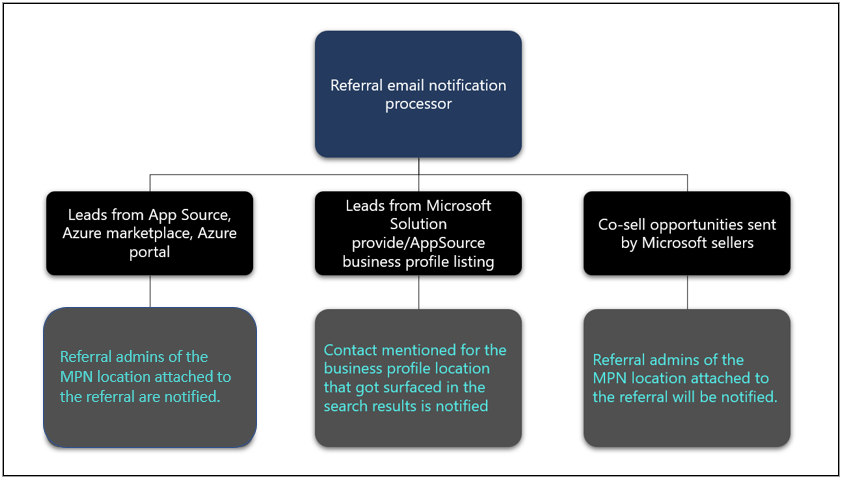
- Leads Digest: When a partner receives multiple leads from Microsoft Marketplace
| Event | Involved parties | Who receives email? |
|---|---|---|
| Multiple leads were generated | Customer Partner |
Referral admin |
Why are you receiving the email? An acknowledgment for the partner that a lead is generated from Microsoft Marketplace and they have opportunity to follow up with the customer.
Who receives the email/notification? Referral admin.
How do we decide who to send the email/notification to?* email addresses of The referral admin registered mail address.
Lead is generated: When a Lead is generated from a Contact me button on the offer listing page in Marketplace
Event Involved parties Who receives email? Multiple leads got generated Customer
PartnerReferral admin Why are you receiving the email? An acknowledgment for the partner that a lead is generated from Microsoft Marketplace and the contact information is shared in the email. Contact me leads require follow-up from the partner because the Customer is can't proceed further. Partners should promptly follow up on these leads to ensure that they're responsive.
Who receives the email/notification? Referral admin.
How do we decide who to send the email/notification to?* email addresses of the referral admin registered mail address.