Note
Access to this page requires authorization. You can try signing in or changing directories.
Access to this page requires authorization. You can try changing directories.
[This article is prerelease documentation and is subject to change.]
FetchXML is Dataverse's native query language that lets makers write data filters as XML code, similar to writing a formula, but more powerful. Use the FetchXML editor to optimize complex profiles for better performance and avoid sync timeouts on large tables (100K+ records).
This feature is best suited for advanced makers and developers who are comfortable working with XML and need more control than what the visual filter builder provides.
Important
- This is a preview feature.
- Preview features aren't meant for production use and might have restricted functionality. These features are subject to supplemental terms of use, and are available before an official release so that customers can get early access and provide feedback.
- This feature is being gradually rolled out across regions and might not be available yet in your region.
Benefits of the FetchXML editor
The FetchXML editor offers several advantages over the visual expression builder for defining offline data filters.
Support for hierarchical conditions:
The FetchXML editor supports building complex, hierarchical conditions such as
under,eq-or-under,above, andeq-or-aboveon hierarchy-enabled lookups. Learn more about querying hierarchical data<fetch> <entity name="account"> <filter type="and"> <condition attribute="statecode" operator="eq" value="0" /> </filter> <link-entity name="businessunit" from="businessunitid" to="owningbusinessunit" link-type="any"> <filter type="and"> <condition attribute="businessunitid" operator="eq-or-under" value="{YOUR-PARENT-BU-GUID}" /> </filter> </link-entity> </entity> </fetch>Support for checks against unrelated tables:
The FetchXML editor lets you link to other tables even if they don't have a direct relationship with the primary table, provided you specify valid from and to attributes. This capability is especially useful in complex offline scenarios where multiple entities share a common foreign key but aren't directly related.
<fetch
    distinct="false"
    latematerialize="true"
    options="DisableRowGoal, EnableOptimizerHotfixes">
<entity
    name="cr57f_producttranslation">
    <filter
       type="and">
       <link-entity
       name="cr57f_userlanguagepreference"
       from="cr57f_language_id"
       to="cr57f_language_id"
       link-type="any">
       <filter
          type="and">
          <condition
             attribute="cr57f_user_id"
             operator="eq"
             value="user_002" />
       </filter>
       </link-entity>
   </filter>
  </entity>
</fetch>
Query optimization support by using late materialization and query hints:
The editor exposes advanced optimization controls directly on the
<fetch>element, including:
latematerialize="true": By usinglatematerialize="true", you optimize query performance by narrowing down matching records before retrieving all their column data. This attribute reduces the load when syncing large tables during offline sync. Learn more about using late materialize<fetch distinct="false" latematerialize="true" options="OptimizeForUnknown,ENABLE_HIST_AMENDMENT_FOR_ASC_KEYS"> <entity name="msdyn_workorder"> <filter type="and"> <condition attribute="statecode" operator="eq" value="0" /> <condition attribute="msdyn_systemstatus" operator="in"> <value>690970000</value> <value>690970001</value> </condition> </filter> <!-- Booking chain --> <link-entity name="bookableresourcebooking" from="msdyn_workorder" to="msdyn_workorderid" link-type="any"> <filter type="and"> <condition attribute="statecode" operator="eq" value="0" /> <filter type="or"> <condition attribute="starttime" operator="today" /> <condition attribute="starttime" operator="next-seven-days" /> </filter> </filter> <link-entity name="bookingstatus" from="bookingstatusid" to="bookingstatus" link-type="any"> <filter type="and"> <condition attribute="statecode" operator="eq" value="0" /> </filter> </link-entity> <link-entity name="bookableresource" from="bookableresourceid" to="resource" link-type="any"> <filter type="and"> <condition attribute="userid" operator="eq-userid" /> </filter> </link-entity> </link-entity> <!-- Customer asset --> <link-entity name="msdyn_customerasset" from="msdyn_customerassetid" to="msdyn_customerasset" link-type="any"> <filter type="and"> <condition attribute="statecode" operator="eq" value="0" /> </filter> <!-- Account --> <link-entity name="account" from="accountid" to="msdyn_account" link-type="any"> <filter type="and"> <condition attribute="statecode" operator="eq" value="0" /> </filter> </link-entity> </link-entity> </entity> </fetch>The
optionsattribute passes SQL Server query hints. Learn more about using these options
How the FetchXML editor works
You access the FetchXML editor through the offline profile configuration experience in Power Apps. You write or paste a FetchXML query, and the editor validates it in real time before you save.
In Power Apps, go to your environment's settings and open the Offline Profiles page. Select an existing offline profile or create a new one, and then select Edit profile.
In the offline profile editor, add or select the table whose data you want to filter for offline use.
Under Filter, choose Custom or Related rows, and then select Edit filter.
In the filter editor, scroll down and select View/Edit FetchXML to open the FetchXML code editor.
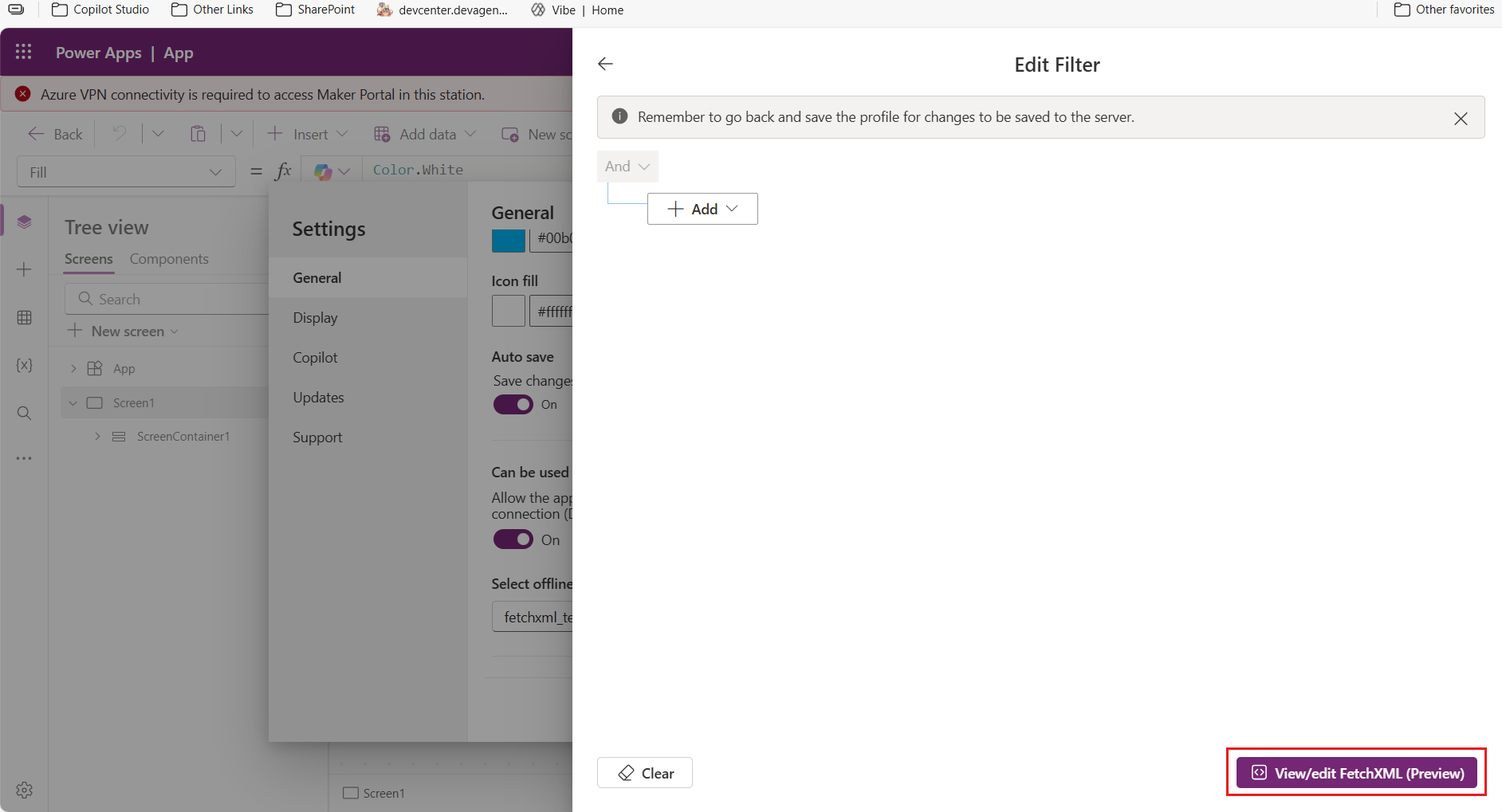
Modify the existing FetchXML query or paste a new one. The editor automatically validates syntax and structure as you edit, checking for:
- A required
<fetch>root element with at least one<entity>element - Only supported FetchXML tags
- Elements placed inside the correct parent elements
- A maximum of 500 filter clauses
If the editor detects an issue, such as a missing required element or an unsupported
<link-entity>usage, it shows a clear error message so you can fix it before saving.- A required
After your FetchXML query is valid, select Apply to convert the filter, and then Save the offline profile.
Important
Always select Apply and then Save after editing FetchXML. If you don't save, your changes are discarded.
After saving, the offline profile uses your custom FetchXML filter for data sync. If your query uses only features supported by the visual builder, those filters continue to display in the Expression Builder UI. If you use advanced FetchXML-only features, the visual filter UI might not render them. Use the FetchXML Editor for any future edits to that filter.
Best practices
- Apply performance hints like
latematerialize="true"orhint="union"for large datasets. - Validate your FetchXML by using the built-in editor checks before saving.
- Save your offline profile immediately after applying FetchXML changes.
- Use only supported FetchXML constructs for offline profiles, such as
link-type="any"orlink-type="not any". - Avoid unsupported join types like
innerorouterin offline filters. - Keep filter clauses under the 500-clause limit per query.
- Don't ignore validation errors. Queries must be well-formed and complete.
Limitations
- Queries must start with a
<fetch>root element and include at least one<entity>element. - Only supported FetchXML elements are allowed. Unknown or unsupported tags trigger validation errors.
- Elements must follow proper parent-child nesting rules.
<link-entity>inside<filter>must uselink-type="any"orlink-type="not any". Inner and outer joins aren't supported.- FetchXML
<attribute>tags aren't used for column selection in offline sync. Use the Filter Columns option instead. - Explicit pagination attributes like
pageandcountare ignored in offline profiles. - Queries are limited to a maximum of 500 filter clauses.