Note
Access to this page requires authorization. You can try signing in or changing directories.
Access to this page requires authorization. You can try changing directories.
[This article is prerelease documentation and is subject to change.]
Configure and use variant DNA visualizations in the process intelligence experience to analyze process variants in a compact, DNA-like pattern showing activity sequences.
Important
- This is a preview feature.
- Preview features aren’t meant for production use and may have restricted functionality. These features are available before an official release so that customers can get early access and provide feedback.
- For more information, go to our preview terms.
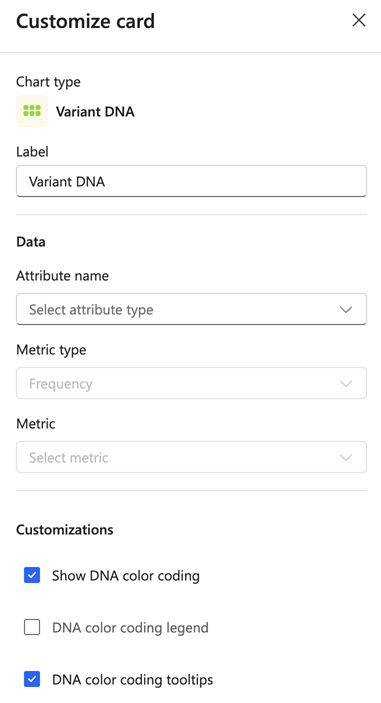
Label
Enter a custom label for the card.
Data
- Attribute name: From the dropdown menu, select the attribute according to which the variants are analyzed.
- Metric type: Choose the metric type for your analysis (for example, Frequency, Performance, Rework, Finance).
- Metric: From the dropdown menu, select the specific metric to display.
Customizations
- Show DNA color coding: Enable or disable color coding for the DNA visualization. Checked by default.
- DNA color coding legend: Display a legend showing the color-to-activity mapping. Unchecked by default.
- DNA color coding tooltips: Show tooltips when hovering over DNA blocks. Checked by default.