Note
Access to this page requires authorization. You can try signing in or changing directories.
Access to this page requires authorization. You can try changing directories.
The Allow data privacy firewall partitions that reference other partitions to also access data sources setting lets Power Query evaluate query steps that reference other queries and access data sources when the involved data source privacy levels are compatible. This behavior helps Power BI Desktop align with the behavior found in Power Query Online, gateways, and the Power BI service.
Enable the data privacy firewall partitions setting
Note
The setting was introduced in the July 2026 version of Power BI Desktop. If you don't see the setting, update Power BI Desktop to the July 2026 version or later.
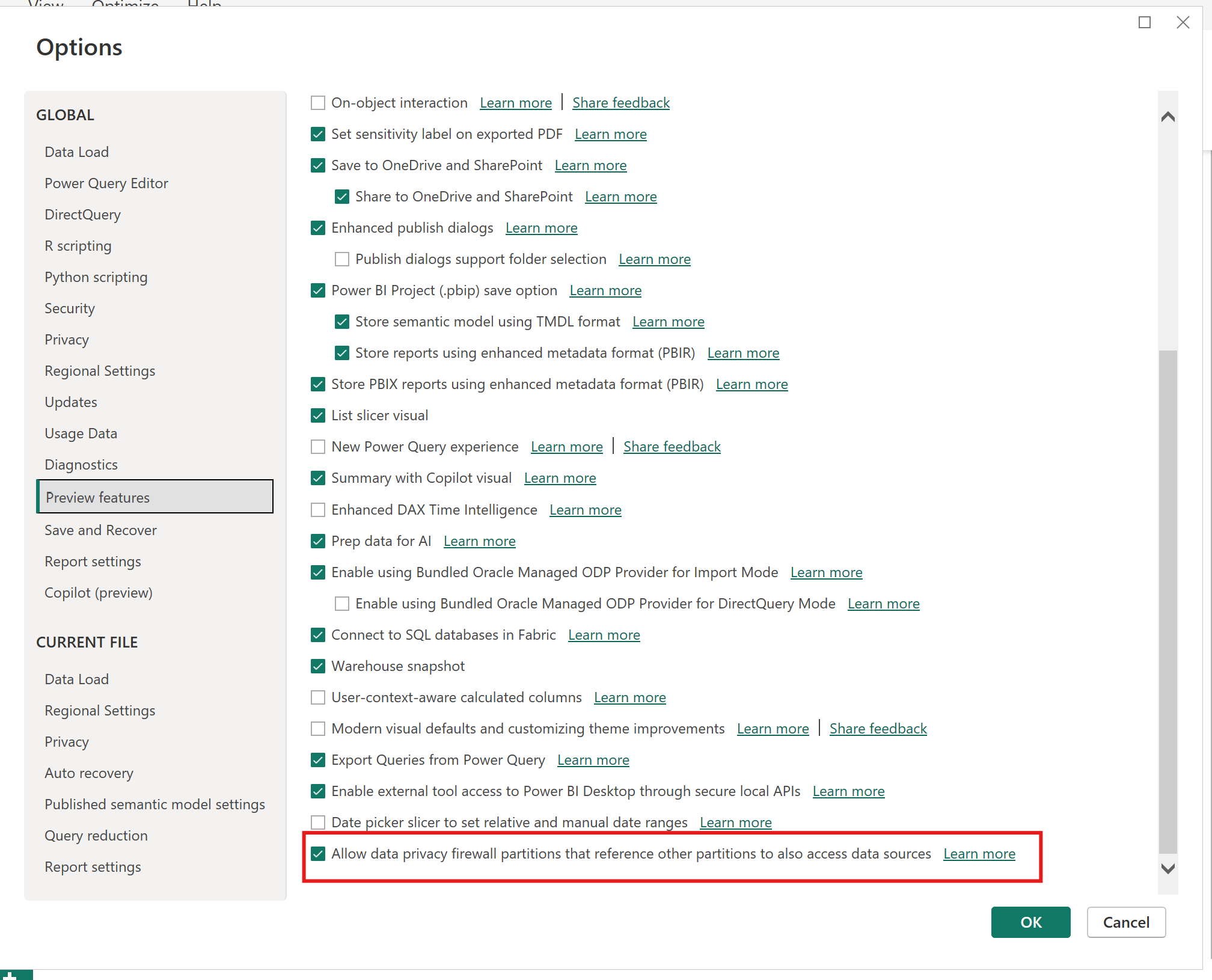
To find the setting in Power BI Desktop:
- Select File > Options and settings > Options.
- Under GLOBAL, select Preview features.
- Select Allow data privacy firewall partitions that reference other partitions to also access data sources.
What's changed
Power Query uses the Data Privacy Firewall to help prevent data from one source from being unintentionally sent to another source. In earlier versions of Power BI Desktop, the firewall blocks queries that reference other queries and also directly access a data source, even when the data source privacy levels are compatible.
When Allow data privacy firewall partitions that reference other partitions to also access data sources is enabled, Power Query allows these query patterns when privacy levels are compatible. Starting with the July 2026 version of Power BI Desktop, the setting is enabled by default and matches the behavior already used by the Power BI service. For example, one query can return a value that another query uses to build a web request, SQL statement, file path, or other data source request, as long as Power Query can combine the sources based on their privacy levels.
When the setting is disabled, Power Query uses the previous Power BI Desktop behavior. The Data Privacy Firewall blocks a query that references another query and then directly accesses a data source, even when the data source privacy levels are compatible.
Scenarios that no longer require the previous workaround
In older Power BI Desktop versions, you might have seen an error similar to the following message:
Formula.Firewall: Query 'Foo' (step 'Bar') references other queries or steps, so it may not directly access a data source. Please rebuild this data combination.
Previously, common workarounds for this scenario included refactoring queries to avoid the query reference, duplicating logic in a single query, or disabling privacy checks. These workarounds aren't needed in Power BI Desktop from the July 2026 version onwards when the involved data source privacy levels are compatible.
The same scenario is already supported in the Power BI service, so published semantic models don't require a separate setting to enable this behavior.
Privacy levels still apply
This capability doesn't disable the Data Privacy Firewall. Power Query still evaluates the privacy levels of the involved data sources before combining data.
To review privacy settings in Power BI Desktop:
- Select File > Options and settings > Data source settings.
- Select a data source, and then select Edit Permissions.
- Review the Privacy Level setting.
- Repeat these steps for the other data sources used by the query.
For more information, see Privacy levels and Behind the scenes of the Data Privacy Firewall.
When you might need to change the query
You might need to change the query or privacy settings if:
- The data source privacy levels aren't compatible.
- Your organization requires stricter privacy isolation between sources.
- You're using an older Power BI Desktop version where the setting isn't available or isn't enabled.
In these cases, consider moving the referenced value into the same query before the data source access step, creating an intermediate staging query, or separating data source access steps from steps that combine or transform results from other queries. Avoid disabling privacy checks unless your organization's security policy allows it and you understand the risk of sending data from one source to another.