Note
Access to this page requires authorization. You can try signing in or changing directories.
Access to this page requires authorization. You can try changing directories.
[This article is prerelease documentation and is subject to change.]
Security agent is an AI-powered assistant built into the Power Pages Security workspace that helps makers review, configure, and strengthen the security of their Power Pages sites by using natural language.
The agent supports the core security scenarios involved in securing a Power Pages site, including reviewing security posture, configuring authentication and authorization, managing application security settings, and troubleshooting common security problems. Recommendations are based on your site's configuration, so you can make informed decisions based on your environment rather than generic guidance.
Important
- This is a preview feature.
- Preview features aren’t meant for production use and might have restricted functionality. These features are subject to supplemental terms of use, and are available before an official release so that customers can get early access and provide feedback.
For any configuration changes, the agent always requests your approval before making updates, so you remain in control of your site's security.
Security scenarios
Security agent supports four primary security scenarios that cover the core areas of Power Pages site protection.
Site security posture review
Review your site's overall security in a single conversation. The agent analyzes authentication settings, authorization configuration, security settings, vulnerability scan findings, and site configuration to identify issues such as overly permissive access, anonymous data exposure, authentication misconfigurations, and missing security protections. The agent prioritizes findings, explains them in plain language, and provides recommended remediation steps.
Example prompts:
- Review my site's security and tell me the highest priority issues.
- Show me everything anonymous users can currently access.
- Summarize my latest security scan findings.
- Check whether my authentication, authorization, and security settings follow best practices.
- Identify any web roles or permissions that provide broader access than intended.
- Review my page and table permissions and highlight any inconsistencies.
- Check whether sensitive Dataverse tables are exposed through overly permissive permissions.
- Create a security posture report I can share with my team.
Authorization configuration
Configure how users access your site's pages and Dataverse data. The agent helps create and update web roles, page permissions, and table permissions. It explains existing authorization settings and recommends least-privilege access based on your site's configuration.
Example prompts:
- Show all web roles and the pages they can access.
- Create a web role named CaseReviewer for authenticated users.
- Restrict the SupportCases page so only users with the CaseReviewer role can access it.
- Create a table permission that allows the CaseReviewer role to read and create incidents.
- Change this table permission from Global scope to Contact scope.
- Remove anonymous access from this table permission.
- List all table permissions that don't have any web roles assigned.
- Can a user with RoleB and RoleC access TestC and submit TestForm?
Authentication configuration and troubleshooting
Configure authentication providers, validate authentication settings, and diagnose common sign-in problems. The agent supports Microsoft Entra ID, OpenID Connect, and SAML 2.0, and recommends configuration updates to resolve authentication problems.
Example prompts:
- Review my site authentication setup and tell me what is misconfigured.
- Validate my Microsoft Entra ID sign-in settings and recommend fixes.
- Validate my OpenID Connect configuration.
- Users click Sign in but return to the sign-in page. Help me identify the problem.
- Users authenticate successfully but receive Access denied after signing in.
- Configure this site to support both local accounts and Microsoft Entra ID.
- Set Microsoft Entra ID as the default sign-in option.
- Help me investigate why sign-in succeeds for some users but fails for others.
Application security settings
Review and configure application-level security settings including Content Security Policy (CSP), HTTP security headers, CORS, cookie settings, session management, and WAF-related configurations.
Example prompts:
- Review my current Content Security Policy and recommend improvements.
- Diagnose Content Security Policy errors blocking JavaScript or CSS.
- Review and strengthen my HTTP security headers.
- Recommend more secure CORS settings.
- Review my authentication cookie configuration.
- Update the session timeout for inactive users.
- Check whether WAF is enabled for my site and explain the current protection status.
- Review my application security settings and recommend improvements.
How the agent works
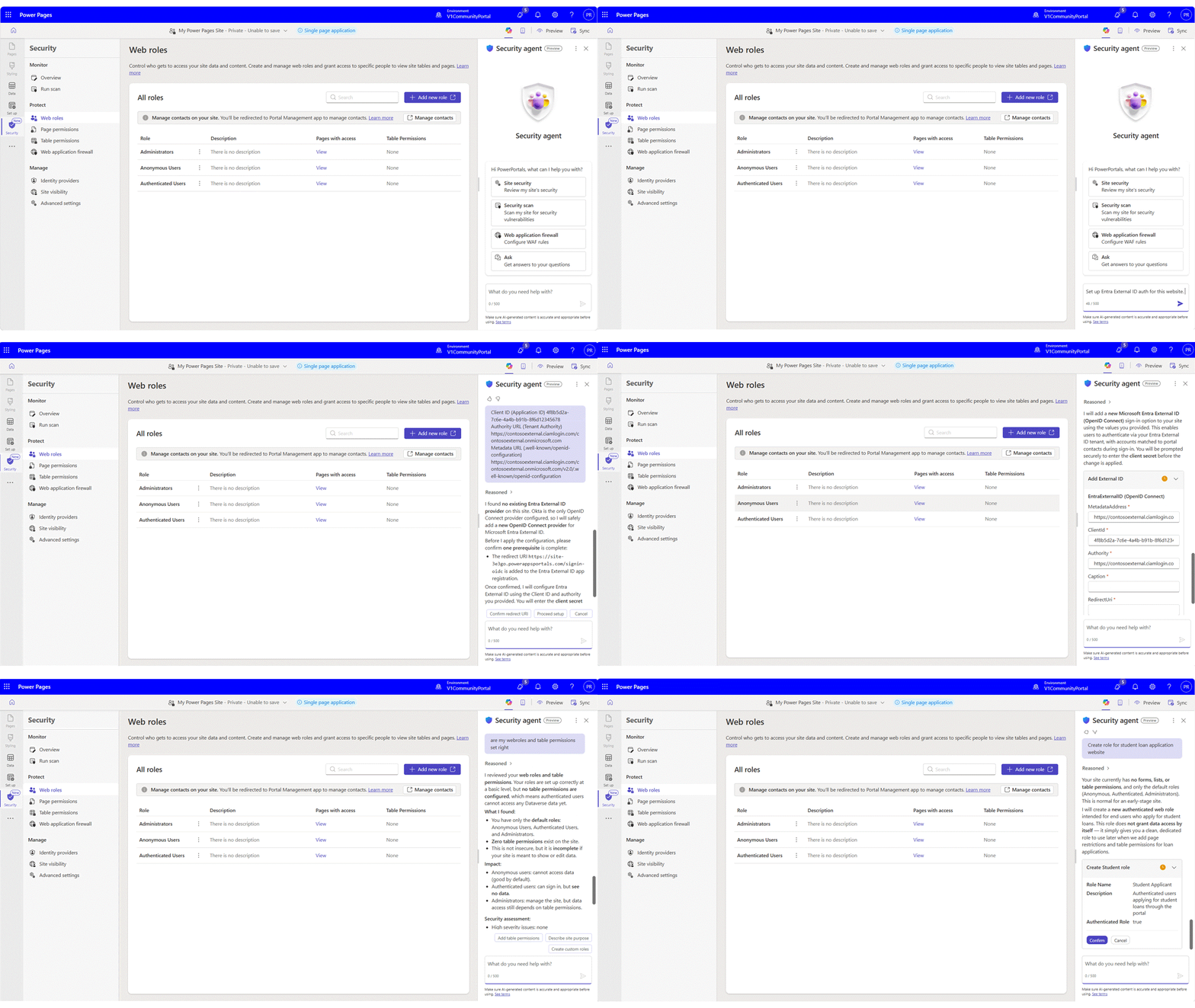
You can find the security agent in the Security workspace of Power Pages Design Studio. After launching the Security agent chat panel, describe what you want to accomplish using natural language. Example prompts include:
- Review my site's security.
- Configure Microsoft Entra ID authentication.
- Create permissions for the Sales role.
- Why can't users sign in?
- Configure a Content Security Policy.
The agent analyzes your site's configuration, explains its findings, and proposes configuration changes where appropriate. Before applying any change, it requests your approval and, once complete, confirms exactly what was updated.
Best practices
For the best experience:
- Use Security agent in development or test environments before promoting changes to production.
- Review all proposed configuration changes before approving write actions.
- Use the conversational experience to understand security concepts as well as configure your site.
- Validate and deploy approved changes using your organization's standard ALM process.
Because recommendations are grounded in your site's configuration, the guidance is tailored to your environment rather than generic security best practices.
Related security capabilities
In addition to the Security agent, the Security workspace includes automated security capabilities that help continuously monitor your site.
Security scan (preview) lets you schedule recurring vulnerability scans that evaluate your site against OWASP-based security rules.
Site traffic monitoring (preview) continuously analyzes traffic patterns to detect suspicious activity and potential attacks.
Findings from both capabilities appear as alerts in the Overview page of the Security workspace. From there, you can review the alert details, take recommended actions directly, or open the Security agent to understand the issue and receive guided remediation.