Note
Access to this page requires authorization. You can try signing in or changing directories.
Access to this page requires authorization. You can try changing directories.
In this tutorial, you set up GitHub OIDC and Microsoft Entra federated identity credentials (FIC) so GitHub Actions can authenticate to Power Platform without storing a client secret.
In this tutorial, you will:
- Configure OIDC in your GitHub repository
- Create a Microsoft Entra app registration and configure FIC
- Grant the app access in the Power Platform admin center
- Create a GitHub workflow to run Power Platform actions
Step 1: Configure OIDC in your GitHub repository
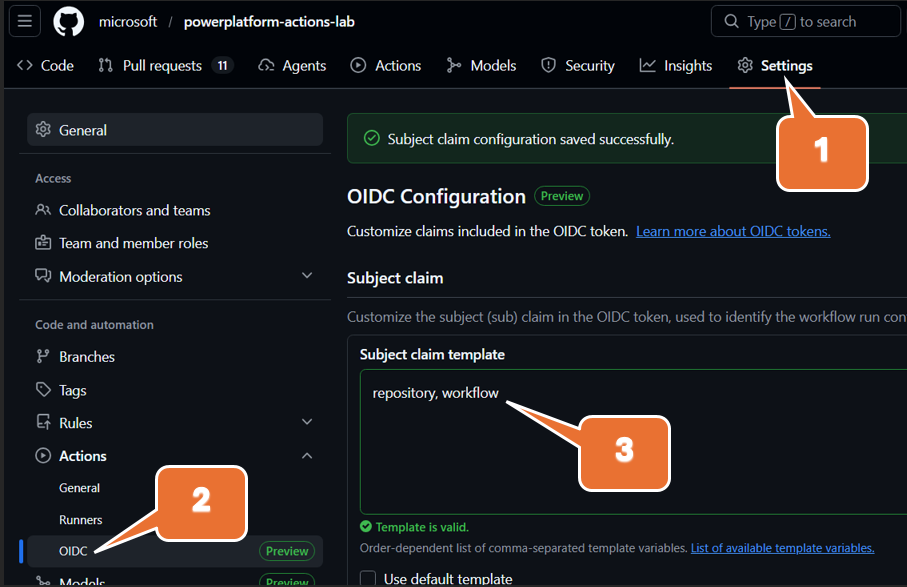
In GitHub, open your repository and make sure GitHub Actions is enabled.
To enable GitHub Actions in the repo, select Settings > Actions and then under General you are presented with an option to enable. If you do not see Actions under Settings, you do not have the required repo securtity permission.
Review OIDC settings and subject claim customization guidance. Refer to OpenID Connect in GitHub Actions.
Configure the OIDC subject claim template to be
repository, workflowfor this tutorial, as shown in the figure above. It creates a unique subject claim for each workflow in your repository, which you can then reference in your federated credential configuration in Microsoft Entra ID.The subject format resolves to values like:
repo:MyOrg/MyRepo:workflow:MyWorkflow
Save your repository OIDC configuration.
Step 2: Create a Microsoft Entra app registration and add FIC
In the Azure portal, go to Microsoft Entra ID > App registrations > New registration.
Create the app registration and copy the Application (client) ID and Directory (tenant) ID values.
Open API permissions > Add a permission > Dynamics CRM and grant Dataverse permission.
Open Certificates & secrets (or Federated credentials, depending on portal experience), and select
Otherin Federated credential scenario.
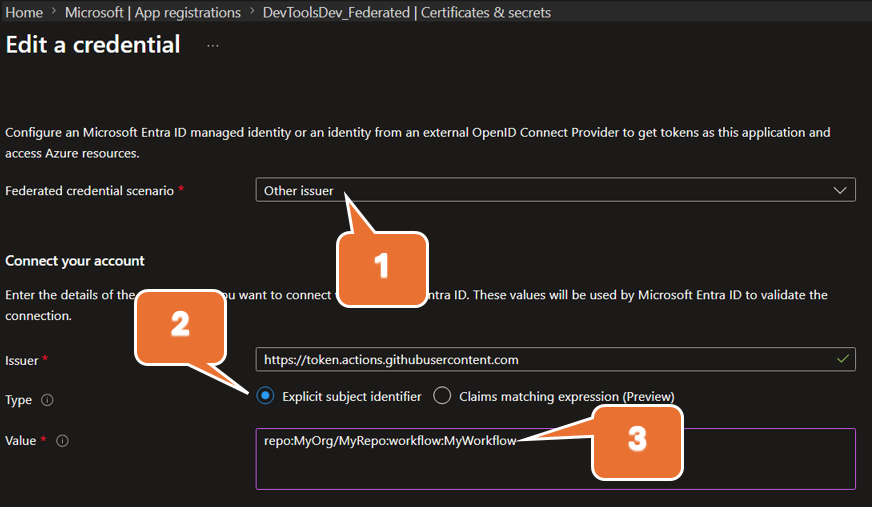
Use this explicit subject identifier:
repo:MyOrg/MyRepo:workflow:MyWorkflowSave the federated credential.
Note
The subject claim in GitHub and the subject identifier in your federated credential must match exactly.
Step 3: Grant the app access in the Power Platform admin center
Go to the Power Platform admin center.
Add the Entra ID app registration as an application user and assign required security roles in each target environment.
For detailed steps, see Manage application users in the Power Platform admin center.
Step 4: Create a GitHub workflow to run Power Platform operations
In your repository, create or update a workflow in
.github/workflows/.Ensure the workflow requests OIDC token permissions for the job that runs Power Platform actions.
Configure your Power Platform GitHub Actions to use:
- Tenant ID
- App (client) ID
- Environment URL
- OIDC/FIC-based authentication parameters supported by the action
Paste your sample workflow YAML in this section and update placeholders for your environment.
# https://docs.github.com/en/actions/how-tos/secure-your-work/security-harden-deployments/oidc-in-azure
name: fic-auth

on:
  # Allows you to run this workflow manually from the Actions tab
  workflow_dispatch:

jobs:
  who-am-i:

    runs-on: ubuntu-latest

    permissions:
      id-token: write # Grant permissions to the OIDC endpoint for federation
      contents: read

    steps:
    - name: Install Power Platform Tools
      uses: microsoft/powerplatform-actions/actions-install@v1
      with:
        pac-version-override: 2.4.1

    - name: WhoAmI
      uses: microsoft/powerplatform-actions/who-am-i@v1
      with:
        environment-url: https://MyOrg.crm.dynamics.com/
        app-id: 00000000-0000-0000-0000-000000000000 # Client (application) ID from your app registration
        tenant-id: 00000000-0000-0000-0000-000000000000 # Directory (tenant) ID from your app registration
When the workflow runs, GitHub issues an OIDC token. Microsoft Entra validates that token against your federated credential, and the action authenticates to Dataverse/Power Platform without a client secret.