Note
Access to this page requires authorization. You can try signing in or changing directories.
Access to this page requires authorization. You can try changing directories.
An agent that answers business questions over Microsoft Fabric or Power BI data can help analysts save time extracting data, comparing results, and writing commentary each reporting cycle. To benefit, people need numbers they can trust, and answers must arrive fast enough to support their work. How you connect the agent to your semantic model determines how accurate, fast, consistent, and maintainable the agent is.
This article describes the scenario and outcomes analytics agents deliver, explains why your choice of pattern matters, and compares four patterns. For most organizations with a governed semantic model, start with a Copilot Studio agent on the Microsoft Copilot harness that queries the model through the Power BI connector.
Scenario: Analytics agents over business data
Analysts in finance, sales operations, supply chain, and other functions spend much of each reporting cycle on the same tasks. They extract figures and compare actual results with forecasts, targets, and prior-year results. They identify which products, regions, or channels contributed to each variance and write commentary for leadership. This repetitive work makes deadlines harder to meet, and its quality varies depending on who performs it.
An analytics agent takes on these repetitive tasks. Users ask questions in plain language in Microsoft Copilot or Teams, such as "Which regions missed target last month, and why?" The agent queries the governed semantic model, returns the figures in a consistent format, explains the variances, and drafts commentary. A person reviews and signs off the answer before it's shared further. The analyst's role shifts from compiling numbers to checking and interpreting them.
Outcomes to plan for
Agree on the outcomes with your stakeholders before you choose a pattern. Analytics agents can deliver the following outcomes, depending on your design choices:
| Outcome | What success looks like | Design choices that affect it most |
|---|---|---|
| Accurate figures | Every figure matches the source of truth, and the agent indicates when data isn't available instead of estimating. | Governed semantic model, and which component writes the query |
| Interactive response time | Typical questions return in seconds, not minutes. | Number of agent layers, and a direct connection to the model |
| Consistent, review-ready answers | Every answer follows the same table layout, units, status indicators, and commentary order. | Control over formatting and commentary in the orchestration layer |
| Less manual effort | Analysts review and sign off answers instead of extracting and compiling figures. | Answer quality and response time together |
| Maintainability | Model knowledge is centralized, and the agent can move between environments with minimal changes. | Instruction capacity, support for skills, and number of agents to keep aligned |
| Secure access | Each user sees only the data they're allowed to see. | End-user identity, workspace roles, and row-level security |
Why your choice of pattern matters
Each pattern in this article supports answering questions about your data. They differ in how well they deliver the outcomes described in the previous section. These differences become clear when real users depend on the agent.
- Trust: The component that writes the query decides how errors arise and how the agent catches them. An agent that writes its own queries needs precise knowledge of the model. A Fabric data agent absorbs more of that detail for you.
- Adoption: Response time decides whether people use the agent interactively. An answer in seconds fits into a conversation. An answer in minutes becomes a batch job that users route around.
- Answer quality: The orchestration layer decides how much control you have over the table layout, units, commentary order, and disclaimers that make an answer ready for review.
- Maintenance: The number of agents, the instruction capacity, and support for skills decide how much effort it takes to keep the agent accurate as the model and the business change.
- Rollout: Identity and permissions flow differently through each pattern, which affects how you secure the agent for a wider audience.
You can switch patterns later, but doing so requires rewriting instructions, retesting, and resetting user expectations. Choose a pattern based on the outcomes you need in production, not on how quickly you can set it up for a demo.
Questions to answer first
- Who will use the agent, and in which channel?
- Which questions must it answer, and how will the answers be used?
- How fast do answers need to be for people to rely on the agent?
- How mature is the semantic model? Are the measures governed, documented, and stable?
- Who will maintain the agent's knowledge of the model as it evolves?
- Which data must each user be allowed, or not allowed, to see?
Before you choose
The following two foundations improve the accuracy of results across all patterns in this article and help you compare the patterns consistently:
- A governed semantic model. Business logic lives in documented measures, the date table is marked, and table and column names are documented. Learn more in Prepare a semantic model for AI agents.
- One output contract and one evaluation pack. Agree on what a good answer looks like and on a set of test prompts with exact expected answers. Score every pattern against both. Learn more in Evaluate analytical agents with an output contract and golden prompts.
Without these foundations, a pattern might appear effective in a demo but remain difficult to validate for production use.
The key concept: Where query construction lives
Every pattern turns a natural language question into a query against the semantic model. The difference is which component writes that query.
In patterns 1 and 2, a Fabric data agent writes the query. The data agent handles model details, so these patterns can accommodate a model that's still evolving. In patterns 3 and 4, your Copilot Studio agent writes Data Analysis Expressions (DAX) queries directly and runs them through the Power BI connector. This approach removes a layer of agent calls and gives you more control over the answer. However, the agent needs precise knowledge of the model, and the model needs governed measures.
Pattern 1: Fabric data agent, published directly

A Fabric data agent is published directly to Microsoft Copilot or Teams, with no Copilot Studio agent in the path. The data agent interprets the question with its own instructions, queries the semantic model, and returns the answer.
Strengths
- Has the fewest moving parts, with one agent and one model.
- Handles query construction, reducing the need to adapt the agent when the model's structure changes.
- Provides a reliable baseline to confirm that the data layer answers correctly on its own.
Considerations
- The data agent's defaults determine answer formatting and narrative, limiting your control over a fixed output contract or executive commentary.
- Give the data agent the same model rules you'd give any agent. Use exact names, prioritize measures, avoid raw scenario codes, and follow the unit convention.
Best fit
Use this pattern for quick, self-service questions about a semantic model when users need a figure or a small table. Also use this pattern as the first step in any project by running evaluation prompts against the data agent alone to verify that the data layer returns correct results before you add orchestration.
Pattern 2: Copilot Studio agent with a connected Fabric data agent
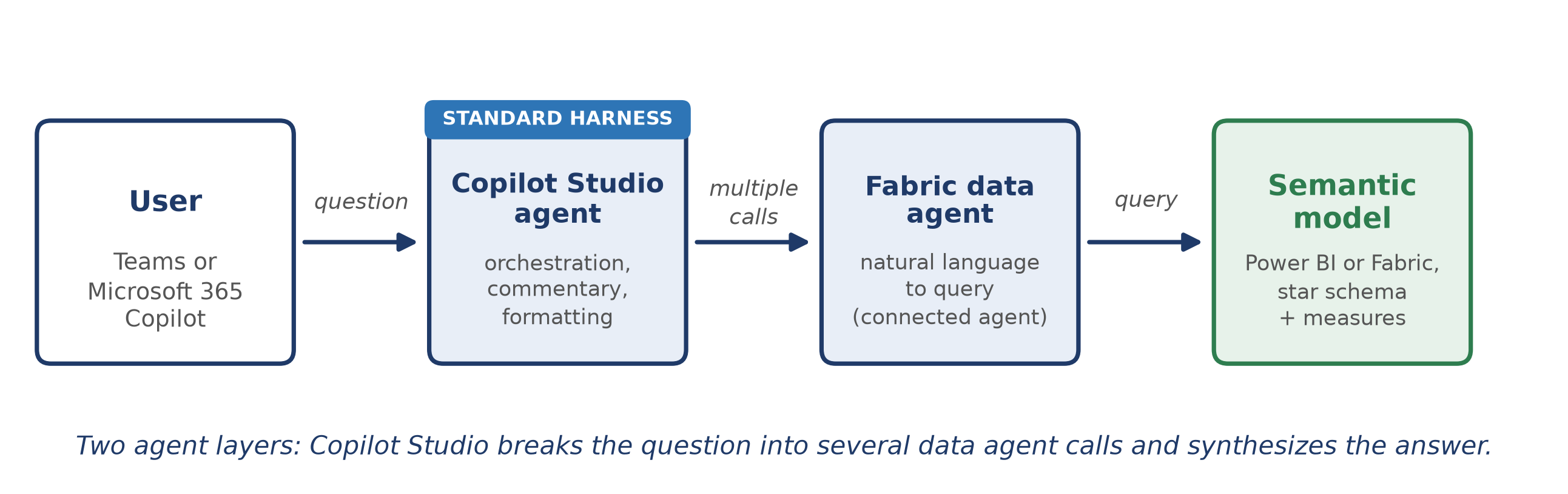
A Copilot Studio agent handles orchestration, reasoning, commentary, and formatting. For every data question, it calls a Fabric data agent as a connected agent.
Strengths
- Separates responsibilities by keeping numerical accuracy in the data layer and the narrative in the Copilot Studio agent.
- Accommodates an evolving model because the data agent owns query construction.
- Supports deep analysis because the Copilot Studio agent can break a question into several data questions and combine the results.
- Gives you strong control over formatting and commentary.
Considerations
- Measure response times in the published channel against your target. Each delegated call adds time, so questions that break into several data questions take longer to answer.
- Maintain instructions in two agents and keep them aligned.
- Confirm that your target channels support the connected-agent configuration you plan to use.
Best fit
Use this pattern when adapting to model changes matters more than response time, the semantic model or its measures are still evolving, and your team doesn't yet have the expertise to maintain detailed DAX guidance.
Pattern 3: Copilot Studio agent on the standard harness with Power BI connector

The Copilot Studio agent generates DAX queries directly and calls the Power BI connector action Run a query against a dataset. This action runs a read-only EVALUATE statement against the semantic model without an intermediary data agent.
Strengths
- Answers quickly because each query is a single direct call to the model.
- Keeps full control of formatting and commentary in Copilot Studio.
Considerations
- The agent's instructions must describe the model precisely: exact table and column names, data types, codes to avoid, and the unit convention.
- The standard harness supports up to 8,000 characters of instructions and doesn't support skills. All required knowledge about the model must fit within the instruction limit.
- The standard harness doesn't run an automatic retry loop. Invest in precise model documentation and query guardrails to minimize query errors.
Best fit
Use this pattern when you need fast, interactive analysis using a stable, governed semantic model with concise documentation and must use the standard harness.
Pattern 4: Copilot Studio agent on Microsoft Copilot harness with Power BI connector (recommended)

This pattern keeps the direct connector of pattern 3 and runs the agent on the Microsoft Copilot harness. The harness adds three capabilities that matter for analytical agents:
- Self-correction: The harness runs an agentic loop, so the agent reads a failed query's error, corrects the DAX query, and retries within the same turn.
- Skills: Model knowledge and tested query patterns live in a reusable skill instead of in the instructions.
- Instruction capacity: Instructions aren't limited to 8,000 characters.
Strengths
- Answers as fast as pattern 3.
- Recovers from query errors on its own.
- Separates behavior (instructions) from model knowledge (skill), which makes both easier to maintain and reuse.
- Retargets from a development tenant to production by changing the IDs in one configuration block.
Considerations
- The agent still depends on a governed model with documented names and stable measures. The skill and retry loop reduce, but don't remove, that dependency.
- The connector uses each user's identity, so plan permissions and row-level security before deploying the solution broadly.
Best fit
Use this pattern for interactive analytics agents that query a governed semantic model with stable measures when you need fast, consistently formatted answers that you can trace to a live query. Learn more in the reference architecture Copilot Studio analytics agent over a Microsoft Fabric semantic model.
Compare the patterns
| Dimension | 1. Fabric data agent | 2. Copilot Studio + Fabric data agent | 3. Copilot Studio (standard harness) + Power BI connector | 4. Copilot Studio (Microsoft Copilot harness) + Power BI connector |
|---|---|---|---|---|
| Who writes the query | Fabric data agent | Fabric data agent | Copilot Studio agent | Copilot Studio agent, guided by a skill |
| Response time | Depends on data agent processing | Longest; grows with each delegated call | Fast | Fast |
| Tolerance of model changes | High | Highest | Needs a stable, governed model | Needs a governed model; skill and retry help |
| Recovery from query errors | Handled by the data agent | Handled by the data agent | Relies on precise instructions | Automatic correct-and-retry loop |
| Formatting and commentary control | Data agent defaults | Strong | Strong | Strong |
| Instruction capacity | Data agent instructions | Instructions in two agents | Up to 8,000 characters, no skills | Long instructions plus skills |
| Components to maintain | One agent | Two agents | One agent and a connector | One agent, a connector, and a skill |
| Typical role | Data layer validation, quick questions | Evolving models | Fast answers on the standard harness | Default for governed models |
Decision checklist
Work through the questions in order. The first question that produces a clear answer usually decides the pattern.
| Question | If yes | If no |
|---|---|---|
| 1. Do you have a governed semantic model with stable measures, a marked date table, and documented names? | Go to question 2. | Fix the model first. Meanwhile, use pattern 1 or 2 to explore. |
| 2. Do users need rich formatting, a fixed output contract, or narrative commentary? | Go to question 3. | Pattern 1 might be enough. |
| 3. Do users expect interactive response times? | Use a direct connector (pattern 3 or 4). Go to question 4. | Pattern 2 is an option. Go to question 5. |
| 4. Do you need skills, or more than 8,000 characters of instructions? | Use pattern 4. | Go to question 5. |
| 5. Can your team maintain DAX guidance (model structure, query patterns, and guardrails) as the model evolves? | Use pattern 4, or pattern 3 if you need to stay on the standard harness. | Use pattern 2, or build the skill before you move to a direct connector. |
Example: A typical progression between patterns
Teams often move through the patterns as their requirements become clear. Consider a finance team that wants an agent to explain monthly sales volume against forecast, target, and prior year, needs exact figures, and requires a person to sign off every answer. A typical progression looks like this:
- Start with pattern 2 to separate numerical accuracy from narrative. Copilot Studio's ability to break a question into several data questions produces richer analysis.
- If some answers need investigation, run the evaluation prompts against the Fabric data agent alone (pattern 1). This step shows whether to focus on the model and its instructions or on orchestration.
- If analysts need interactive response times, move query construction into the Copilot Studio agent with the Power BI connector (pattern 3).
- To add skills, longer instructions, and automatic recovery from query errors, move the same design to the Microsoft Copilot harness (pattern 4) for production.
Throughout, score every pattern against the same output contract and evaluation prompts. A change of pattern, harness, or model can then be retested in hours.
Other integration options
Agent integration options for Fabric, such as Model Context Protocol (MCP) servers and agent-to-agent connections, continue to evolve. Before you adopt a new option, run your evaluation pack in the published channel your users use. Confirm that the option meets your network and endpoint requirements.
Next step
Prepare the semantic model for your chosen architecture. Learn how to structure measures, document the schema, and configure security so agents can query trusted business data.
Contributors
Microsoft maintains this article. The following contributors wrote this article.
Principal author:
- Chinmay Kodaganur, Product Manager II