Note
Access to this page requires authorization. You can try signing in or changing directories.
Access to this page requires authorization. You can try changing directories.
Many organizations still rely on manual processes to retrieve and send bill copies, especially when working with legacy systems that lack modern integration options. This reliance often requires account representatives to navigate multiple screens, search for invoices, and respond to requests individually, leading to delays and inefficiencies.
This article shows how Microsoft Power Platform can automate bill copy requests. This solution replaces manual effort with a scalable, reliable solution that improves processing speed and provides better visibility into operations.
Tip
This article provides an example scenario and visual representation of how to automate bill copy requests using Power Platform. This solution is a generalized example scenario architecture, which can be used for many different scenarios and industries.
Architecture diagram
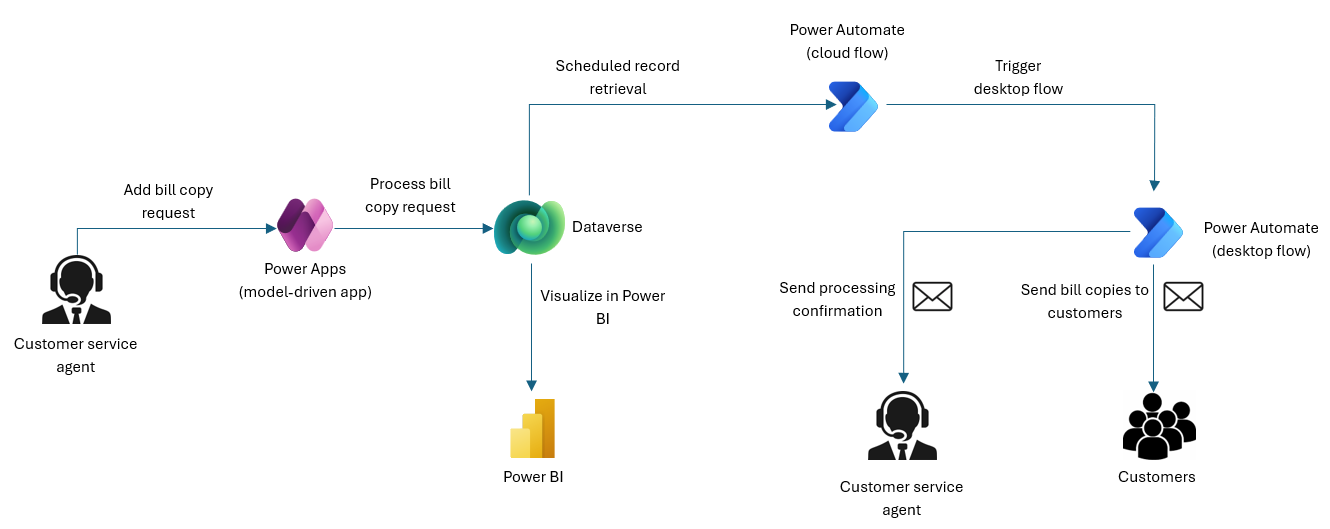
Workflow
Microsoft Power Platform provides the foundation for building a secure, scalable, and automated solution for managing bill copy requests through apps, automation, and reporting.
Create bill copy requests in Power Apps:
- Customer service representatives create bill copy requests in a Power Apps model-driven app.
- Bill copy requests are standardized to improve data integrity and reduce manual tracking errors.
- Dataverse is used as the central repository for all bill copy request data.
Process bill copy requests with Power Automate:
- A scheduled Power Automate cloud flow triggers Power Automate desktop flows at defined intervals.
- The desktop flow accesses bill copy requests in Dataverse, searches for invoices in bank-provided web-based applications, and processes the requests automatically.
- Customer service representatives receive real-time notifications confirming successful processing.
Monitor bill copy request metrics with Power BI:
Built on top of Dataverse, a Power BI dashboard provides leadership with visibility into:
- Daily, weekly, and monthly request volumes
- Processing success rates
- Trends in customer demand
This visibility enables data-driven decision-making and improved resource allocation.
Components
Power Automate desktop flows: Search and process invoices in web-based applications that lack APIs.
Power Automate cloud flows: Trigger desktop flows at scheduled intervals.
Power Apps model-driven apps: Enables account representatives to log bill copy requests.
Microsoft Dataverse: Stores bill copy requests and related data.
Power BI: Provides visibility into operations for leadership.
Scenario details
This architecture demonstrates how Microsoft Power Platform can modernize operations in the energy and utility sector, reduce costs, and improve customer satisfaction.
Business challenge
An energy and utility organization receives more than 100 daily customer requests for bill copies, creating an operational bottleneck.
The organization used a bank-provided web-based application to search for, locate, and send bill copies. However, the process was manual and tedious. Account representatives had to navigate each account, filter by date, identify invoices, and send them individually. Each request took 10 to 30 minutes, depending on the number of invoices involved. This process created inefficiencies, delayed responses, and affected customer satisfaction.
Business value
After the organization built and deployed the solution, each request completed in about 30 seconds instead of 10 to 30 minutes.
By combining model-driven apps, Power Automate cloud and desktop flows, and Power BI, the organization transformed a labor-intensive process into a fully automated workflow.
With AI-driven enhancements on the horizon, the solution is poised to deliver even greater value.
Prerequisites
To enable this solution, use the following licenses:
Power Automate premium license (per user):
- Assign to account representatives so they can securely access and use the model-driven app.
- Ensure they can log requests into Dataverse.
Power Automate premium license (service account):
- Use a dedicated service account to run scheduled flows.
- Provide secure, centralized automation without tying execution to individual users.
Power Automate unattended robotic process automation (RPA) license:
- Enable Power Automate desktop to run on a virtual machine in unattended mode.
- Allow the automation to execute without human intervention, ensuring requests are processed reliably and consistently.
This licensing model balances cost efficiency with scalability, ensuring compliance while maximizing automation benefits.
Technical constraints and trade‑offs
Legacy system limitations
Constraint:
- The legacy web application doesn't expose REST or SOAP APIs, webhooks, or connector support.
- All required operations, like reading data and sending emails, are only available through the UI.
Trade-off:
- RPA is considered the only viable integration method.
- UI automation introduces sensitivity to layout changes and system latency, so you need robust retry logic and checkpointing.
Single‑threaded bot execution
Constraint:
- Power Automate desktop bots execute one session at a time per machine.
- No native parallelism within a single bot session.
Trade-off:
- Throughput is limited by sequential execution.
- However, because the daily volume (100 requests or fewer) is well below the bot's capacity (about 200 per day), this constraint doesn't affect service level agreements (SLAs).
- Machine groups were available but unnecessary, avoiding extra operational overhead.
Credential security requirements
Constraint:
- You can't store credentials locally, embed them in flows, or expose them to developers.
- Enterprise security requires centralized secret management.
Trade-off:
Use Azure Key Vault and Dataverse credential objects.
This approach adds initial configuration complexity but ensures:
- Zero credential exposure
- Automated rotation
- Least‑privilege access
- Full auditability
Service account permission boundaries
Constraint:
- Restrict the dedicated service account to:
- Read-only access in the legacy system
- Send email permissions
- No delete, write, or administrative privileges
Trade-off:
- Ensured data integrity and minimized risk.
- Required the automation to operate strictly within the allowed UI paths.
- Prevented certain optimizations that would require elevated permissions.
- Restrict the dedicated service account to:
UI-driven automation sensitivity
Constraint:
- UI automation is inherently sensitive to:
- Page load delays
- Element rendering problems
- Browser updates
- Unexpected pop-ups
Trade-off:
- Implemented robust retry logic and Dataverse-based checkpointing.
- Added overhead to flow design but improved resilience.
- Ensured failed or partial runs could resume without manual intervention.
- UI automation is inherently sensitive to:
Dataverse as the state and logging layer
Constraint:
- All request statuses, checkpoints, and error logs had to be persisted in Dataverse.
Trade-off:
Introduced extra read and write operations per transaction.
Provided a reliable, centralized state store that enables:
- Automatic reprocessing of failed or partial requests
- Idempotent execution
- Full audit trail
Infrastructure and maintenance windows
Constraint:
- Bot machines require periodic operating system (OS) updates, browser updates, and Power Automate Desktop (PAD) version updates.
Trade-off:
Slightly reduces available runtime.
Mitigated by:
- Scheduling updates during off‑peak hours
- Maintaining throughput headroom (50% or less utilization)
Considerations
These considerations implement the pillars of Power Platform Well-Architected, a set of guiding tenets that improve the quality of a workload. Learn more in Microsoft Power Platform Well-Architected.
Reliability
This solution includes multiple reliability safeguards to ensure that unattended Power Automate desktop executions stay stable and recoverable. These safeguards make the process resilient to UI variability, system latency, and transient failures. They work across credential security, execution monitoring, state tracking, and automated recovery.
Scheduled maintenance and update controls
Machines follow a controlled update cycle.
Safeguards:
- Apply OS patches and PAD updates during off-peak windows
- Validate browser updates before rollout
- Monitor for breaking UI changes
Outcome: Reduces unexpected downtime and maintains long-term reliability.
Centralized logging and observability
The solution captures all execution details for audit and troubleshooting.
Safeguards:
- Dataverse logs for request-level tracking
- PAD logs for step-level execution
- Key Vault logs for credential access
- Cloud flow logs for orchestration events
Outcome: Full traceability and rapid root-cause analysis.
Operational Excellence
Time savings: Reduced processing time per request from up to 30 minutes to just 30 seconds.
Efficiency gains: Automated handling of more than 100 daily requests without manual intervention.
Transparency: Leadership can monitor performance and trends in real time.
Employee productivity: Account reps are freed from repetitive tasks, so they can focus on higher-value customer interactions.
Next steps
You can extend this solution with AI integration using AI Builder.
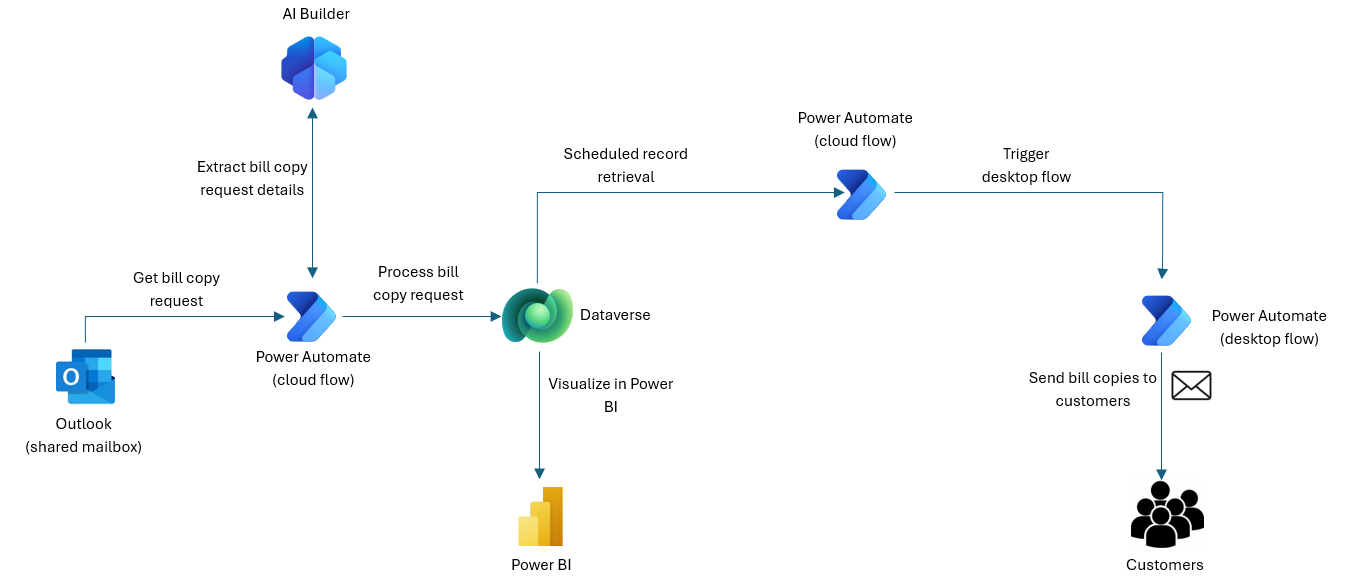
- The solution reads bill copy requests directly from a shared mailbox.
- AI Builder automatically extracts key details, such as the account number, date range, and invoice type.
- The solution logs requests into Dataverse without any human input.
This enhancement eliminates manual request entry to improve efficiency and reduce costs.
Contributors
Microsoft maintains this article. The following contributors wrote this article.
Principal authors:
- Salman Mahmood, Principal Architect