Note
Access to this page requires authorization. You can try signing in or changing directories.
Access to this page requires authorization. You can try changing directories.
This architecture combines read-only enterprise data with operational business processes. A centralized data warehouse provides a governed source of reference data, which Microsoft Dataverse exposes through virtual tables. Users can work with this data alongside editable Dataverse records, enabling business processes such as assessments, requests, approvals, and external system integrations without replicating data across systems.
Tip
This article provides an example scenario and a generalized example architecture to illustrate how to extend Power Apps applications by connecting them to a centralized data warehouse through Dataverse virtual tables. The architecture example can be modified for many different scenarios and industries.
Architecture diagram
Workflow
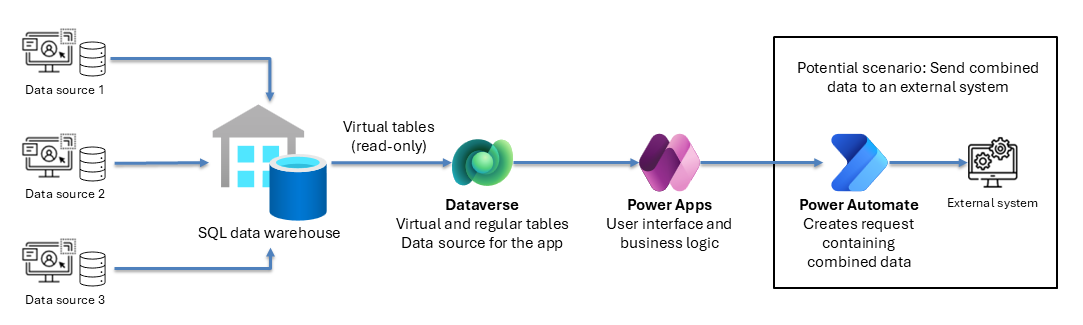
The following steps describe the workflow that's shown in the example architecture diagram:
The SQL data warehouse ingests data from multiple different data sources.
Dataverse uses virtual tables to access the data you need from the data warehouse, such as a global table of products across systems or global sales across systems.
When you create a request, Dataverse virtual tables retrieve the reference data you need. They query the data warehouse in real time. This process means the request uses the warehouse data available at creation time. However, the actual freshness of that data depends on how frequently the upstream source systems load and refresh the data warehouse.
Dataverse also has regular tables that can reference the virtual tables, such as a product evaluation for one of the products across the systems.
Power Apps provides the user interface for executing a business process by using the combined editable records and referenced data from the data warehouse.
Power Automate sends data or an API request based on the global tables from the data warehouse to an external system. Cloud flows call external APIs and process responses, as needed. Depending on the scenario, the Power Apps application might receive an immediate response or be updated when processing is complete.
Components
Azure SQL Server: Serves as the central data warehouse, consolidating information from multiple disparate sources for unified access and analysis.
Dataverse: Supports both regular and virtual tables, enabling seamless integration and referencing of data from the warehouse.
Power Apps: Enables business users to execute processes leveraging referenced and warehouse data.
Power Automate: Allows for automated actions, such as sending data or API requests from global tables in the warehouse to external systems.
Scenario details
This reference architecture is based on a lifecycle assessment calculation solution implemented in a third-party application. The finished goods, raw materials, and models are managed in multiple different systems across multiple legal entities spanning different countries and regions. Data is available in a globally managed data warehouse.
An international team uses a third-party lifecycle assessment calculator to assess products. The team needs details for all the products across the various systems.
By using this architecture, you can build an application that references the products across different systems, retrieves the associated data from the data warehouse, and creates and sends a request for the third-party calculator.
Considerations
These considerations implement the pillars of Power Platform Well-Architected, a set of guiding tenets that improve the quality of a workload. Learn more in Microsoft Power Platform Well-Architected.
Reliability
Ensure the data warehouse is resilient to failure and has high availability.
Use cleaned-up data in the data warehouse to ensure completeness and data quality in the virtual tables.
Security
Restrict access to the virtual tables to read access only.
Ensure the data warehouse data is read-only and only visible in the Power Apps application and referenceable from regular Dataverse tables.
Operational Excellence
Standardize ALM across Power Apps, Dataverse, and Power Automate, ensuring consistent and reliable lifecycle operations.
Enable monitoring at each stage—from data warehouse ingestion to Dataverse virtual table usage—to quickly detect data quality or connectivity issues.
Follow solution‑based ALM with incremental, tested releases for deployments of the Power App, regular Dataverse tables, and Power Automate flows to reduce risk.
Use automated pipelines to minimize manual efforts including packaging, validation, and environment deployments.
Performance Efficiency
Only expose the required datasets using virtual tables to minimize query load.
Optimize Power Apps screens and Dataverse tables to retrieve data on demand rather than loading full datasets.
Trigger Power Automate flows only when necessary.
Use the data warehouse for heavy processing, and keep only lightweight references in Dataverse to ensure the architecture scales.
Experience Optimization
Design the Power App so users can easily browse and select global data sourced through virtual tables, with each screen loading only the necessary data to ensure the app remains responsive.
Ensure the application provides a unified, consistent, and predictable interface.
Contributors
Microsoft maintains this article. The following contributors wrote this article.
Principal authors: