Note
Access to this page requires authorization. You can try signing in or changing directories.
Access to this page requires authorization. You can try changing directories.
COSMO CONSULT is a Microsoft partner that specializes in enterprise resource planning (ERP), customer relationship management (CRM), and digital transformation. Founded in Germany, the company grew from 500 employees in 2017 to more than 1,600 employees across 50 offices in 20 countries/regions.
To support its growth, COSMO CONSULT standardized its operations on Microsoft Dynamics 365 to use the same technologies internally that it delivers to customers. The company also built several Microsoft Copilot Studio agents to support its sales processes.
This case study shows how COSMO CONSULT combines Dynamics 365, Copilot Studio, and Microsoft Power Apps to build agent-driven business processes across sales and project operations.
Read the full story: COSMO CONSULT quadruples sales pipeline with Dynamics 365 and Copilot Studio
Business challenges
Rapid growth through acquisitions exposed limitations in COSMO CONSULT's systems. Regional teams operated separate systems, which led to data silos, inconsistent processes, and limited visibility into customers and the sales pipeline. COSMO CONSULT addressed these challenges by first consolidating data and moving to a single Dynamics 365 environment. The environment includes Dynamics 365 Sales, Dynamics 365 Customer Service, and Dynamics 365 Customer Insights - Journeys. Since 2025, it also includes Dynamics 365 Project Operations. This move to a single environment addressed some of the problems, but key process challenges remained.
- Inconsistent processes led to lost or delayed trade fair leads
- Data quality relied on manual checks and documentation
- Users depended on central teams to resolve incomplete records
At 1,600 employees, the company struggled to maintain consistent data and sales processes.
Solution
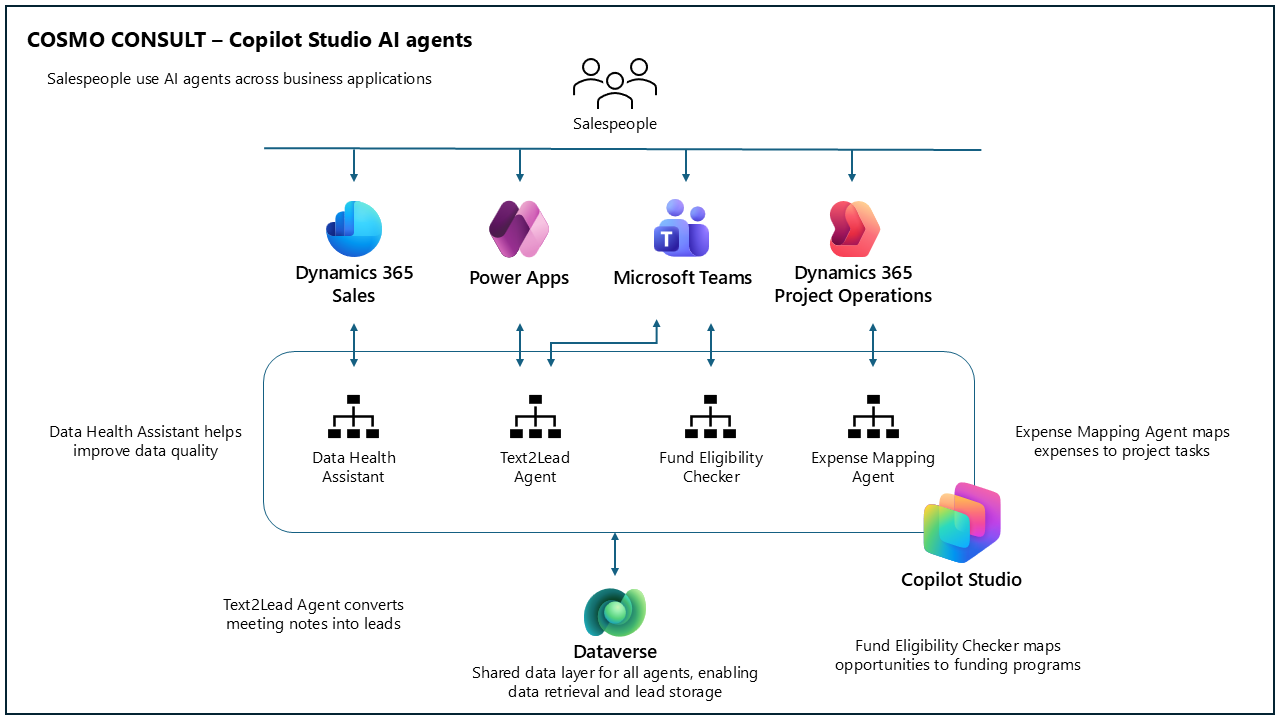
COSMO CONSULT built a set of Copilot Studio agents integrated with Dynamics 365, Microsoft Dataverse, Microsoft Teams, and Power Apps. Rather than introducing standalone AI experiences, the company embedded each agent into existing business workflows.
The solution includes four primary agents:
Data Health Assistant evaluates account data against predefined quality standards and guides users through issue resolution directly in the workflow. The solution reduced data quality support requests by 80 percent. On average, 96 percent of accounts within COSMO CONSULT's target markets now meet the company's highest data quality standards, which are based on approximately 14 core fields such as country/region, website, and industry.
Text2Lead Agent and Lead Recorder convert unstructured notes and audio recordings captured at trade fairs and customer events into structured leads in Dynamics 365 Sales. Lead information no longer needs to be manually processed after events, reducing delays and minimizing the risk of lost information. The solution saves an estimated 5 to 7 minutes per lead across more than 2,000 event leads annually in Germany, Austria, and Switzerland.
Expense Mapping Agent automatically assigns project expenses to the correct tasks in Dynamics 365 Project Operations, removing the need for employees to search for project tasks across multiple systems. This autonomous agent reduced manual corrections and decreased the time spent resolving mapping errors.
Fund Eligibility Checker identifies sales opportunities that qualify for Microsoft incentive programs, helping sellers avoid manually reviewing frequently changing eligibility documentation and simplifying incentive tracking within the sales process. The agent typically returns results in about one minute, reducing research time by an estimated 80 percent compared to manually reviewing incentive documentation.
Before the Data Health Assistant, we handled five to ten data quality inquiries each week. Now we see one or two every two weeks, mostly for cases that require elevated permissions. This change significantly reduced my workload and enabled users to resolve most issues independently.
— Maximilian Breitinger, Global Process Owner for Customer Centricity, COSMO CONSULT
Architecture
The architecture combines Dynamics 365, Power Platform, and Copilot Studio to support agent-driven workflows across sales and project operations. Dynamics 365 applications manage core business processes and operational data, while Dataverse provides a shared data layer across applications and agents.
The solution includes:
- Dynamics 365 Sales as the core CRM system
- Dynamics 365 Project Operations for project and expense management
- Microsoft Dataverse as the shared data layer
- Copilot Studio for building and managing AI agents
- Microsoft Teams and Copilot in Dynamics 365 Sales for conversational agent interfaces
- Power Apps for mobile lead capture scenarios
Text2Lead Agent workflow
A user submits notes in natural language through Microsoft Teams or a Power Apps mobile app, including:
- Contact name and company information
- Discussion topics
- Trade fair or event name
The agent retrieves relevant records from Dataverse, including contact, account, and campaign information.
The agent creates a new lead in Dynamics 365 Sales and links it to existing records when available.
Data Health Assistant workflow
A user opens an account record in Dynamics 365 Sales.
The user triggers the agent with a command such as "data health".
The Copilot Studio topic retrieves the account ID (GUID).
An AI prompt evaluates the record against defined rules.
The agent returns:
- Completeness status
- Missing fields
- Recommended actions
Fund Eligibility Checker workflow
A user triggers the agent directly from an opportunity in Dynamics 365.
The agent evaluates the opportunity against the Microsoft incentive program.
The agent stores the results in a custom table related to the opportunity. The results can then be used in subsequent steps, such as funding requests.
Expense Mapping Agent workflow
A user submits project expenses from a third-party tool, and the solution transfers these expenses to expense records in Dynamics 365 Project Operations.
The solution automatically triggers the agent during expense creation.
The agent uses an AI prompt to match the expense description to the appropriate project task and updates the expense report accordingly.
COSMO CONSULT highlights the importance of embedding agents directly into existing workflows, including Microsoft Teams and Dynamics 365 Sales processes.
It's not only about the capability of your agent, it's also about your user journey. You have to embed it in the process. And that's the particular strength we find in using Copilot Studio.
— Markus Lischka, IT Business Partner & Product Owner, COSMO CONSULT
Key features
This section describes the solution's key features and explains how its agents support COSMO CONSULT's sales and project operations.
Data Health Assistant
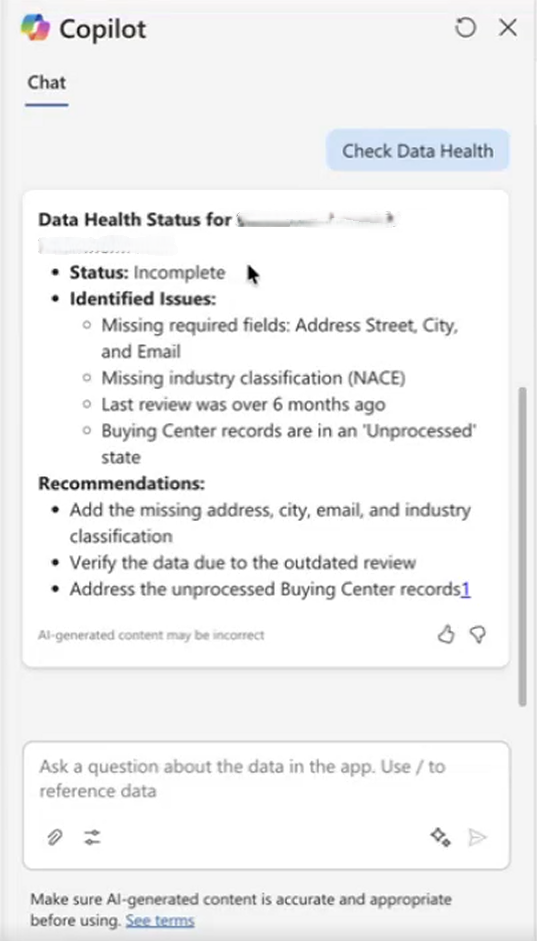
The Data Health Assistant is integrated into the Copilot sidebar in Dynamics 365 Sales, so users can check data quality directly within the sales process. When the assistant identifies issues, it guides users through the necessary updates with step-by-step recommendations. Users remain responsible for validating and applying the changes, which helps ensure data accuracy.
Unlike standard sales data quality checks, the solution evaluates records against COSMO CONSULT's internally defined quality rules, which were previously maintained in internal documentation.
The following image shows the sidebar displayed within the Account form in a Power Apps model-driven app.
Text2Lead Agent
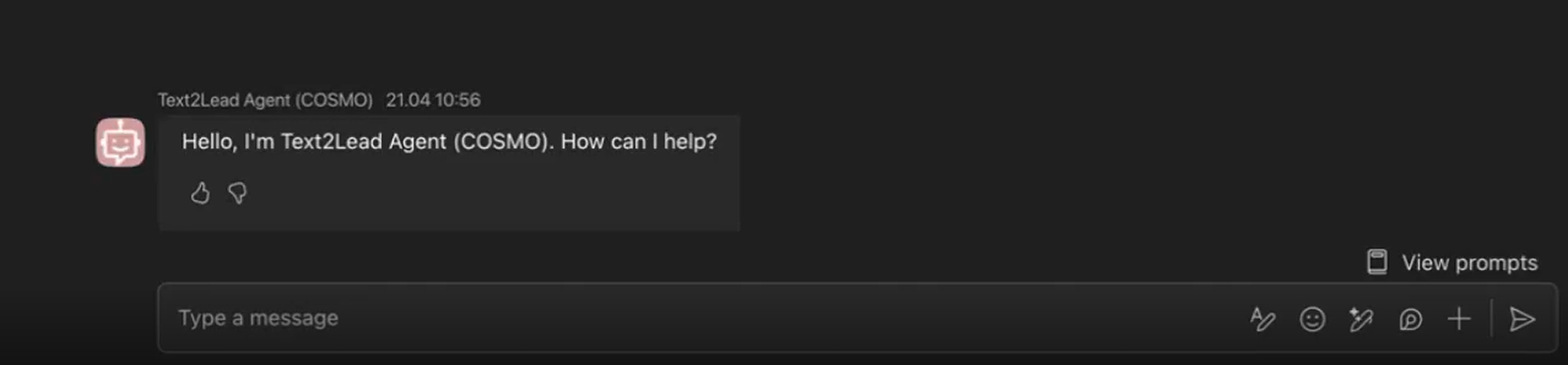
The Text2Lead Agent is available in Microsoft Teams, where salespeople can capture notes from customer conversations and trade fairs without switching applications. The agent converts unstructured input into structured lead records in Dynamics 365.
The solution matches submitted information against existing Dataverse records to identify or create related contacts and accounts. It then automatically creates and links leads to the relevant campaign when applicable. This approach supports consistent lead tracking while reducing manual data entry.
Lead Recorder (mobile app)
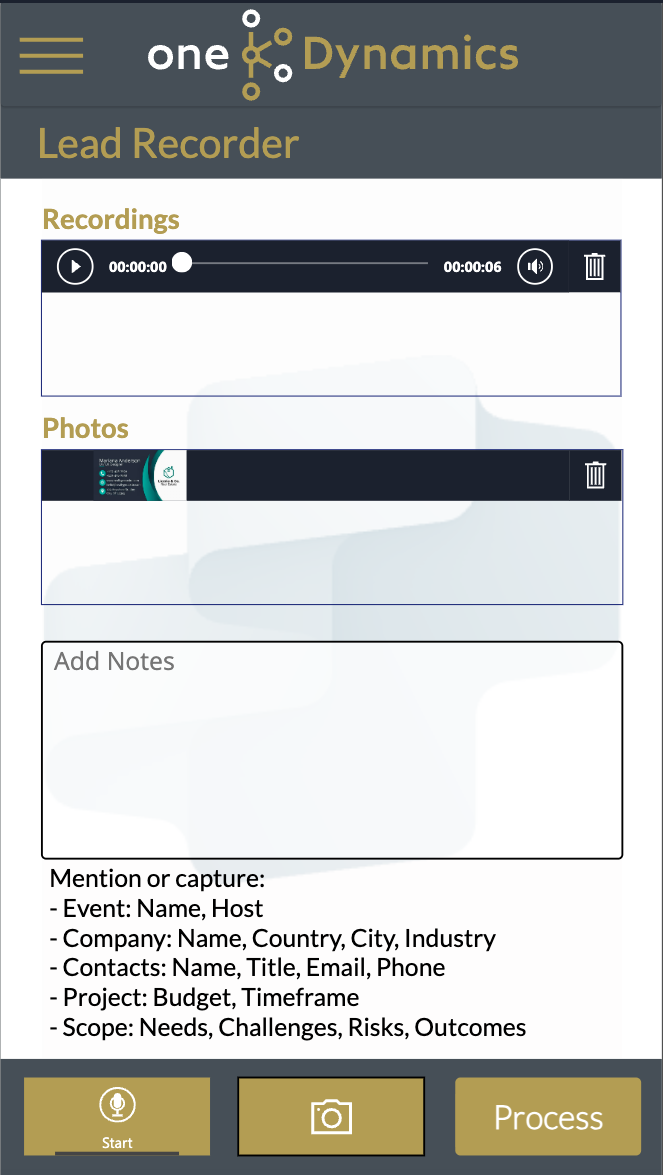
The Lead Recorder Power Apps mobile app enables sellers to capture leads during events by using voice recordings, images, and notes. The application uses AI processing to structure and enrich the captured information before passing it to the Text2Lead Agent.
The agent matches the data against existing records and creates prequalified leads in Dynamics 365, supporting efficient lead capture in field and event scenarios.
Fund Eligibility Checker
The Fund Eligibility Checker evaluates sales opportunities against Microsoft incentive programs to identify available funding opportunities. It flags eligible opportunities for sellers, which helps reduce the effort required to manually review frequently changing incentive documentation.

Expense Mapping Agent
The Expense Mapping Agent automatically assigns expenses to the appropriate tasks in Dynamics 365 Project Operations. By using AI prompts to interpret expense descriptions, the agent maps submitted expenses to the correct project tasks without requiring users to manually select them. Previously, users had to choose tasks from exported data, a time-consuming step that they often skipped.
Implementation approach
After consolidating systems on Dynamics 365, COSMO CONSULT prioritized operational scenarios with high manual effort or data quality challenges, including lead capture and account data validation. The company implemented these scenarios as Copilot Studio agents embedded directly into existing business workflows.
We understand agents in different classes: personal agents, process automation agents, user experience enhancement agents, and system-to-system automation agents. This structure helps us understand where AI can create the most value.
— Markus Lischka, IT Business Partner & Product Owner, COSMO CONSULT
The Copilot Studio agents integrate with Dynamics 365 and Microsoft Teams. The company also uses Power Apps mobile apps to capture data and invoke agent workflows.
Text2Lead Agent
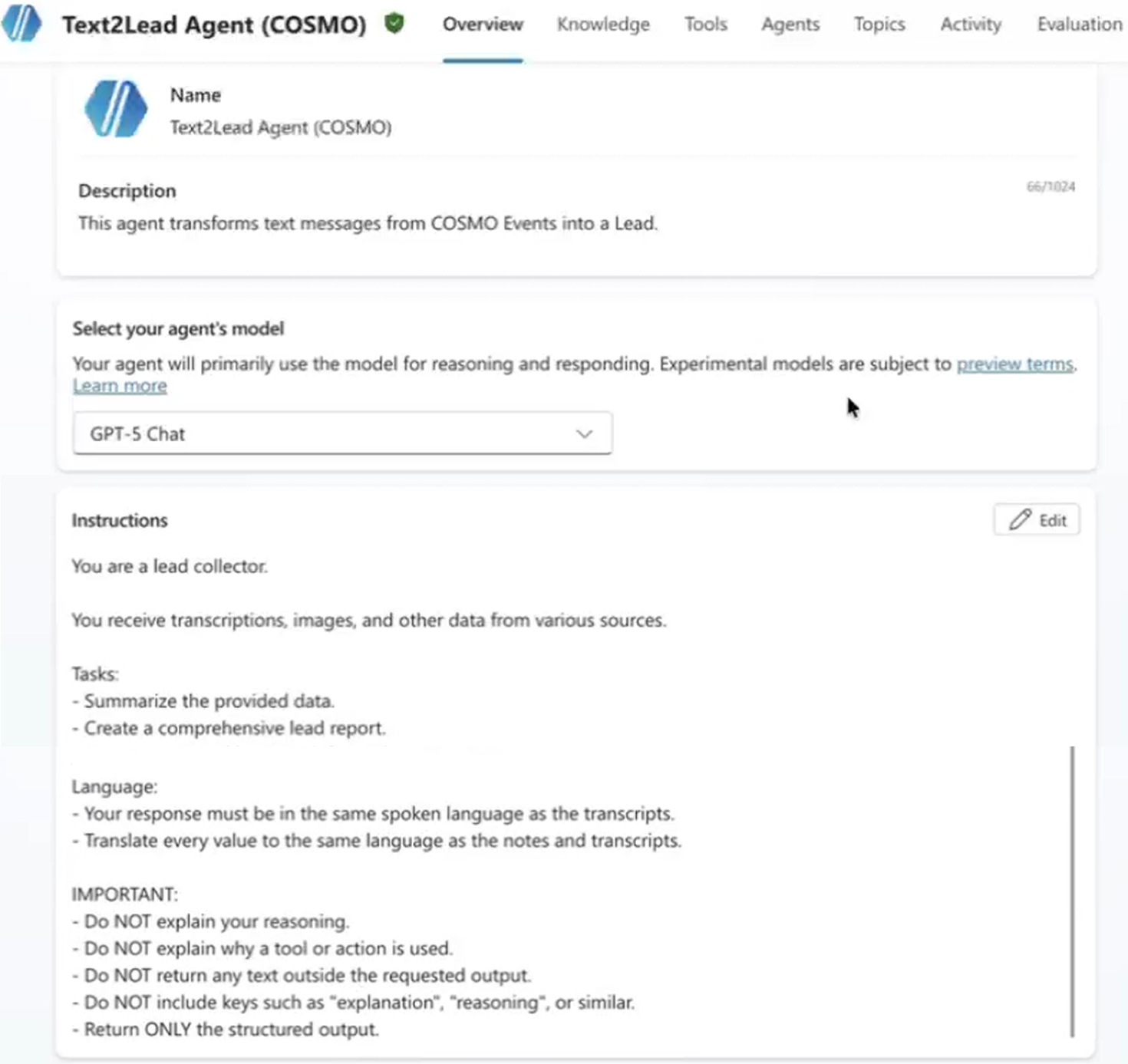
This agent is deployed to Copilot in Dynamics 365 Sales and Microsoft Teams. Its functionality is also available through a Power Apps mobile app called Lead Recorder. The implementation uses AI prompts and agent flows to process unstructured input, retrieve data from Dataverse, and create lead records.
A custom Copilot Studio topic extracts structured lead information by using predefined extraction rules, field mappings, and a structured JSON output. During runtime, the JSON output is passed to an agent flow, which retrieves more data from Dataverse and creates the lead record.
The following image shows the start of the agent's general instructions.
Lead Recorder
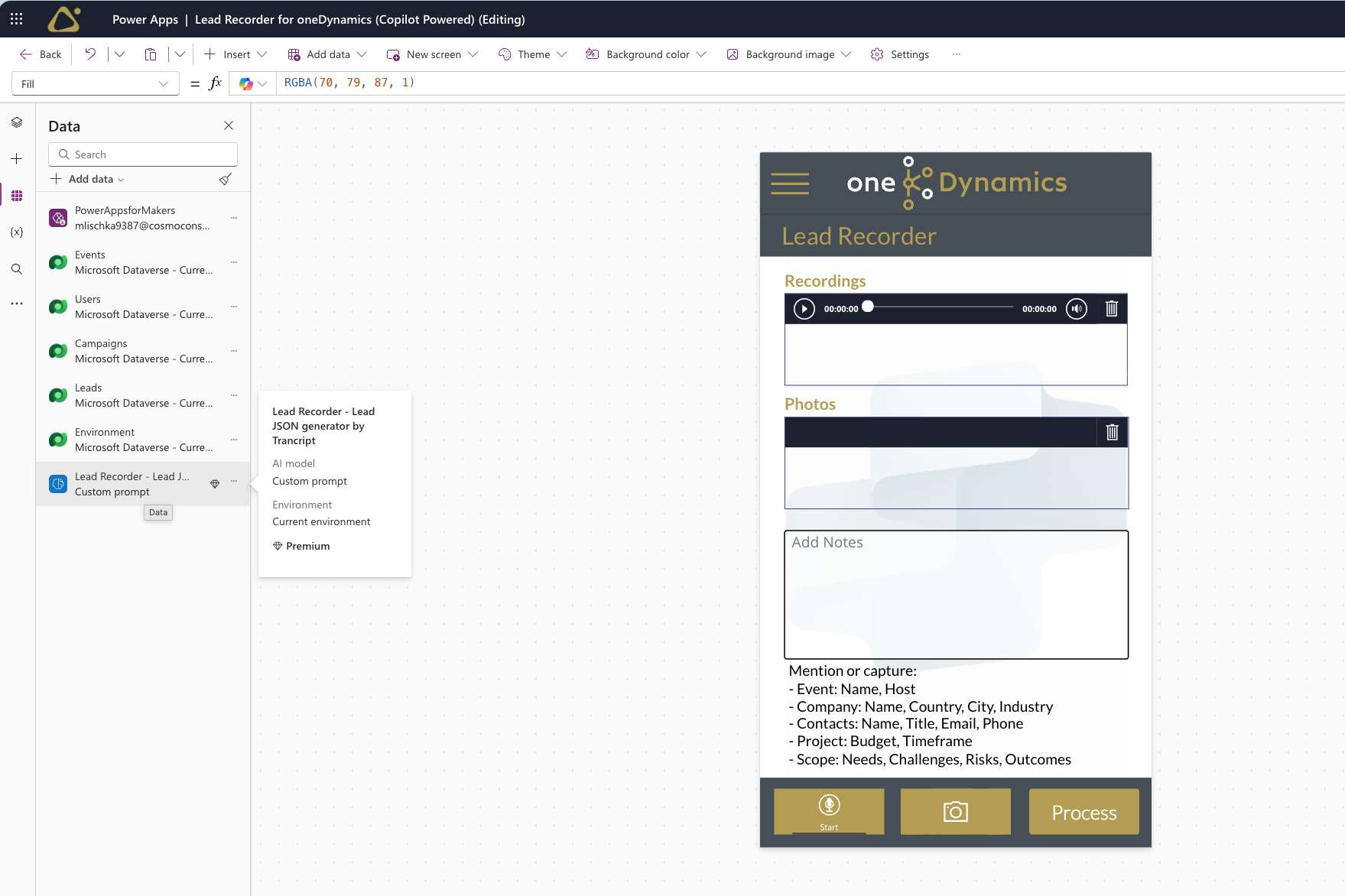
This Power Apps canvas app extends the functionality of the Text2Lead Agent. The team initially built the solution by using a ChatGPT-based backend but later refactored it to align with the broader Copilot Studio–based architecture. They also replaced ChatGPT's Whisper transcription services with Microsoft's Azure Speech services.
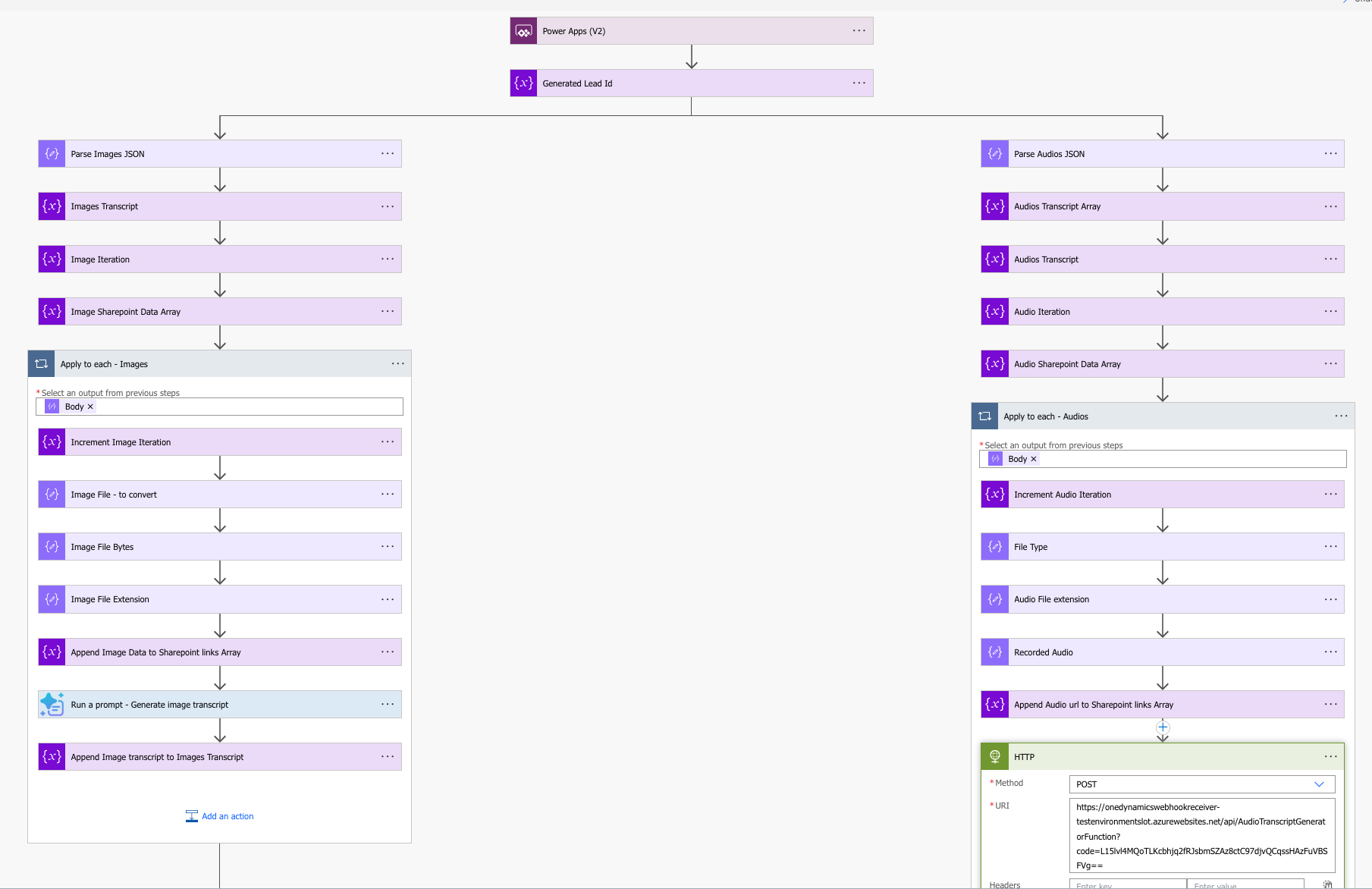
Users can submit audio recordings, images, and other lead-related content through the app. Power Automate cloud flows process the submitted content. Azure Speech services transcribe audio recordings, while the app processes images by using optical character recognition (OCR) and AI Builder capabilities to extract text and relevant information.
The app uses a custom AI Builder prompt to convert the collected information into a structured lead representation.
Before creating a lead in Dynamics 365 Sales, the app presents the extracted information to the user for review and validation. The app then passes the information to the Text2Lead Agent, which creates the lead record.
The following image shows the app in Power Apps Studio.
This image shows the Power Automate cloud flow.
Data Health Assistant
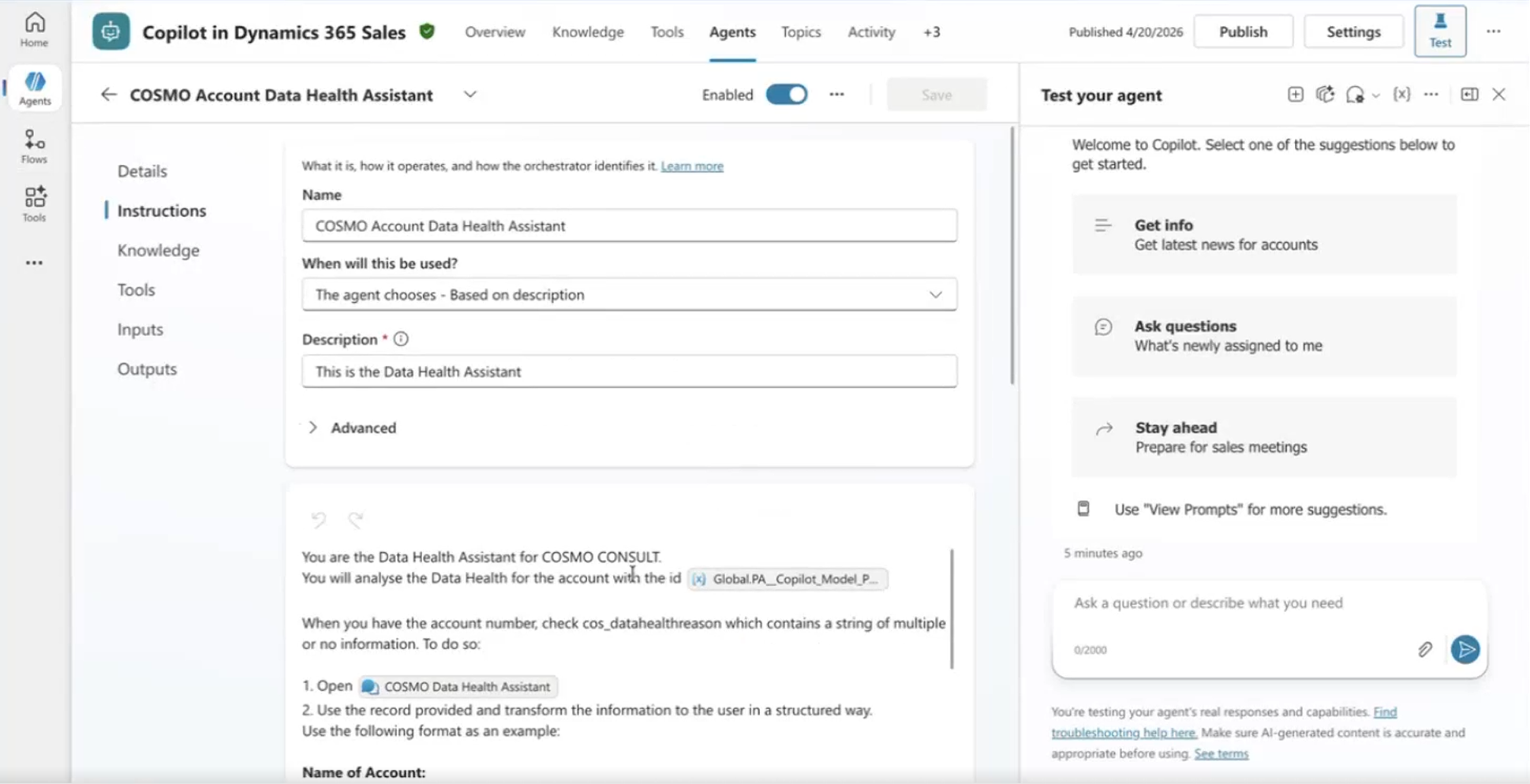
This agent is built as a child agent within a Dynamics 365 Sales agent experience. It evaluates account records against multiple data quality rules and returns results with recommendations for updating records. This approach replaces the need for separate documentation and reduces reliance on central teams.
The agent uses a structured set of instructions to ensure consistent evaluation and output. The instructions define the agent's role, specify how account data is evaluated against predefined rules, and standardize how results are presented.
The output includes key account details, identified issues, and recommended next steps to help users update records efficiently. Additional constraints ensure that the agent follows the defined structure and avoids generating unsupported responses.
The following image shows the agent configuration.
Fund Eligibility Checker
Initially, the team built this agent outside Power Platform by using Azure services and OpenAI. As Copilot Studio expanded its capabilities to easily connect it to Dataverse data, the team refactored the solution to use a Copilot Studio agent for eligibility checking. The agent evaluates Dataverse opportunities against Microsoft incentive program rules that the team uploaded as a PDF document. The resulting eligibility information can then be used in subsequent processes, including funding-related activities that integrate with Microsoft Partner Center APIs.
Expense Mapping Agent
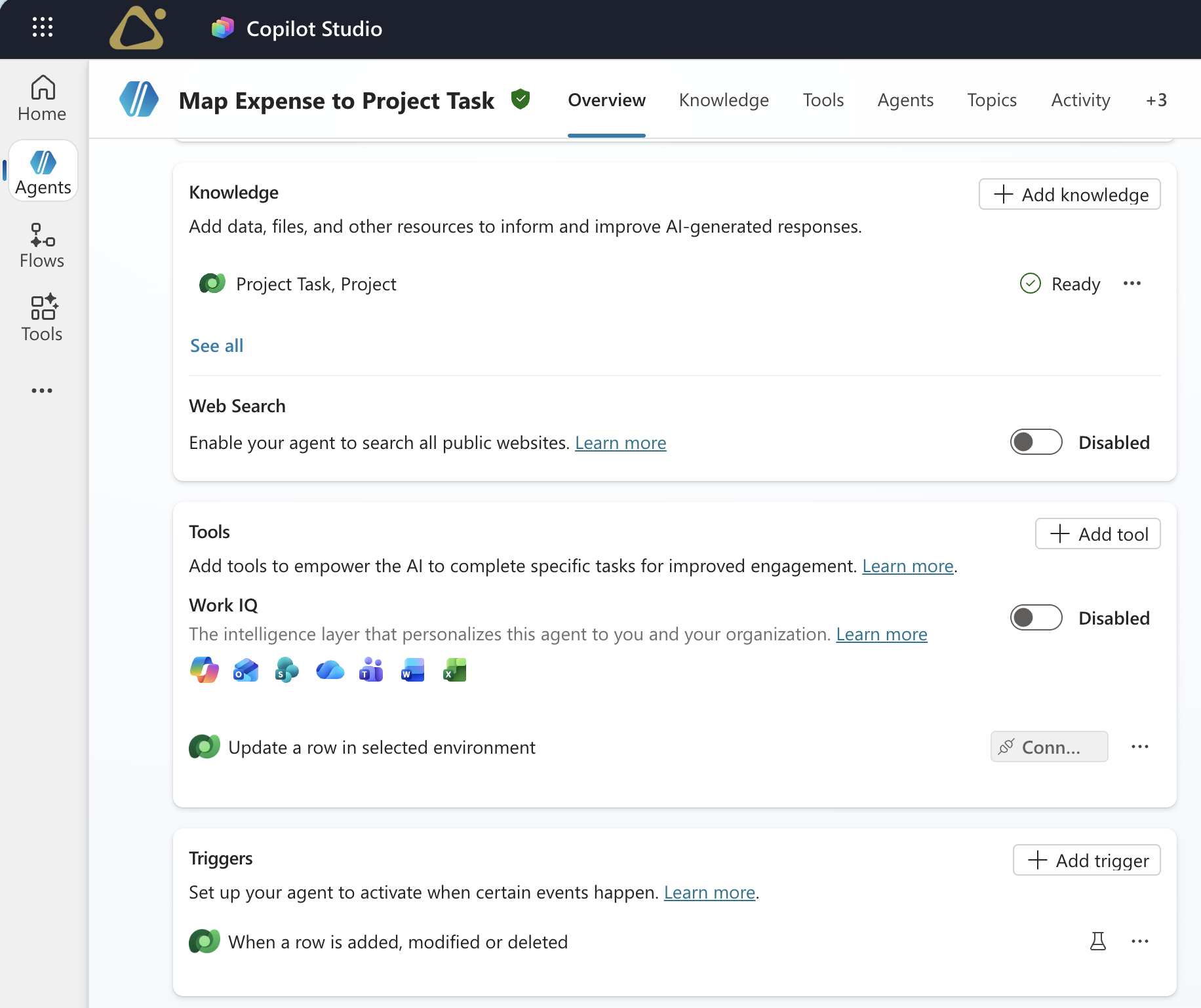
Previously, registering expenses required users to manually select the correct task. Instead of extending Dynamics 365 Project Operations, the team built an agent that triggers when a new expense is created. The agent analyzes the expense description and assigns the expense to the most relevant task within the selected project. Users now select only the project, while the agent automatically assigns the appropriate task.
The following image shows the agent configuration in Copilot Studio, including trigger, knowledge, and the Dataverse update as a tool.
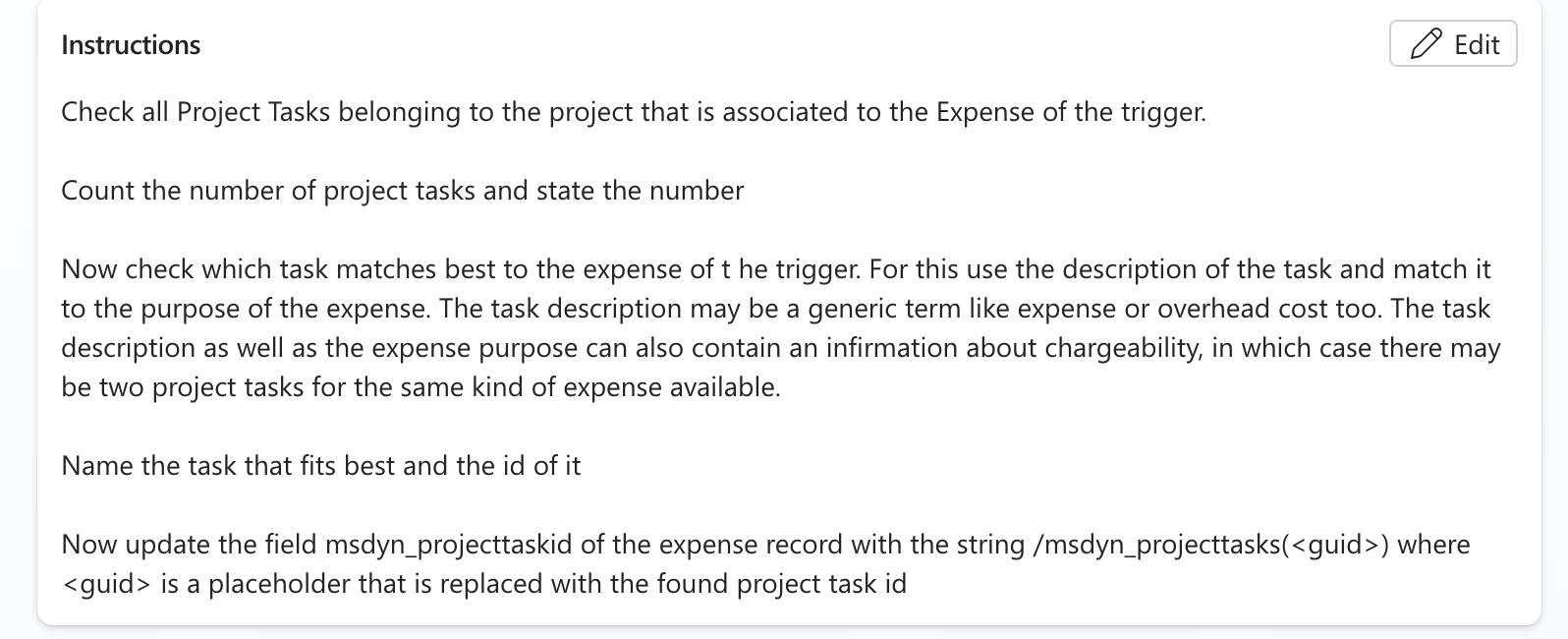
The instructions direct the agent to review all tasks for the associated project, identify the task that best matches the expense purpose, and update the expense record with that task's ID. The following image shows these instructions in Copilot Studio.
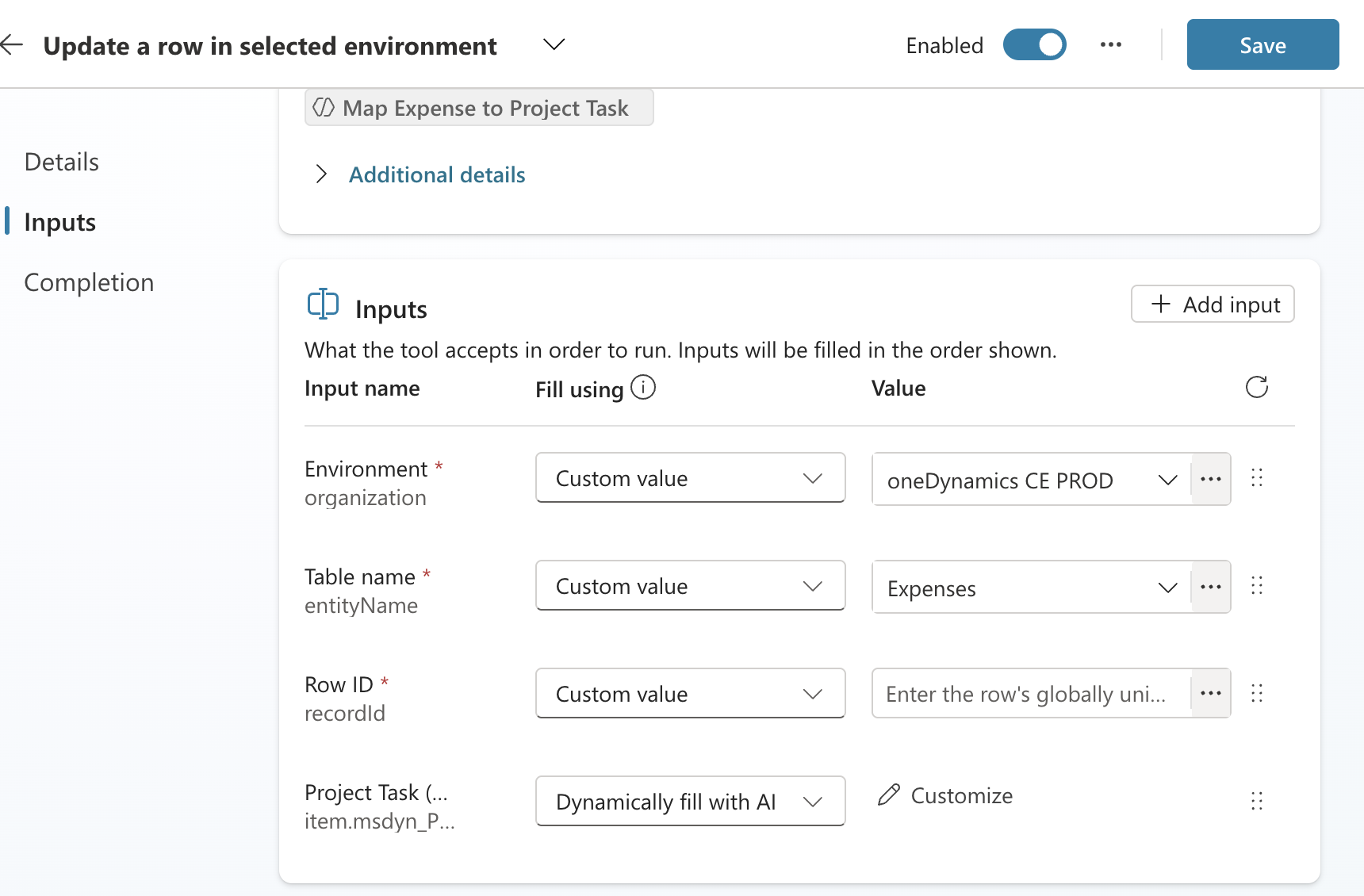
This image shows the associated Dataverse update:
COSMO CONSULT highlights how implementation timelines vary by complexity. Some agents require several weeks to design and integrate, while simpler use cases can be delivered in a few days.
Things like these fully automated agents—it's just a couple of days to build, really, basically two days more or less. The Power Platform relieves us of a lot of technical debt.
— Markus Lischka, IT Business Partner & Product Owner, COSMO CONSULT
Takeaways
This case study shows how organizations can use Dynamics 365 and Copilot Studio to extend sales capabilities and tailor solutions to meet their specific business needs.
Here are some key takeaways for professionals who want to implement a similar solution in their own organizations:
Identify gaps in standard Dynamics 365 functionality and use Power Platform and Copilot Studio to extend those capabilities.
Embed Copilot Studio agents directly into existing workflows to improve adoption and reduce context switching.
Prioritize high-impact scenarios such as data quality management and lead capture, where automation can reduce manual effort and improve consistency.
Design agents to handle repetitive tasks first while allowing escalation for scenarios that require additional permission or human validation.
Involve business users in identifying use cases and shaping solutions based on real business needs.
COSMO CONSULT found that many successful AI initiatives originated directly from business teams.
Very often the idea for an agent or for the usage of AI is coming from the line of business. It's not something that IT imposes. The initiative comes from the people who see the problem every day.
— Peter Dibbern, Chief Marketing Officer, COSMO CONSULT
Looking ahead
COSMO CONSULT is expanding its use of Dynamics 365 and Copilot Studio by standardizing processes and deploying agents across more countries and regions.
The company also plans to develop new agents to support a broader range of business scenarios, including:
- Ticket analysis to improve support processes
- Ideal customer profile (ICP) identification to support targeting and sales strategies
- Business model canvas generation to support consulting and pre-sales activities
- Website traffic analysis to better understand customer behavior and engagement
COSMO CONSULT is also investing in deeper analytics by using unified data across systems. Planned capabilities include real-time insights into conversion rates, deal size, and pipeline performance to help sales teams make more informed decisions.
These initiatives build on the existing foundation and expand the use of Copilot Studio from operational improvements to more data-driven and predictive scenarios.