Note
Access to this page requires authorization. You can try signing in or changing directories.
Access to this page requires authorization. You can try changing directories.
Version 260430 for the new Power Apps experience is available in the US, Australia, India, and Asia region. This article describes all new features released in the month of April of 2026.
Preview Date: May 01, 2026
Worldwide Rollout Date: May 02, 2026
New features
🪟 Standard M365 connectors
Your apps can now connect directly to Microosoft Outlook, Office 365 Users, and Teams! Look up user profiles, send emails, manage calendar events, and post to channels right from your app, using the M365 sign-in your users already have, with no extra licensing required.

🧠 Work IQ integration
Your apps now come with Work IQ built in, bringing organizational intelligence directly into the experiences you create. No extra setup required. Your apps are now smarter with more contextual experiences out of the box because it already understands the people, data, and workflows across your organization.

📋 Plan before you build
Start your app with a conversation and a plan before you build. With plan mode, the agent shows you a proposal of the app with potential clarifying questions up front, so that you can shape the scope before the app gets generated. Iterate with the agent until the plan reflects what you actually want, then hit Accept and watch it build against a spec you signed off on. Fewer surprises, fewer rebuilds, and a much clearer shared understanding between you and the agent from the very first prompt.

📝 Plan before you edit
For bigger changes, you can now turn on plan mode to review an edit before it happens. The agent lays out what it intends to change and why, giving you a chance to discuss the approach, adjust the scope, or redirect it entirely before anything is touched. Once the plan looks right, approve it and the agent carries out the edits as agreed. It's a simple way to stay in control of meaningful changes without losing the speed of working with an agent.

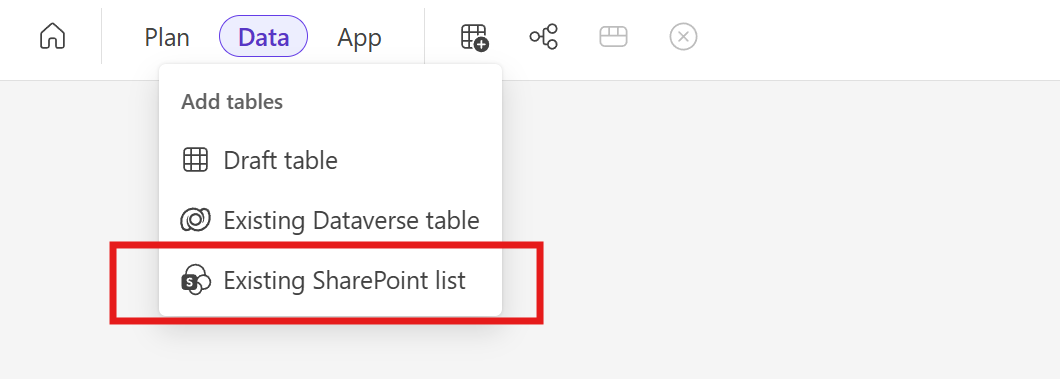
🗂️ SharePoint list connector
You can now connect your app to existing SharePoint lists! It can read or write list items directly, without having to import data into Dataverse first. Bring in the lists your team already maintains from SharePoint and keep them as the source of truth across your apps.
🚀 Publish and share app with draft tables
You no longer need to commit every schema change before publishing or sharing your app. We now support publishing and sharing your app with draft tables, so you can continue to iterate on your data model even after the app has been published.
