Note
Access to this page requires authorization. You can try signing in or changing directories.
Access to this page requires authorization. You can try changing directories.
Important
Microsoft 365 Agents Toolkit is deprecated for Teams agent and app development, and TeamsFx SDK is fully deprecated for all scenarios.
For all new Teams agent and app development, use Teams SDK and the Teams developer CLI.
You can learn how to install Microsoft 365 Agents Toolkit (previously known as Teams Toolkit) and enjoy enhanced experience for app development.
Install Agents Toolkit for Visual Studio
Download and open Microsoft Visual Studio installer.
Select Install. If you've already installed Visual Studio, select Modify.
Visual Studio installer shows all workloads.
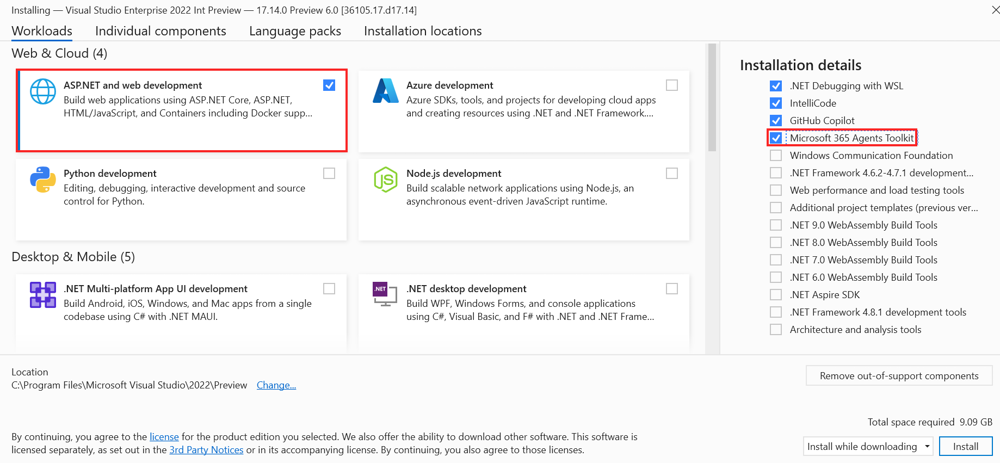
From the installation screen, perform the following steps:
- Select Workloads > ASP.NET and web development.
- On the right pane, go to Installation details > Optional and then select Microsoft 365 Agents Toolkit.
- Select Install. Visual Studio is installed and a pop-up appears.
Select Launch.
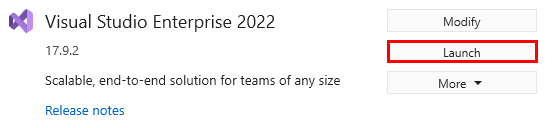
The Visual Studio 2022 window appears.