Note
Access to this page requires authorization. You can try signing in or changing directories.
Access to this page requires authorization. You can try changing directories.
Applies to:  Analytics Platform System (PDW)
Creates an external table.
Use an external table to:
- Query Hadoop or Azure Blob Storage data with Transact-SQL statements.
- Import and store data from Hadoop or Azure Blob Storage into Analytics Platform System.
See also CREATE EXTERNAL DATA SOURCE and DROP EXTERNAL TABLE.
Syntax
CREATE EXTERNAL TABLE { database_name.schema_name.table_name | schema_name.table_name | table_name }
    ( <column_definition> [ , ...n ] )
    WITH (
        LOCATION = 'hdfs_folder_or_filepath' ,
        DATA_SOURCE = external_data_source_name ,
        FILE_FORMAT = external_file_format_name
        [ , <reject_options> [ , ...n ] ]
    )
[ ; ]

<column_definition> ::=
column_name <data_type>
    [ COLLATE collation_name ]
    [ NULL | NOT NULL ]

<reject_options> ::=
{
    | REJECT_TYPE = { value | percentage },
    | REJECT_VALUE = reject_value ,
    | REJECT_SAMPLE_VALUE = reject_sample_value ,

}
Arguments
{ database_name.schema_name.table_name | schema_name.table_name | table_name }
The one to three-part name of the table to create.
For an external table, Analytics Platform System stores only the table metadata along with basic statistics about the file or folder that is referenced in Hadoop or Azure Blob Storage. No actual data is moved or stored in Analytics Platform System.
Important
For best performance, if the external data source driver supports a three-part name, you should provide the three-part name.
<column_definition> [ ,...n ]
CREATE EXTERNAL TABLE supports the ability to configure column name, data type, nullability, and collation. You can't use the DEFAULT CONSTRAINT on external tables.
The column definitions, including the data types and number of columns, must match the data in the external files. If there's a mismatch, the file rows are rejected when querying the actual data.
LOCATION = 'folder_or_filepath'
Specifies the folder or the file path and file name for the actual data in Hadoop or Azure Blob Storage. The location starts from the root folder. The root folder is the data location specified in the external data source.
In Analytics Platform System, the CREATE EXTERNAL TABLE AS SELECT (CETAS) statement creates the path and folder if it doesn't exist. CREATE EXTERNAL TABLE doesn't create the path and folder.
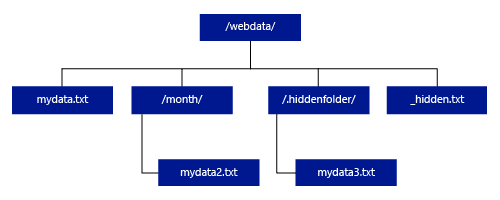
If you specify LOCATION to be a folder, a PolyBase query that selects from the external table retrieves files from the folder and all of its subfolders. Just like Hadoop, PolyBase doesn't return hidden folders. It also doesn't return files for which the file name begins with an underline (_) or a period (.).
In the following image example, if LOCATION='/webdata/', a PolyBase query returns rows from mydata.txt and mydata2.txt. It doesn't return mydata3.txt because it's in a subfolder of a hidden folder, and it doesn't return _hidden.txt because it's a hidden file.
To change the default and only read from the root folder, set the attribute <polybase.recursive.traversal> to 'false' in the core-site.xml configuration file. This file is located under <SqlBinRoot>\PolyBase\Hadoop\Conf\ under the bin root of SQL Server. For example, C:\Program Files\Microsoft SQL Server\MSSQL13.XD14\MSSQL\Binn\.
DATA_SOURCE = external_data_source_name
Specifies the name of the external data source that contains the location of the external data. This location is either a Hadoop or Azure Blob Storage. To create an external data source, use CREATE EXTERNAL DATA SOURCE.
FILE_FORMAT = external_file_format_name
Specifies the name of the external file format object that stores the file type and compression method for the external data. To create an external file format, use CREATE EXTERNAL FILE FORMAT.
REJECT options
This option can be used only with external data sources where TYPE = HADOOP.
You can specify the reject parameters that determine how PolyBase handles dirty records it retrieves from the external data source. A data record is considered 'dirty' if it actual data types or the number of columns don't match the column definitions of the external table.
When you don't specify or change reject values, PolyBase uses default values. This information about the reject parameters is stored as additional metadata when you create an external table with CREATE EXTERNAL TABLE statement. When a future SELECT statement or SELECT INTO SELECT statement selects data from the external table, PolyBase uses the reject options to determine the number or percentage of rows that can be rejected before the actual query fails. The query returns (partial) results until the reject threshold is exceeded. It then fails with the appropriate error message.
REJECT_TYPE = { value | percentage }
Clarifies whether the REJECT_VALUE option is specified as a literal value or a percentage.
value
REJECT_VALUEis a literal value, not a percentage. The PolyBase query fails when the number of rejected rows exceeds reject_value.For example, if
REJECT_VALUE = 5andREJECT_TYPE = value, the PolyBaseSELECTquery fails after five rows are rejected.percentage
REJECT_VALUEis a percentage, not a literal value. A PolyBase query fails when the percentage of failed rows exceeds reject_value. The percentage of failed rows is calculated at intervals.
REJECT_VALUE = reject_value
Specifies the value or the percentage of rows that can be rejected before the query fails.
For REJECT_TYPE = value, reject_value must be an integer between 0 and 2,147,483,647.
For REJECT_TYPE = percentage, reject_value must be a float between 0 and 100.
REJECT_SAMPLE_VALUE = reject_sample_value
This attribute is required when you specify REJECT_TYPE = percentage. It determines the number of rows to attempt to retrieve before the PolyBase recalculates the percentage of rejected rows.
The reject_sample_value parameter must be an integer between 0 and 2,147,483,647.
For example, if REJECT_SAMPLE_VALUE = 1000, PolyBase calculates the percentage of failed rows after it has attempted to import 1,000 rows from the external data file. If the percentage of failed rows is less than reject_value, PolyBase attempts to retrieve another 1,000 rows. It continues to recalculate the percentage of failed rows after it attempts to import each additional 1,000 rows.
Note
Since PolyBase computes the percentage of failed rows at intervals, the actual percentage of failed rows can exceed reject_value.
Example
This example shows how the three REJECT options interact with each other. For example, if REJECT_TYPE = percentage, REJECT_VALUE = 30, and REJECT_SAMPLE_VALUE = 100, the following scenario could occur:
- PolyBase attempts to retrieve the first 100 rows; 25 fail and 75 succeed.
- Percent of failed rows is calculated as 25%, which is less than the reject value of 30%. As a result, PolyBase continues retrieving data from the external data source.
- PolyBase attempts to load the next 100 rows; this time 25 rows succeed and 75 rows fail.
- Percent of failed rows is recalculated as 50%. The percentage of failed rows has exceeded the 30% reject value.
- The PolyBase query fails with 50% rejected rows after attempting to return the first 200 rows. Matching rows are returned before the PolyBase query detects the reject threshold has been exceeded.
Permissions
Requires these user permissions:
CREATE TABLEALTER ANY SCHEMAALTER ANY EXTERNAL DATA SOURCEALTER ANY EXTERNAL FILE FORMATCONTROL DATABASE
The login that creates the external data source must have permission to read and write to the external data source, located in Hadoop or Azure Blob Storage.
Important
The ALTER ANY EXTERNAL DATA SOURCE permission grants any principal the ability to create and modify any external data source object, and therefore, it also grants the ability to access all database scoped credentials on the database. This permission must be considered as highly privileged, and therefore must be granted only to trusted principals in the system.
Error handling
While executing the CREATE EXTERNAL TABLE statement, PolyBase attempts to connect to the external data source. If the attempt to connect fails, the statement fails and the external table isn't created. It can take a minute or more for the command to fail since PolyBase retries the connection before eventually failing the query.
Remarks
In ad hoc query scenarios, such as SELECT FROM EXTERNAL TABLE, PolyBase stores the rows that are retrieved from the external data source in a temporary table. After the query completes, PolyBase removes and deletes the temporary table. No permanent data is stored in SQL tables.
In contrast, in the import scenario, such as SELECT INTO FROM EXTERNAL TABLE, PolyBase stores the rows that are retrieved from the external data source as permanent data in the SQL table. The new table is created during query execution when PolyBase retrieves the external data.
PolyBase can push some of the query computation to Hadoop to improve query performance. This action is known as predicate pushdown. To enable it, specify the Hadoop resource manager location option in CREATE EXTERNAL DATA SOURCE.
You can create many external tables that reference the same or different external data sources.
Limitations
Since the data for an external table isn't under the direct management control of the appliance, it can be changed or removed at any time by an external process. As a result, query results against an external table aren't guaranteed to be deterministic. The same query can return different results each time it runs against an external table. Similarly, a query might fail if the external data is moved or removed.
You can create multiple external tables that each reference different external data sources. If you simultaneously run queries against different Hadoop data sources, then each Hadoop source must use the same 'hadoop connectivity' server configuration setting. For example, you can't simultaneously run a query against a Cloudera Hadoop cluster and a Hortonworks Hadoop cluster since these use different configuration settings. For the configuration settings and supported combinations, see PolyBase connectivity configuration.
Only these Data Definition Language (DDL) statements are allowed on external tables:
CREATE TABLEandDROP TABLECREATE STATISTICSandDROP STATISTICSCREATE VIEWandDROP VIEW
Constructs and operations not supported:
- A
DEFAULTconstraint on external table columns - Data Manipulation Language (DML) operations of delete, insert, and update
- Dynamic data masking on external table columns
Query limitations
PolyBase can consume a maximum of 33k files per folder when running 32 concurrent PolyBase queries. This maximum number includes both files and subfolders in each HDFS folder. If the degree of concurrency is less than 32, a user can run PolyBase queries against folders in HDFS that contain more than 33k files. We recommend that you keep external file paths short and use no more than 30k files per HDFS folder. When too many files are referenced, a Java Virtual Machine (JVM) out-of-memory exception might occur.
Table width limitations
In SQL Server 2016 (13.x), PolyBase has a row width limit of 32 KB based on the maximum size of a single valid row by table definition. If the sum of the column schema is greater than 32 KB, PolyBase can't query the data.
In Azure Synapse Analytics, this limitation has been raised to 1 MB.
Data type limitations
The following data types can't be used in PolyBase external tables:
- geography
- geometry
- hierarchyid
- image
- text
- ntext
- xml
- Any user-defined type
Locking
Shared lock on the SCHEMARESOLUTION object.
Security
The data files for an external table are stored in Hadoop or Azure Blob Storage. These data files are created and managed by your own processes. It's your responsibility to manage the security of the external data.
Examples
A. Join HDFS data with Analytics Platform System data
SELECT cs.user_ip
FROM ClickStream AS cs
     INNER JOIN [User] AS u
         ON cs.user_ip = u.user_ip
WHERE cs.url = 'www.microsoft.com';
B. Import row data from HDFS into a distributed Analytics Platform System Table
CREATE TABLE ClickStream_PDW
WITH (DISTRIBUTION = HASH(url)) AS
SELECT url,
       event_date,
       user_ip
FROM ClickStream;
C. Import row data from HDFS into a replicated Analytics Platform System Table
CREATE TABLE ClickStream_PDW
WITH (DISTRIBUTION = REPLICATE) AS
SELECT url,
       event_date,
       user_ip
FROM ClickStream;