Note
Access to this page requires authorization. You can try signing in or changing directories.
Access to this page requires authorization. You can try changing directories.
A subordinate control is made active by the selection of another (superior) control.
Make subordinate controls unavailable—and their labels and contents (the values that the controls contain) dimmed—until the superior control is selected.
Do not place superior and subordinate controls at a peer level. Users require a visual cue that the controls have a contingent relationship. Indent subordinate controls below the superior control.
Do not place subordinate and superior controls at a peer level.

 Design Note:
Layout Specification for Subordinate Controls 
When you're subordinating controls, you have extra flexibility with regard to labels and access keys. For example, in the following figure, the superior and subordinate control can share a label and its access key.
 In this case, the user is able to use the arrow keys to move focus from the option button to its subordinate control.
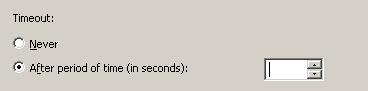 When clarity would be compromised, create separate labels for the superior and subordinate controls.

You may also specify units (seconds, connections, and so on) in parentheses after the label. Do not place the units label to the right of the subordinate control, as it is problematic for localization. Do not make the contents of the subordinate control (or its units label) part of a sentence, because this is not localizable.
Correct
Incorrect

Incorrect

Subordinate check boxes should be shown as such. Do not make check boxes at a peer level interoperate. When subordinate check boxes are inactive, set them to the cleared state.
When an option button is the superior control, make its selection move input focus to the subordinate control. In the following image, when the second option button is selected, the spin box control has input focus.
Exception: Do not apply this guideline to superior check boxes. Their selection should always result in the check box retaining input focus, whether or not it has subordinate controls.Do not make a control on one surface subordinate to a control on another surface without explanatory text near the subordinate control. For example, if the user needs to select the Enable Logging option button on a property sheet in order to make a View Log command button active in another dialog box, this relationship must be clearly explained near the View Log button.
See Also
Concepts
Check Boxes
Layout
Layout Specifications: Win32
Layout Specifications: Windows Forms
List Boxes
Option Buttons
Spin Boxes