Note
Access to this page requires authorization. You can try signing in or changing directories.
Access to this page requires authorization. You can try changing directories.
[ The Windows Gadget Platform/Sidebar is available for use in the operating systems specified in the Requirements section. It may be altered or unavailable in subsequent versions. ]
Gets a System.Time.timeZone object that represents the system time zone.
This property is read-only.
Syntax
objcurrentTimeZone = System.Time.currentTimeZone
Property value
An Object that receives a System.Time.timeZone instance.
Remarks
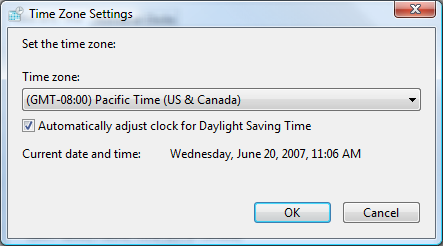
Each System.Time.timeZone in the timeZones collection corresponds to the system time zones itemized in the Time Zone Settings dialog.
The following image shows the Time Zone Settings dialog.
Examples
The following example demonstrates how to use currentTimeZone to get the details for the system time zone.
var oSelectedTimeZone = System.Time.currentTimeZone;

// Set the time zone details.
var sTimeZoneDetails = function()
{
    var sDetails = "";
    sDetails += "Bias: " + oSelectedTimeZone.bias + "<hr />";
    sDetails += "Display Name: " + oSelectedTimeZone.displayName + "<hr />";
    sDetails += "DST Bias: " + oSelectedTimeZone.DSTBias + "<hr />";
    sDetails += "DST Date: " + oSelectedTimeZone.DSTDate + "<hr />";
    sDetails += "DST Display Name: " + oSelectedTimeZone.DSTDisplayName + "<hr />";
    sDetails += "Name: " + oSelectedTimeZone.name + "<hr />";
    sDetails += "Standard Bias: " + oSelectedTimeZone.standardBias + "<hr />";
    sDetails += "Standard Date: " + oSelectedTimeZone.standardDate + "<hr />";
    sDetails += "Standard Display Name: " + oSelectedTimeZone.standardDisplayName;
    return sDetails;
}
Requirements
| Minimum supported client |
Windows Vista [desktop apps only] |
| Minimum supported server |
Windows Server 2008 [desktop apps only] |
| End of client support |
Windows 7 |
| End of server support |
Windows Server 2008 |
| IDL |
|
| DLL |
|