Note
Access to this page requires authorization. You can try signing in or changing directories.
Access to this page requires authorization. You can try changing directories.
You can increase the relevancy and consistency of the content Project "Sophia" generates by adding context to better interpret data. Project "Sophia" applies this context to your prompts automatically, so you don't have to repeat that same contextual information every time you interact with Project "Sophia".
For example, you can add the start of your organization's fiscal year to the context. Project "Sophia" can then relate input in prompts like Q1 or this fiscal year to the correct period of time.
You can also add definitions for acronyms or column headings for your data used by your organization in the context. When they're used in prompts or present in your uploaded data or data sources, Project "Sophia" can correctly interpret their meaning and return better results.
To set and manage the context:
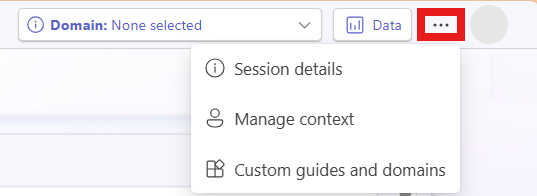
- Select the options menu (…), then Manage context.
Enter context information. You don't need to fill in every field, but adding more context leads to more relevant content generated.
- Turn on Remember data for new workspaces to have Project "Sophia" consider previously selected data and domains when working in new workspaces. Turn off to only consider data and domains from the current workspace.
- To delete the current context, data, and domain information, select Delete all.
Enter a question or topic to analyze with Project "Sophia".