Note
Access to this page requires authorization. You can try signing in or changing directories.
Access to this page requires authorization. You can try changing directories.
Microsoft Fabric provides two complementary Model Context Protocol (MCP) servers that give AI agents access to Fabric using natural language. Choose the remote Core server for quick access to Fabric workspaces and items, or the local Fabric MCP Server for development workflows with API documentation, OneLake data, and extensibility.
What is Model Context Protocol
Model Context Protocol (MCP) is an open standard that enables AI agents to access external data sources and services through a unified interface. MCP extends AI interactions beyond conversation to system control, allowing agents to read data, perform operations, and automate workflows.
Key benefits
- Standardized interface — One protocol works across any MCP-compatible AI host or custom agent
- Secure by design — Built-in authentication, role-based access control (RBAC), and audit trails protect your enterprise data
- Typed operations — Defined schemas for inputs and outputs reduce errors and improve reliability
- Discoverable capabilities — AI agents explore available operations automatically, adapting to what you can access
How it works
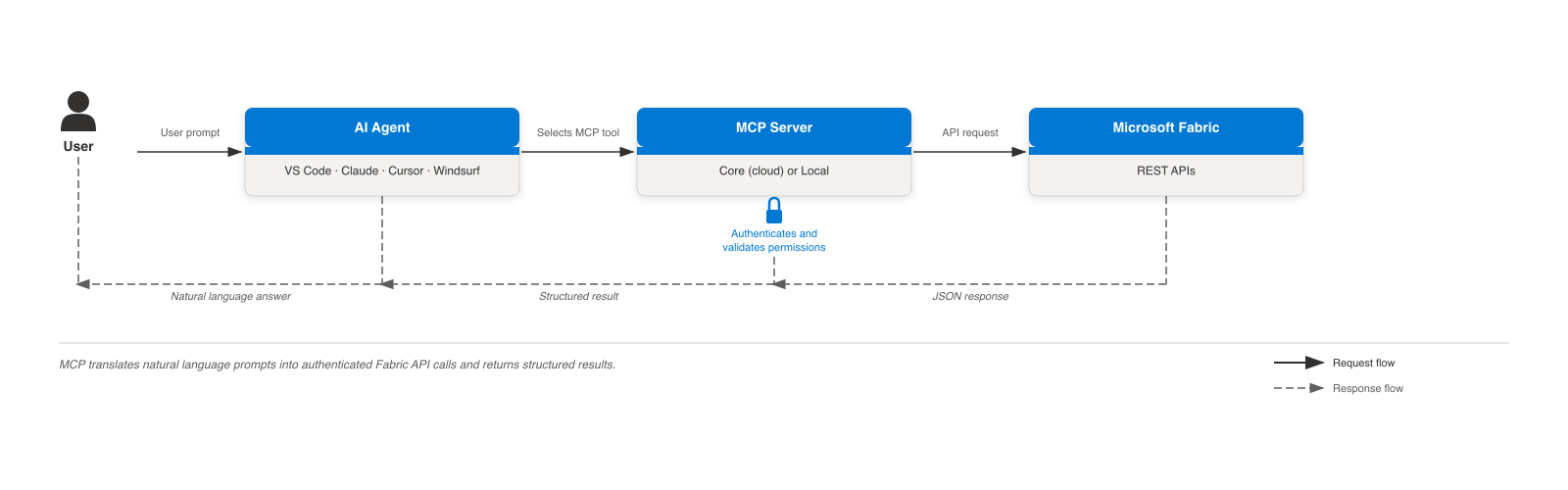
When you ask an AI agent a question about Fabric:
- The agent analyzes your prompt to understand your intent.
- The agent discovers available MCP tools and selects the appropriate operation.
- The MCP server authenticates your request and validates your permissions.
- The server calls the Fabric API on your behalf.
- The agent interprets the API response and provides a natural language answer.
What is Fabric Core MCP Server
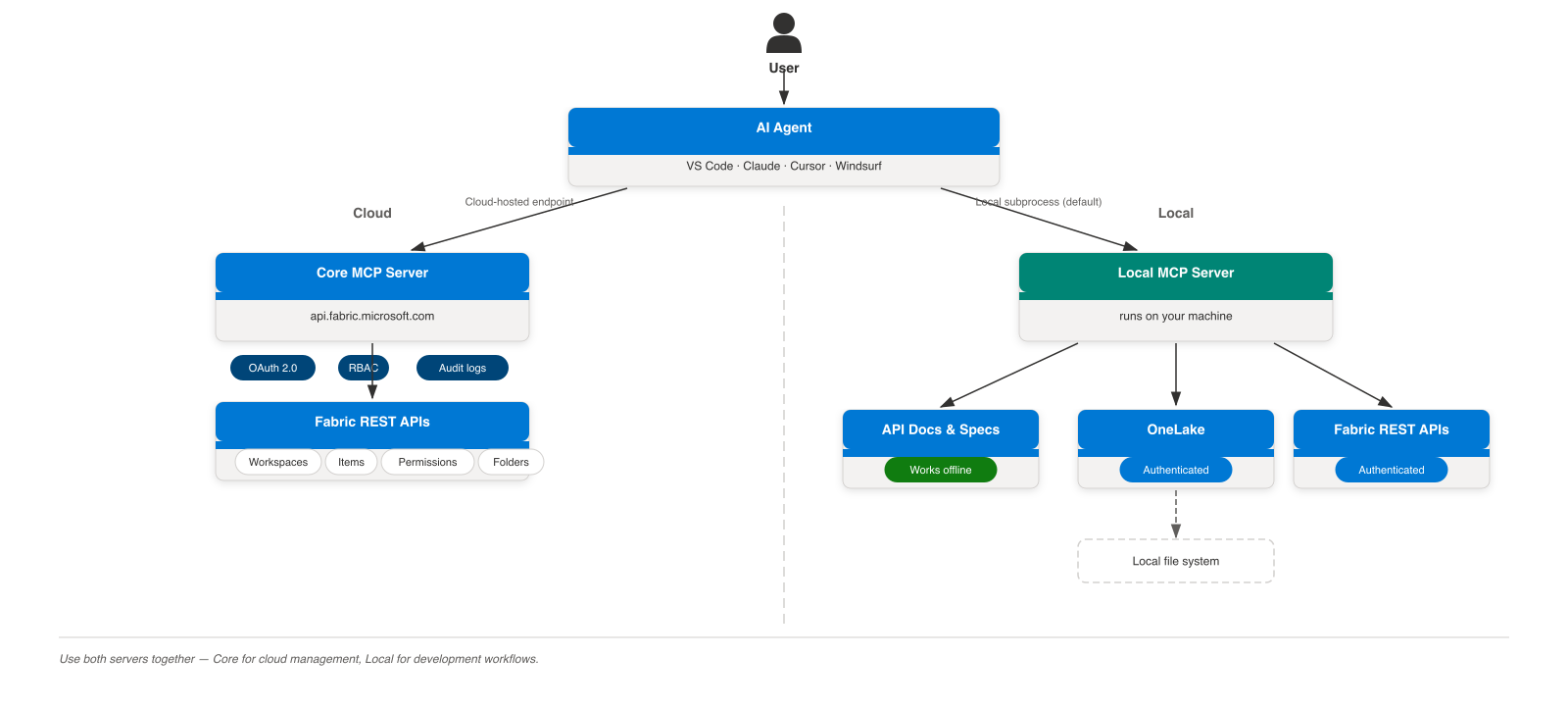
Fabric Core MCP Server is a remote endpoint that exposes Fabric's public APIs as typed MCP tools. Any MCP-compatible AI agent can connect to it without installing software — add the server URL and authenticate with your Microsoft Entra ID account.
Note
Fabric Core MCP Server is currently in preview. Features and configuration may change before general availability.
Key characteristics:
- Remote — No local installation required. Connect by pointing your AI agent to the server URL.
- API-driven — Each MCP tool maps to a Fabric REST API for workspaces, items, permissions, and more.
- OAuth 2.0 authentication — Automatic authentication through Microsoft Entra ID using your existing credentials.
- RBAC enforced — Every operation respects your Fabric role assignments (Admin, Member, Contributor, or Viewer). You can only access resources you're authorized to use.
- Audit logged — Fabric audit logs capture all actions with your user identity.
What is Fabric MCP Server (local)
Fabric MCP Server (local) is an open-source, development-focused MCP server that runs as a subprocess on your machine. It provides AI agents with Fabric API documentation, OneLake data operations, and core Fabric item creation — alongside access to your local file system.
Key characteristics:
- Local subprocess architecture — Runs on your machine whenever your AI agent needs it, no remote dependency.
- File system integration — Read and write local files and configurations as part of development workflows.
- Development tooling — API specs, best practices, and OneLake operations designed for building Fabric solutions.
- Open source — Extend and customize for your workflows on GitHub.
- Offline capable — Documentation and best practice tools work without a live Fabric connection.
Compare servers
| Feature | Core (remote) | Local |
|---|---|---|
| Workspace management | Yes | — |
| Item CRUD | Yes | Create only |
| Permission management | Yes | — |
| Folder management | Yes | — |
| OneLake file operations | — | Yes |
| API docs and specs (offline) | — | Yes |
| Installation required | No | Yes |
| Primary install method | N/A (remote endpoint) | VS Code extension |
| Authentication | OAuth 2.0 (Entra ID) | Local credentials |
| Audit logging | Yes | — |
| Open source | No | Yes |
Tip
You can use both servers simultaneously. Configure your AI agent to connect to Core (for remote operations) and the local server (for development tasks).
Security and compliance
Both Fabric MCP servers maintain enterprise security standards:
- Authentication required — All operations require valid credentials
- RBAC enforced — You can only access resources you're authorized to use
- No privilege escalation — Servers don't grant additional permissions beyond what you have in Fabric
- Token-based — Short-lived access tokens with automatic refresh
For details on authentication flows and troubleshooting, see Get started with Fabric Core MCP Server or Get started with Fabric MCP Server (local).
Related content
- Fabric Core MCP Server overview — Architecture, scenarios, and limitations
- Fabric Core MCP tools reference — All Core server tools and example workflows
- Fabric MCP Server (local) overview — Architecture and capabilities
- Fabric MCP Server (local) tools reference — All local server tools and example workflows
- Model Context Protocol specification — MCP standard
- Microsoft Fabric REST API — Fabric API reference
- Microsoft MCP Servers — Other Microsoft MCP implementations