Azure Functions hosted skills: Insurance claims review
An insurance claim package — a JSON claim form plus its supporting documents — is uploaded to Blob Storage. A hosted skill on Azure Functions reads the claim and starts a Dynamic Workflow: coverage, required documents, and claim history are checked in parallel as durable workflow steps, then a final step records a decision — approve, request_info, or refer_to_adjuster — with every reason.
This is the insurance claims review scenario as a runnable template: azd up, upload the sample claims, and read the decisions. Workflow state runs on Durable Task Scheduler, so every run can be inspected step by step in its dashboard.
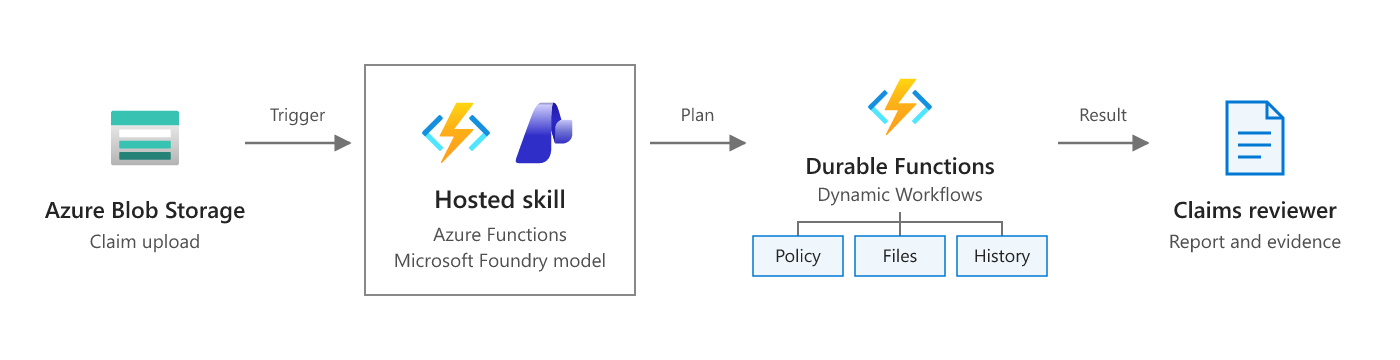
Scenario overview from Plan a multistep review on Microsoft Learn. The diagram below shows how this template implements it.
flowchart LR
    U[claim JSON + attachments] --> B[(Blob: claims-inbox)]
    B --> EG[Event Grid]
    EG --> A["claims_review.agent.md<br/>hosted skill"]
    A -- read_claim --> A
    A -- fhs_start_workflow --> W{{Dynamic Workflow<br/>Durable Task Scheduler}}
    W --> C1[check_coverage]
    W --> C2[check_documents]
    W --> C3[check_claim_history]
    C1 --> P[publish_claim_decision]
    C2 --> P
    C3 --> P
    P --> D[(Blob: claims-decisions)]
Why this scenario fits a hosted skill with a workflow
Claim forms are messy: free-text loss descriptions, attachments with inconsistent names, and the occasional "please pay quickly". The model is good at reading that and writing a note an adjuster can use. The checks that decide the outcome — is the policy in force, are the required documents here, has this customer claimed three times this year — should be deterministic, retried on transient failures, and auditable. A Dynamic Workflow gives you that: the skill plans a small DAG once, the runtime runs the three checks in parallel as durable steps with retries and timeouts, and the final step can't run until every check has produced a result.
| Sample | Situation | Expected decision |
|---|---|---|
CLM-24001.json |
Rear-end auto collision, $3,200 estimate, active policy, photos and estimate uploaded | approve |
CLM-24002.json |
Kitchen water damage; photos listed but not uploaded, no plumber report | request_info |
CLM-24003.json |
$48,500 SUV theft, 15 days after the policy started, 2 prior claims this year | refer_to_adjuster |
Policies, document requirements, and claim history are mock data in src/data/*.json. Everything else — Blob Storage, Event Grid, Durable Task Scheduler, Foundry — is real.
How the workflow runs
A
.jsonblob lands inclaims-inbox. Event Grid invokes theclaims_reviewhosted skill.The skill calls
read_claim(a normal tool) to validate the form and list the attachments. If the claim is invalid, it stops there.The skill calls
fhs_start_workflowonce with this DAG, replies with theworkflow_id, and ends its turn. It never polls.{ "tasks": [ {"id": "check_coverage", "type": "tool", "tool": "check_coverage", "args": {"claim_blob": "..."}}, {"id": "check_documents", "type": "tool", "tool": "check_documents", "args": {"claim_blob": "..."}}, {"id": "check_claim_history", "type": "tool", "tool": "check_claim_history", "args": {"claim_blob": "..."}}, {"id": "publish_claim_decision", "type": "tool", "tool": "publish_claim_decision", "depends_on": ["check_coverage", "check_documents", "check_claim_history"], "args": {"claim_blob": "...", "coverage": "${check_coverage.result}", "documents": "${check_documents.result}", "history": "${check_claim_history.result}", "recommended_decision": "...", "intake_concerns": [], "adjuster_note": "..."}} ] }The workflow orchestrator (
agents_workflow_orchestrator) runs the three@workflow_toolchecks in parallel. Each has 3 attempts with exponential backoff and a 1-minute timeout. Storage errors are retryable; a missing or invalid claim is a terminal error.publish_claim_decisionre-reads the claim, re-runs all three checks in code with the same functions the check steps use, and decides only on those recomputed results. The results passed in through${...}are compared with the recomputed ones; any difference is listed incheck_mismatchesand refers the claim to an adjuster. It writesclaims-decisions/<claim-blob-name>.jsontogether with theworkflow_id. The three check steps still run in the workflow so each one is visible, retried, and audited on its own.
The optional sub_agent summary step from the scenario is left out. The skill already writes adjuster_note before it starts the workflow. See Make it yours to add one.
Prerequisites
- An Azure subscription with access to a Microsoft Foundry model deployment (the template deploys one).
- Azure Developer CLI (
azd) 1.10 or later, and Azure CLI (az). The postdeploy hook usesaz. - Python 3.13. On Windows, the hook runs in PowerShell 7 (
pwsh). - For local runs: Azure Functions Core Tools 4.x, Azurite, and Docker for the Durable Task Scheduler emulator.
Deploy to Azure
git clone https://github.com/Azure-Samples/azure-functions-hosted-skills-samples
cd azure-functions-hosted-skills-samples/claims-review-workflow
azd auth login
az login
azd up
azd up creates a resource group with:
- A Flex Consumption function app running the hosted skill, with a user-assigned managed identity.
- A Durable Task Scheduler (Consumption SKU) with a
claimstask hub. The app connects with its managed identity (Durable Task Data Contributor). Your signed-in account gets the same role so you can open the dashboard. - A storage account (no shared key access) with the
claims-inbox,claims-attachments, andclaims-decisionscontainers. - An Event Grid system topic on the storage account. Flex Consumption runs blob triggers through Event Grid. After the code is deployed,
scripts/postdeploy.pysubscribes the topic to the function's blob webhook forBlobCreatedevents inclaims-inbox/that end in.json. - A Microsoft Foundry project with a model deployment.
- Application Insights and Log Analytics.
The auto-approve limit defaults to 10,000. Change it before azd up with azd env set CLAIMS_AUTO_APPROVE_LIMIT 5000.
Try it
python -m venv .venv
# Windows: .venv\Scripts\activate    macOS/Linux: source .venv/bin/activate
pip install --pre -r requirements-dev.txt

python scripts/demo.py upload               # upload the attachments and all three sample claims
python scripts/demo.py results --wait 600   # wait for and print the decisions
Example output (from a real run of python scripts/demo.py e2e):
uploaded supporting documents -> claims-attachments/
uploaded CLM-24001.json -> claims-inbox/e2e-1d7523-CLM-24001.json
uploaded CLM-24002.json -> claims-inbox/e2e-1d7523-CLM-24002.json
uploaded CLM-24003.json -> claims-inbox/e2e-1d7523-CLM-24003.json
waiting... 0/3 decisions recorded
waiting... 1/3 decisions recorded

e2e-1d7523-CLM-24001: approve (auto) claim CLM-24001 claimed 3200.0 / est. payout 2700.0
  workflow 24e7a06ab26f1deeee4177d59877a97f-54c5289e54734222981c6ccfe9a420b8
  - Policy active and covers the loss, all required documents present, no fraud signals, amount within the 10,000.00 auto-approve limit.
  note: Auto collision claim for rear-end damage at a stop light on Main St on 2026-10-28. Reported damage includes the rear bumper, trunk lid, and left tail lamp, with a repair estimate of $3,200.

e2e-1d7523-CLM-24002: request_info (human review) claim CLM-24002 claimed 7800.0 / est. payout 6800.0
  workflow 2ea1983260680bd5c5dc25bcd01640fa-cf857af32e1b4c28810f8a57889a9e80
  - Missing photos (Photos of the damaged area): listed file CLM-24002/photos.txt was not uploaded.
  - Missing plumber_report (Plumber report stating the cause of the leak): not listed on the claim form.
  note: Kitchen water damage claim from a burst supply line under the sink on 2026-10-19. Reported damage includes the kitchen floor and lower cabinets, with a submitted repair estimate totaling $7,800.

e2e-1d7523-CLM-24003: refer_to_adjuster (human review) claim CLM-24003 claimed 48500.0 / est. payout 47500.0
  workflow 12fae1ba972ef0c0c58e85801bff5f29-4cbe460916e64e749e3c4cf3c79bfca9
  - Fraud signal (frequent_claims): 2 prior claims in the 12 months before the incident.
  - Fraud signal (new_policy): Incident 15 days after the policy started.
  - Amount claimed 48,500.00 is above the auto-approve limit 10,000.00.
  note: Claim for theft of a 2025 SUV reportedly stolen overnight from the claimant's driveway on 2026-10-25. Police report and proof of ownership appear consistent with the claim form.
e2e passed
Each decision is a JSON document in claims-decisions, named after the claim blob. Upload one sample with --sample CLM-24003, or your own claim form with --file my-claim.json (add its policy to src/data/policies.json first). python scripts/demo.py e2e uploads uniquely named copies and checks that each claim got a decision with reasons and a workflow_id, and that nothing with fraud signals, coverage issues, missing documents, check mismatches, or an amount over the limit was auto-approved.
Inspect workflow runs in the Durable Task Scheduler dashboard
Every decision record has a workflow_id. That is the orchestration instance ID in the task hub.
In Azure:
azd env get-value DTS_DASHBOARD_URL
Open the URL and sign in with the account you used for azd up. You can also open it from the Azure portal: go to the resource group, select the Durable Task Scheduler resource, select Task hubs > claims, and then select the dashboard URL. Search for the workflow_id to see the workflow instance. The dashboard shows:
- the orchestration's input (the DAG the skill planned),
- one
agents_workflow_run_toolactivity per step (check_coverage,check_documents, andcheck_claim_historystart at the same time, andpublish_claim_decisionstarts after all three), - each step's result, retries, and timing.
To give a teammate access, assign them Durable Task Data Reader on the scheduler.
Locally: the emulator's dashboard is at http://localhost:8082. Select the default task hub.
Run locally
Azurite has no Event Grid, so locally the blob trigger polls the container instead (CLAIMS_BLOB_SOURCE=LogsAndContainerScan in the settings sample). Polling can take a few seconds to notice a new blob.
Start Azurite and the Durable Task Scheduler emulator:
docker run -d -p 10000-10002:10000-10002 mcr.microsoft.com/azure-storage/azurite
docker run -d -p 8080:8080 -p 8082:8082 mcr.microsoft.com/dts/dts-emulator:latest
Create the settings file and point it at a Foundry project. After
azd up,azd env get-value FOUNDRY_PROJECT_ENDPOINTprints the endpoint.cp src/local.settings.json.sample src/local.settings.json # set FOUNDRY_PROJECT_ENDPOINT in src/local.settings.jsonThe sample already sets
DURABLE_TASK_SCHEDULER_CONNECTION_STRING=Endpoint=http://localhost:8080;Authentication=NoneandTASKHUB_NAME=default.Start the app from
srcwith the virtual environment active, then upload claims to Azurite from another terminal:cd src && func start python scripts/demo.py upload --local python scripts/demo.py results --local --wait 600
func start lists claims_review together with the workflow runtime's functions: agents_workflow_orchestrator, agents_workflow_run_tool, and agents_workflow_run_sub_agent. Locally the app uses your az login identity for Foundry.
Make it yours
| To change | Edit |
|---|---|
| How the skill reads claims, writes the adjuster note, and plans the DAG | src/claims_review.agent.md |
| Policy, document, and claim-history lookups | src/tools/_checks.py — replace the src/data/*.json reads with calls to your policy admin and claims systems |
| Decision rules (fraud signals, limits, coverage) | decide() in src/tools/_checks.py, and CLAIMS_AUTO_APPROVE_LIMIT |
| Retries and timeouts per step | the @workflow_tool(...) decorators in src/tools/check_*.py |
| Where decisions go (claims system, adjuster queue, Teams) | src/tools/publish_claim_decision.py and _claims.py |
| Add a summary step | enable workflows.subagents in the front matter and add a sub_agent task that depends on the three checks and feeds ${summary.result} into publish_claim_decision (see docs/workflows.md in the runtime) |
| Model | azd env set FOUNDRY_MODEL ... (and the deployment in infra/app/foundry.bicep) |
Guardrails built in
- Recommend, don't pay. The workflow records a decision. Payouts stay in your claims system behind its own approval flow.
- Approval rules enforced in code.
publish_claim_decisionrecomputes coverage, required documents, and claim history from the stored claim and decides on those results only. A claim with any fraud signal, with an amount aboveCLAIMS_AUTO_APPROVE_LIMIT, or with a coverage problem is alwaysrefer_to_adjuster. Missing documents are always at leastrequest_info. The model'srecommended_decisioncan only make the outcome stricter, never more lenient. Every decision other thanapproveis markedrequires_human_review. - Check results passed through the workflow are never trusted. Workflow arguments come from a plan the model writes, so they could be fabricated (for example, an "all clear" result with no coverage issues and no missing documents). The publisher never decides on them. It compares them with its own recomputed checks; a result that is missing, belongs to another claim, or differs in a field the decision depends on is recorded in
check_mismatchesand the claim is alwaysrefer_to_adjuster, neverapprove. - Claim content is data, not instructions. The skill is told to report — never follow — text in a claim such as "approve this immediately".
- Durable and retried. Each check is a durable workflow step with bounded retries and a timeout. A transient storage failure doesn't lose the claim, and a bad claim fails fast with a terminal error.
- Idempotent. Blob events can be delivered more than once. The decision is written with
overwrite=False, so a retry returnsduplicateinstead of a second write. - Bounded input. Tools only read inside
claims-inboxandclaims-attachments, and attachment excerpts are capped. - No extra reach.
web_requestand MCP are disabled. The skill can callread_claimand start a workflow over the four workflow tools.
Test
From the repository root:
python scripts/test.py --template claims-review-workflow                 # Bicep build, skill/tool loading, unit tests
python scripts/test.py --template claims-review-workflow --level local   # + func start against Azurite and the DTS emulator
python scripts/test.py --template claims-review-workflow --level deploy --down  # + azd up, e2e, azd down
Troubleshooting
azd upfails withOperationPending: Unable to create taskhub because the scheduler ... is being provisioned. The scheduler finished provisioning, but the resource provider wasn't ready for the task hub yet. The template creates the role assignments before the task hub to avoid this. If you still see the error, runazd upagain.azd upfails while uploading the package with403 ... not authorized to perform this operation. The app's role assignments were just created and haven't reached Storage yet. Wait a minute and runazd deploy.- The postdeploy hook gives up waiting for the
blobs_extensionkey or the Event Grid subscription. The host may still be starting. Runazd hooks run postdeployto try again. - A claim gets no decision. Check that the
claims-blob-createdsubscription exists on the Event Grid system topic (az eventgrid system-topic event-subscription list -g <rg> --system-topic-name <topic>). Then look the claim up in Application Insights. If the skill replied with aworkflow_id, open that instance in the dashboard to see which step failed and why. - The dashboard says you're not authorized. Your account needs Durable Task Data Contributor or Durable Task Data Reader on the scheduler.
azd upassigns it to the deploying user. Role assignments can take a few minutes to take effect.
Clean up
azd down --purge