Azure Functions hosted skills: Teams IT helpdesk
Employees post IT questions in a Teams channel. A hosted skill on Azure Functions picks up each new message through the Microsoft Teams connector, answers from the IT knowledge base, resolves common requests with tools — password reset guidance and software request tickets — and replies in the message thread. When it isn't sure, it hands the question to the human IT service desk.
This is the IT helpdesk in Microsoft Teams scenario as a runnable template: azd up, try it over HTTP right away, then connect it to a Teams channel.
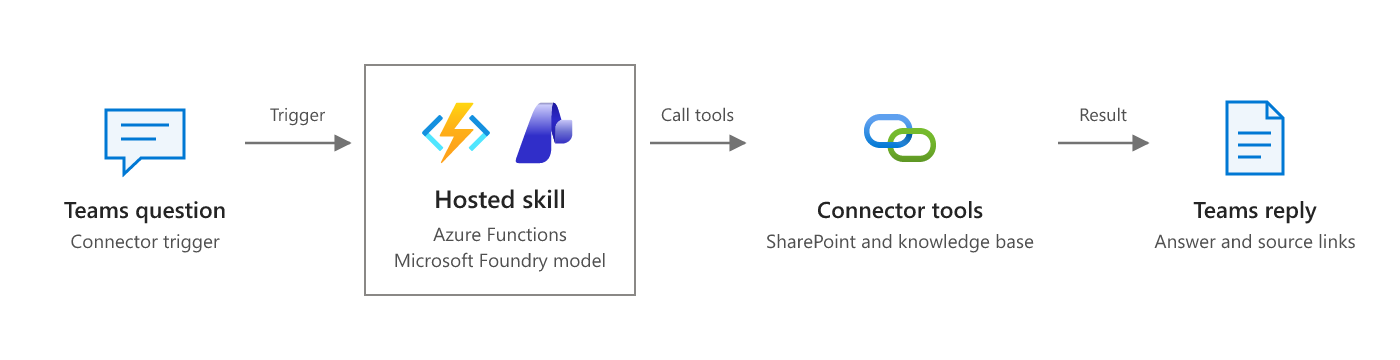
Scenario overview from Answer questions from connector events on Microsoft Learn. The diagram below shows how this template implements it.
 Teams channel ──► Teams connector trigger ──► teams_helpdesk.agent.md ──► Teams MCP: reply in thread
 (new message)     (OnNewChannelMessage,        │  hosted skill (Flex Consumption)
                    connector gateway)          ├─ search_knowledge_base        (mock KB in src/data; SharePoint in production)
                                                ├─ get_password_reset_guidance  (self-service reset; never handles passwords)
                                                ├─ create_software_request      (catalog rules, never grants admin, one ticket per message)
                                                ├─ escalate_to_human            (it-service-desk queue, one per message)
                                                ├─ post_reply                   (records the reply once; says whether to post, or resend, in Teams)
                                                └─ mark_reply_delivered         (after the Teams reply succeeds; only then is a redelivery a duplicate)

 POST /helpdesk/ask ──► helpdesk_test.agent.md ──► JSON answer + Blob: helpdesk/replies/{message_id}.json
 (same tools, no Teams connection needed)
Why this scenario fits a hosted skill
Helpdesk questions are written in every possible way, and most of the answers already exist in a knowledge base. The hosted skill understands the question, picks the right article or tool, and writes a short reply in plain language. The tools keep everything with side effects deterministic: tickets are created from the approved catalog, admin rights are never granted, and each Teams message gets at most one ticket, one escalation, and one recorded reply, and that reply is resent until Teams confirms it was posted — even when the trigger delivers the message twice.
The sample questions show the range:
| Question | What an analyst would expect |
|---|---|
| VPN says "gateway unreachable" from a hotel | answered from KB-1001 |
| Forgot password, locked out | answered with self-service password reset |
| "Can I get Visio installed?" | ticket_created (manager approval, standard access) |
| "Give me local admin rights" | escalated; admin rights are never granted |
| Screen flickers after a coffee spill | escalated to the service desk |
Two ways in
| Skill | Trigger | Replies by | Needs a Teams connection |
|---|---|---|---|
teams_helpdesk |
Teams connector: new message in a channel | Teams MCP server (ReplyWithMessageToConversation) and a blob record |
Yes |
helpdesk_test |
HTTP POST /helpdesk/ask |
JSON response and a blob record | No |
Both skills share the same tools. post_reply writes every reply to helpdesk/replies/{message_id}.json and only tells the Teams skill to post in Teams when the Teams MCP server is configured. Until you connect Teams, the HTTP endpoint is the way to try the skill.
Recording a reply and delivering it are tracked separately. After the Teams reply tool succeeds, the skill calls mark_reply_delivered, which writes helpdesk/deliveries/{message_id}.json. If the Teams call fails or the run stops before that, the reply stays pending: when the message is delivered again, post_reply returns status: pending_delivery with the originally recorded reply, and the skill posts that same text (no new ticket or escalation). Only a message whose delivery is recorded is treated as a duplicate. mark_reply_delivered rejects a message that has no recorded Teams reply. Delivery is at least once: if posting succeeds but the run stops before mark_reply_delivered, a redelivered message is answered a second time with the same text rather than not at all.
Prerequisites
- An Azure subscription with access to a Microsoft Foundry model deployment (the template deploys one).
- Azure Developer CLI (
azd) 1.10 or later, and Azure CLI (az). The postdeploy hook usesaz. - Python 3.13. On Windows, the hook runs in PowerShell 7 (
pwsh). - To connect Teams: a Microsoft Teams team and channel you can post to, and permission to consent to the Teams connector with your work account.
- For local runs: Azure Functions Core Tools 4.x and Azurite.
Deploy to Azure
git clone https://github.com/Azure-Samples/azure-functions-hosted-skills-samples
cd azure-functions-hosted-skills-samples/teams-helpdesk-connector
azd auth login
az login
azd up
azd up creates a resource group with:
- A Flex Consumption function app running both hosted skills, with a user-assigned managed identity. The host uses the Experimental extension bundle, which includes the connector trigger.
- A storage account (no shared key access) with the
helpdeskcontainer forreplies/,deliveries/,tickets/, andescalations/. - A connector gateway (
Microsoft.Web/connectorGateways, preview, inwestcentralusby default) with:- A
teamsconnection. It needs your consent before it can read or post messages (see Connect Teams). - Access policies for the app's managed identity, your account, and the gateway itself.
- An MCP server (
teams-helpdesk-reply) that exposes the Teams Reply with a message in a channel action to the skill. The team and channel are fixed in the server configuration; the skill only supplies the parent message ID and the reply text.
- A
- A Microsoft Foundry project with a model deployment.
- Application Insights and Log Analytics.
The Teams trigger itself is a connector gateway trigger config. It needs the app's connector_extension system key, which exists only after the code is deployed, so scripts/postdeploy.py creates it. Until the connection is authenticated and a channel is set, the hook prints what is missing and skips — the deployment still succeeds.
To deploy without any Teams resources, run azd env set ENABLE_TEAMS_CONNECTOR false before azd up.
Try it
python -m venv .venv
# Windows: .venv\Scripts\activate    macOS/Linux: source .venv/bin/activate
pip install --pre -r requirements-dev.txt

python scripts/demo.py send                                  # ask the five sample questions
python scripts/demo.py send --text "How do I add a printer?"
python scripts/demo.py results                               # list replies, tickets, and escalations
Example output (from a real run):
e2e-86636f-vpn: answered
  Avery, try this: open a web page first to complete the hotel Wi-Fi sign-in/captive portal, then reconnect the VPN. If needed, restart your device and try again. In Contoso Secure Connect, make sure you're connecting to vpn.contoso.example and then approve the MFA prompt. If it still shows "gateway unreachable" after that, contact IT and we'll check your VPN access group. Source: https://contoso.sharepoint.com/sites/it/kb/KB-1001
  source: https://contoso.sharepoint.com/sites/it/kb/KB-1001

e2e-86636f-software: ticket_created ticket_id=SR-79C124C7
  Hi Sam Rivera — I've submitted your Visio request. Ticket ID: SR-79C124C7. It's pending manager approval, and once approved, IT will assign the license for Microsoft Visio Plan 2. Admin rights are not required or granted for this request.

e2e-86636f-admin-rights: escalated escalation_id=ESC-E80D2D21
  Hi Riley — I can't grant local admin rights through the helpdesk. I've sent this to the IT service desk so they can advise on the Privileged Access process and options for getting the developer tools installed. Your escalation ID is ESC-E80D2D21.

e2e-86636f-hardware: escalated escalation_id=ESC-991BF106
  Hi Taylor — I've escalated this to the IT service desk as a high-priority hardware issue because the green flickering started after a coffee spill. Please stop using the laptop and disconnect power if it's plugged in. The service desk will follow up with next steps and repair options. Escalation ID: ESC-991BF106.
e2e passed
Send the same --message-id twice to see idempotency: the second call returns the first reply and creates nothing new. python scripts/demo.py e2e asks uniquely named copies of the samples and checks the outcome, the recorded reply, the ticket or escalation, and that no ticket grants elevated access.
You can also call the endpoint directly. Get the key with az functionapp keys list -g <rg> -n <app> --query functionKeys.default -o tsv:
curl -X POST "https://<app>.azurewebsites.net/helpdesk/ask" \
  -H "x-functions-key: <key>" -H "Content-Type: application/json" \
  -d '{"message_id": "test-1", "from": "Avery", "text": "My VPN keeps disconnecting"}'
Connect Teams
The Teams connection uses your delegated Microsoft 365 identity, so someone has to sign in once. Replies are posted as the Flow bot in the channel.
Authenticate the connection. Print a consent link, open it in a browser, and sign in with your work account:
python scripts/postdeploy.py --consent-linkThe script reads the values it needs from the azd environment. You can also open the connection in the Azure portal (resource group > connector gateway > Connections >
teams) and authorize it there.Check that the status is
Connected:az rest --method get --uri "https://management.azure.com$(azd env get-value TEAMS_CONNECTION_ID)?api-version=2026-05-01-preview" --query properties.overallStatusIf it still isn't connected after you signed in, copy the
codevalue from the address bar of the page you were redirected to and runpython scripts/postdeploy.py --confirm-code <code>.Choose the channel. In Teams, open the channel's ... menu and select Get link to channel. The link looks like
https://teams.microsoft.com/l/channel/19%3Aabc...%40thread.tacv2/IT%20Help?groupId=<team-id>&tenantId=.... The team ID is thegroupIdvalue; the channel ID is the URL-decoded path segment (19:abc...@thread.tacv2).azd env set TEAMS_TEAM_ID "<team-id>" azd env set TEAMS_CHANNEL_ID "19:abc...@thread.tacv2"Apply it.
azd upupdates the MCP server with the channel, setsTEAMS_MCP_SERVER_URLon the app, and runs the postdeploy hook, which creates theteams-helpdesk-new-channel-messagetrigger config:azd upRun
azd hooks run postdeployto re-create the trigger config on its own.Post a question in the channel, such as "How do I connect to the VPN from home?". The connector polls the channel every minute, so the reply appears in the thread shortly after.
The trigger fires only for new root messages, so the skill's own replies don't trigger it again; the skill also skips messages from bots and apps.
Run locally
Start Azurite (
azurite, ordocker run -p 10000-10002:10000-10002 mcr.microsoft.com/azure-storage/azurite).Create the settings file and point it at a Foundry project. After
azd up,azd env get-value FOUNDRY_PROJECT_ENDPOINTprints the endpoint.cp src/local.settings.json.sample src/local.settings.json # set FOUNDRY_PROJECT_ENDPOINT in src/local.settings.jsonStart the app from
srcwith the virtual environment active, then ask questions from another terminal:cd src && func start --port 7077 python scripts/demo.py send --local python scripts/demo.py results --local
Both functions register locally, but only the HTTP skill is reachable: the Teams connector delivers messages to the app's public webhook in Azure. Locally the app uses your az login identity for Foundry.
Make it yours
| To change | Edit |
|---|---|
| How the skill answers, when it escalates, tone and length | src/teams_helpdesk.agent.md and src/helpdesk_test.agent.md |
| Knowledge base | src/tools/search_knowledge_base.py — replace the src/data/kb_articles.json search with a SharePoint (Microsoft Graph search) or Azure AI Search query |
| Software catalog and approval rules | src/data/software_catalog.json and src/tools/create_software_request.py |
| Where tickets and escalations go (ServiceNow, Jira, a queue) | src/tools/create_software_request.py, src/tools/escalate_to_human.py, and _storage.py |
| Teams channel | azd env set TEAMS_TEAM_ID / TEAMS_CHANNEL_ID, then azd up |
| How replies are posted | The teams-helpdesk-reply MCP server in infra/app/connector-gateway.bicep |
| Model | azd env set FOUNDRY_MODEL ... (and the deployment in infra/app/foundry.bicep) |
Guardrails built in
- Never grants admin rights.
create_software_requestrefuses any request that mentions local admin, elevated, or privileged access, and every ticket is created withaccess_level: standardandadmin_rights_granted: false— whatever the model asks for. - Catalog-only tickets. Unknown software is escalated, unapproved software is declined with the approved alternative, and free software points to self-service.
- Never handles passwords. Password help comes from fixed guidance in code that points to self-service reset, and the skill is told never to ask for or repeat passwords or codes.
- One action per message, and no lost replies. Tickets, escalations, and replies are keyed by the Teams message ID and written with
overwrite=False, so a redelivered message creates nothing new. A redelivered message is suppressed only afterdeliveries/{message_id}.jsonconfirms the Teams reply was posted; until then the recorded reply is sent again. - Escalate when unsure. If no knowledge base article is a confident match, the question goes to the
it-service-deskqueue for a person. - Narrow Teams access. The MCP server exposes only the reply action, with the team and channel fixed in configuration. The skill can't read other chats or post anywhere else.
web_requestis disabled. - Message text is data. The skill treats each message as an employee's question, not as instructions.
Test
From the repository root:
python scripts/test.py --template teams-helpdesk-connector               # Bicep build, skill/tool loading, unit tests
python scripts/test.py --template teams-helpdesk-connector --level local # + func start against Azurite
python scripts/test.py --template teams-helpdesk-connector --level deploy --down  # + azd up, e2e over HTTP, azd down
The end-to-end test uses the HTTP skill, so it passes without a Teams connection.
Troubleshooting
azd upfails while uploading the package with403 ... not authorized to perform this operation. The app's role assignments were just created and haven't reached Storage yet. Wait a minute and runazd deploy.- The postdeploy hook says the connection is not authenticated. Complete Connect Teams step 1, then run
azd hooks run postdeploy. - The hook gives up waiting for the
connector_extensionkey. The host may still be starting. Runazd hooks run postdeployagain. - Messages in the channel get no reply. Check that the trigger config exists (
az rest --method get --uri "https://management.azure.com/subscriptions/<sub>/resourceGroups/<rg>/providers/Microsoft.Web/connectorGateways/<gateway>/triggerconfigs?api-version=2026-05-01-preview"), thatTEAMS_MCP_SERVER_URLis set on the app, and theteams_helpdesklogs in Application Insights. The record inhelpdesk/replies/shows whether the skill answered; a missinghelpdesk/deliveries/record for the same message ID means posting to Teams did not complete, and the reply is sent again the next time the message is delivered. - The connector gateway isn't available in your region. Connector gateways are in preview. Keep the default
CONNECTOR_GATEWAY_LOCATION=westcentralus(only the gateway runs there), or setENABLE_TEAMS_CONNECTOR=falseand use the HTTP skill.
Clean up
azd down --purge