Customized editable grid Power Apps component framework sample
This sample demonstrates how to customize the Power Apps editable grid control as described in Customize the editable grid control.
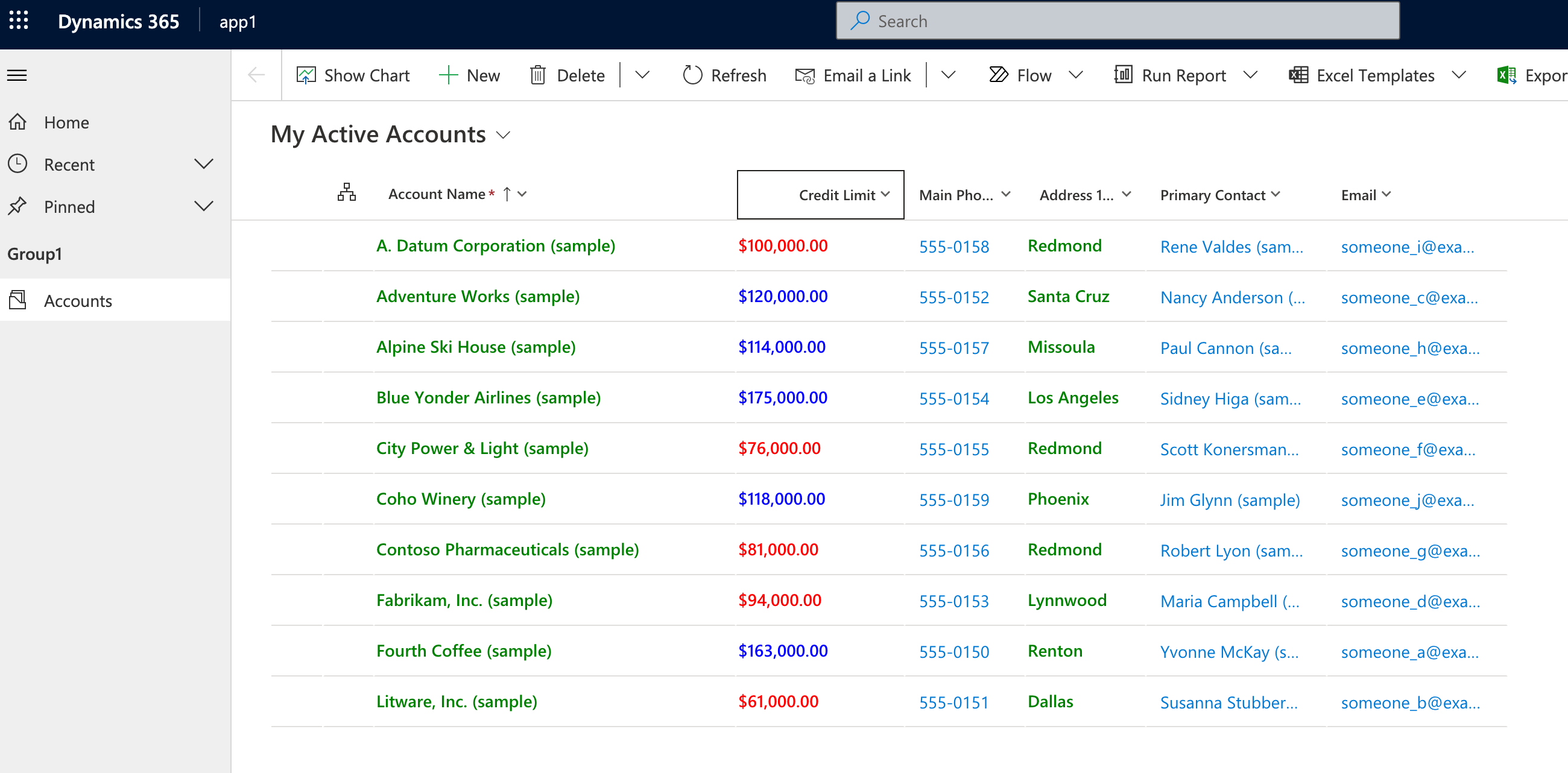
This sample changes the main grid page for a table that's configured to use this control, for example all text columns use green text. Any values for the creditlimit column displays as blue, if the value is greater than 100,000, or red otherwise.
Compatibility
This sample works for model-driven apps.
Applies to
Power Apps component framework
Get your own free development tenant by subscribing to Power Apps Developer Plan.
Contributors
This sample was created by the Power Apps component framework team.
Version history
| Version | Date | Comments |
|---|---|---|
| 1.0 | January 18, 2024 | README created |
Prerequisites
Install the Microsoft Power Platform CLI.
Try this sample
Follow the steps in the README.md to generate solutions containing the controls so you can import and try the sample components in your model-driven or canvas app.
Related information
Disclaimer
THIS CODE IS PROVIDED AS IS WITHOUT WARRANTY OF ANY KIND, EITHER EXPRESS OR IMPLIED, INCLUDING ANY IMPLIED WARRANTIES OF FITNESS FOR A PARTICULAR PURPOSE, MERCHANTABILITY, OR NON-INFRINGEMENT.