AMD FSR™ Upscaling 4 — GDK Sample
This sample requires the Microsoft Game Development Kit October 2025 or later.
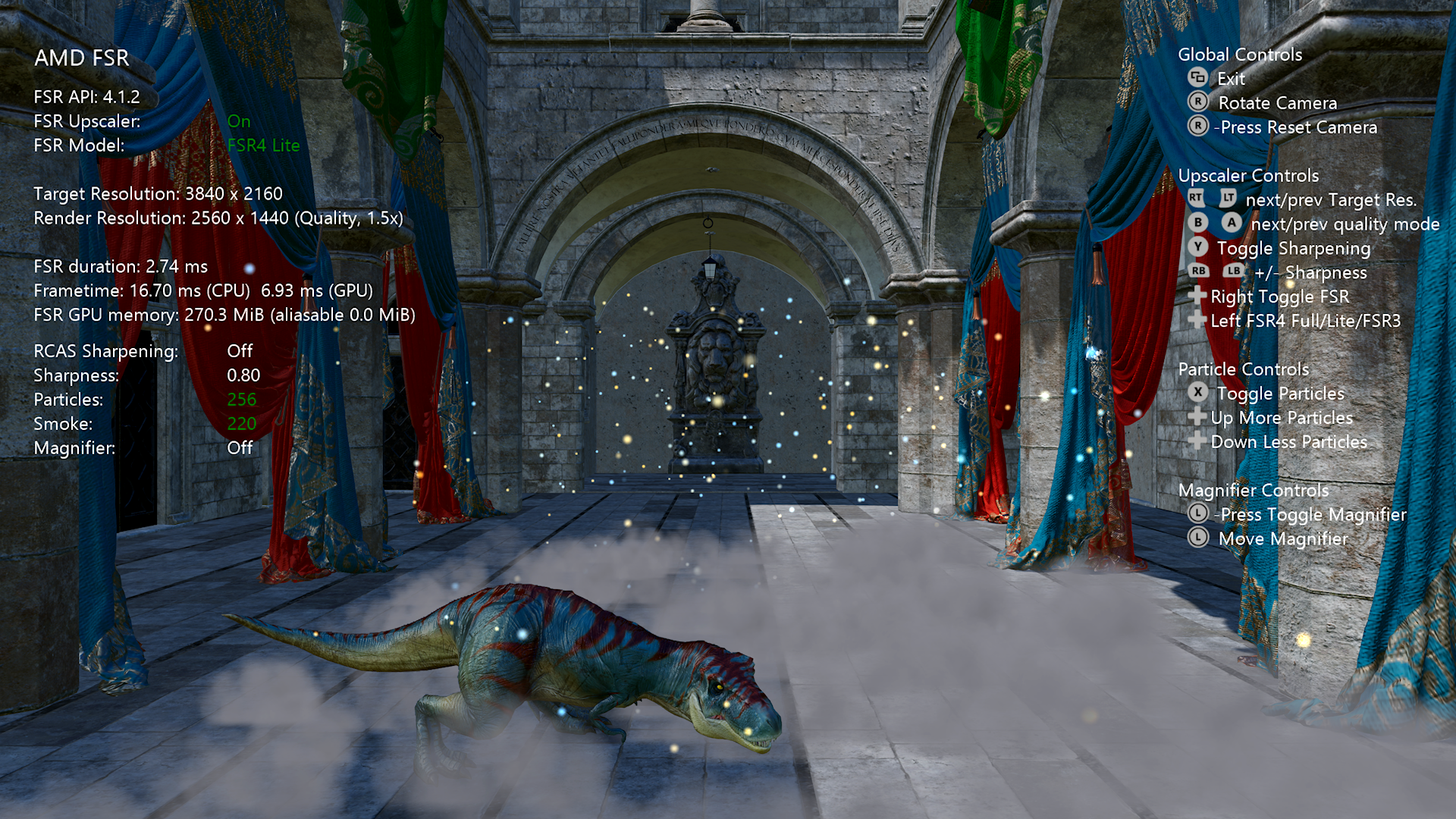
Description
This sample demonstrates AMD FSR™ Upscaling 4 on the Microsoft GDK, integrated through the unified AMD FSR™ SDK.
| Technique | Version in this sample | Variants |
|---|---|---|
| AMD FSR™ Upscaling 4 | 4.1.2 | Full and Lite |
Table of contents
- Building the sample
- Using the sample
- Sample configuration
- AMD FSR™ Upscaling 4
- Sample notes
- Limitations
- See also
Building the Sample
Open AMD_FSR.sln in Visual Studio and select the appropriate platform:
| Platform | Target |
|---|---|
Gaming.Xbox.Scarlett.x64 |
XBOX Series X|S |
x64 |
Windows PC |
If using Windows Desktop, set the active solution platform to x64. When running on Windows Desktop, ensure the latest graphics drivers for your system are installed.
For more information, see Running samples, in the GDK documentation.
Using the sample
Global controls
| Action | Gamepad |
|---|---|
| Exit | View Button |
| Rotate camera | Right Thumbstick |
| Reset camera | Right Thumbstick (click) |
| Move magnifier | Left Thumbstick |
| Toggle magnifier | Left Thumbstick (click) |
Upscaler controls
| Action | Gamepad |
|---|---|
| Quality mode (next / previous) | A / B Buttons |
| AMD FSR™ Upscaling 4 On/Off | Dpad Right |
| Sharpening (RCAS) On/Off | Y Button |
| Sharpness value (– / +) | Left / Right Shoulder |
| Upscaler model FSR4 Full / FSR4 Lite / FSR3 (XBOX only) | Dpad Left |
Particle controls
| Action | Gamepad |
|---|---|
| Particles On/Off | X Button |
| Particle count (double / halve) | Dpad Up / Down |
Sample configuration
The sample renders in a dynamic-resolution style: display-resolution resources are allocated once, and the scene is rendered into a smaller render-resolution viewport before being upscaled.
The target (display) resolution is the output size, and the render resolution is derived from the selected scaling mode, which can be changed at runtime with the A / B buttons. Any supported mode can be used — the resolutions below are only the default example used for the figures and memory numbers in this document:
| Setting | Value |
|---|---|
| Target (display) resolution | 3840 × 2160 |
| Quality mode | Quality (1.5×) |
| Render resolution | 2560 × 1440 |
AMD FSR™ Upscaling 4
AMD FSR™ Upscaling 4 is a machine-learning upscaling technique. It analyses temporal and spatial information across multiple frames to reconstruct a higher-resolution image from a lower-resolution, jittered input, delivering higher perceived resolution and image quality without a significant performance cost.
This sample runs the INT8 model and exposes two variants:
| Variant | Notes |
|---|---|
| Full | Default. |
| Lite | Highly optimized ML model that is less than half the size of the original INT8 model and purpose-built for lower class of hardware. |
On XBOX, Dpad Left cycles FSR4 Full → FSR4 Lite → FSR3 at runtime; the upscaler context is recreated to pick up the change. The Full/Lite choice is made with the loader's ffxXboxSetUseFsr4Lite export before the context is created. FSR3 (the analytical, non-ML upscaler) is selected by enumerating the available upscaler providers with ffx::QueryDescGetVersions and passing the FSR3 provider's version id to the create call through ffx::CreateContextDescOverrideVersion. If no FSR3 provider is available, the sample logs a warning and falls back to FSR4 Full. The running version string (for example 4.1.2 or 3.1.6) is read back with a version query and shown in the UI.
Scaling modes
For the convenience of end users, the AMD FSR™ Upscaling 4 API provides a number of preset scaling ratios which are named.
| Quality mode | Per-dimension scaling factor |
|---|---|
| NativeAA | 1.0× |
| Quality | 1.5× |
| Balanced | 1.7× |
| Performance | 2.0× |
| Ultra Performance | 3.0× |
We strongly recommend that applications adopt consistent naming and scaling ratios in their user interface. This ensures a consistent experience for users who may have encountered AMD FSR™ Upscaling 4 in other applications.
The sample labels NativeAA as Native on screen; the other four mode names match the table. At 1.0× (NativeAA) no upscaling is performed and the pass acts as anti-aliasing only. For the sample's default 3840 × 2160 target, the modes map to render resolutions of 3840 × 2160, 2560 × 1440, 2258 × 1270, 1920 × 1080 and 1280 × 720 respectively.
When the quality mode changes, the sample also updates the texture LOD bias to -log2(scaleFactor) - 1.0 so that texture sampling matches the lower render resolution.
Input resources
Inputs marked Render are supplied at render resolution. All of them except motion vectors are rendered with a sub-pixel jitter applied to the camera's projection matrix. Motion vectors are computed with un-jittered matrices, so they contain only real scene motion. The output is written at display (presentation) resolution.
| Name | Description | Resolution |
|---|---|---|
| Color buffer | Jittered HDR scene color. | Render |
| Depth buffer | Single floating-point depth value. Set FFX_UPSCALE_ENABLE_DEPTH_INVERTED if your depth is inverted ([1..0] range), and FFX_UPSCALE_ENABLE_DEPTH_INFINITE if it uses an infinite far plane. This sample uses inverted, infinite depth and sets both flags at context creation. |
Render |
| Motion vectors | 2D screen-space motion vectors. | Render |
| Exposure | Not supplied in this sample. If no exposure texture is supplied, FFX_UPSCALE_ENABLE_AUTO_EXPOSURE must be set when creating the context. |
1 × 1 |
| Reactive mask | Optional (AMD FSR™ Upscaling 4 does not require it). Not used by this sample (passed as null). | Render |
| Transparency & composition mask | Optional (AMD FSR™ Upscaling 4 does not require it). Not used by this sample (passed as null). | Render |
| Output | Upscaled color. | Presentation |
Integration — AMD FSR™ Upscaling 4
The sample does not link the FidelityFX loader's import library. At startup, LoadFfxLoader() loads amd_fidelityfx_loader_dx12.dll (PC) or amd_fidelityfx_loader_xbox.dll (XBOX) with LoadLibraryExW, and the SDK's ffxLoadFunctions() (ffx_api_loader.h) fills an ffxFunctions table with the loader's ffxCreateContext, ffxQuery, ffxDispatch, and related entry points. On XBOX, the ffxXboxSetUseFsr4Lite and ffxXboxGetUseFsr4Lite exports are resolved the same way with GetProcAddress. Small helpers (FfxCreateContext, FfxQuery, FfxDispatch, FfxDestroyContext) mirror the SDK's ffx:: C++ wrappers but call through that table. The loader then loads the upscaler DLL itself.
The upscaler context is created with ffx::CreateContextDescUpscale, with a linked ffx::CreateContextDescUpscaleVersion declaring the API version the application was built against (FFX_UPSCALER_VERSION = 4.1.2):
ffx::CreateContextDescUpscale createFsr{};
createFsr.maxUpscaleSize = { resourceSizeWidth, resourceSizeHeight };
createFsr.maxRenderSize  = { resourceSizeWidth, resourceSizeHeight };
createFsr.flags = FFX_UPSCALE_ENABLE_AUTO_EXPOSURE | FFX_UPSCALE_ENABLE_HIGH_DYNAMIC_RANGE |
                  FFX_UPSCALE_ENABLE_DEPTH_INVERTED | FFX_UPSCALE_ENABLE_DEPTH_INFINITE;

ffx::CreateContextDescUpscaleVersion headerVersion = {};
headerVersion.version = FFX_UPSCALER_VERSION;   // 4.1.2

FfxCreateContext(m_ffxApi, m_upscalingContext, createFsr, backendDesc, headerVersion);
Each frame the upscaler is dispatched with ffx::DispatchDescUpscale, supplying the color, depth and motion-vector inputs, the jitter offset, the render and upscale sizes, the camera parameters, and optional RCAS sharpening:
ffx::DispatchDescUpscale dispatchUpscale{};
dispatchUpscale.commandList    = commandList;
dispatchUpscale.color          = GetFfxResourceFromD3D12(m_gltfScene.Get(),         FFX_API_RESOURCE_STATE_COMPUTE_READ);
dispatchUpscale.depth          = GetFfxResourceFromD3D12(m_motionVectorDepth.Get(), FFX_API_RESOURCE_STATE_COMPUTE_READ);
dispatchUpscale.motionVectors  = GetFfxResourceFromD3D12(m_motionVectors.Get(),     FFX_API_RESOURCE_STATE_COMPUTE_READ);
dispatchUpscale.exposure       = GetFfxResourceFromD3D12(nullptr,                   FFX_API_RESOURCE_STATE_COMPUTE_READ);
dispatchUpscale.output         = GetFfxResourceFromD3D12(m_upsampleOutput.Get(),    FFX_API_RESOURCE_STATE_COMPUTE_READ);
dispatchUpscale.reactive       = m_useFSRReactiveMask ? /* reactive mask */ : /* null */;
dispatchUpscale.jitterOffset   = { m_jitterOffsets.x, m_jitterOffsets.y };
dispatchUpscale.renderSize     = { renderWidth,  renderHeight };
dispatchUpscale.upscaleSize    = { displayWidth, displayHeight };
dispatchUpscale.enableSharpening = m_rcasEnable;
dispatchUpscale.sharpness        = m_rcasSharpness;
// ... camera, frameTimeDelta, reset ...

FfxDispatch(m_ffxApi, m_upscalingContext, dispatchUpscale);
All input resources are transitioned to D3D12_RESOURCE_STATE_NON_PIXEL_SHADER_RESOURCE before the dispatch.
Memory usage — AMD FSR™ Upscaling 4
GPU memory is queried with ffx::QueryDescUpscaleGetGPUMemoryUsage. Measured on XBOX Series X|S at 3840 × 2160 target / 2560 × 1440 render (Quality), excluding swapchain overhead. The Full/Lite choice is an XBOX-only feature, so these figures are XBOX-specific:
| Variant | Total usage |
|---|---|
| Full and Lite | 304.03 MB (318,799,872 bytes) |
Upscaler memory is identical for both variants — it is driven by render/display resolution, not the model, so the query sums the same resolution-sized intermediate resources in each case. The Full/Lite choice is a performance trade-off, not a memory one (see Performance). All of this memory is dedicated — the upscaler's aliasable usage is 0 bytes.
Figures are for this sample's configuration and are subject to change.
Performance — AMD FSR™ Upscaling 4
Upscaler pass cost in milliseconds (lower is better), by target (display) resolution, measured on XBOX Series X and Series S for both model variants:
| Console | Upscaling ML Model (INT8) | Output resolution | Time (ms) |
|---|---|---|---|
| XBOX Series X | FSR4 Lite | 1440p | 1.29 ms |
| XBOX Series X | FSR4 Lite | 4K | 2.75 ms |
| XBOX Series X | FSR4 Full | 1440p | 1.95 ms |
| XBOX Series X | FSR4 Full | 4K | 3.86 ms |
| XBOX Series S | FSR4 Lite | 1080p | 1.9 ms |
| XBOX Series S | FSR4 Lite | 1440p | 3.4 ms |
| XBOX Series S | FSR4 Full | 1080p | 2.9 ms |
| XBOX Series S | FSR4 Full | 1440p | 5.2 ms |
Times are the upscaler dispatch only, not whole-frame cost. Full is the INT8 model; Lite is the INT8 Lite model. Figures are subject to change.
Sample notes
- On XBOX Series X|S, if an HDR display is available the sample runs in HDR mode. On Desktop the sample runs in SDR mode only.
Limitations
- AMD FSR™ Upscaling 4 requires a GPU with typed UAV load and
R16G16B16A16_UNORMsupport. - AMD FSR™ Upscaling 4 is machine-learning based and requires supported hardware. This sample uses the INT8 model variants.
See also
Update history
10/2026 -- Added initial documentation placeholder.
Privacy statement
When compiling and running a sample, the file name of the sample executable will be sent to Microsoft to help track sample usage. To opt-out of this data collection, you can remove the block of code in Main.cpp labeled "Sample Usage Telemetry".
For more information about Microsoft's privacy policies in general, see the Microsoft Privacy Statement.