DeepLinking Sample
This sample is compatible with the Microsoft Game Development Kit (October 2025) and later.
Description
This sample shows how a GDK title can receive a protocol (URI) activation and use the data in the URI to "deep link" the player directly into a specific area of the game (for example, the multiplayer lobby or the campaign) instead of always starting at the title screen. Deep linking lets Xbox editorial placements, marketing campaigns, and event hubs drop players straight into the right destination with a single click.
Deep linking is supported on Xbox console only today.
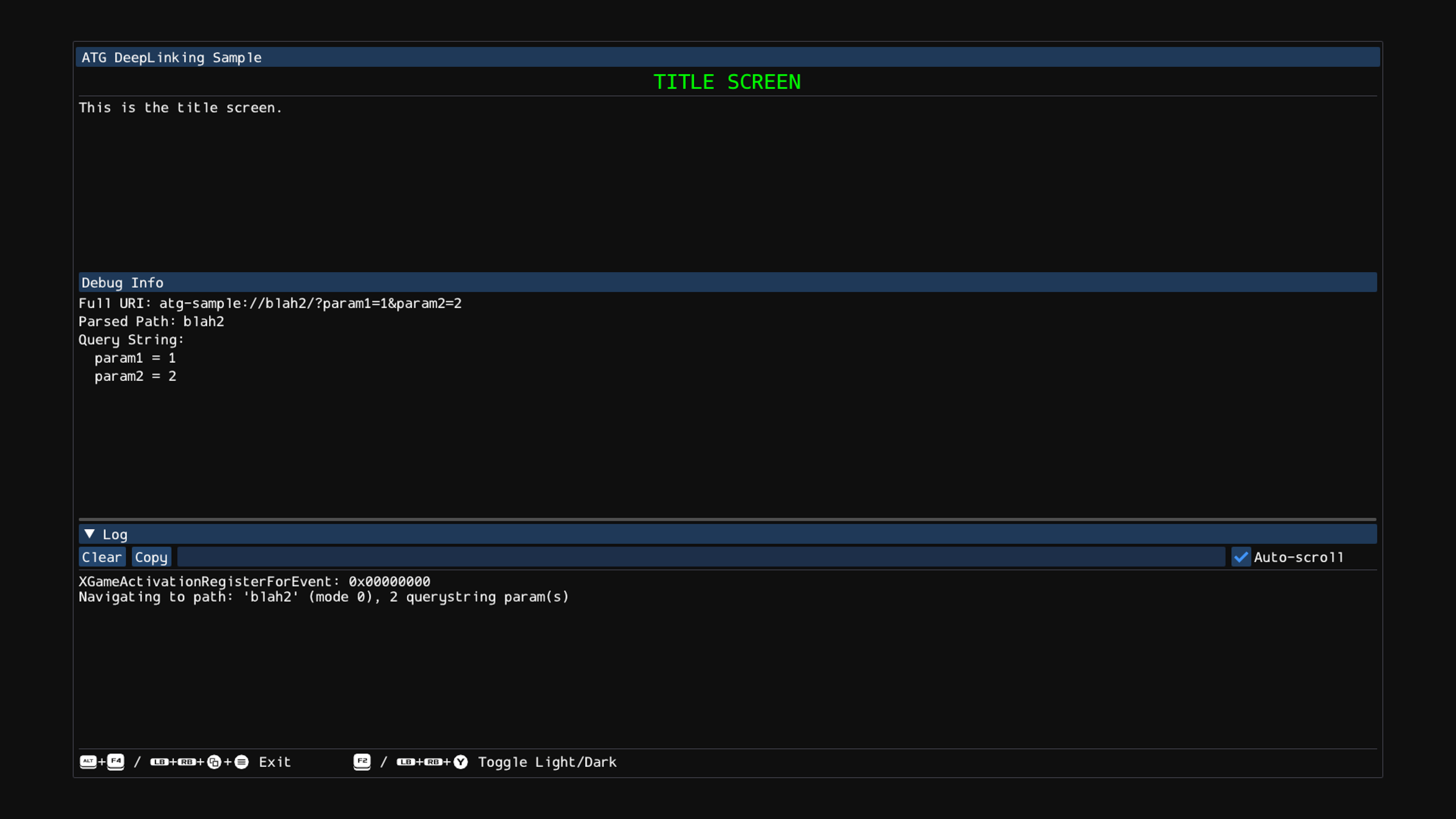
Protocol activation
Deep linking is built on the GDK's protocol activation system. Any process on the system can launch the title
via protocol activiation and pass it a payload by activating a URI with that required parameters.
The title receives the full URI through its
XGameActivationRegisterForEvent callback. If the title is already running, the same callback fires
on the existing process rather than starting a second instance, so command-line parsing is not
sufficient: titles that want to handle activations after launch must register the callback. Two
flavors of protocol are available:
The implicit
ms-xbl-<TITLEID>://protocol. Every title with a Title ID has an auto-generatedms-xbl-XXXXXXXX://protocol, whereXXXXXXXXis the hexadecimal Title ID without the leading0x. No declaration is required, and any caller (the Microsoft Store, another title viaXLaunchUri, the system shell, etc.) can activate the title through it. Store-driven deep links authored asms-windows-store://launch?productId=...&path=...are rewritten by the platform intoms-xbl-<TITLEID>://<path>and delivered as activation typeProtocol. This is what the sample exercises.Custom protocols declared in
MicrosoftGameConfig.mgc. Titles can register one or more additional protocols by adding a<ProtocolList>block to the MGC. Example:<Game configVersion="1"> ... <ProtocolList> <Protocol Name="atg-sample" Executable="MyExecutable.exe"/> </ProtocolList> </Game>Once declared, the title can be activated with a URI such as
atg-sample://Parameter1=xyz&Parameter2=abc, and the URI is delivered to the same activation callback with typeProtocol. Custom protocols are useful for cross-title launches, internal/debug entry points, and any case where the publisher wants to route URIs that do not flow through the storefront. TheExecutableattribute lets different protocols target different executables in a multi-exe package (for example, a debug build for QA-only activations).
Both the implicit protocol and any custom protocols share the same activation callback; the title inspects the incoming URI (scheme, path, querystring) to decide what to do. For the full reference, see the Protocol activation page in the GDK documentation.
Deep-link URL structure
Deep links generated by Xbox or by the publisher are authored against the Microsoft Store protocol:
ms-windows-store://launch?productId=<PRODUCTID>&path=<PATH>
If the title is installed, the system launches it and delivers the activation. If the title is not installed, the same URL opens the title's PDP in the Store.
<PRODUCTID> is the title's Microsoft Store product ID: the 12-character alphanumeric ID
assigned in Partner Center (for this sample, 9NV0ZMV5GB11). It is not the GDK Title ID, Service
Configuration ID, or any other identifier. <PATH> is one of the routing paths the title has
defined and shared with Xbox.
The platform decodes path before delivering the activation, rewriting the URI into the title's own
ms-xbl-<TITLEID> protocol:
ms-xbl-<TITLEID>://<PATH>/
The deep link protocol only exposes productId and path, so anything richer (sub-paths, querystrings,
GUIDs) must be packed into path as a single url-encoded string on the source side. For example, to also pass
offer=1234 and qty=3, do not append as a standard query string. Instead, append it to the path as
%2F%3Foffer%3D1234%26qty%3D3.
For example, the publisher generates:
ms-windows-store://launch?productId=9NV0ZMV5GB11&path=store%2F%3Foffer%3D1234%26qty%3D3
...which arrives at the title's activation callback as:
ms-xbl-<TITLEID>://store/?offer=1234&key=value
The callback does not need to URL-decode the value, it will arrive decoded to the title.
Here is a table of the most common characters that will be requried for encoding your additional params:
| Character | Encoded |
|---|---|
/ |
%2F |
? |
%3F |
= |
%3D |
& |
%26 |
Common use cases
| Goal | Typical destination |
|---|---|
| Reactivate lapsed players | Lobby or landing screen |
| Season launch / new mode | Hub or new-mode screen |
| Limited-time event | Event hub |
| In-game purchase or promotion | In-game store, item shop, specific item, VC bundle |
| Battle pass | Battle pass page |
| Ownership-based engagement | Deep link if installed, PDP fallback if not |
Building the sample
If using an Xbox Series X|S devkit, set the active solution platform to Gaming.Xbox.Scarlett.x64.
If using an Xbox One devkit, set the active solution platform to Gaming.Xbox.XboxOne.x64.
For more information, see Running samples, in the GDK documentation.
Using the sample
This sample is published to the XDS.1 sandbox with Microsoft Store product ID
9NV0ZMV5GB11, so it can be exercised end-to-end on any devkit switched to that sandbox without
re-publishing. Because deep linking relies on the title being addressable via its retail
ms-xbl-<TITLEID>:// protocol, the sample cannot be exercised from a plain "F5 deploy" of a loose
build. To test it:
- Switch the devkit to the
XDS.1sandbox (or publish your own build to a sandbox you control). - Search the store and install the "ATG DeepLinking Sample" package on the devkit so the system records the license and registers the protocol handler.
- From this state, you can deploy the sample build from Visual Studio on top of the installed package if you wish to experiment. The installed license and protocol registration carry over to the freshly deployed bits.
The paths the sample understands are arbitrary names chosen for the demo. A real title defines whatever vocabulary it needs:
| Path | Destination |
|---|---|
lobby |
Lobby screen |
campaign |
Campaign / single-player |
shop |
In-game shop (reads id and qty querystrings) |
none |
Title screen (explicit) |
| other | Title screen (default) |
Once the title is installed, trigger a deep link from a separate process. From an Xbox Gaming
command prompt, the following commands cover every screen and parser path the sample supports. The
double quotes are required; without them the shell will eat the & and the path parameter will be
lost.
:: Title screen (explicit), lobby, campaign, shop
xbapp launch "ms-windows-store://launch?productId=9NV0ZMV5GB11&path=none"
xbapp launch "ms-windows-store://launch?productId=9NV0ZMV5GB11&path=lobby"
xbapp launch "ms-windows-store://launch?productId=9NV0ZMV5GB11&path=campaign"
xbapp launch "ms-windows-store://launch?productId=9NV0ZMV5GB11&path=shop"

:: Shop with querystring: id=1234, then id=1234&qty=3
xbapp launch "ms-windows-store://launch?productId=9NV0ZMV5GB11&path=shop%2F%3Fid%3D1234"
xbapp launch "ms-windows-store://launch?productId=9NV0ZMV5GB11&path=shop%2F%3Fid%3D1234%26qty%3D3"

:: Unknown path falls back to the title screen
xbapp launch "ms-windows-store://launch?productId=9NV0ZMV5GB11&path=doesnotexist"

:: Custom protocol (atg-sample, declared in MicrosoftGameConfig.mgc). NOT required for deep
:: linking; included only to demonstrate that a title can define its own protocols. The URI is passed
:: through to the activation callback as-is.
xbapp launch "atg-sample://shop?id=1234&qty=3"
xbapp launch "atg-sample://campaign"
The shop-with-querystring URLs are delivered to the title as ms-xbl-<TITLEID>://shop/?id=1234 and
ms-xbl-<TITLEID>://shop/?id=1234&qty=3. The custom-protocol URLs (which, again, are not part of
deep linking; they are an independent demonstration) arrive as atg-sample://shop?id=1234&qty=3
and atg-sample://campaign. The sample displays each parsed key/value pair under "Query String",
and the SHOP screen pulls id and qty out of the map.
The default ATG ImGui shortcuts (F2 / LB+RB+Y to toggle light/dark, Alt+F4 / LB+RB+View+Menu
to exit) are also active.
Publisher responsibilities for deep linking
Xbox owns the storefront placement, the routing of the protocol activation, and the Product Detail Page (PDP) fallback when the title is not installed. The publisher owns everything from the moment the activation arrives at the title:
- Define stable, unique routing paths for every in-game destination that should be deep-linkable (lobby, playlist, event hub, item shop, battle pass page, specific item, etc.). Once a path is shared with Xbox it may be live in storefront placements; changing or removing it without coordination will break those links.
- Handle the routing payload on launch for both cold-start (game not running) and warm-start (game already running, raised via activation) paths.
- Implement deterministic navigation. The same link must always land on the same destination. If the player is interrupted by sign-in, entitlement checks, or a title update, resume navigation to the deep-link target once the interruption clears.
- Handle suspend/resume and quick resume. An activation can arrive while the title is suspended or constrained; the title must route the player correctly when it resumes.
- Use the correct Microsoft Store product ID in every deep link the publisher generates. See Deep-link URL structure below for the definition. The platform uses it for the PDP fallback when the title is not installed; no additional game logic is required for that case.
Validation scenarios
Before submitting deep links to Xbox, publishers are expected to validate end-to-end behavior across at least these scenarios:
- Title not installed. The link should land on the title's Store PDP (the title must have been published to the target sandbox).
- Title installed but not running. Cold-launch should bring the player to the deep-link destination, not the title screen.
- Title already running on the deep-link destination. Re-invoking the same link should leave the player on the same destination (deterministic navigation).
- Title already running, player navigated away. Re-invoking the link should return the player to the deep-link destination.
- Title constrained / suspended. After opening another app or game, invoking the link should resume the title and route to the deep-link destination.
Testing on retail consoles via Microsoft Edge
For validation on retail consoles (where xbapp launch is not available), deep links can be invoked
from Microsoft Edge bookmarks:
- On PC, sign in to Microsoft Edge with a personal account.
- Open the favorites bar and add a new favorite. Set the URL to the deep link
(
ms-windows-store://launch?productId=...&path=...) and give it a descriptive name. A folder hierarchy helps when managing many links. - On the Xbox console, open Microsoft Edge and sign in with the same account so the favorites sync.
- Open the bookmark to invoke the deep link. The title must already be published and live to the console's sandbox.
Implementation notes
The interesting code lives in DeepLinking.cpp:
Registration.
Sample::InitializecallsXGameActivationRegisterForEvent, passingthisas the callback context. The registration token is held inm_activationTokenand released inSample::ShutdownviaXGameActivationUnregisterForEventwithwait=true, so any in-flight callback finishes beforethisis destroyed. Registering with anullptrtask queue runs the callback on the process task queue, the right default for UI-driven samples.Older GDKs (April 2025 / 2504 and earlier). Use
XGameProtocolRegisterForActivation/XGameProtocolUnregisterForActivationinstead ofXGameActivation. Registration semantics are identical; only the callback signature differs (const char* urion the older API vs. anXGameActivationInfo*struct on the new one, which also carries non-protocol activation types). URI parsing is unchanged.Filtering activation types. The callback fires for every activation, so the sample early-outs on anything that is not
XGameActivationType::Protocol.URI parsing. The callback skips past
://, splits the remainder on the first?to separate path from querystring, and strips the trailing/the platform appends when there is no querystring. Because the platform has already URL-decoded the payload, the callback does not decode it again.Querystring parsing. When a
?is present, the sample walks the querystring once, splitting on&and then=into astd::map<std::string, std::string>displayed under "Query String". The SHOP screen pullsidandqtyout of the map withfind+end()checks (the pattern a real title would use to load a specific item, quantity, event, or battle pass page).Path -> mode lookup.
Sample::NavigateTolooks the path up ins_pathToGameMode(astatic const unordered_map<string, GameMode>onSample) usingfind+ an explicitGameMode::Nonefallback.operator[]would silently insert a default-constructed entry on every unknown path, sofindis the safer pattern. Unknown paths fall through toGameMode::None(the title screen).Example custom protocol declared in the MGC.
MicrosoftGameConfig.mgcdeclares one custom protocol,atg-sample, pointing atDeepLinking.exe:<ProtocolList> <Protocol Name="atg-sample" Executable="DeepLinking.exe"/> </ProtocolList>This is purely an example and NOT required for deep linking. Custom protocols are useful for cross-title launches, internal/debug entry points, and any case where the publisher wants to route URIs that do not flow through the storefront.
Deterministic navigation in production titles. The sample switches a single
m_modevalue on activation. A shipping title is expected to route consistently to the same destination for the same link, defer routing through sign-in or entitlement checks if needed, and resume routing after the interruption clears. The callback fires for cold-launch and warm activations (including activations that arrive while the title is suspended or constrained), so the routing code must be safe to invoke from any state.
Update history
06/2026 - Initial release