Note
Access to this page requires authorization. You can try signing in or changing directories.
Access to this page requires authorization. You can try changing directories.
Important
Some information in this article relates to a prereleased product which may be substantially modified before it's commercially released. Microsoft makes no warranties, expressed or implied, with respect to the information provided here. Project Perception is currently in Limited Public Preview. Limited Public Preview Program means Perception is available to a small, invitation-only set of customers for a defined preview window before broader public availability.
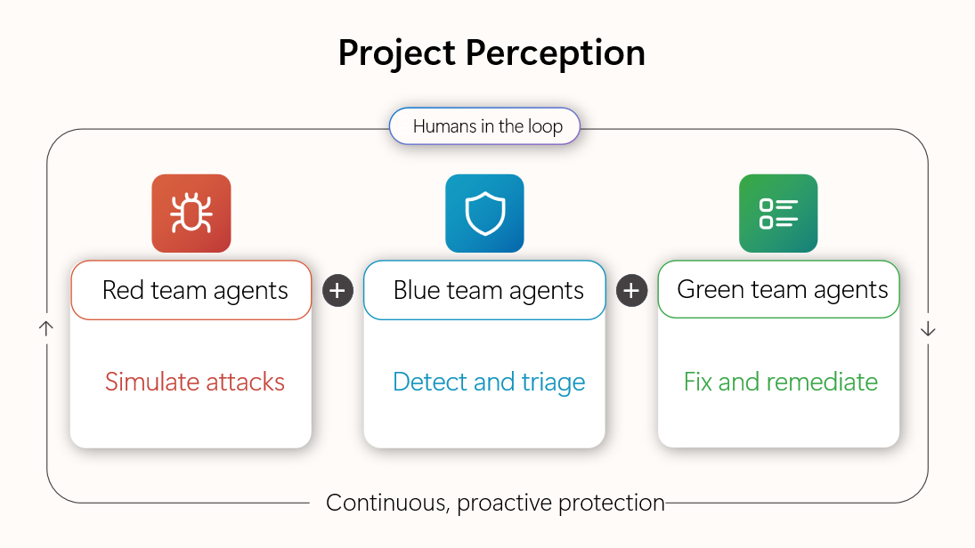
Project Perception is a new multi-agent security system designed for the realities of AI. Perception brings together signals, context, models, and specialized agents into a continuously learning system of defense. It can reason, prioritize, and act at machine speed while keeping humans firmly in control and empowering them with powerful new workflows.
Perception is based on a simple idea: effective defense requires continuously understanding how an attacker sees the world, how a defender evaluates risk, and how protections are improved over time.
Perception brings together three categories of specialized security agents: red team agents that expose vulnerabilities before attackers can exploit them, blue team agents that detect, triage, and investigate threats, and green team agents that remediate and harden your posture. Working together, they form a closed-loop system that continuously discovers, evaluates, and improves an organization's security posture.
For a full breakdown of each category and the agents within it, see Agent categories in Project Perception.
How does Project Perception work?
Perception uses coordinated agent playbooks to achieve specific security outcomes. A playbook assigns a team of specialized agents a set of objectives and orchestrates their actions throughout the workflow. Each agent has a distinct role, but they work together by sharing intelligence, findings, and security context to drive coordinated defense. Throughout the workflow, agents surface recommendations and request approvals when needed, keeping security teams in control of critical decisions.
To see how the agents work together in a complete workflow, see Agent categories in Project Perception.
Working with Project Perception agents
With Project Perception, you can:
Configure agents
View all agents enabled for your organization, enable or disable specific agents, and configure agent identity, roles, and custom settings. You control which users can execute or view agent sessions, ensuring that access aligns with your organization's security policies.
For more information, see Work with agents.
Delegate work to agents
Initiate autonomous execution using playbooks. Playbooks are reusable templates that define how agents should respond to specific scenarios.
You can also use Chat to start a session using natural language. Describe the task and Perception identifies the right playbook, pre-populates inputs, and runs inline. For more information, see Interact with Project Perception using chat.
For more information on playbooks, see Work with playbooks.
Supervise agentic work
Monitor work happening now or recently completed. Understand what initiated each session, approve or reject agent actions when they request input, stop sessions that are headed in the wrong direction, and provide alternative guidance when agents need redirection.
For more information, see Approve, reject, or stop agentic work.
Navigate Project Perception
Project Perception is organized into the following primary sections in the Microsoft Defender portal: Overview, New Chat, Sessions, Agents, and Playbooks. For details on what each section contains and how to navigate between them, see Use the Project Perception overview and navigation.