Note
Access to this page requires authorization. You can try signing in or changing directories.
Access to this page requires authorization. You can try changing directories.
The Zero Trust Assessment is a community PowerShell module that checks your Microsoft 365 tenant and Azure configuration against security recommendations. Use its reports to review findings and plan improvements across seven Zero Trust pillars.
The assessment doesn't apply remediation. It collects configuration data and produces local reports that help you decide what to address.
Why run this assessment?
Manually comparing tenant configuration with security guidance can be time-consuming. The assessment automates these checks and shows where your configuration aligns with recommendations and where you need to investigate.
The report includes findings, risk and status filters, and supporting guidance. Review skipped checks and errors as well as passed and failed checks: missing access, services, or licenses can leave part of your environment unassessed.
For guidance on interpreting reports, see Review assessment results.
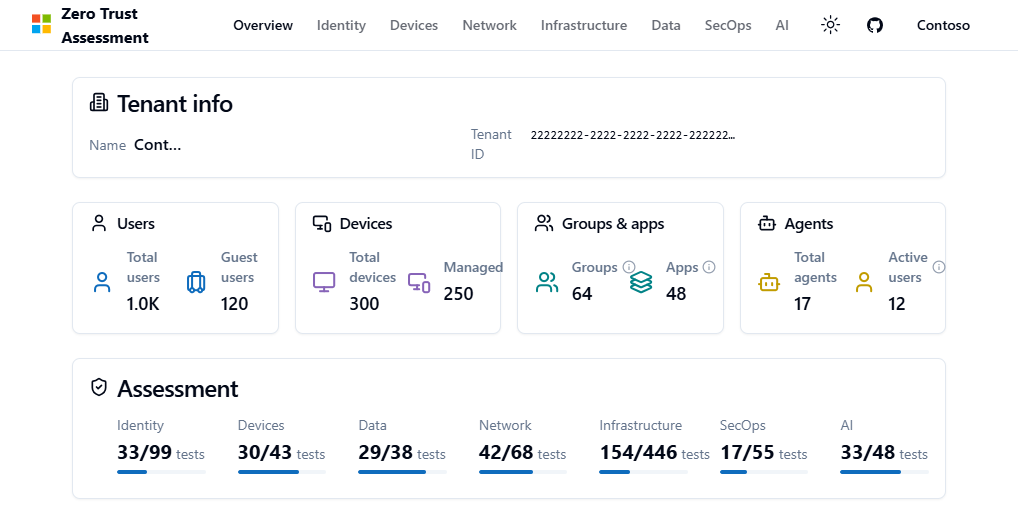
Supported pillars
The current default run includes all seven pillars. Use the linked guidance and coverage summaries to plan your assessment.
| Pillar | Guidance or coverage |
|---|---|
| Identity | Configure Microsoft Entra for increased security. |
| Devices | Configure Microsoft Intune for increased security. |
| Network | Apply Zero Trust principles to Azure networks. |
| Data | Configure Microsoft Purview for increased security. |
| Infrastructure | Infrastructure assessment scope. |
| Security operations (SecOps) | Security operations assessment coverage. |
| AI | Configure agent identity security. |
Infrastructure
Infrastructure findings use Microsoft Defender for Cloud recommendations. The assessment includes only accessible Azure subscriptions tagged with ZeroTrustAssessment:Infrastructure. If no matching subscription exists, the assessment skips rather than passes. See Infrastructure scope.
Security operations (SecOps)
The default run includes SecOps. Azure connections support SecOps, Infrastructure, and Network assessments, not just audit and sign-in log export checks. Arrange the relevant service and resource access and review skipped checks or authorization errors before treating the run as complete.
How the assessment works
The assessment separates service connections, assessment execution, and report review:
- Connect to the services you intend to assess. Each service has its own authentication and authorization requirements.
- Run the assessment to collect data and evaluate the selected checks.
- Review the local reports, investigate incomplete coverage, and use the findings to plan improvements. You can also import the generated JSON into Zero Trust Workshop.
Reports, exports, and diagnostics can contain sensitive tenant configuration and personal information. Review data handling and telemetry before running the assessment.
Before connecting, see Review permissions and roles to identify the access requirements for your assessment.
Source and package versions
These articles cover the development source. Published packages can differ. Check the release history and the help for your installed version before relying on a version-specific dependency, parameter, or permission.
Release 2.6.0 introduced the redesigned report and all seven default pillars. Later source changes include updated dependencies and the AttackSimulation.Read.All scope. Installing a prerelease package and using the assessment's -Preview switch are separate choices.
Open source and transparent
Microsoft employees maintain the assessment as a community project. It isn't an official Microsoft product and Microsoft provides it as-is, without support through a Microsoft support program or service.
Review the PowerShell source and support policy. For community help, see Report an issue or provide feedback.