Note
Access to this page requires authorization. You can try signing in or changing directories.
Access to this page requires authorization. You can try changing directories.
Occasionally previously installed Microsoft Graph Modules may cause a conflict and prevent New-MicrosoftAssessmentsApplication from execution.
In these cases we recommend removing all currently installed Microsoft Graph Powershell modules from the default module directory using steps below.
Open Powershell console and confirm version
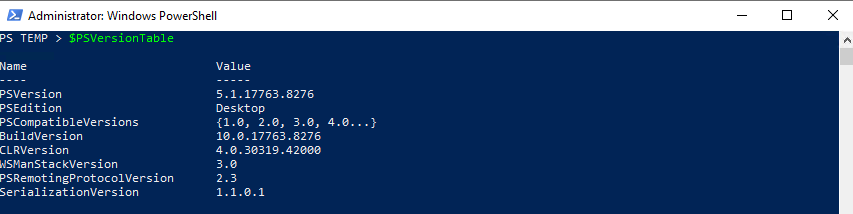
On-Demand Assessments were designed and tested to use Windows Powershell Desktop edition except where otherwise noted . To confirm your edition, open powershell command windows and run following command.
$PSVersionTable
If you are running Windows Powershell Desktop edition you should see following output.
Get list of Powershell Module locations
In the current Powershell window run following command
$env:PSModulePath.split(";")
You will get a list of directories where Powershell looks up modules

Remove all currently existing modules
Save the list of directories elsewhere and close all powershell windows
Important
Make sure you close all powershell windows. If a window is a open it may have a Microsoft Graph module loaded and you won't be able to delete it
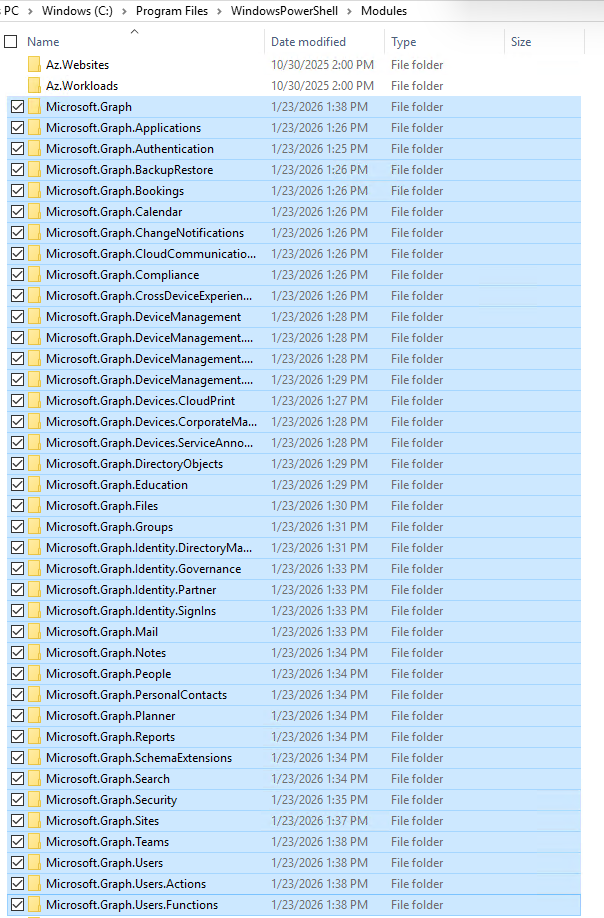
Open Windows Explorer and navigate to the paths identified in the previous step one by one. In each location find a directory that starts with 'Microsoft.Graph' and delete it.