Note
Access to this page requires authorization. You can try signing in or changing directories.
Access to this page requires authorization. You can try changing directories.
This is an early baseline version for the upcoming SharePoint 1.23 version with initial updates. We are introducing new capabilities as part of the following updates before the general availability of 1.23.
Caution
This version is currently available as a public beta made available for testing.
For production environments, we recommend using the SPFx version referenced on Set up your SharePoint Framework development environment.
beta.0 Released: March 23, 2025
Important
This page addresses details related to a specific SPFx release version. This page doesn't include additional SPFx prerequisites that must be installed in order to develop SPFx solutions, including Node.js, Yeoman, and other tools.
To learn more about these prerequisites, see Set up your SharePoint Framework development environment.
Install the latest version
Install the latest preview release of the SharePoint Framework (SPFx) by using the @next tag
npm install @microsoft/generator-sharepoint@next --global
Upgrading projects to v1.23 preview version
The upgrade steps required to convert a gulp-based toolchain SPFx project to the Heft-based toolchain are detailed in the following article: Migrate from the Gulp Toolchain to Heft Toolchain.
New features and capabilities
Grouping support for list view command sets
Starting with the SPFx 1.23, we will be also supporting grouping of list view command sets in the toolbar and in the context menu. This provides more control on how the list view commands are rendered in lists and libraries.
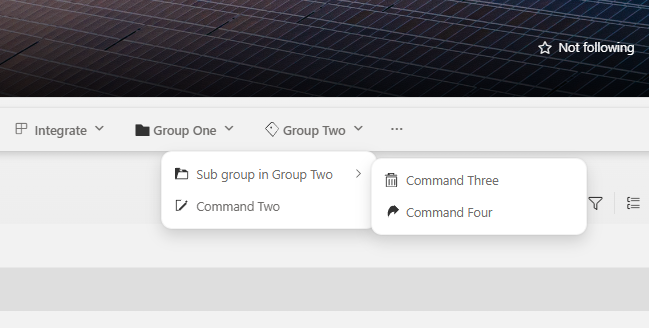
This feature is currently in progress to rollout in production and will be enable in all tenants by early April.
See more details on this upcoming change from the following documentation:
Preview of new SPFx CLI and open-sourced templates
We're excited to provide a first preview version of upcoming SPFx CLI (Command Line Interface) which will eventually replace the current usage of Yeoman generator. We're also open-sourcing the used solution templates that the SPFx CLI tool is using for the solution creation.
SPFx CLI can be used to scaffold SPFx solutions in the same way as SPFx Yeoman generator previously. Used templates are open-source and you can also configure the CLI to use alternative templates that you're storing in another location. This enables ecosystem to build replacement templates or project specific templates, optimized for the use case.
SPFx CLI and templates are available in GitHub as open-source solution and we welcome Pull Requests and suggestions on the needed changes.
We are in progress of publishing first version of the CLI to NPMjs in upcoming days and we will share more documentation on the usage at this time. Current schedule for General Availability of SPFx CLI is June 2026.
Install the preview version of the SPFx CLI using following command.
npm install @microsoft/spfx-cli --global
and you can scaffold your first solution with following command.
spfx create \
  --template webpart-react \
  --library-name my-spfx-library \
  --component-name "Hello World"
See more details and other options from the CLI documentation.
Your feedback is welcome. Let us know your first impressions and provide suggestions.
Addressing npm audit issues
When installing the SharePoint Framework Yeoman generator, we have worked on the reported npm audit issues. Addressing vulnerabilities is a moving target, which we keep on addressing with all releases.
We're also looking into addressing deprecated packages in the following releases of SharePoint Framework.
Deprecations
No new updates.
Feedback and issues
We're interested in your feedback about the release and if you find any issues, share them using the sp-dev-docs repository issue list. We're also tracking any other discussions if you simply want to have a discussion with the engineering team on this release. Thank you for your input advance.
Happy coding! Sharing is caring! 🧡