Note
Access to this page requires authorization. You can try signing in or changing directories.
Access to this page requires authorization. You can try changing directories.
This is a minor bump that addresses known npm vulnerabilities, fixes reported issues, and provides readiness for the list panel override on the client side.
Tip
After the initial release of SPFx 1.23.0, we also released update 1.23.1. However, it was delisted due to regressions.
Released: June 30, 2026
Important
This page addresses details related to a specific SPFx release version. This page doesn't include additional SPFx prerequisites that must be installed in order to develop SPFx solutions, including Node.js, Yeoman, and other tools.
To learn more about these prerequisites, see Set up your SharePoint Framework development environment.
Install the latest version
Install the latest release of the SharePoint Framework (SPFx) by including the @latest tag:
npm install @microsoft/generator-sharepoint@latest --global
Upgrading projects from v1.23.0 to v1.23.2
In the project's package.json file, identify all SPFx v1.23.0 packages. For each SPFx package:
Uninstall the existing v1.23.0 package:
npm uninstall @microsoft/{spfx-package-name}@1.23.0Install the new v1.23.2 package:
npm install @microsoft/{spfx-package-name}@latest --save --save-exact
Tip
The CLI for Microsoft 365 provides an easy step-by-step guidance to upgrade your solutions to latest SharePoint Framework version.
Readiness for list panel override
We're rolling out readiness for the Form Customizer panel override with this release. When enabled in the Form Customizer manifest, the extension is automatically rendered in the list panel without requiring a page transition. This enables complex panel extensions directly in the list panel with SPFx.
You can enable this support with the isPanelExperienceEnabled attribute in the extension override. When set to true, the Form Customizer is rendered inside the new, edit, or display panel in the list view instead of opening a separate page. When the attribute is absent, it defaults to false (the existing behavior).
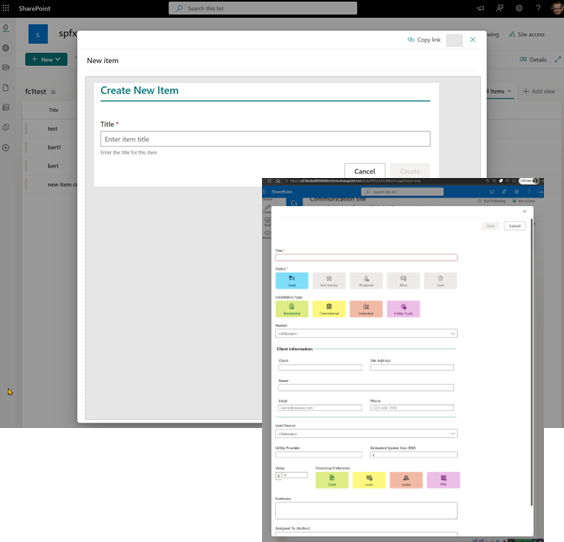
Note that at the time of the 1.23.2 client-side package release, this feature isn't yet fully available on the server side. This means that even if you include this attribute in the manifest, the new experience will become visible by the end of July 2026.
Addressing vulnerabilities
We have fixed all critical and high vulnerabilities with this release. However, there are a few known issues with external dependencies that are waiting for updates from their maintainers. These reported moderate vulnerabilities don't affect the runtime security of SPFx, and they'll be fixed once the external dependencies are updated.
The SharePoint Framework toolchain relies on server-side npm packages for build and debugging operations, but these packages are never included in the final sppkg package that runs in SharePoint Online or Microsoft 365. Because these packages only support the localhost experience and are not exposed to end users, they do not create risks in production environments.
This model ensures predictable updates, reduces unnecessary concern, and keeps npm audit reports clean when creating new SPFx solutions.
For more details about this model, see the following article:
Fixed issues
Here's a list of specific issues fixed around SharePoint Framework since the previous public release.
- #10831 - [SPFx 1.23] CSS/SCSS source maps not working in development mode — regression from SPFx 1.20
- #10832 - [SPFx 1.22+] Undocumented breaking change: plain .scss and .css files generate typed CSS module declarations but webpack processes them as global CSS
- #10833 - SPFx scaffold template includes deprecated @import of Fluent UI SCSS variables — should be removed and documented
- #10854 - [SPFx 1.22→1.23] Sass import resolution changed — ~ breaks in meta.load-css(), bare specifiers and importIncludePaths no longer work (undocumented)
- #10872 - postcss-calc emits spurious warnings for relative color syntax and color-mix() channel keywords (SPFx 1.23)
Feedback and issues
We're interested in your feedback about the release and if you find any issues, share them using the sp-dev-docs repository issue list. Thank you for your input advance.
Happy coding! Sharing is caring! 🧡